
ROI of Using Zapier in Real Estate Workflows
Most firms accept this as normal. However, these small tasks consume hours every day. Over time, they slow down deals, reduce productivity, and increase labor costs.
That is why more CRE firms now use workflow automation. The ROI of using Zapier in real estate workflows comes from saving time, reducing manual work, and helping teams move faster without hiring more staff.
Zapier connects the tools your team already uses. It moves information automatically between platforms. Instead of copying data manually, workflows run in the background. This improves speed, consistency, and team coordination.
For example, a new lead can automatically:
-
Enter your CRM
-
Notify a broker
-
Trigger a follow-up email
-
Update a spreadsheet
-
Send a Slack alert
All of this can happen within seconds.
Without automation, someone must complete every step manually. That wastes time and creates delays.
This guide explains how Zapier improves CRE operations. You will learn:
-
Where CRE teams lose time
-
Which workflows create the highest ROI
-
How automation reduces costs
-
What mistakes firms should avoid
-
How to implement workflows quickly
The goal is simple. Help CRE professionals spend less time on admin work and more time on deals, relationships, and growth.
These numbers matter because CRE operations still rely heavily on manual systems.
Many firms use disconnected tools for:
-
CRM management
-
Reporting
-
Communication
-
Scheduling
-
Deal tracking
-
Investor updates
As a result, employees waste hours moving information between systems.
For example, a broker may copy leads from email into HubSpot. Then they update a spreadsheet manually. Next, they notify the team in Slack. Finally, they schedule follow-ups in another tool.
That process repeats daily.
Automation removes those repetitive steps. Instead of people moving information manually, systems communicate automatically.
This creates several benefits:
-
Faster response times
-
Fewer mistakes
-
Cleaner data
-
Better reporting
-
More scalable operations
Most importantly, automation helps firms grow without increasing operational chaos.
Small inefficiencies become expensive over time. A few wasted minutes per workflow may not seem serious. However, across an entire team, those hours add up quickly.
That is why workflow automation now matters so much in commercial real estate.
What Zapier Actually Does in Real Estate Operations
Many CRE professionals hear about Zapier but do not fully understand how it works.
Some think it is an AI tool. Others assume it requires coding skills. In reality, Zapier is much simpler.
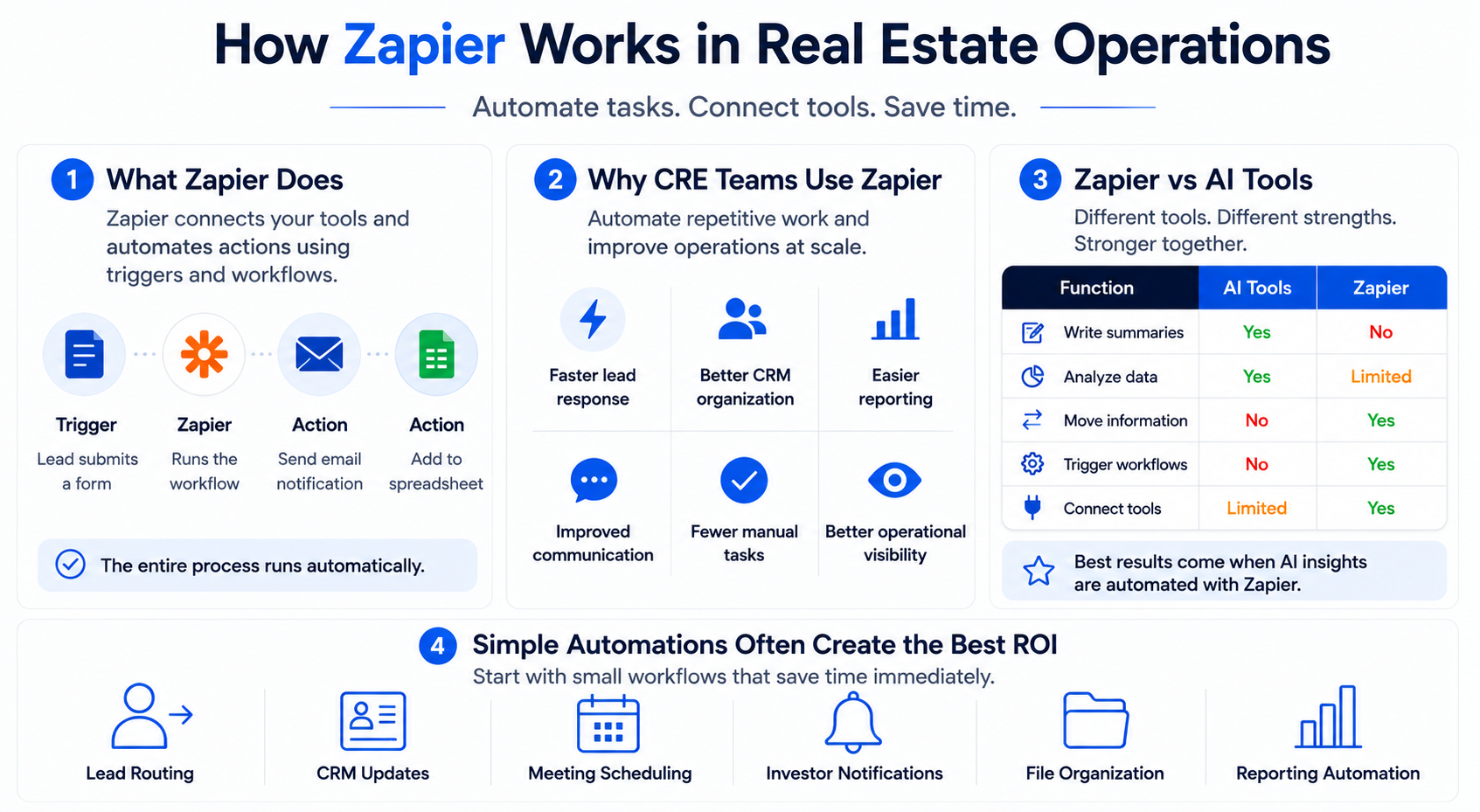
Zapier connects software tools together. It automates actions between platforms using triggers and workflows.
A trigger starts the workflow. Then Zapier performs one or more actions automatically.
For example:
-
A lead submits a form
-
Zapier adds the lead to the CRM
-
The broker receives a notification
-
A follow-up email gets sent
-
The lead enters a tracking spreadsheet
The entire process runs automatically.
Without Zapier, someone must complete every step manually.
That is why automation creates a strong ROI in CRE operations.
Commercial real estate teams use many disconnected systems. A typical firm may use:
-
HubSpot
-
Salesforce
-
Gmail
-
Slack
-
Google Sheets
-
Calendly
-
Airtable
-
Notion
-
Dropbox
Normally, employees move data between these platforms themselves. Zapier handles that movement automatically.
This saves time and improves consistency.
Why CRE Firms Use Zapier
Most firms start automation because they want to reduce repetitive work.
Common goals include:
-
Faster lead response
-
Better CRM organization
-
Easier reporting
-
Improved communication
-
Fewer manual tasks
-
Better operational visibility
However, the biggest value is scalability.
As deal volume grows, manual systems become harder to manage. Teams struggle with follow-ups, reporting, and coordination.
Automation helps firms handle more activity without adding operational stress.
Zapier vs AI Tools
This distinction is important.
Zapier is not an AI platform. It is an automation platform.
AI tools create or analyze content. Zapier moves information and triggers workflows.
Here is the difference:
| Function | AI Tools | Zapier |
|---|---|---|
| Write summaries | Yes | No |
| Analyze data | Yes | Limited |
| Move information | No | Yes |
| Trigger workflows | No | Yes |
| Connect software tools | Limited | Yes |
The best CRE systems combine both.
For example:
-
AI summarizes market reports
-
Zapier distributes the summary automatically
-
CRM records update instantly
-
Leadership receives alerts automatically
Together, AI and automation create faster operations with less manual effort.
Simple Automations Often Create the Best ROI
Many firms overcomplicate automation at first.
They try building advanced systems before fixing basic operational problems.
Usually, the highest ROI comes from simple workflows like:
-
Lead routing
-
CRM updates
-
Meeting scheduling
-
Investor notifications
-
File organization
-
Reporting automation
These workflows save time immediately.
They also reduce operational friction across the entire organization.
Where CRE Teams Waste the Most Time
Most CRE firms lose time in the same areas.
The problem is not one large issue. Instead, it is dozens of small repetitive tasks repeated daily.
One major issue is manual lead entry.
Many brokers still copy information from emails or websites into CRMs manually. This creates delays and increases the risk of mistakes.
Slow lead response also hurts conversion opportunities.
Another common problem is spreadsheet management.
Teams manually update:
-
Deal pipelines
-
Investor tracking
-
Leasing activity
-
Underwriting progress
-
Reporting dashboards
As firms grow, these systems become difficult to manage.
Communication creates another operational bottleneck.
Brokers send repetitive updates constantly. Investor relations teams repeat the same reporting process every week. Operations staff manually coordinate reminders and approvals.
These workflows consume hours every week.
Common Time-Wasting Tasks in CRE
-
Manual CRM updates
-
Duplicate data entry
-
Meeting scheduling
-
Investor reporting
-
Internal reminders
-
File movement
-
Dashboard updates
-
Follow-up emails
Document management also creates major inefficiencies.
CRE teams constantly move:
-
Lease files
-
Offering memorandums
-
Financial statements
-
Inspection reports
-
Investor documents
Without automation, file organization becomes messy quickly.
Most Common Time-Wasting CRE Tasks
| Workflow | Manual Time Per Week | Automated Time Per Week | Estimated Savings |
|---|---|---|---|
| Lead entry | 5–8 hours | 30 minutes | Major labor savings |
| Investor updates | 4–6 hours | 1 hour | Faster communication |
| Scheduling | 3–5 hours | 30 minutes | Better coordination |
| CRM updates | 5–10 hours | 1 hour | Cleaner data |
| Reporting | 6–12 hours | 2 hours | Faster visibility |
These inefficiencies grow as firms scale.
A small team may survive with manual systems. However, larger firms eventually hit operational limits.
That is why automation becomes critical for long-term growth.
Want proven CRE automation workflows instead of generic AI advice? Join CRE professionals using real systems, prompts, and automation playbooks inside the AI for CRE Collective.
ROI of Using Zapier in Real Estate Workflows
The biggest benefit of automation is not convenience. It is operational leverage.
CRE firms constantly look for ways to close more deals without increasing overhead. That becomes difficult when teams spend hours on repetitive admin work every day.
Zapier helps solve that problem by reducing manual tasks across the business.
Instead of hiring more staff to manage operations, firms automate repetitive workflows. This allows brokers, analysts, and operators to focus on high-value work.
That shift creates measurable ROI. For example, many firms now use AI CRM dashboard automation to centralize lead tracking, reporting, and pipeline visibility across brokerage teams.
Time Savings Create Immediate ROI
Time is one of the most expensive resources inside a CRE firm.
Senior brokers should spend time:
-
Building relationships
-
Negotiating deals
-
Meeting investors
-
Finding opportunities
They should not spend hours updating spreadsheets or moving data between systems.
Automation reduces those low-value tasks significantly.
For example, a brokerage team may spend:
-
2 hours daily updating CRMs
-
1 hour managing follow-ups
-
1 hour organizing reports
-
30 minutes scheduling meetings
That equals more than 20 hours weekly.
With automation, much of that work disappears.
Even saving 10 hours per employee every week creates major long-term productivity gains.
Labor Costs Decrease Over Time
Many firms underestimate the hidden cost of repetitive work.
A workflow may only take five minutes manually. However, if employees repeat it hundreds of times weekly, labor costs rise quickly.
Automation reduces those operational expenses.
For example:
| Task | Manual Process | Automated Process |
|---|---|---|
| Lead entry | Admin updates CRM | Zapier updates instantly |
| Meeting reminders | Staff sends emails | Automatic notifications |
| Investor reporting | Analyst compiles reports | Workflow distributes updates |
| File organization | Team moves documents manually | Files sorted automatically |
This does not mean automation replaces employees.
Instead, it helps employees operate more efficiently.
That distinction matters.
The goal is not fewer people. The goal is higher productivity per person.
Faster Lead Response Improves Conversion Rates
Speed matters in commercial real estate.
When leads wait too long for responses, opportunities disappear. Investors lose interest. Prospects contact competitors.
Automation improves response speed dramatically.
For example, Zapier can instantly:
-
Assign new leads
-
Notify brokers
-
Trigger follow-up emails
-
Update CRM records
-
Schedule reminders
This creates a more responsive business.
Even a few minutes can make a difference in competitive markets.
Automation Reduces Human Error
Manual workflows create mistakes.
Employees forget follow-ups. Data gets entered incorrectly. Reports become outdated. Files disappear in the wrong folders.
These issues create operational friction across the organization.
Automation improves consistency because workflows follow the same process every time.
This leads to:
-
Cleaner CRM records
-
Better reporting accuracy
-
More reliable communication
-
Improved operational visibility
Consistency becomes especially important as firms scale.
Firms Can Scale Without Operational Chaos
Growth creates complexity.
More deals mean:
-
More communication
-
More reporting
-
More coordination
-
More data movement
-
More operational pressure
Without automation, teams eventually become overwhelmed.
That is why scalable firms build systems early.
Zapier helps firms handle larger workloads without dramatically increasing administrative overhead.
Estimated ROI From Common CRE Automations
| Workflow | Hours Saved Monthly | Revenue Impact | ROI Potential |
|---|---|---|---|
| Lead routing | 15–20 hours | Faster conversions | High |
| CRM automation | 20–30 hours | Better pipeline visibility | High |
| Investor reporting | 10–15 hours | Improved relationships | Medium–High |
| Scheduling workflows | 8–12 hours | Faster coordination | Medium |
| AI reporting systems | 15–25 hours | Better operational speed | High |
The strongest automation ROI usually comes from workflows repeated daily.
The more repetitive the process, the more valuable automation becomes.
Highest-ROI Zapier Workflows for Real Estate Teams
Not every automation creates equal value.
Some workflows save only a few minutes weekly. Others transform entire operational systems.
The highest-ROI workflows usually involve repetitive tasks completed many times every day.
Lead Capture Automation
Lead management is one of the best places to start.
Many CRE firms still handle lead intake manually. This slows response times and creates inconsistent follow-up processes.
A simple automated workflow can fix this quickly.
Example Workflow
-
Prospect submits website form
-
Zapier adds leads to CRM
-
Broker receives Slack notification
-
Follow-up email sends automatically
-
Lead enters the tracking dashboard
This workflow may save only a few minutes per lead. However, across hundreds of inquiries, the time savings become substantial.
More importantly, response times improve immediately.
Investor Update Automation
Investor communication requires constant coordination.
Teams repeatedly send:
-
Deal updates
-
Market reports
-
Meeting reminders
-
Financial summaries
Automation reduces this workload significantly.
For example, a workflow can:
-
Pull data from spreadsheets
-
Generate investor summaries
-
Send email updates automatically
-
Notify leadership teams
This improves communication consistency while reducing operational pressure.
Property Inquiry Routing
Large brokerage teams often struggle with lead assignment.
Without automation:
-
Emails get missed
-
Brokers respond late
-
Leads route incorrectly
Zapier solves this problem through automatic routing workflows.
Leads can be routed based on:
-
Geography
-
Asset class
-
Team structure
-
Investment type
-
Property size
This creates faster and more organized operations.
AI-Powered Market Research Workflows
Many CRE firms now combine AI tools with automation systems.
For example:
-
Market reports uploaded
-
AI summarizes insights
-
Zapier distributes summaries
-
CRM updates automatically
-
Leadership receives alerts
This workflow reduces hours of repetitive research coordination.
It also improves information flow across teams.
Meeting Scheduling Automation
Scheduling creates constant friction inside CRE operations.
Brokers coordinate:
-
Investor calls
-
Property tours
-
Internal meetings
-
Client reviews
Zapier simplifies scheduling by connecting:
-
Calendly
-
Google Calendar
-
Outlook
-
CRM systems
-
Slack notifications
This reduces back-and-forth communication significantly.
Deal Alert Automation
Investors and brokers often monitor markets manually.
That process takes time and creates delays.
Automation helps firms track:
-
New listings
-
Distressed assets
-
Market shifts
-
Investment opportunities
-
Lease activity
Instead of checking systems manually, teams receive automatic alerts.
Best Zapier Workflows by CRE Role
| Role | Best Automation | Primary Benefit |
|---|---|---|
| Broker | Lead routing | Faster response |
| Analyst | Reporting workflows | Reduced admin work |
| Investor relations | Automated updates | Better communication |
| Property manager | Maintenance notifications | Faster coordination |
| Acquisitions team | AI research automation | Faster analysis |
The best workflows are usually simple.
Many firms try building advanced automations too early. However, small operational improvements often create the highest immediate ROI.
Before vs After Automation in CRE Operations
The easiest way to understand automation ROI is through operational comparison.
Before automation, many CRE teams relied heavily on manual coordination.
Employees constantly:
-
Copy information
-
Update spreadsheets
-
Send reminders
-
Search for documents
-
Repeat follow-up tasks
These workflows consume time and create stress.
As transaction volume grows, operational bottlenecks become worse.
Before Zapier
Most manual CRE operations look similar.
Teams deal with:
-
Slow lead response
-
Disconnected systems
-
Duplicate data entry
-
Spreadsheet confusion
-
Missed follow-ups
-
Reporting delays
Employees spend large portions of their day managing operations instead of advancing deals.
After Zapier
Automation changes how information moves across the organization.
Instead of manual coordination:
-
Systems communicate automatically
-
Notifications happen instantly
-
Reports update faster
-
CRM records stay cleaner
-
Teams coordinate more efficiently
The operational environment becomes more organized and scalable.
Before vs After Productivity Comparison
| Workflow Area | Before Automation | After Automation |
|---|---|---|
| Lead management | Manual follow-up | Instant routing |
| Reporting | Spreadsheet updates | Automated syncing |
| Scheduling | Back-and-forth emails | Calendar automation |
| CRM updates | Manual entry | Real-time updates |
| Investor communication | Repetitive outreach | Automated workflows |
Automation does not eliminate work completely.
Instead, it removes repetitive operational friction.
That allows teams to focus on activities that actually generate revenue.
How to Calculate Automation ROI for Your Real Estate Business
Many CRE firms know automation sounds valuable. However, they struggle to measure the financial impact clearly.
The good news is that automation ROI is usually easier to calculate than people think.
You do not need advanced analytics. You simply need to measure:
-
Time savings
-
Labor costs
-
Operational improvements
-
Revenue impact
The goal is to compare how much value automation creates versus how much the system costs. This live demo shows how AI automation can screen deals faster and reduce repetitive underwriting and research work across CRE teams.
Step 1: Identify Repetitive Tasks
Start by finding workflows repeated every day.
These tasks usually create the highest ROI because employees perform them constantly.
Common repetitive CRE workflows include:
-
Lead entry
-
CRM updates
-
Scheduling meetings
-
Investor communication
-
Reporting
-
File management
-
Internal reminders
-
Data syncing
Focus on workflows that happen frequently.
A task repeated 50 times weekly creates more automation value than a task completed once monthly.
Step 2: Estimate Labor Costs
Next, calculate how much employee time costs the business.
This step helps translate time savings into financial impact.
For example:
| Employee Role | Estimated Hourly Cost |
|---|---|
| Broker | $75–$200/hour |
| Analyst | $40–$80/hour |
| Operations staff | $25–$50/hour |
| Marketing coordinator | $30–$60/hour |
Now estimate how many hours employees spend on repetitive tasks weekly.
Example:
-
CRM updates: 8 hours
-
Reporting: 5 hours
-
Scheduling: 3 hours
-
Investor follow-ups: 4 hours
That equals 20 hours weekly.
If the average labor cost is $50/hour, the firm spends roughly $1,000 weekly on repetitive operational work.
That is over $50,000 annually.
Step 3: Estimate Time Savings
Now, calculate how much time automation removes.
Most workflows will not disappear entirely. However, automation can reduce workload dramatically.
For example:
| Workflow | Manual Time | Automated Time |
|---|---|---|
| CRM updates | 8 hours | 1 hour |
| Reporting | 5 hours | 2 hours |
| Scheduling | 3 hours | 30 minutes |
| Follow-ups | 4 hours | 1 hour |
This example saves more than 15 hours weekly.
Over a year, that becomes hundreds of hours returned to the business.
Step 4: Compare Against Zapier Costs
Zapier pricing is relatively small compared to labor expenses.
Most CRE firms spend far more on inefficient workflows than on automation software.
When calculating ROI, include:
-
Zapier subscription cost
-
Setup time
-
Workflow maintenance
-
Additional software integrations
Even with these costs, automation usually delivers strong operational returns.
Step 5: Measure Revenue Impact
This step matters most.
Automation not only saves time. It can also increase revenue opportunities.
For example:
-
Faster lead response improves conversion rates
-
Better follow-up increases engagement
-
Cleaner CRM systems improve pipeline visibility
-
Faster reporting supports quicker decisions
These operational improvements create measurable business value.
Simple Automation ROI Formula
Use this formula:
ROI=Automation Costs(Savings+Revenue Gains−Automation Costs)
This formula helps firms estimate whether automation creates positive financial returns.
In most cases, repetitive operational workflows generate a positive ROI quickly.
The more frequently a workflow occurs, the more valuable automation becomes.
What Most CRE Professionals Get Wrong About Automation
Many firms fail with automation for one reason.
They focus on tools instead of workflows.
Automation works best when operational systems are already organized. If the underlying process is broken, automation usually makes the problem worse.
That is why many CRE teams become frustrated early.
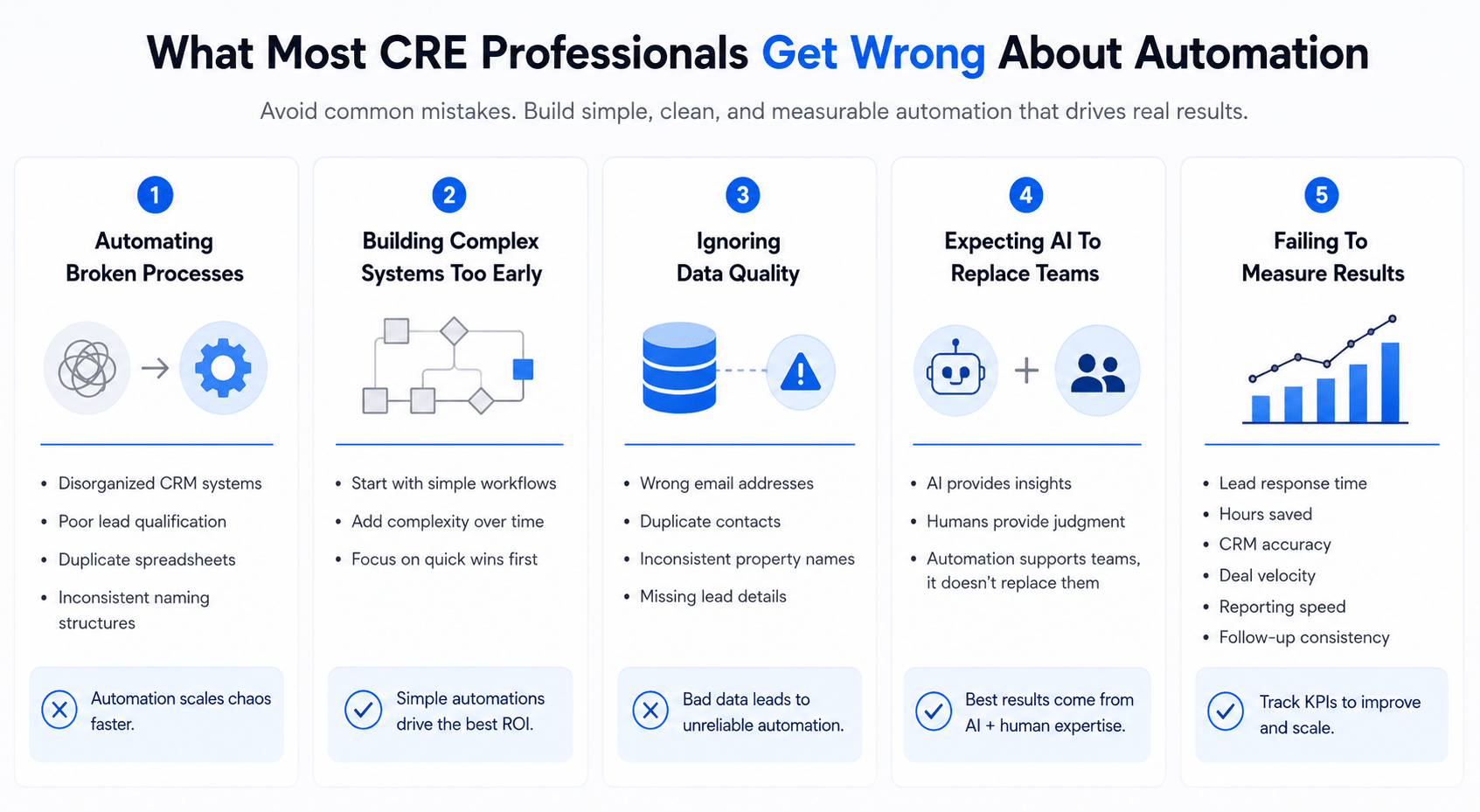
Automating Broken Processes
Some firms automate messy workflows without fixing the workflow first.
For example:
-
Disorganized CRM systems
-
Poor lead qualification
-
Duplicate spreadsheets
-
Inconsistent naming structures
Automation cannot solve operational chaos automatically.
Instead, it scales the chaos faster.
Before building automations, firms should simplify processes first.
Building Complex Systems Too Early
Another common mistake is overengineering workflows.
Many teams try building advanced automations immediately. They connect dozens of tools and create complicated logic chains.
That usually creates maintenance problems later.
Simple automations often create the best ROI.
Start with workflows like:
-
Lead routing
-
CRM syncing
-
Calendar automation
-
Internal notifications
-
Reporting updates
These workflows are easier to maintain and produce fast operational wins.
Ignoring Data Quality
Automation depends on clean data.
If CRM records are inaccurate, automation workflows become unreliable.
For example:
-
Wrong email addresses
-
Duplicate contacts
-
Inconsistent property names
-
Missing lead details
These issues create operational problems across automated systems.
Good automation requires good operational discipline.
Expecting AI To Replace Entire Teams
Many firms misunderstand how AI and automation work together.
AI tools can summarize reports, generate drafts, and analyze information. However, human oversight still matters.
Commercial real estate depends heavily on:
-
Relationships
-
Negotiation
-
Judgment
-
Market experience
Automation supports teams. It does not replace expertise.
The firms seeing the best results use automation to remove repetitive work while keeping humans focused on high-value decisions.
Failing To Measure Results
Some firms implement automation without tracking outcomes.
That makes it difficult to understand what actually works.
Track measurable KPIs such as:
-
Lead response time
-
Hours saved
-
CRM accuracy
-
Deal velocity
-
Reporting speed
-
Follow-up consistency
Operational visibility helps firms improve workflows over time.
Tools That Actually Work vs Automation Hype
The automation market is crowded.
New AI and workflow tools appear constantly. Many promise fully autonomous business systems. However, most CRE firms need practical solutions, not hype.
The best automation tools are usually:
-
Reliable
-
Easy to manage
-
Fast to implement
-
Flexible enough for scaling
Zapier remains popular because it balances simplicity with strong functionality.
Zapier vs Make
Make is another popular automation platform.
Both tools connect software systems together. However, they work differently.
| Feature | Zapier | Make |
|---|---|---|
| Ease of use | Very beginner-friendly | More technical |
| Workflow flexibility | Moderate | Advanced |
| Learning curve | Low | Medium–High |
| Setup speed | Fast | Moderate |
| Visual workflow builder | Basic | Advanced |
| CRE suitability | Excellent for most teams | Better for advanced users |
Zapier works especially well for non-technical CRE teams.
Make offers more customizable, but it often requires additional operational knowledge.
Zapier vs Native CRM Automations
Some CRM systems already include automation tools.
For example:
-
HubSpot workflows
-
Salesforce automations
-
Monday.com automations
These native tools work well inside their own ecosystems. However, they often struggle with cross-platform coordination.
Zapier performs best when firms use multiple disconnected systems.
For example:
-
CRM
-
Email platform
-
Calendar tools
-
AI software
-
Reporting dashboards
-
Communication apps
Zapier connects them together more easily.
Where Zapier Performs Best
Zapier delivers strong value for:
-
Brokerage firms
-
Investor relations teams
-
Acquisitions groups
-
Property management operations
-
Small and mid-sized CRE firms
It is especially useful when teams need fast operational improvements without hiring developers.
Where Zapier Struggles
No tool is perfect.
Zapier becomes more expensive with very high task volume. Extremely advanced workflows may also require more flexible systems.
Potential limitations include:
-
Complex branching logic
-
Enterprise-scale customization
-
High automation volume pricing
-
Advanced database coordination
Still, for most CRE teams, Zapier offers more than enough operational capability.
Automation Platform Comparison
| Platform | Best For | Ease of Use | CRE Suitability |
|---|---|---|---|
| Zapier | Fast automation setup | Easy | Excellent |
| Make | Advanced workflows | Moderate | Strong |
| HubSpot Workflows | CRM-based automation | Easy | Good |
| Salesforce Automation | Enterprise systems | Advanced | Strong |
| Monday.com Automation | Task coordination | Easy | Moderate |
The most important factor is not choosing the “perfect” tool.
It is implementing workflows that actually solve operational problems.
How To Implement Zapier in 24 Hours
Many CRE professionals delay automation because they think implementation will take weeks.
In reality, most firms can launch their first useful workflow within a single day.
The key is starting small.
Do not try to automate the entire business immediately. Focus on one repetitive workflow that wastes time every day.
Simple systems create faster wins and fewer problems.
First 2 Hours: Identify Repetitive Work
Start by auditing your daily operations.
Look for tasks that employees repeat constantly. These workflows usually create the best automation opportunities.
Common examples include:
-
Lead entry
-
CRM updates
-
Meeting reminders
-
Investor follow-ups
-
File organization
-
Reporting workflows
Next, identify which tools your team already uses.
For example:
-
HubSpot
-
Salesforce
-
Gmail
-
Slack
-
Calendly
-
Airtable
-
Google Sheets
Most CRE firms already have enough software. The real problem is that these tools do not communicate properly.
That is where Zapier helps.
Hours 3–6: Build the First Workflow
Now create one simple automation.
Do not overcomplicate the process.
A good first workflow could look like this:
-
New website lead submits form
-
Zapier adds leads to CRM
-
Broker receives Slack notification
-
Follow-up email sends automatically
This type of workflow is easy to build and creates immediate operational value.
During setup:
-
Test triggers carefully
-
Check data formatting
-
Verify notifications work properly
-
Make sure CRM fields match correctly
Most automation errors happen because of inconsistent data formatting.
Hours 6–12: Add Operational Layers
Once the basic workflow works, improve it gradually.
Add supporting automations such as:
-
Internal alerts
-
Calendar updates
-
Task assignments
-
AI-generated summaries
-
Reporting triggers
However, avoid adding too much complexity immediately.
Simple systems are easier to maintain.
Hours 12–24: Train the Team
Automation only works if teams trust the system.
Spend time showing employees:
-
How workflows operate
-
What happens automatically
-
Where information gets stored
-
How notifications work
This reduces confusion and improves adoption.
Also, monitor the workflow closely during the first day.
Check for:
-
Duplicate records
-
Missing information
-
Incorrect formatting
-
Notification failures
Most issues are easy to fix early.
24-Hour Automation Launch Checklist
-
CRM connected properly
-
Lead routing tested
-
Notifications working
-
Email automations verified
-
Calendar syncing active
-
AI integrations tested
-
Reporting workflows checked
-
Team permissions configured
The goal is not perfection.
The goal is operational momentum.
Once teams see immediate time savings, automation adoption becomes much easier.
Copy-Paste Zapier + AI Prompts for CRE Teams
AI prompts become far more useful when connected to operational workflows.
Instead of manually using AI tools repeatedly, CRE teams can automate prompts through Zapier workflows.
This saves time and improves consistency.
The best prompts are specific, practical, and tied to real operational tasks.
Lead Qualification Prompt
Use this workflow when a new lead enters the CRM.
Prompt:
“Review this commercial real estate lead and summarize the prospect’s likely investment goals, property interests, urgency level, and potential next steps. Write the summary in a professional CRM note style using concise language.”
This prompt helps brokers understand leads faster.
It also creates cleaner CRM records automatically.
Investor Update Prompt
This workflow helps automate investor communication.
Prompt:
“Summarize the following deal updates into a professional investor-friendly report. Highlight major progress, risks, milestones, leasing activity, and financial changes. Keep the tone clear, concise, and executive-level.”
This reduces repetitive reporting work significantly.
Market Research Prompt
Many acquisition teams spend hours reviewing market reports.
AI workflows can speed up that process.
Prompt:
“Analyze this commercial real estate market report. Summarize leasing trends, cap rate movement, demand indicators, supply changes, investment risks, and emerging opportunities in simple executive-level language.”
This helps leadership review information faster.
Property Summary Prompt
CRE marketing teams often repeat listing descriptions manually.
This workflow simplifies the process.
Prompt:
“Write a concise commercial real estate property summary using a professional investment-focused tone. Highlight location advantages, tenant profile, asset strengths, value-add opportunities, and market positioning.”
This creates more consistent marketing materials.
Meeting Notes Prompt
Brokers spend large amounts of time writing follow-up notes.
This workflow helps automate documentation.
Prompt:
“Summarize this meeting transcript into structured CRM notes. Include client priorities, investment criteria, concerns, action items, follow-up tasks, and timeline expectations.”
These workflows work best when connected directly to CRMs and operational systems.
That is where automation creates real value.
Real-World CRE Use Cases and Mini Case Studies
The strongest proof of automation ROI comes from real operational use cases.
Most CRE firms do not need futuristic AI systems. They need practical workflows that remove repetitive work.
That is where automation delivers measurable value.
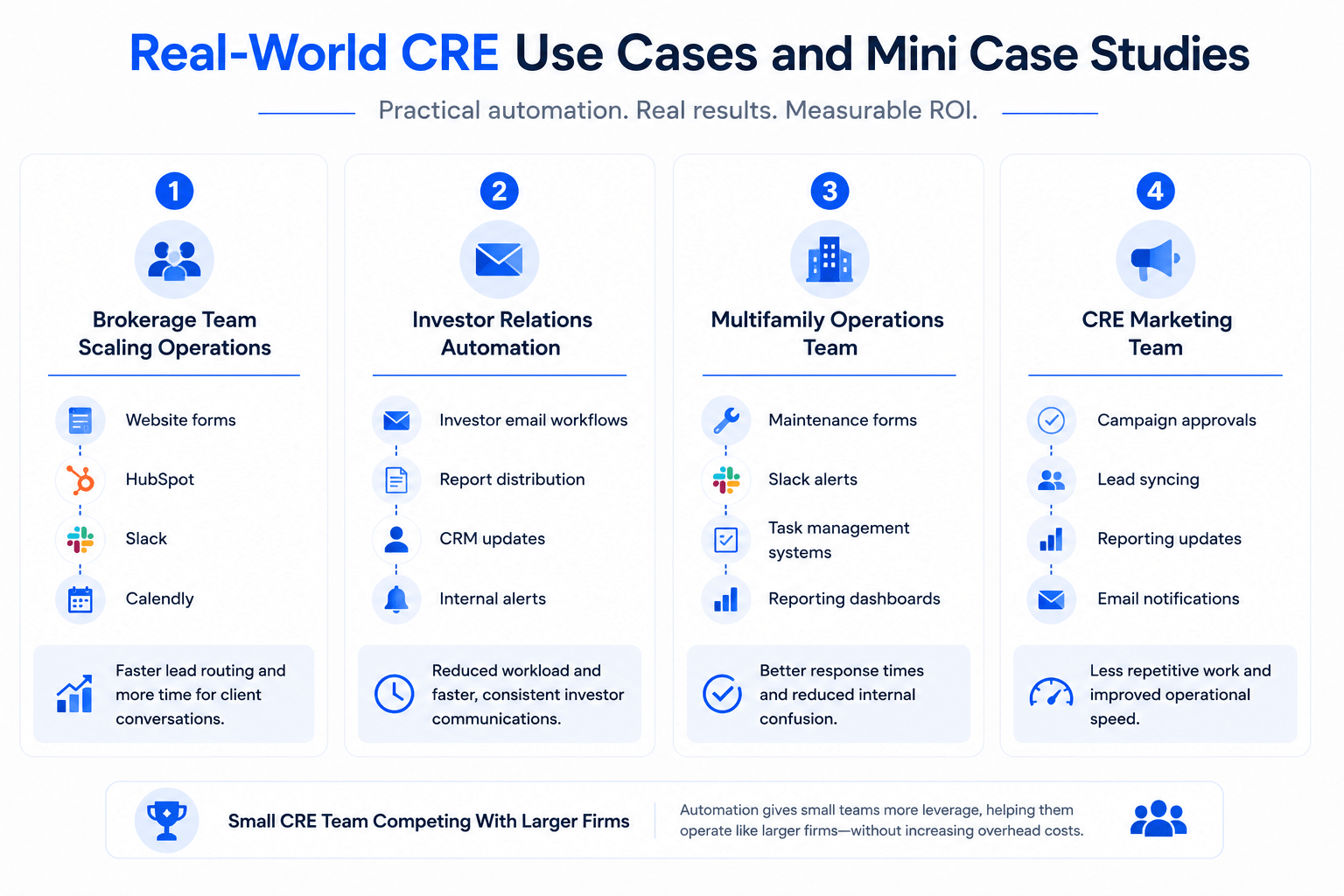
Brokerage Team Scaling Operations
A brokerage team handling growing deal volume struggled with lead management.
Brokers manually:
-
Updated CRMs
-
Assigned leads
-
Scheduled follow-ups
-
Sent reminder emails
As activity increased, response times slowed.
The firm implemented simple Zapier workflows connecting:
-
Website forms
-
HubSpot
-
Slack
-
Calendly
Now leads the route automatically within seconds.
Response speed improved dramatically, and brokers spent more time on client conversations instead of admin work.
Investor Relations Automation
An investment firm managed recurring investor updates manually.
Each reporting cycle required hours of repetitive coordination.
The firm automated:
-
Investor email workflows
-
Report distribution
-
CRM updates
-
Internal alerts
This reduced operational workload and improved communication consistency.
Investors received faster updates with fewer delays.
Multifamily Operations Team
A property management group struggled with maintenance communication.
Requests arrived through email, text messages, and spreadsheets.
The team created automated workflows connecting:
-
Maintenance forms
-
Slack alerts
-
Task management systems
-
Reporting dashboards
Now requests route automatically to the correct staff members.
This improved response times and reduced internal confusion.
CRE Marketing Team
A marketing department handled repetitive campaign coordination manually.
Employees constantly moved information between systems.
The firm automated:
-
Campaign approvals
-
Lead syncing
-
Reporting updates
-
Email notifications
This reduced repetitive coordination work and improved operational speed.
Small CRE Team Competing With Larger Firms
One small acquisitions team used automation to operate like a much larger organization.
Instead of hiring additional administrative staff, they automated:
-
Market research summaries
-
Deal alerts
-
CRM updates
-
Scheduling workflows
-
Internal reporting
This gave the firm more operational leverage without increasing overhead costs.
That is one of the biggest advantages of automation.
Small teams can scale productivity faster without dramatically increasing staffing costs.
Future of Automation in Commercial Real Estate
Commercial real estate operations will become far more automated over the next few years.
However, the future is not about replacing professionals.
It is about reducing operational friction.
The firms gaining the biggest advantage will combine:
-
AI tools
-
Workflow automation
-
Centralized data systems
-
Operational visibility
Together, these systems create faster and more scalable businesses. Similarly, firms moving toward AI-driven operations should understand how automating CRE workflows can connect research, reporting, and execution into one scalable system.
AI Agents and Workflow Automation
AI tools are becoming more operationally useful.
Instead of only generating text, AI systems now assist with:
-
Research
-
Reporting
-
Communication
-
Data analysis
-
Workflow recommendations
Zapier acts as the coordination layer connecting those systems together.
This creates more intelligent workflows across CRE operations.
Automated Reporting Systems
Reporting automation will continue growing rapidly.
Many firms still rely heavily on manual spreadsheet reporting.
Future systems will automate:
-
Investor updates
-
Operational dashboards
-
Leasing summaries
-
Market reporting
-
Financial reporting
This improves speed and reduces repetitive analysis work.
Predictive Workflow Triggers
Future automations will become more proactive.
Instead of waiting for manual input, systems will react automatically to:
-
Market changes
-
Leasing activity
-
Investor behavior
-
CRM engagement
-
Deal pipeline shifts
This creates faster operational response across teams.
AI and CRE Software Will Integrate More Deeply
Today, many CRE systems still operate separately.
Over time, software platforms will become more connected.
Firms will increasingly combine:
-
CRM systems
-
AI tools
-
Automation workflows
-
Reporting platforms
-
Communication tools
The result will be more centralized operational ecosystems.
Conclusion
The commercial real estate industry still depends heavily on manual work. Many firms operate through disconnected systems, repetitive admin tasks, and slow operational processes. Over time, those inefficiencies reduce productivity and limit growth.
That is why automation matters so much today.
The ROI of using Zapier in real estate workflows comes from improving how information moves across the business. Instead of employees constantly updating spreadsheets, forwarding emails, and managing repetitive coordination tasks, workflows run automatically in the background.
This creates several long-term benefits:
-
Faster lead response
-
Better operational visibility
-
Cleaner CRM systems
-
Improved investor communication
-
Reduced administrative workload
-
More scalable operations
The biggest advantage is not just time savings. It is operational leverage.
Firms using automation effectively can handle more activity without increasing operational chaos. Brokers spend more time building relationships. Analysts focus more on underwriting and market analysis. Operations teams become more organized and efficient.
The most successful CRE firms are not necessarily the ones with the most software. They are the ones building practical systems that reduce friction across the organization.
The best way to start is simple.
Choose one repetitive workflow. Automate it. Measure the results. Then, improve gradually over time.
Small operational improvements often create the strongest long-term ROI.
Learn How CRE Teams Use AI and Automation
Most CRE professionals know they need automation, but struggle with implementation. Explore real workflows, tested AI systems, and practical training built specifically for commercial real estate teams.
Common Zapier Questions for CRE Teams
What is Zapier used for in commercial real estate?
Zapier helps commercial real estate firms automate repetitive workflows between software tools. Instead of manually moving information between platforms, Zapier connects systems together automatically.
For example, when a prospect submits a property inquiry form, Zapier can:
-
Add the lead to a CRM
-
Notify a broker instantly
-
Trigger a follow-up email
-
Update reporting dashboards
-
Create internal tasks automatically
CRE firms commonly use Zapier for:
-
Lead management
-
Investor communication
-
Scheduling workflows
-
Reporting automation
-
CRM updates
-
Property management coordination
The biggest benefit is operational efficiency. Teams spend less time on admin work and more time on deals, relationships, and revenue-generating activities.
Zapier also works well with AI tools, making it useful for modern CRE automation systems.
Is Zapier worth it for small real estate teams?
Yes. Small CRE teams often see strong value from automation because they usually operate with limited staff and resources.
Without automation, small teams spend large amounts of time handling repetitive operational work manually. This includes:
-
CRM updates
-
Lead routing
-
Scheduling
-
Reporting
-
Follow-up emails
Zapier helps reduce that workload significantly.
Even a simple automation can save several hours weekly. Over time, those hours create meaningful productivity gains.
Small firms also benefit because automation improves scalability. Instead of hiring more administrative staff immediately, teams can automate repetitive workflows first.
This helps lean firms compete more effectively with larger organizations.
The key is starting small. Focus on one workflow with high repetition and clear operational value.
How much time can automation save in CRE?
The amount of time saved depends on the workflow volume and operational complexity.
However, many CRE firms save between 10 and 30 hours weekly after implementing core automations.
The biggest time savings usually come from:
-
CRM management
-
Reporting
-
Scheduling
-
Investor updates
-
Lead follow-ups
-
File organization
For example, manually updating CRM systems may take several hours every week. Automation can reduce that work to minutes.
The same applies to repetitive communication workflows.
Instead of manually sending updates and reminders repeatedly, automation handles those tasks automatically.
The larger the team and workflow volume, the greater the potential time savings.
Most firms see the strongest ROI from workflows repeated daily.
What are the best Zapier workflows for brokers?
Brokers usually benefit most from automations that improve speed and organization.
Some of the highest-value workflows include:
-
Lead routing automation
-
CRM syncing
-
Meeting scheduling
-
Follow-up reminders
-
Email notifications
-
Property inquiry workflows
For example, a new website inquiry can automatically:
-
Enter the CRM
-
Notify the broker
-
Trigger a follow-up email
-
Schedule reminder tasks
This improves response speed significantly.
Fast response times matter in competitive CRE markets because prospects often contact multiple firms at once.
Automation also reduces operational friction. Brokers spend less time handling repetitive admin work and more time building relationships and advancing deals.
Can Zapier integrate with AI tools?
Yes. Zapier integrates with many AI platforms and helps automate how AI outputs move through operational systems.
For example, AI tools can:
-
Summarize market reports
-
Draft investor updates
-
Generate property summaries
-
Analyze meeting notes
Zapier then distributes that information automatically.
A typical workflow may look like this:
-
User uploads market report
-
AI summarizes the report
-
Zapier emails the summary
-
CRM records update automatically
-
Slack alerts notify leadership
This combination creates stronger operational efficiency than using AI alone.
AI handles analysis and content generation. Zapier handles workflow coordination and execution.
That is why many CRE firms now combine both technologies.
What are the risks of automation in real estate?
Automation improves efficiency, but poor implementation can create operational problems.
The most common risks include:
-
Bad CRM data
-
Workflow errors
-
Duplicate records
-
Overcomplicated systems
-
Missing notifications
Many firms also automate broken workflows without fixing the underlying process first.
That usually creates more confusion instead of less.
Good automation requires:
-
Organized workflows
-
Clean data
-
Clear operational structure
-
Ongoing monitoring
Human oversight still matters.
Automation should support operations, not completely replace operational judgment and relationship management.
Most automation risks are manageable when firms start with simple workflows and scale gradually.
How expensive is Zapier for CRE firms?
Zapier is usually inexpensive compared to labor costs created by inefficient workflows.
Pricing depends on:
-
Workflow volume
-
Number of automations
-
Software integrations
-
Task usage
Many small and mid-sized CRE firms spend far more money on repetitive operational labor than on automation software itself.
For example, if automation saves 10–20 labor hours weekly, the operational savings often exceed software costs quickly.
However, firms with extremely high automation volume may eventually need more advanced enterprise systems.
The best approach is to start small and measure operational impact before scaling heavily.
Zapier vs Make: Which is better for CRE?
Both Zapier and Make are strong automation platforms. The better option depends on the firm’s technical needs.
Zapier works well for:
-
Beginner-friendly workflows
-
Fast implementation
-
Non-technical teams
-
Simple operational systems
Make offers:
-
More advanced customization
-
Better visual workflow design
-
Greater flexibility for complex automations
However, Make usually requires more technical knowledge.
Most CRE firms choose Zapier because it is easier to learn and faster to deploy.
For highly advanced enterprise workflows, some firms eventually move toward more customizable systems.
What workflows should CRE firms automate first?
The best starting point is repetitive operational work.
Focus on workflows that:
-
Happen daily
-
Consume large amounts of time
-
Create operational delays
-
Require repetitive coordination
Most firms start with:
-
Lead routing
-
CRM updates
-
Scheduling
-
Follow-up reminders
-
Investor communication
-
Reporting automation
These workflows are usually simple to implement and create immediate operational value.
Avoid starting with highly advanced systems.
Simple automations often deliver the strongest early ROI.
Can automation improve lead conversion?
Yes. Faster response times often improve lead engagement and conversion opportunities.
Automation helps because leads receive immediate follow-up instead of waiting for manual responses.
For example, automation can instantly:
-
Assign leads
-
Notify brokers
-
Send welcome emails
-
Schedule reminders
-
Update CRM systems
This creates a more responsive experience for prospects and investors. Consistency also improves.
Without automation, follow-ups sometimes get delayed or forgotten. Automated workflows reduce those gaps and improve operational reliability across the sales process.
