
How to Build a Claude Knowledge Base for CRE: Complete Guide for Real Estate Professionals
Commercial real estate professionals generate and consume vast amounts of information every day. Offering memorandums, underwriting models, broker emails, market reports, rent comps, due diligence findings, and investment committee notes all contain valuable intelligence. Yet most of that information never becomes a reusable asset.
Instead, it gets buried in email inboxes, shared drives, spreadsheets, disconnected folders, and employee memory. As a result, firms repeatedly perform the same research, reanalyze similar opportunities, and lose valuable insights gained from past deals.
A Claude knowledge base CRE system solves this problem by transforming scattered information into an organized, searchable, and continuously improving intelligence repository. Rather than treating every deal as a brand-new analysis, you can leverage years of accumulated knowledge to make faster and more informed decisions.
For acquisitions teams, brokers, developers, lenders, and asset managers, building a knowledge base is becoming less of a competitive advantage and more of a necessity. The firms that successfully organize and utilize their proprietary data will consistently outperform those relying on fragmented information systems.
Why Commercial Real Estate Firms Need a Knowledge Base
Commercial real estate is fundamentally an information business.
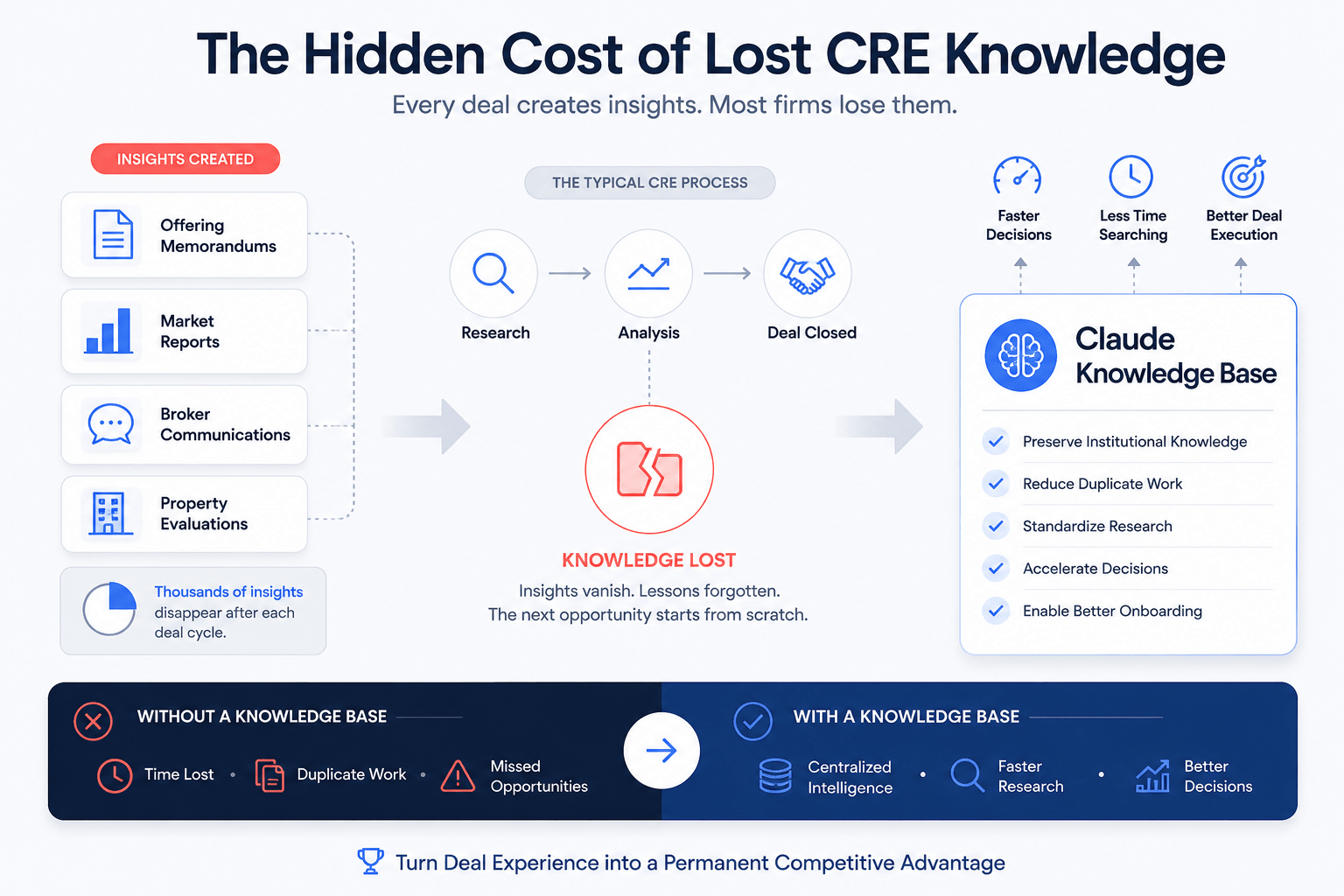
Every acquisition, disposition, lease negotiation, and development project creates valuable knowledge. Unfortunately, most firms fail to capture and reuse that knowledge effectively.
Consider how many opportunities a typical acquisitions team reviews annually.
They may analyze:
-
Hundreds of offering memorandums
-
Dozens of market reports
-
Multiple underwriting scenarios
-
Thousands of broker communications
-
Countless property evaluations
Most of these insights disappear after the deal concludes. When a similar opportunity appears six months later, the process starts from scratch.
A Claude knowledge base CRE framework prevents this cycle by preserving information and making it instantly accessible when needed.
Common Challenges CRE Firms Face
Many firms struggle with:
-
Information stored across multiple platforms
-
Lack of standardized documentation
-
Lost historical deal analyses
-
Inconsistent research processes
-
Difficulty onboarding new employees
-
Repeated underwriting efforts
A centralized knowledge base directly addresses these problems.
The Real Cost of Poor Information Management
The highest cost is not storage. The highest cost is lost decision-making power.
When valuable information cannot be found quickly, teams:
-
Waste time
-
Miss opportunities
-
Duplicate work
-
Forget lessons from previous deals
Over time, these inefficiencies become expensive.
What Is a Claude Knowledge Base?
A Claude knowledge base is a structured system that allows Claude to access, reference, organize, and utilize your commercial real estate information. Instead of functioning as a simple AI chatbot, Claude becomes a research assistant that understands your firm’s historical data and investment strategy.
Think of it as creating institutional memory. Rather than repeatedly explaining your acquisition criteria, market focus, and investment goals, Claude can reference information already stored within the system.
What Information Should Be Included?
A commercial real estate knowledge base should contain:
-
Deal evaluations
-
Property summaries
-
Underwriting assumptions
-
Broker contact records
-
Market reports
-
Due diligence findings
-
Investment committee notes
-
Transaction outcomes
-
Internal research
The objective is simple.
Create a system that helps future decisions benefit from past experience.
Benefits of a Claude Knowledge Base for CRE Professionals
The benefits extend far beyond file organization. Once your knowledge base contains historical deals, market research, and underwriting assumptions, Claude can do much more than retrieve information. It can help analyze opportunities using that accumulated context.
Faster Deal Screening
When new opportunities arrive, Claude can compare them against existing investment criteria and historical transactions. Instead of manually reviewing every detail, you immediately receive contextual analysis.
Improved Market Intelligence
Over time, research accumulates into a powerful market database.
Claude can identify:
-
Rent growth trends
-
Vacancy patterns
-
Cap rate movements
-
Development activity
-
Demand drivers
Better Team Collaboration
Knowledge bases create a shared source of truth. Everyone works from the same information rather than maintaining separate records.
Stronger Institutional Memory
-
Employees eventually leave.
-
Deals close.
-
Projects change.
-
The knowledge remains.
Reduced Administrative Work
Many repetitive activities become easier:
-
Deal summaries
-
Research organization
-
Broker tracking
-
Contact management
-
Opportunity categorization
Choosing Where Your Knowledge Base Lives
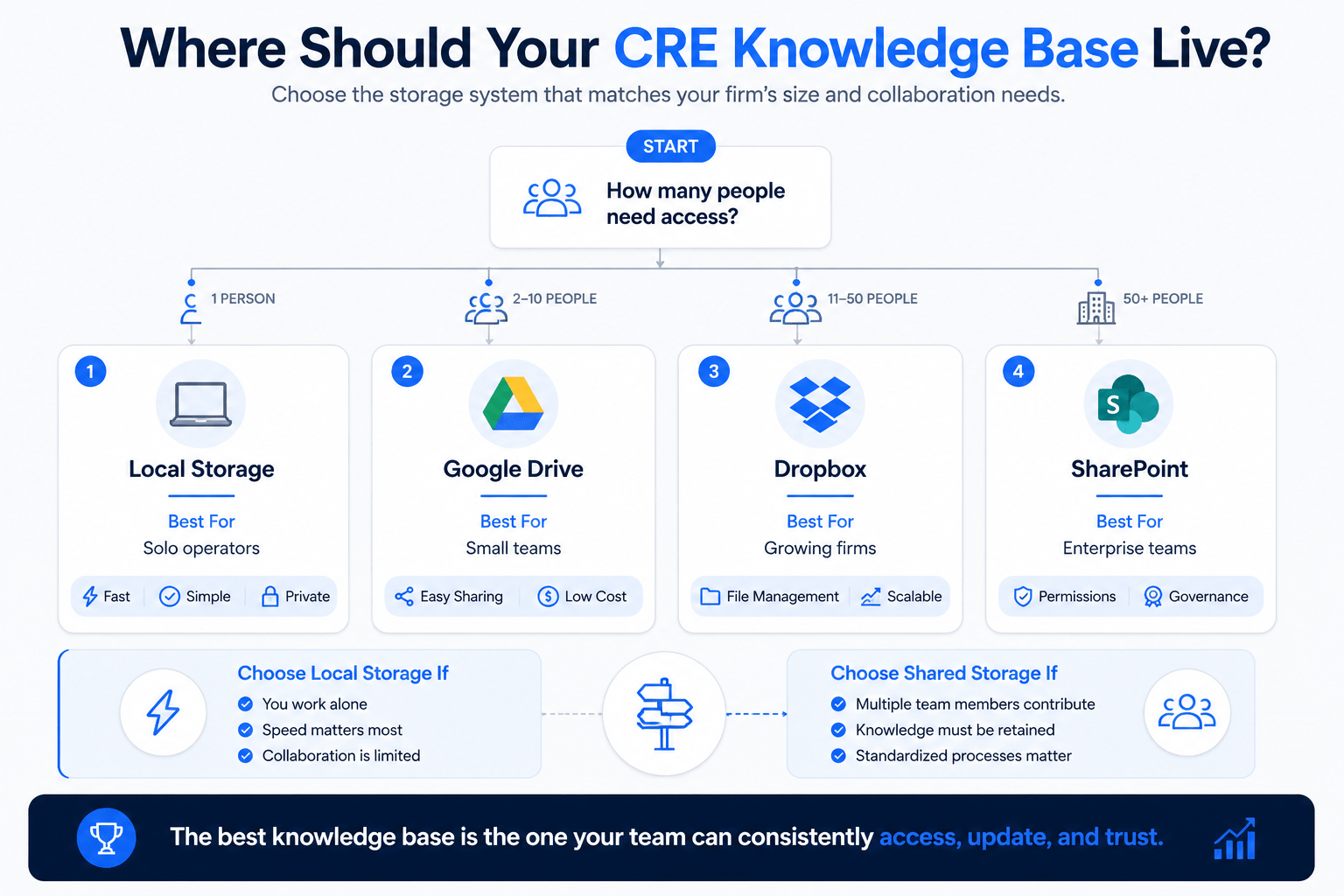
Before creating folders, workflows, or templates, you must determine where the system will be stored. This decision affects accessibility, collaboration, and long-term scalability.
Storage Options Comparison
| Storage Option | Best For | Advantages | Limitations |
|---|---|---|---|
| Local Storage | Solo operators | Fast and simple | Limited collaboration |
| Google Drive | Small teams | Easy sharing | Requires organization |
| Dropbox | Growing firms | Strong file management | Monthly costs |
| SharePoint | Enterprise teams | Advanced permissions | More complex setup |
Local Storage
A local setup works well for:
-
Independent investors
-
Solo brokers
-
Small operators
Advantages include simplicity and speed.
Shared Storage
Teams typically benefit from shared environments.
Benefits include:
-
Collaborative access
-
Centralized information
-
Easier onboarding
-
Better knowledge retention
Changing storage systems later often requires substantial restructuring, so it is worth making the right decision upfront.
The Four-Folder Structure That Works Best
After extensive testing, a four-folder structure consistently performs well for commercial real estate workflows.
Inbox
The Inbox serves as the intake area.
New files arrive here first:
-
Offering memorandums
-
Research reports
-
Broker packages
-
Financial statements
Nothing should remain permanently in the Inbox.
Knowledge Base
This is the permanent repository.
It stores:
-
Deal records
-
Market research
-
Contact information
-
Investment analyses
Every important insight eventually belongs here.
Active Projects
This folder contains only current work.
Examples include:
-
Live acquisitions
-
Active underwriting
-
Ongoing due diligence
-
Negotiations
Archive
Older materials move into the Archive.
Examples include:
-
Expired reports
-
Dormant opportunities
-
Historical reference materials
Folder Structure Overview
| Folder | Primary Purpose | Examples |
|---|---|---|
| Inbox | Intake processing | New files |
| Knowledge Base | Permanent storage | Research and deals |
| Active Projects | Current activities | Live opportunities |
| Archive | Historical records | Older documents |
This structure keeps information organized without becoming complicated.
Use the Ask-Questions-First Method
Many professionals make a critical mistake. They immediately ask Claude to create a folder structure. A more effective approach is to have Claude gather information first.
Why It Works
By asking questions first, Claude learns:
-
Your buy box
-
Market preferences
-
Property types
-
Team structure
-
Workflow requirements
This leads to a customized system rather than a generic template.
Example Discovery Questions
Round One:
-
What asset classes do you target?
-
Who will use the system?
-
Where will information be stored?
Round Two:
-
Which markets matter most?
-
How should deals be categorized?
Three:
-
What return thresholds are required?
-
How should opportunities be scored?
The resulting knowledge base becomes significantly more useful because it reflects your actual business model.
Creating the CLAUDE.md Context File
The most important part of the entire setup is the context file. Without it, Claude provides a generic analysis. With it, Claude understands your firm’s specific requirements.
If you’re planning to implement this system inside Claude’s workspace environment, these Claude Cowork workflows provide additional examples of how CRE teams are organizing research, underwriting, and document management with AI.
Why the Context File Matters
The context file acts as an operating manual.
It tells Claude:
-
How your business works
-
What opportunities qualify
-
How information should be organized
-
Which actions to take during processing
What to Include
Investment Criteria
Document:
-
Target markets
-
Asset classes
-
Minimum cap rates
-
Hold periods
-
Return thresholds
Specific numbers are critical.
Deal Screening Rules
Define:
-
Pass criteria
-
Pursuit criteria
-
Red flags
-
Required metrics
Contact Management Instructions
Specify:
-
Information to capture
-
Formatting requirements
-
Categorization methods
Folder Rules
Establish:
-
Naming conventions
-
Filing procedures
-
Archiving standards
Consistency improves long-term usability.
Building an Effective Intake Workflow
A knowledge base is only as good as its intake process. If information enters inconsistently, the system eventually becomes unreliable.
Standard Intake Process
-
Receive document
-
Place it in the Inbox
-
Trigger processing
-
Extract relevant information
-
Generate summary
-
Store in a proper location
Processing Offering Memorandums
Claude should:
-
Read the document
-
Extract key metrics
-
Compare against the buy box
-
Create a property summary
-
Assign a status
Processing Market Reports
Claude should:
-
Identify key trends
-
Summarize findings
-
Categorize by market
-
Store for future reference
Intake Workflow Table
| Document Type | Claude Action | Destination |
|---|---|---|
| OM | Analyze and summarize | Deal Folder |
| Market Report | Extract insights | Research Folder |
| Broker List | Organize contacts | Contact Database |
| Due Diligence Report | Create summary | Project Folder |
The simpler the workflow, the easier it is to maintain.
Creating a Dedicated Intake Skill
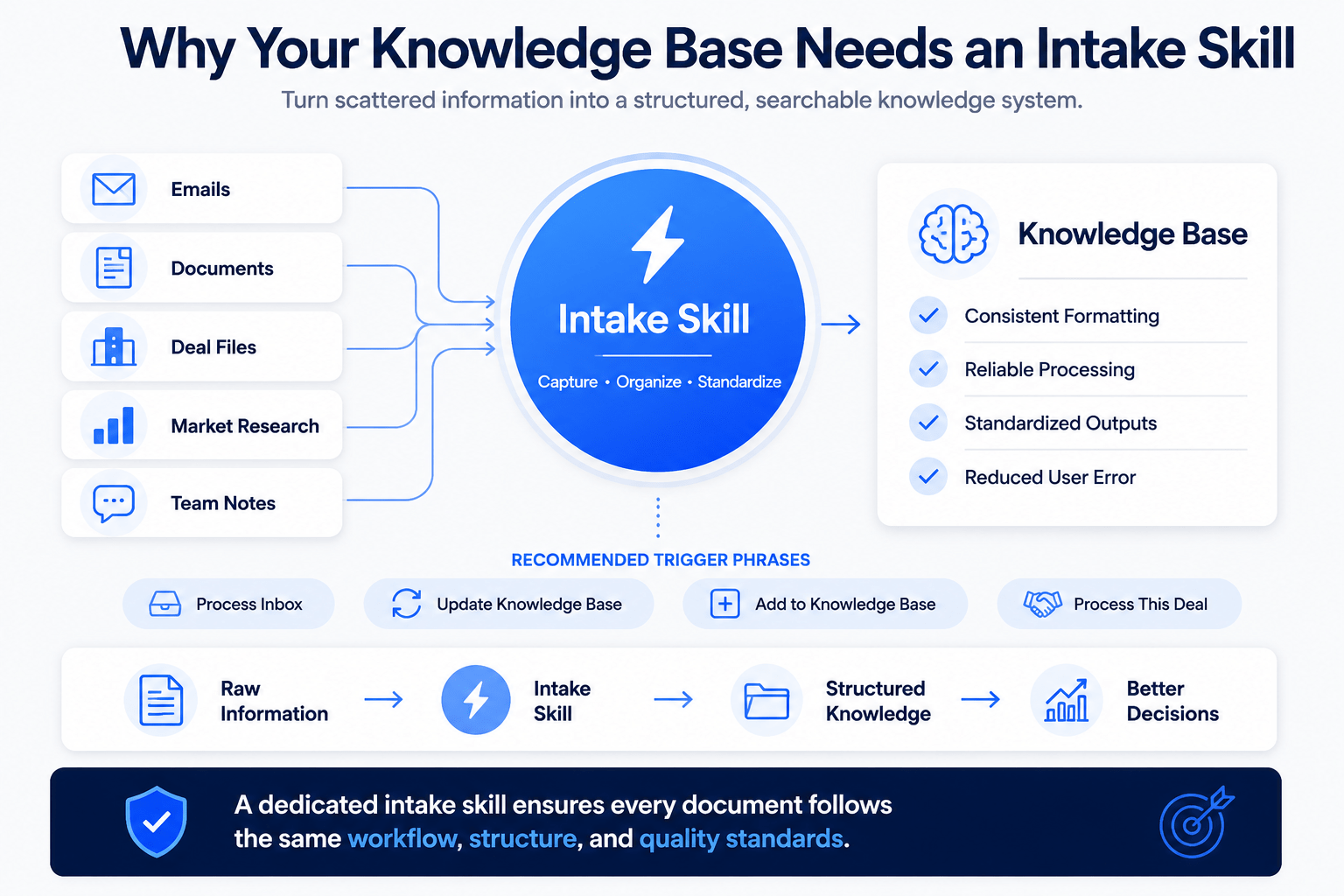
One challenge with large knowledge bases is consistency. This is where a dedicated intake skill becomes valuable.
In addition, many firms pair their knowledge base with Claude automation routines to streamline intake, document processing, and recurring research workflows.
Recommended Trigger Phrases
Examples include:
-
Process Inbox
-
Update Knowledge Base
-
Add to Knowledge Base
-
Process This Deal
-
Second Brain
Multiple triggers improve usability.
Why Skills Matter
Skills ensure:
-
Consistent formatting
-
Reliable processing
-
Standardized outputs
-
Reduced user error
Together, the context file and intake skill create a dependable workflow.
Managing Broker Intelligence Within the Knowledge Base
Many CRE professionals underestimate the value of broker information. Over time, broker relationships generate significant intelligence.
Information Worth Capturing
Record:
-
Contact information
-
Property specialties
-
Geographic focus
-
Historical interactions
-
Deal quality
Long-Term Benefits
After a year, you can identify:
-
Which brokers bring qualified deals
-
Which markets do they specialize in
-
How frequently do opportunities align with your criteria
This becomes a competitive advantage.
Using Market Research More Effectively
Market reports are often consumed once and forgotten.
A knowledge base changes that.
Organizing Research
Categorize reports by:
-
Market
-
Property type
-
Year
-
Research source
Building Market Intelligence
As reports accumulate, Claude can identify recurring themes.
Examples include:
-
Emerging submarkets
-
Demand shifts
-
Rental growth trends
-
New supply pipelines
The value increases every time new information is added.
Claude Knowledge Base vs Traditional File Systems
Many firms already use folders and shared drives. However, traditional storage systems have limitations.
Comparison Table
| Feature | Traditional Folders | Claude Knowledge Base |
|---|---|---|
| Searchability | Basic | Contextual |
| Historical Analysis | Limited | Advanced |
| Pattern Recognition | Manual | Automated |
| Deal Comparison | Time-consuming | Instant |
| Knowledge Retention | Moderate | High |
Traditional systems store information. Knowledge bases help utilize information. That distinction is important.
How the System Becomes More Valuable Over Time
The biggest advantage of a Claude knowledge base CRE system is compounding value.
Month One
You may have:
-
Five deals
-
A few contacts
-
Limited research
Useful, but relatively small.
Month Six
The system grows.
You now have:
-
Dozens of opportunities
-
Extensive market research
-
Broker intelligence
Patterns emerge.
Year One
Questions become more sophisticated:
-
Why did we reject deals?
-
Which brokers produce qualified opportunities?
-
Which submarkets generate the strongest returns?
Year Two
The knowledge base becomes a strategic asset.
It supports:
-
Faster underwriting
-
Better acquisitions
-
Improved forecasting
-
More efficient onboarding
At this stage, your proprietary knowledge becomes difficult for competitors to replicate.
Common Mistakes to Avoid
Skipping the Context File
This is the most common mistake. Without instructions, Claude lacks strategic context.
Vague Investment Criteria
Specific numbers outperform broad descriptions.
Poor Folder Management
Organization matters. Inconsistent filing reduces value.
No Quality Control
Review early outputs and refine instructions.
Expecting Perfection Immediately
The best systems evolve through continuous improvement. Small adjustments create substantial gains over time.
Build a CRE Knowledge Base That Gets Smarter Every Year
The firms winning in commercial real estate are increasingly those that can organize, access, and leverage proprietary information more effectively than their competitors. A structured knowledge base allows teams to move beyond simple file storage and build a scalable intelligence system that improves acquisitions, market research, underwriting, and decision-making. Through the AI for CRE Collective, professionals can learn practical frameworks for implementing these systems and adapting them to real-world CRE workflows.
Today, 600+ CRE professionals are exploring how AI can improve efficiency and create lasting competitive advantages across the commercial real estate industry. If you want ongoing insights, implementation guides, and examples from practitioners actively using these tools, subscribe to the newsletter and continue building a smarter approach to CRE knowledge management.
Conclusion
A Claude knowledge base CRE system is much more than an organizational tool. It is a framework for capturing institutional knowledge, preserving valuable insights, and improving every future investment decision.
By combining a structured folder hierarchy, a detailed context file, standardized intake workflows, and dedicated processing skills, commercial real estate professionals can create an intelligence asset that grows stronger with every deal analyzed.
The most successful CRE firms of the future will not simply collect information. They will build systems that transform information into actionable knowledge. A well-designed Claude knowledge base is one of the most practical ways to start that process today.
FAQs Regarding How to Build a Claude Knowledge Base for CRE
What is a Claude knowledge base for CRE?
A Claude knowledge base for CRE is a structured system that stores commercial real estate deals, market research, broker contacts, underwriting analyses, and investment criteria in one searchable location. Instead of starting every analysis from scratch, Claude can reference historical information and provide context-aware insights based on your firm’s previous work.
For acquisitions teams, brokers, and investors, this creates institutional memory and helps improve consistency, efficiency, and decision-making across future transactions.
How do you build a Claude knowledge base for commercial real estate?
Building a Claude knowledge base starts with creating a structured folder system, defining investment criteria, and establishing a process for organizing new information. Most professionals use folders for active projects, historical deals, research, and archived materials.
The next step is creating a context file that tells Claude how to evaluate opportunities, organize information, and apply your firm’s investment strategy. Once these foundations are in place, the system becomes easier to scale as more deals and research are added.
What should be included in a CRE knowledge base?
A CRE knowledge base should include any information that contributes to better investment decisions. This typically includes offering memorandums, underwriting models, broker contacts, market reports, due diligence findings, lease information, and investment committee notes.
The goal is to create a single source of truth where historical deal information and market intelligence can be accessed quickly. The more organized and complete the information is, the more valuable the knowledge base becomes.
Why is the CLAUDE.md file important?
The CLAUDE.md file serves as the operating guide for your knowledge base. It provides Claude with critical information about your investment strategy, target markets, preferred asset classes, return thresholds, and workflow preferences.
Without this context, Claude can only provide generic responses. With it, Claude can evaluate opportunities based on your firm’s specific criteria and deliver recommendations that align with your business objectives.
Can a Claude knowledge base improve deal screening?
Yes. One of the biggest benefits of a Claude knowledge base is faster and more consistent deal screening. When a new opportunity enters the system, Claude can compare it against your buy box, historical transactions, and predefined investment criteria.
This allows teams to identify qualified opportunities more quickly while filtering out deals that do not meet their requirements. Over time, the process becomes increasingly efficient because the system learns from a growing library of past evaluations.
What is the best folder structure for a Claude knowledge base?
Most commercial real estate professionals benefit from a four-folder structure consisting of Inbox, Knowledge Base, Active Projects, and Archive. This approach keeps incoming information separate from active work and long-term records.
The simplicity of this structure makes it easy to maintain while providing enough organization for growing portfolios. It also ensures that important information remains searchable and accessible without creating unnecessary complexity.
Can multiple team members use the same knowledge base?
Yes. A shared knowledge base can be used by acquisitions teams, brokers, analysts, asset managers, and leadership teams when it is stored in a collaborative environment such as Google Drive, Dropbox, or SharePoint.
Shared access improves consistency across the organization and prevents valuable information from becoming isolated within individual employees’ files. It also helps new team members learn from historical transactions and existing market research.
How long does it take to set up a Claude knowledge base?
Most professionals can create an initial Claude knowledge base in two to three hours. This includes building the folder structure, creating the context file, defining workflows, and testing the intake process.
However, the real value develops over time. As deals, research reports, and broker interactions accumulate, the knowledge base becomes a richer source of information and a more effective decision-making tool.
How is a Claude knowledge base different from traditional file storage?
Traditional file storage systems are designed to hold information, while a Claude knowledge base is designed to help users retrieve insights from that information. Standard folders require manual searching and analysis, whereas Claude can provide context and identify patterns across documents.
This difference makes it easier to compare opportunities, locate historical research, and understand how previous decisions relate to current deals. The result is a more intelligent and useful information management system.
Does a Claude knowledge base become more valuable over time?
Yes. Every deal analyzed, market report stored, broker contact logged, and underwriting model added contributes to the overall value of the system. As information accumulates, Claude can identify trends, compare opportunities, and provide increasingly informed recommendations.
Over the long term, the knowledge base evolves into a proprietary intelligence asset that reflects your firm’s experience, decision-making history, and market expertise. This compounding effect is one of the primary reasons many CRE professionals are investing in knowledge management systems today.
