
How to Generate CRE Leads Using LinkedIn Sales Navigator + AI
Commercial real estate professionals spend a lot of time looking for prospects. They search for property owners, investors, developers, tenants, and decision-makers. The problem is that most prospecting is still manual. Research takes hours. Outreach takes even more time. As a result, many professionals struggle to keep their pipeline full. This is where CRE Lead Generation AI can help.
Instead of manually researching every prospect, you can combine LinkedIn Sales Navigator with AI tools to identify opportunities faster and create more relevant outreach. The goal is not to replace relationships. Commercial real estate remains a people-first business. The goal is to spend less time gathering information and more time having conversations.
LinkedIn is one of the largest professional databases available today. Sales Navigator helps users find the right people inside target companies. AI helps organize information, summarize research, and assist with outreach preparation. Together, they create a practical prospecting system that can save hours each week.
Whether you are a broker, investor, developer, consultant, or operator, this guide will show you how to use CRE Lead Generation AI in a way that supports real business development.
By the end of this guide, you will understand:
Why traditional prospecting is becoming less effective
How Sales Navigator helps identify qualified prospects
Where AI saves the most time
How to create a repeatable lead generation process
Common mistakes that reduce response rates
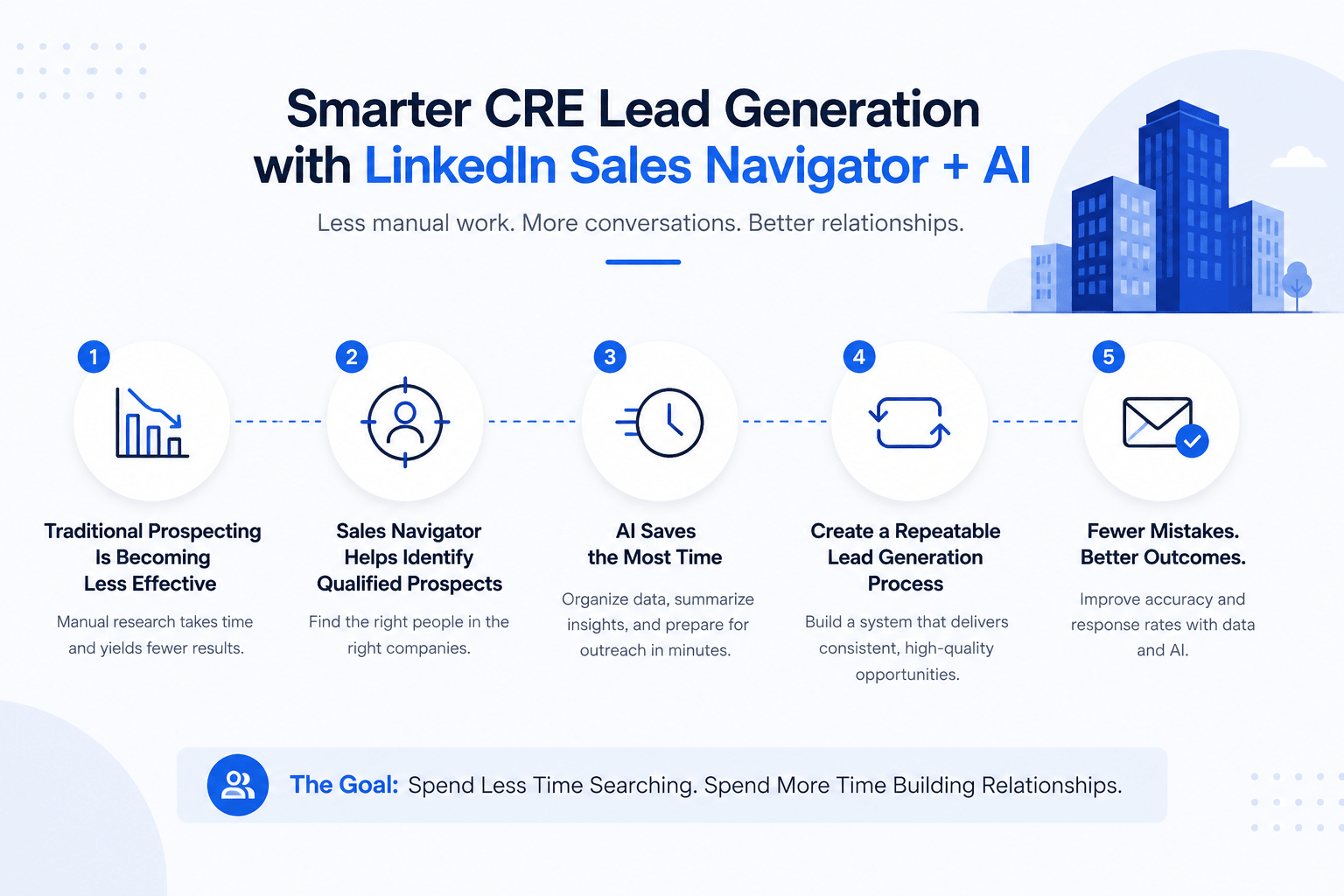
Table of Contents
ToggleKey AI & CRE Productivity Statistics
The use of AI continues to grow across business functions. Commercial real estate is no different. Several studies show why more firms are investing in technology-assisted workflows.
McKinsey estimates generative AI could add up to $4.4 trillion annually across industries.
Deloitte reports measurable productivity improvements among organizations using AI.
Real estate professionals continue to increase technology adoption across sales and operations.
LinkedIn reports stronger lead identification and prioritization through Sales Navigator.
Sales Navigator studies show meaningful returns for sales and business development teams.
These numbers explain why more firms are exploring CRE Lead Generation AI strategies to improve prospecting efficiency.
Traditional Prospecting vs AI-Assisted Prospecting
| Activity | Traditional Process | AI-Assisted Process |
|---|---|---|
| Prospect Research | 20–30 minutes per lead | 3–5 minutes per lead |
| Company Analysis | Manual review | AI summaries |
| Outreach Drafting | Written from scratch | AI-assisted personalization |
| Lead Qualification | Spreadsheet review | Faster analysis |
| Daily Prospect Volume | Limited capacity | Higher volume potential |
The biggest benefit is time. Faster research allows professionals to focus on meetings, calls, and relationship building.
CRE Lead Generation AI Workflow
Sales Navigator finds prospects. AI reduces research time. Relationships create deals.
Why Traditional CRE Prospecting No Longer Works
Commercial real estate prospecting has changed significantly over the past decade. Many professionals still rely on referrals, networking events, cold calls, and email outreach.
These methods still work. However, competition has increased. Buyers, sellers, investors, and owners receive more messages than ever before. As a result, generic outreach often gets ignored.
Many firms also struggle with limited prospecting capacity. Research takes time. Contact discovery takes time. Personalization takes time. When multiplied across hundreds of prospects, the workload becomes difficult to manage.
The Old CRE Lead Generation Process
Most traditional prospecting follows a similar path:
Find potential companies.
Identify decision-makers.
Gather contact information.
Research the business.
Write outreach messages.
Track everything manually.
The process works, but it is slow.
Many professionals spend more time preparing for outreach than actually speaking with prospects.
Common Prospecting Bottlenecks
Several problems appear repeatedly across CRE teams.
Finding the Right Decision-Makers
Commercial real estate deals often involve multiple stakeholders.
These may include:
Property owners
Asset managers
Acquisitions directors
Investors
Developers
Corporate real estate leaders
Finding the right person can take considerable effort.
Identifying Active Opportunities
Not every company is actively buying, selling, leasing, or developing property. Without clear signals, prospecting often becomes guesswork. Many professionals spend time pursuing companies that have no immediate need.
Personalization at Scale
Most people know personalized outreach performs better. The challenge is creating personalized messages for dozens or hundreds of prospects every week. This is where many teams struggle.
Where Most CRE Professionals Waste Time
Research is often the biggest productivity drain.
Many professionals spend hours:
Reviewing company websites
Reading LinkedIn profiles
Searching news articles
Analyzing portfolios
Looking for growth signals
Research is important. However, too much research slows prospecting. A more effective approach is to collect the most important information quickly and move into conversations sooner.
That is one reason CRE Lead Generation AI has become increasingly popular among brokers, investors, and operators.
Instead of spending 30 minutes researching one prospect, professionals can review key information in minutes and decide whether the opportunity is worth pursuing.
The firms seeing the strongest results are not necessarily using more software. They are simply using better systems.
Prospecting Reality Check
Where Most CRE Teams Lose Time
The issue is rarely lead volume. The issue is how much time gets spent before the first conversation happens.
What LinkedIn Sales Navigator Actually Does
Many commercial real estate professionals have heard of Sales Navigator. Fewer use it to its full potential.
Sales Navigator is not just an upgraded LinkedIn account. It is a prospecting platform designed to help users identify decision-makers, track companies, and discover business opportunities.
When paired with CRE Lead Generation AI, it becomes much more powerful.
Core Sales Navigator Features CRE Professionals Use
Several features are particularly valuable for commercial real estate.
Advanced Search
Allows users to find prospects based on highly specific criteria.
Lead Lists
Helps organize prospects into targeted groups.
Account Lists
Tracks companies instead of individual people.
Real-Time Alerts
Provides updates when prospects change jobs, post content, or engage on LinkedIn.
Relationship Insights
Shows mutual connections and relationship paths. Together, these features help reduce prospecting guesswork.
Filters That Matter Most for CRE
Many users only use basic search filters. However, Sales Navigator offers much deeper targeting.
The most useful filters include:
Geography
Industry
Company size
Job title
Seniority level
Years in role
Recent activity
These filters help narrow large markets into manageable prospect lists.
Best CRE Decision-Makers to Target
The ideal contact depends on your service.
However, common targets include:
Managing Directors
Principals
Owners
Acquisitions Managers
Asset Managers
Development Directors
Real Estate Vice Presidents
Portfolio Managers
Targeting the correct stakeholder often has a greater impact than the outreach message itself.
Valuable Sales Navigator Filters for CRE
| Filter | Why It Matters |
|---|---|
| Geography | Target local markets |
| Seniority | Reach decision-makers |
| Company Size | Match the ideal client profile |
| Industry | Focus on relevant firms |
| Job Function | Improve targeting accuracy |
| Recent Activity | Identify engagement opportunities |
Sales Navigator provides the data. The challenge is turning that data into action. This is where AI becomes useful.
CRE Targeting Simulator
This is how top CRE teams narrow thousands of companies into a focused prospect list using Sales Navigator filters.
Most brokers search broad markets. The highest-performing teams stack multiple filters together until only highly relevant decision-makers remain.
How AI Changes CRE Lead Generation
AI is not replacing prospecting. Instead, it helps professionals complete repetitive tasks faster. The best use cases involve research, preparation, organization, and prioritization.
Research Tasks AI Can Automate
Research often takes the largest amount of time.
AI can help summarize:
Company websites
LinkedIn profiles
Market news
Property portfolios
Investment activity
Instead of reading multiple pages, users can review a concise summary.
Outreach Tasks AI Can Support
Creating outreach messages is another time-consuming task.
AI can help generate:
First-touch messages
Follow-up emails
Connection requests
Meeting requests
Personalized talking points
The final message should still be reviewed by a human. The goal is better efficiency, not complete automation.
Lead Qualification Tasks AI Can Assist With
Not every lead deserves equal attention.
AI can help prioritize prospects based on:
Company growth
Market activity
Portfolio size
Expansion signals
Investment activity
This allows teams to focus on higher-value opportunities.
What AI Should Never Automate
Some parts of business development should remain personal.
These include:
Relationship building
Trust development
Negotiations
Strategic discussions
Long-term client management
The strongest CRE Lead Generation AI workflows combine technology with human expertise. AI handles research and preparation. People build relationships and close deals. That combination is where the biggest gains occur.
Step 1 — Build Your Ideal CRE Prospect Profile
Before you start searching in Sales Navigator, you need to know exactly who you want to reach.
Many CRE professionals make the mistake of targeting everyone. As a result, they end up with large prospect lists but few meaningful conversations.
The best prospecting systems start with a clear Ideal Customer Profile (ICP).
A strong ICP helps improve search results, outreach quality, and conversion rates. It also makes your CRE Lead Generation AI workflow more effective because AI performs better when it has clear inputs.
Define Your Target Market
Start by identifying the type of companies and people you want to work with.
Ask yourself:
What property types do they own or operate?
Which markets do they serve?
What size portfolio do they manage?
What business challenges do they face?
What services do you provide that solve those challenges?
For example, a broker specializing in industrial properties should not target every real estate company on LinkedIn. Instead, they should focus on industrial owners, developers, occupiers, and investors.
The more specific your targeting becomes, the better your prospecting results.
Identify the Right Decision-Makers
The company may fit your target profile, but that does not guarantee you are contacting the right person.
Many CRE professionals lose opportunities because they reach out to someone who has little influence over real estate decisions.
Depending on your service, decision-makers may include:
Managing Partners
Principals
Property Owners
Acquisitions Directors
Asset Managers
Development Managers
Portfolio Managers
Real Estate Directors
When building prospect lists, focus on people who can influence transactions, investments, leasing decisions, or operational changes.
Create an AI-Assisted ICP
AI can help organize and refine your target audience.
For example, you can provide AI with information about your best clients and ask it to identify common patterns.
A simple prompt might look like this:
“Analyze these five clients and identify shared characteristics, business challenges, portfolio size, growth signals, and decision-maker titles.”
The result is a more refined prospect profile.
Instead of guessing who to target, you begin working from real customer data.
Checklist: Ideal CRE Prospect Profile
Use this checklist before building lead lists.
Target property type identified
Geographic market selected
Portfolio size defined
Company size identified
Preferred ownership structure selected
Key decision-maker titles listed
Growth indicators identified
Common pain points documented
Service fit confirmed
Outreach angle prepared
The stronger your ICP, the easier it becomes to generate qualified opportunities.
Stop Guessing Which AI Workflows Actually Work
Join 700+ CRE professionals using proven AI workflows, prospecting systems, underwriting tools, and implementation guides.
Step 2 — Find High-Quality CRE Leads Using Sales Navigator
Once your ICP is defined, the next step is building prospect lists. This is where Sales Navigator becomes valuable. Instead of manually searching LinkedIn, you can use advanced filters to create highly targeted lead lists.
For many professionals, this is where CRE Lead Generation AI starts producing noticeable time savings.
Create Advanced Searches
Begin with the most important filters.
Start with:
Location
Industry
Job title
Seniority level
Company size
Then add filters based on your niche.
For example:
An industrial broker targeting Dallas may search for:
Dallas-Fort Worth
Industrial Real Estate
Principal
Managing Director
Asset Manager
Owner
This instantly reduces thousands of potential contacts into a highly relevant audience.
Build Lead Lists by Market
Avoid creating one large prospect database.
Instead, organize leads into focused segments.
Examples include:
Multifamily Owners
Industrial Developers
Retail Investors
Office Landlords
Self-Storage Operators
Medical Office Investors
Segmented lists improve personalization and make outreach campaigns easier to manage.
Save Accounts and Leads
Sales Navigator allows users to save both people and companies. This is important because opportunities often emerge months after initial research.
By saving accounts, you receive updates when meaningful activity occurs.
Examples include:
Leadership changes
Hiring activity
Company growth
New content
Industry announcements
These updates provide useful conversation starters.
Set Alerts for Buying Signals
One of the most overlooked features inside Sales Navigator is account monitoring. Many professionals focus only on finding contacts. However, timing often matters more than contact information.
Would You Contact This Prospect Today?
The strongest CRE opportunities usually show multiple buying signals at once.
Look for signals such as:
New market expansion
Office relocation
Property acquisitions
Fundraising activity
Development announcements
Hiring growth
Strategic partnerships
These events often indicate potential real estate needs.
Strong Buying Signals for CRE Prospecting
| Signal | Why It Matters |
|---|---|
| New Office Opening | Potential leasing activity |
| Hiring Growth | Increased space requirements |
| Property Acquisition | Additional services may be needed |
| Capital Raise | Expansion opportunities |
| Market Expansion | New real estate decisions ahead |
| Development Announcement | Future project opportunities |
The goal is to contact prospects when they are most likely to need assistance. Timing can dramatically improve response rates.
What AI Sees vs What Most Brokers See
Most Brokers See
- Company name
- LinkedIn profile
- Basic contact information
- Job title
- Website
AI Finds
- Expansion signals
- Capital events
- Hiring activity
- Portfolio growth
- Market entry plans
- Best outreach angle
Step 3 — Use AI to Research Prospects in Minutes
Research is often the most time-consuming part of prospecting. Many professionals spend 20 to 30 minutes reviewing websites, LinkedIn profiles, news articles, and company information before sending a message.
When multiplied across dozens of prospects, that time adds up quickly. This is where CRE Lead Generation AI can create immediate efficiency gains.
The goal is not to eliminate research. The goal is to shorten the time required to gather useful information.
Gather LinkedIn Profile Data
Start by reviewing the prospect’s profile.
Look for:
Current role
Years in position
Previous companies
Industry experience
Recent activity
Copy the profile information into your preferred AI tool.
Ask it to summarize:
Career background
Key responsibilities
Potential business priorities
Relevant conversation angles
Within seconds, you have a clear overview.
Extract Company Insights
Next, collect information about the company.
Useful sources include:
Company website
LinkedIn company page
Press releases
News articles
Investor information
AI can quickly summarize:
Business model
Market focus
Geographic footprint
Recent growth
Expansion plans
This helps identify potential real estate needs.
Identify Business Challenges
Strong outreach starts with understanding potential challenges.
Ask AI to evaluate:
Growth constraints
Expansion opportunities
Market pressures
Portfolio management issues
Operational inefficiencies
The goal is not perfect accuracy.
The goal is to develop informed talking points before reaching out.
Create Prospect Summaries
One of the most practical applications of CRE Lead Generation AI is creating one-page prospect summaries.
A good summary should include:
Company overview
Decision-maker information
Portfolio details
Growth indicators
Potential opportunities
Suggested outreach angle
This makes prospect reviews much faster and keeps information organized across your pipeline.
If you want to see AI-assisted prospecting in action, this live demo walks through a real CRE prospecting workflow from research to lead identification.
Copy-and-Paste AI Prompts for CRE Prospect Research
One reason many professionals struggle with AI is that they ask vague questions. The quality of the output depends heavily on the quality of the prompt.
A strong prompt gives context, explains the objective, and tells the AI exactly what information to find.
For CRE Lead Generation AI, the goal is simple: gather useful insights that help create better conversations.
The prompts below can be adapted for brokers, investors, developers, consultants, and operators.
Prospect Summary Prompt
Use this prompt after collecting information from a LinkedIn profile.
Prompt:
“Act as a commercial real estate business development analyst. Review the information below and provide a summary including job responsibilities, likely business priorities, possible real estate challenges, growth indicators, and recommended conversation starters.”
Property Owner Research Prompt
Use this when targeting property ownership groups.
Prompt:
“Analyze this property owner and identify portfolio size, geographic focus, acquisition activity, development activity, investment strategy, and possible real estate needs over the next 12 months.”
Developer Research Prompt
Developers often present opportunities before projects become widely known.
Prompt:
“Review this development company and identify current projects, target markets, growth plans, likely capital needs, development trends, and potential partnership opportunities.”
Investor Research Prompt
Understanding investment strategy can improve outreach quality.
Prompt:
“Analyze this investment firm and summarize target asset classes, geographic focus, acquisition strategy, portfolio trends, recent activity, and potential real estate opportunities.”
Relationship Mapping Prompt
Finding warm introductions can improve response rates.
Prompt:
“Review the following contacts and identify possible relationship paths, mutual interests, common industry connections, and networking opportunities.”
Opportunity Scoring Prompt
Not every prospect deserves equal attention.
Prompt:
“Score this prospect from 1 to 10 based on growth signals, market activity, portfolio size, expansion indicators, decision-making authority, and likelihood of requiring commercial real estate services.”
Personalized Outreach Preparation Prompt
This prompt helps create relevant outreach ideas.
Prompt:
“Using the information below, identify three personalized outreach angles that would be relevant, professional, and valuable for an initial business conversation.”
Discovery Call Preparation Prompt
Preparation improves meeting quality.
Prompt:
“Create a discovery call preparation sheet including company background, likely challenges, potential goals, industry trends, and strategic questions to ask.”
Competitor Analysis Prompt
Competitor research often reveals opportunities.
Prompt:
“Compare this company against its primary competitors and identify growth opportunities, market positioning, strengths, weaknesses, and possible commercial real estate needs.”
Portfolio Expansion Signal Prompt
Growth signals often indicate future opportunities.
Prompt:
“Analyze this company and identify signs of expansion, hiring growth, acquisitions, fundraising activity, market entry plans, or other indicators that suggest future real estate requirements.”
These prompts help create a repeatable prospect research process. Instead of starting from scratch every time, you can gather meaningful insights within minutes.
Step 4 — Create Personalized CRE Outreach Using AI
Finding prospects is only half the process. The next challenge is starting conversations. Many CRE professionals lose opportunities because their outreach sounds generic. Prospects receive similar messages every day. Most are ignored.
The purpose of AI is not to write robotic messages. It is to help create more relevant outreach faster. This is where CRE Lead Generation AI becomes most valuable.
The Anatomy of High-Performing CRE Outreach
The best outreach messages share four characteristics.
Relevance
The message should relate to the prospect’s business. Mention something specific.
Examples include:
Recent acquisition
Expansion plans
Development activity
Hiring growth
Market announcement
Timing
A good message at the wrong time often fails. A message connected to a recent event performs much better.
Personalization
People respond to messages that show effort. Simple personalization often works better than lengthy introductions.
Clear Value
Avoid selling immediately. Focus on providing a reason for the conversation.
First Connection Request Framework
A connection request should be short. Do not pitch services. Do not send long introductions.
Instead:
Mention a common interest
Reference their business
Keep it professional
Focus on networking
Example structure:
Greeting
Relevant observation
Connection request
First Message Framework
Once a prospect accepts your connection request, start a conversation.
A simple structure works best:
Thank them for connecting.
Mention a relevant observation.
Ask a thoughtful question.
Keep the message brief.
The goal is engagement, not a meeting request.
Follow-Up Framework
Most opportunities come from follow-up. However, many professionals either follow up too aggressively or not at all.
A better approach includes:
Additional insight
Relevant market information
Useful observation
New conversation angle
Every follow-up should add value.
Meeting Request Framework
Once engagement begins, move toward a conversation.
Keep meeting requests simple.
Include:
Reason for meeting
Expected value
Flexible scheduling
Avoid lengthy explanations.
Simple CRE Outreach Sequence
| Stage | Objective | Timing |
|---|---|---|
| Connection Request | Start relationship | Day 1 |
| First Message | Begin conversation | Day 2 |
| Follow-Up #1 | Add value | Day 5 |
| Follow-Up #2 | Share insight | Day 10 |
| Meeting Request | Schedule discussion | Day 14 |
This structure keeps outreach professionals from overwhelming prospects.
In addition, if you want to automate follow-ups after initial outreach, our guide on lead nurturing automation shows how CRE teams can stay consistent without adding more manual work.
What Most CRE Professionals Get Wrong About AI Prospecting
Many people assume technology alone will improve results. That rarely happens. The firms seeing success with CRE Lead Generation AI follow consistent processes and avoid common mistakes.
Over-Automation
Automation can save time. Too much automation can damage relationships. Prospects can usually recognize generic messages. If every message sounds identical, response rates decline quickly.
Generic Prompts
Poor prompts create poor outputs. Many users ask AI broad questions and receive broad answers. Specific prompts usually generate better insights and more useful recommendations.
Bad ICP Targeting
The wrong audience creates poor results. Even excellent outreach cannot fix weak targeting. Before adjusting messages, review your prospect profile.
Sending AI-Generated Spam
Some users attempt to automate every interaction. This often produces low-quality outreach. AI should support communication, not replace genuine conversations.
Ignoring Relationship Signals
Many professionals focus entirely on contact information.
They overlook:
Mutual connections
Shared interests
Industry relationships
Previous interactions
These signals often have a greater impact than messaging.
The most successful users of CRE Lead Generation AI combine technology with relationship-building skills. AI provides speed. Relationships create opportunities.
Step 5 — Build a Repeatable Lead Generation System
The biggest mistake in prospecting is inconsistency. Many CRE professionals spend a few days generating leads and then stop when deals become busy. A few weeks later, the pipeline starts to shrink.
A repeatable system solves this problem. The goal of CRE Lead Generation AI is not just finding leads. It is creating a process that consistently produces opportunities.
Daily Workflow
Spend 30–45 minutes each day on prospecting activities.
Focus on:
Reviewing Sales Navigator alerts
Adding new prospects to lead lists
Researching priority prospects
Sending connection requests
Responding to messages
Small daily actions produce better results than occasional prospecting sprints.
Weekly Workflow
Set aside time each week to review performance.
Activities should include:
Updating prospect lists
Reviewing response rates
Identifying new buying signals
Refining outreach messages
Prioritizing high-potential opportunities
Consistency matters more than volume.
Monthly Workflow
At the end of each month, review the overall pipeline.
Track:
New connections
Conversations started
Meetings booked
Opportunities created
Deals closed
This helps identify which activities are producing results.
CRE Prospecting Checklist
Before launching outreach, confirm:
ICP is clearly defined
Lead lists are updated
Prospect research is complete
Outreach messages are personalized
The follow-up schedule is prepared
CRM or tracking system is updated
A simple system is often more effective than a complex one.
Similarly, many CRE professionals use automated deal alerts to track opportunities and stay informed without constantly monitoring multiple sources.
Tools That Actually Work vs Hype
New AI tools appear almost every week. Many promise to transform prospecting. Few create meaningful results. For most CRE professionals, a small technology stack is enough.
Practical AI Prospecting Tools for CRE
| Tool | Best For | Starting Cost |
|---|---|---|
| LinkedIn Sales Navigator | Lead discovery | Paid subscription |
| ChatGPT | Research and outreach support | Free/Paid |
| Claude | Long-form analysis | Free/Paid |
| Perplexity | Market research | Free/Paid |
| HubSpot | Lead management | Free/Paid |
| Zapier | Workflow automation | Free/Paid |
The most effective setup is often:
Sales Navigator for prospecting
AI tool for research
CRM for tracking
Automation platform for repetitive tasks
More tools do not automatically create better results.
Real-World Example
Consider a broker targeting industrial property owners. The broker creates a Sales Navigator search for industrial owners in Texas.
Each week they:
Add 50 new prospects
Use AI to summarize company information
Identify acquisition and expansion activity
Send personalized connection requests
Follow up with relevant market insights
Instead of spending hours researching every company, they focus on qualified prospects. The result is more conversations and a healthier pipeline.
How to Implement This System in 24 Hours
You do not need months to start using this process. A basic system can be built in a single day.
1–3 Hours
Define your ICP
Identify target markets
List decision-maker titles
4–8 Hours
Build Sales Navigator searches
Create lead lists
Save target accounts
9–15 Hours
Create research prompts
Build prospect summary templates
Develop outreach frameworks
16–20 Hours
Research your first batch of prospects
Organize notes and opportunities
21–24 Hours
Send connection requests
Launch outreach
Schedule follow-ups
The key is starting simple and improving over time.
Conclusion
Prospecting remains one of the most important activities in commercial real estate. However, the traditional process is often slow and difficult to scale.
By combining LinkedIn Sales Navigator with AI, CRE professionals can identify prospects faster, research companies more efficiently, and create more relevant outreach.
The strongest results come from using technology to support relationships, not replace them.
Sales Navigator helps you find the right people. AI helps you prepare faster. Your expertise builds trust and creates opportunities.
When used together, these tools create a practical system that can improve prospecting efficiency and help maintain a consistent pipeline.
Turn AI Into a Competitive Advantage
Access real CRE workflows, prompt libraries, tool reviews, live demos, and implementation guides built specifically for brokers, investors, developers, and operators.
Frequently Asked Questions About CRE Lead Generation AI
How do you generate commercial real estate leads with AI?
AI helps commercial real estate professionals identify prospects, research companies, prioritize opportunities, and prepare personalized outreach faster. A common workflow includes using LinkedIn Sales Navigator to find decision-makers, AI tools to analyze prospects, and CRM software to track interactions. The goal is not to replace relationship-building but to reduce manual work. When used correctly, AI can help brokers, investors, developers, and consultants spend more time on conversations and less time on research.
What is the best AI tool for commercial real estate lead generation?
There is no single best AI tool for every CRE professional. ChatGPT is commonly used for prospect research and outreach preparation. Claude is useful for analyzing large amounts of information. Perplexity helps with market research and company intelligence. LinkedIn Sales Navigator remains one of the most valuable prospecting platforms. The best approach is usually to combine multiple tools into one workflow rather than relying on a single solution.
Can ChatGPT help commercial real estate brokers find leads?
Yes. ChatGPT can support lead generation by analyzing prospect information, summarizing companies, identifying outreach angles, creating prospect profiles, and preparing personalized messages. It can also help brokers qualify opportunities and organize prospect research. However, ChatGPT does not replace prospect databases. It works best when paired with sources such as LinkedIn Sales Navigator, company websites, public records, and market data.
Is LinkedIn Sales Navigator worth it for commercial real estate professionals?
For active prospectors, LinkedIn Sales Navigator is often worth the investment. It provides advanced search filters, lead tracking, account monitoring, and decision-maker identification. CRE professionals can use it to target owners, investors, developers, asset managers, and other key stakeholders. The value increases significantly when combined with AI tools that help analyze prospects and prepare relevant outreach.
What are the best LinkedIn Sales Navigator filters for CRE prospecting?
The most useful filters typically include geography, industry, company size, seniority level, job title, and recent activity. Commercial real estate professionals often use these filters to narrow large markets into highly targeted prospect lists. Additional filters such as years in role and company headcount can further improve targeting accuracy. The best filters depend on your service and ideal customer profile.
How do commercial real estate investors use AI for deal sourcing?
Investors use AI to identify acquisition opportunities, analyze market trends, review company activity, and monitor growth signals. AI can summarize property information, identify portfolio expansion opportunities, and help prioritize deals based on investment criteria. Many investors also use AI to streamline market research and improve the speed of preliminary deal evaluation before conducting deeper due diligence.
Can AI find commercial property owners and decision-makers?
AI can help organize and analyze publicly available information about property owners and decision-makers. By combining data from LinkedIn, company websites, public records, and industry sources, AI can summarize ownership structures, identify key contacts, and highlight potential opportunities. While AI can accelerate research, professionals should still verify information before making business decisions.
How does AI improve LinkedIn prospecting and outreach?
AI improves LinkedIn prospecting by reducing research time and helping create more relevant messaging. It can summarize profiles, identify common interests, analyze company activity, and suggest personalized conversation starters. This allows professionals to prepare for outreach faster while maintaining a personalized approach. The result is often better efficiency and more meaningful conversations.
Can AI write personalized LinkedIn messages for commercial real estate?
Yes. AI can generate personalized connection requests, first-touch messages, follow-ups, and meeting requests. The best results occur when the AI receives detailed prospect information and clear instructions. However, every message should be reviewed before sending. Human oversight helps ensure the message sounds natural, relevant, and aligned with the relationship being developed.
What are buying signals in LinkedIn Sales Navigator, and how do you use them?
Buying signals are indicators that a prospect may have a current business need. Examples include hiring growth, office expansion, leadership changes, acquisitions, fundraising activity, and market expansion. Sales Navigator alerts help users track these signals. Prospecting around real business events often produces better response rates than generic outreach because the timing is more relevant.
How do you automate commercial real estate prospect research?
Prospect research can be automated by combining Sales Navigator, AI tools, and workflow automation platforms. The process often involves collecting prospect information, generating company summaries, identifying growth signals, and organizing findings into a CRM. Automation reduces repetitive tasks while allowing professionals to focus on conversations, meetings, and relationship development.
Can AI qualify commercial real estate leads automatically?
AI can assist with lead qualification by analyzing company size, portfolio activity, market presence, growth signals, and other factors. It can help prioritize prospects and identify which opportunities deserve attention first. However, qualification decisions should still include human judgment. AI works best as a support tool rather than a complete replacement for prospect evaluation.
Which AI tools work best with LinkedIn Sales Navigator?
Several AI tools work well alongside Sales Navigator. ChatGPT is commonly used for prospect research and outreach preparation. Claude is useful for detailed analysis. Perplexity helps gather market intelligence. CRM platforms such as HubSpot can store prospect information, while automation tools like Zapier can connect workflows. The ideal stack depends on team size, budget, and prospecting goals.
How do you build a commercial real estate prospecting workflow with AI?
A typical workflow begins with defining an ideal customer profile. Sales Navigator is then used to identify prospects and monitor accounts. AI tools summarize prospect information, identify outreach opportunities, and prepare personalized messaging. Prospects are tracked in a CRM, and follow-ups are scheduled consistently. The most effective workflows combine automation with ongoing relationship-building efforts.
What are the biggest mistakes when using AI for CRE lead generation?
Common mistakes include poor targeting, generic prompts, excessive automation, weak follow-up processes, and overreliance on technology. Many professionals focus on tools instead of strategy. Successful prospecting still depends on identifying the right audience, creating relevant messaging, and maintaining consistent communication. AI should support these activities, not replace them.
