
Automated Underwriting System Using Excel + AI
An automated underwriting system using Excel + AI helps CRE teams reduce repetitive work without replacing existing models. Instead of rebuilding workflows from scratch, firms can layer AI tools on top of familiar underwriting processes. This approach improves speed, consistency, and reporting quality while keeping Excel at the center of analysis.
The biggest advantage is operational efficiency. Analysts spend less time formatting data and more time reviewing deals critically. Brokers move faster. Acquisitions teams screen more opportunities. Developers compare scenarios quickly. Asset managers identify issues earlier. The workflow becomes easier to scale without adding large headcounts.
This guide explains how CRE firms are combining AI with Excel underwriting models today. You will learn what AI can automate, what still requires human judgment, which tools work best, and how to build a practical underwriting workflow that actually saves time.
What Is an Automated Underwriting System Using Excel + AI?
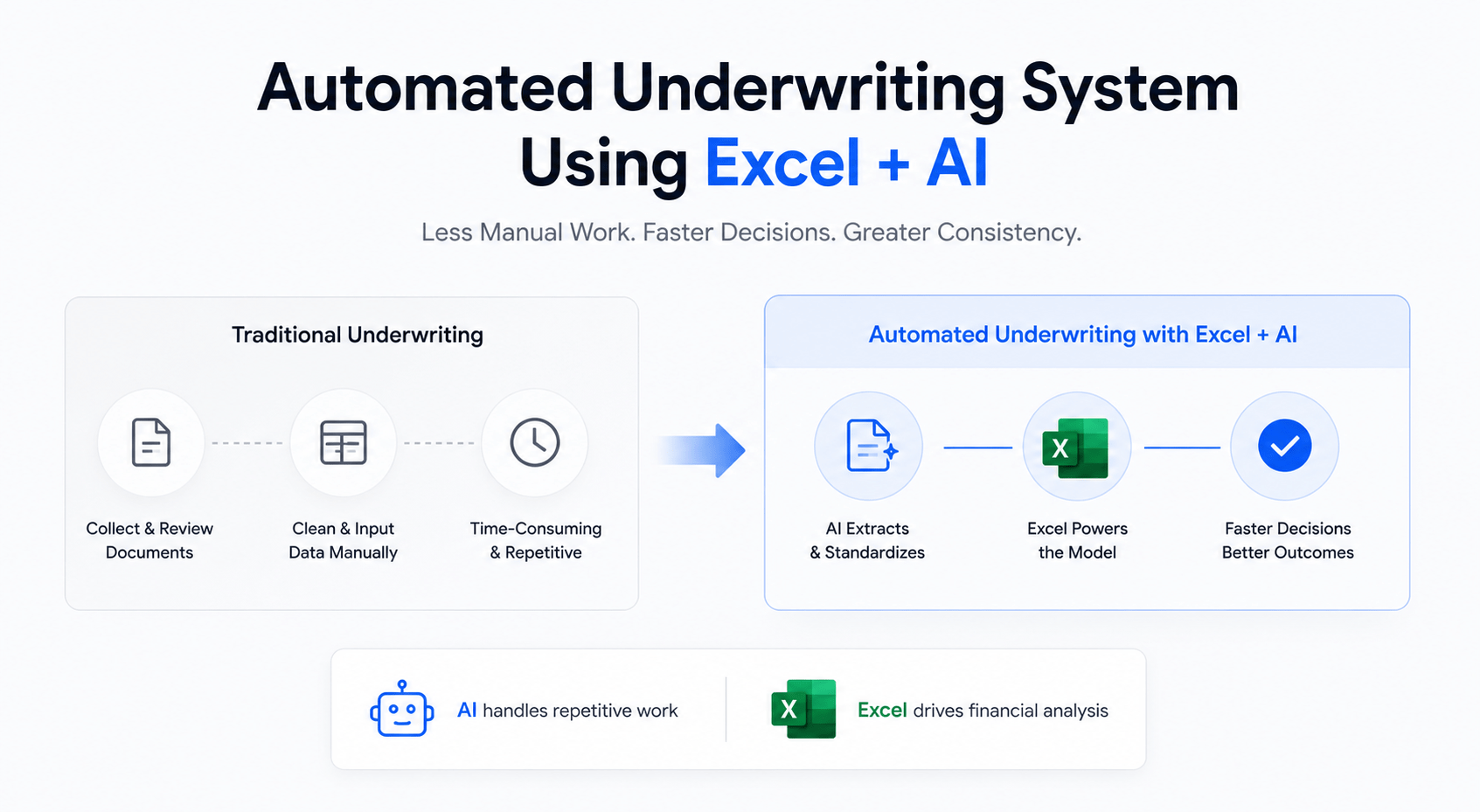
An automated underwriting system combines traditional Excel modeling with AI-powered workflows. The goal is simple: reduce manual effort while improving speed and consistency. Most CRE firms already rely on Excel underwriting models. AI becomes an enhancement layer rather than a replacement.
Traditional underwriting often involves several repetitive tasks:
-
Cleaning rent rolls
-
Reviewing T12 statements
-
Reading offering memorandums
-
Building market assumptions
-
Formatting investment memos
-
Updating debt scenarios
-
Comparing lease structures
These tasks consume hours because the source data usually arrives in inconsistent formats. Different brokers organize files differently. Property financials vary widely. Analysts often spend more time cleaning data than analyzing the actual investment opportunity.
AI helps automate these operational steps.
For example, large language models can extract lease terms from PDFs, summarize market reports, identify missing financial data, and standardize operating expenses. Excel remains the financial engine, while AI handles much of the administrative work surrounding the model.
This distinction matters. AI is strongest when supporting workflows, not replacing investment judgment.
Traditional CRE Underwriting Workflow
Most underwriting processes follow the same structure:
-
Receive OM, rent roll, and T12
-
Clean and organize data
-
Input assumptions manually
-
Build projections
-
Run debt scenarios
-
Review investment metrics
-
Create investment summary
-
Present findings internally
Even experienced analysts lose time during repetitive formatting and document review.
What AI Actually Automates
AI works best in areas involving structured repetition and document-heavy workflows.
Common underwriting automations include:
-
Lease abstraction
-
Rent roll standardization
-
Financial statement summaries
-
Expense categorization
-
Comparable property research
-
Market summary generation
-
IC memo drafting
-
Data extraction from PDFs
AI can also identify anomalies. For example, it may flag unusual repair expenses, inconsistent vacancy assumptions, or duplicate tenant entries.
What Still Requires Human Judgment
Human expertise still drives investment decisions.
AI cannot fully understand:
-
Local market nuance
-
Sponsor reputation
-
Political risks
-
Development execution challenges
-
Tenant quality
-
Long-term strategy alignment
A strong underwriting process combines AI efficiency with experienced decision-making.
Why Excel Still Matters in CRE
Despite newer platforms, Excel remains the dominant underwriting tool across CRE.
There are several reasons:
-
Institutional familiarity
-
Flexible modeling
-
Easy customization
-
Strong audit visibility
-
Existing analyst training
-
Compatibility across firms
Most investment committees still expect Excel-based models. Because of this, firms adopting AI usually enhance Excel workflows rather than abandon them entirely.
Core Components of an AI Underwriting System
A successful underwriting automation system requires several connected components. The best workflows are simple, reliable, and easy for teams to adopt. Overcomplicated systems usually fail because analysts stop using them.
The foundation remains the Excel model itself. AI improves the process surrounding the model.
Excel Financial Model
The underwriting template remains the operational core.
Most models include:
-
Acquisition assumptions
-
Revenue projections
-
Expense forecasts
-
Debt calculations
-
Return metrics
-
Sensitivity analysis
-
Exit scenarios
A clean model structure becomes critical when integrating AI workflows. Messy spreadsheets reduce automation reliability.
Strong Excel architecture includes:
-
Standardized tabs
-
Consistent formulas
-
Clear assumptions sections
-
Organized data inputs
-
Protected formula cells
AI performs better when workflows remain predictable.
AI Data Processing Layer
This layer handles document extraction and interpretation.
Common tasks include:
-
Reading offering memorandums
-
Extracting lease terms
-
Parsing rent rolls
-
Cleaning T12 data
-
Summarizing market reports
Tools like ChatGPT and Claude can process large files quickly. Analysts then review and validate outputs before importing data into Excel.
Workflow Automation Layer
Automation tools connect systems together.
Popular workflow platforms include:
-
Zapier
-
Make
-
Microsoft Power Automate
These tools automate repetitive movement between:
-
Email
-
Storage folders
-
AI tools
-
CRM systems
-
Excel files
-
Reporting dashboards
For example, a new OM upload can automatically trigger:
-
AI document extraction
-
Rent roll cleanup
-
Financial summaries
-
Investment memo draft creation
Data Sources
AI underwriting systems depend heavily on data quality.
Common data sources include:
-
CoStar
-
Crexi
-
Reonomy
-
Census data
-
Public records
-
Market reports
-
Broker documents
Bad source data creates bad underwriting outputs. Firms still need validation systems to maintain reliability.
Reporting Layer
The reporting layer transforms underwriting into actionable communication.
Outputs often include:
-
Investment committee memos
-
Executive summaries
-
Risk reports
-
Deal snapshots
-
Lender packages
AI significantly speeds up reporting workflows. Instead of manually formatting summaries, analysts can focus on reviewing insights and refining recommendations.
Step-by-Step Workflow to Build an Automated Underwriting System
Building an underwriting automation system does not require a complete operational overhaul. Most firms can improve workflows gradually using existing Excel models and a few AI tools. The goal is not perfection. The goal is reducing repetitive work immediately.
The best implementation strategy starts small. Focus first on the most time-consuming bottlenecks. For most CRE teams, those bottlenecks include rent roll cleaning, T12 analysis, and investment memo creation.
Step 1 — Organize Your Excel Underwriting Template
Before adding AI, clean the underlying model structure.
Your underwriting template should include:
-
Standardized tabs
-
Organized assumptions
-
Consistent formulas
-
Dynamic outputs
-
Clear input sections
Messy spreadsheets reduce automation reliability. AI tools struggle when workflows vary across deals.
A strong model architecture improves:
-
Speed
-
Accuracy
-
Collaboration
-
Error detection
-
Workflow scalability
Step 2 — Connect AI to Your Input Documents
Next, connect AI tools to underwriting documents.
Typical file inputs include:
-
Offering memorandums
-
Rent rolls
-
T12 statements
-
Lease agreements
-
Debt term sheets
AI tools can extract:
-
NOI figures
-
Occupancy rates
-
Lease expirations
-
Expense categories
-
Tenant information
This process eliminates large amounts of manual data entry.
Step 3 — Automate Data Cleaning
Raw CRE data is rarely organized properly.
AI can help:
-
Standardize unit types
-
Normalize expense labels
-
Identify duplicates
-
Flag inconsistencies
-
Structure messy spreadsheets
However, analysts should still review outputs carefully before final underwriting decisions.
As a result, many CRE teams now use AI systems to transform messy operating statements into clean underwriting models before importing data into Excel.
Step 4 — Build AI-Assisted Assumptions
Once the source data is clean, the next step is building assumptions faster and more consistently. This is where AI becomes highly valuable for acquisition teams and analysts. Instead of manually researching every market variable, AI can help generate first-pass assumptions within minutes.
Most underwriting assumptions fall into repeatable categories:
-
Market rent growth
-
Vacancy projections
-
Expense growth
-
Payroll trends
-
Insurance estimates
-
Cap rate scenarios
-
Renovation costs
AI tools can summarize market reports, compare historical trends, and organize benchmark data quickly. Analysts still need to validate assumptions, but AI reduces the time spent gathering information manually.
For example, an analyst underwriting a multifamily acquisition in Dallas may upload:
-
Market reports
-
Comparable rent surveys
-
Historical operating statements
-
Census growth data
AI can then summarize:
-
Average rent growth
-
Occupancy trends
-
Competing supply
-
Population growth
-
Expense inflation risks
This speeds up the underwriting process significantly while keeping analysts focused on interpretation instead of data collection.
Step 5 — Push Data Into Excel Automatically
After assumptions are finalized, the data must flow into the underwriting model correctly. This step is critical because poor formatting creates downstream errors.
Most CRE firms use one of three methods:
-
CSV exports
-
Structured AI outputs
-
API-based automation
Structured outputs work especially well because AI can organize extracted information into predictable formats.
For example:
-
Unit mix tables
-
Tenant schedules
-
Expense categories
-
Debt assumptions
-
Renovation budgets
Analysts can then paste or import structured outputs directly into Excel templates.
Many firms also build mapping systems between AI outputs and underwriting tabs. This reduces repetitive copy-paste work across deals.
The key is consistency. Automation only works when templates remain standardized.
Step 6 — Generate Investment Summaries
Investment summaries often take longer than expected. Analysts may spend hours formatting narrative reports after the underwriting itself is complete.
AI dramatically improves this process.
Instead of writing summaries manually, analysts can generate:
-
Executive overviews
-
Risk summaries
-
Deal highlights
-
Market positioning
-
Investment theses
-
Sensitivity explanations
The best workflows combine AI-generated drafts with human editing. This keeps reporting fast while maintaining quality control.
A strong investment summary should explain:
-
Why the deal matters
-
Key risks
-
Upside potential
-
Financial highlights
-
Operational strategy
AI handles structure and formatting efficiently. Analysts then refine nuance and strategic positioning.
Step 7 — Create Automated Review Workflows
Underwriting automation should never remove review procedures. In fact, stronger automation requires stronger quality control systems.
The best review workflows include:
-
Analyst verification
-
Senior review checkpoints
-
Assumption audits
-
Formula validation
-
Version tracking
-
Source documentation
Many firms also create automated review triggers.
For example:
-
Vacancy assumptions exceeding thresholds
-
Expense growth outside benchmarks
-
Inconsistent lease data
-
Missing financial entries
These automated checks improve underwriting reliability while reducing manual review time.
Best AI Tools for Automated Underwriting
The market now contains hundreds of AI tools, but only a small percentage actually improve CRE underwriting workflows. Many tools create more operational complexity instead of reducing it.
The best AI tools for commercial real estate share several traits:
-
Easy implementation
-
Reliable outputs
-
Fast document handling
-
Strong workflow flexibility
-
Practical integration with Excel
Firms should prioritize operational efficiency instead of chasing trendy platforms.
ChatGPT
OpenAI’s ChatGPT remains one of the most flexible tools for underwriting workflows. It performs especially well for document summaries, financial analysis support, and investment memo drafting.
Best use cases include:
-
Rent roll summaries
-
Market report analysis
-
IC memo drafts
-
Assumption explanations
-
Sensitivity scenario discussions
Strengths:
-
Fast output generation
-
Flexible prompts
-
Strong reasoning
-
Easy adoption
Weaknesses:
-
Requires validation
-
Output quality depends on prompting
-
Limited spreadsheet-native workflows
Pricing remains relatively affordable compared to specialized CRE platforms.
Claude
Anthropic’s Claude performs exceptionally well with large documents. Many underwriting teams prefer Claude for lease abstraction and long offering memorandums because of its strong context handling.
Best use cases:
-
Lease reviews
-
Large PDF analysis
-
Detailed financial summaries
-
Risk extraction
Strengths:
-
Excellent long-context processing
-
Strong summarization quality
-
Better handling of complex documents
Weaknesses:
-
Less spreadsheet-native functionality
-
Requires structured prompting
Claude works especially well for acquisitions teams reviewing large multifamily or office deals.
Perplexity
Perplexity AI is useful for research-heavy underwriting workflows. It combines AI reasoning with live web sourcing.
Best use cases:
-
Market research
-
Economic trends
-
Comparable analysis
-
Demographic research
Strengths:
-
Source-backed outputs
-
Fast research
-
Good for validating assumptions
Weaknesses:
-
Less useful for spreadsheet workflows
-
Not designed for deep underwriting models
Excel Copilot
Microsoft Excel Copilot helps analysts automate spreadsheet tasks directly inside Excel.
Best use cases:
-
Formula generation
-
Spreadsheet cleanup
-
Data formatting
-
Quick analysis
Strengths:
-
Native Excel integration
-
Easy adoption
-
Faster spreadsheet management
Weaknesses:
-
Limited CRE-specific functionality
-
Less powerful narrative generation
Zapier + Make
Zapier and Make automate repetitive operational tasks between platforms.
Common automations:
-
File uploads
-
CRM updates
-
AI workflow triggers
-
Email routing
-
Reporting systems
These tools become especially valuable for firms managing high deal volume.
Best AI Tools for CRE Underwriting Automation
| Tool | Best Use | Strengths | Weaknesses | Excel Integration |
|---|---|---|---|---|
| ChatGPT | Analysis and summaries | Flexible workflows | Needs validation | Moderate |
| Claude | Large document review | Excellent context handling | Less spreadsheet-focused | Moderate |
| Perplexity | Market research | Source-backed research | Limited underwriting depth | Low |
| Excel Copilot | Spreadsheet tasks | Native Excel workflows | Less CRE-specific | High |
| Zapier / Make | Workflow automation | Operational efficiency | Setup complexity | High |
Automated Underwriting System Using Excel + AI for Multifamily Deals
Multifamily underwriting is one of the strongest use cases for AI-assisted automation. Multifamily deals contain repeatable data structures, standardized rent rolls, and operational metrics that fit AI workflows well.
For a quick example of how underwriting workflows are changing, this demo shows how AI can analyze CRE deals significantly faster than traditional manual methods.
Many acquisition teams already process:
-
Unit mix tables
-
Lease schedules
-
Occupancy reports
-
Renovation budgets
-
Payroll expenses
-
Utility reimbursements
AI can organize these inputs rapidly and reduce repetitive administrative work significantly.
Consider a typical 200-unit acquisition process. Analysts often spend several hours:
-
Cleaning rent rolls
-
Categorizing expenses
-
Verifying lease terms
-
Formatting investment summaries
-
Building lender packages
AI reduces much of this operational burden.
Multifamily Workflow Example
A practical workflow may look like this:
-
Upload OM, rent roll, and T12
-
AI extracts unit mix automatically
-
Expense categories become standardized
-
Lease expirations are summarized
-
Market rent comps are organized
-
AI drafts executive summary
-
Analyst validates assumptions
-
Excel model updates automatically
This process dramatically improves workflow speed while maintaining analyst oversight.
Manual vs AI-Assisted Multifamily Underwriting
| Task | Manual Time | AI-Assisted Time | Workflow Impact |
|---|---|---|---|
| Rent Roll Cleaning | 90 minutes | 10 minutes | Faster intake |
| T12 Categorization | 60 minutes | 15 minutes | Cleaner data |
| Market Summary | 2 hours | 20 minutes | Faster assumptions |
| IC Memo Drafting | 90 minutes | 15 minutes | Better reporting |
| Data Formatting | 45 minutes | 5 minutes | Less repetitive work |
Real-World Case Study
A midsize acquisitions team underwriting multifamily deals across Texas implemented a basic AI-assisted workflow using Excel, ChatGPT, and Zapier.
Before automation:
-
Average underwriting time: 5–6 hours per deal
-
Analysts manually cleaned every rent roll
-
Investment summaries required extensive formatting
After implementation:
-
Average underwriting time dropped below 1 hour
-
Deal screening volume increased significantly
-
Analysts focused more on risk review and strategy
-
Reporting consistency improved across the team
The biggest improvement was not just speed. It was operational scalability. The firm could evaluate more opportunities without expanding analyst headcount.
Copy-Paste AI Prompts for CRE Underwriting
Most AI underwriting failures come from weak prompts. Generic prompts produce generic outputs. Strong prompts create structured, actionable results that fit real CRE workflows.
The best prompts:
-
Define the task clearly
-
Specify output structure
-
Include role context
-
Request concise formatting
-
Explain desired analysis depth
Below are practical prompts CRE professionals can adapt immediately.
Rent Roll Cleaning Prompt
You are a senior CRE underwriting analyst reviewing a multifamily rent roll.
Analyze the attached rent roll and complete the following:
– Standardize all unit types
– Identify duplicate tenant entries
– Flag missing lease expiration dates
– Identify concessions or irregular rent structures
– Calculate average in-place rent by unit type
– Create a clean table organized by:
Unit Number | Unit Type | Current Rent | Lease Expiration | Occupancy Status
Highlight any underwriting risks or unusual trends.
T12 Financial Analysis Prompt
You are a commercial real estate acquisitions analyst reviewing a trailing 12-month operating statement.
Analyze the attached T12 and provide:
– Standardized expense categories
– NOI calculation
– Expense ratio analysis
– Year-over-year expense anomalies
– Unusual operating trends
– Potential underwriting risks
– Missing or inconsistent financial data
Format the output into:
1. Executive Summary
2. Expense Breakdown Table
3. Risk Flags
4. Recommended Underwriting Adjustments
Keep explanations concise and investment-focused.
IC Memo Prompt
You are preparing an investment committee memo for a multifamily acquisition.
Using the attached underwriting assumptions and property information, create:
– Executive summary
– Investment thesis
– Key strengths
– Major risks
– Market overview
– Financial highlights
– Exit strategy considerations
– Recommended next steps
Use institutional CRE language. Keep the tone concise, analytical, and professional.
Market Research Prompt
You are a CRE market analyst evaluating a multifamily acquisition opportunity.
Research and summarize:
– Population growth trends
– Employment drivers
– New supply pipeline
– Average market rents
– Occupancy trends
– Major economic risks
– Comparable property performance
Present findings in bullet format with short explanations and underwriting implications.
Debt Sizing Prompt
You are a CRE debt analyst comparing financing structures.
Analyze the attached deal assumptions and compare:
– Agency debt
– Bank financing
– Bridge debt
Provide:
– DSCR comparison
– Loan proceeds
– Interest rate sensitivity
– Cash flow impact
– Refinance risk
– Recommended financing strategy
Summarize which structure best fits the investment business plan and why.
Risk Detection Prompt
You are reviewing a CRE acquisition for underwriting risks.
Identify:
– Aggressive rent assumptions
– Unusual expense trends
– Weak tenant quality
– Market supply risks
– Lease rollover concentration
– Debt structure concerns
– Cap rate sensitivity issues
Rank each risk:
Low | Moderate | High
Provide concise explanations and mitigation recommendations.
What Most CRE Professionals Get Wrong About AI Underwriting
Many commercial real estate professionals approach AI with unrealistic expectations. Some expect fully automated underwriting with zero oversight. Others dismiss AI completely because they tested weak tools or poor workflows. Both approaches create problems.
The firms seeing real operational improvements usually take a practical approach. They focus on workflow efficiency instead of hype. AI works best when solving specific operational bottlenecks, not when replacing the entire investment process.
One of the biggest mistakes is assuming AI automatically produces accurate underwriting. It does not. AI reflects the quality of the inputs and instructions provided. Poor source documents, weak prompts, and inconsistent spreadsheets create unreliable outputs.
Another common issue is overcomplication. Many teams build workflows that involve too many tools, too many automations, and too many moving parts. Analysts eventually stop using these systems because they become harder than the original manual process.
Successful underwriting automation focuses on simplicity first.
Expecting Fully Autonomous Underwriting
AI cannot replace investment judgment.
A model may identify:
-
Revenue opportunities
-
Expense inconsistencies
-
Debt sensitivities
-
Lease rollover risk
However, it cannot fully evaluate:
-
Local politics
-
Sponsor execution ability
-
Neighborhood momentum
-
Market psychology
-
Strategic fit
Human review remains essential for final investment decisions.
Using Bad Source Data
Bad data creates bad underwriting.
This problem appears constantly in CRE because:
-
Broker packages vary widely
-
Rent rolls contain inconsistencies
-
T12s lack standard formatting
-
Market reports use conflicting assumptions
AI improves speed, but it does not magically fix unreliable source information.
Strong workflows require:
-
Validation systems
-
Standardized templates
-
Consistent review procedures
Overcomplicated Automations
Many firms fail because they automate too much too quickly.
For example:
-
Multiple disconnected tools
-
Complex API chains
-
Excessive workflow triggers
-
Overengineered dashboards
Simple workflows usually perform better operationally.
The best systems often involve:
-
One AI platform
-
One automation tool
-
One standardized Excel model
-
One reporting structure
That simplicity increases adoption across teams.
Ignoring Excel Structure
Messy spreadsheets reduce AI effectiveness significantly.
Problems include:
-
Broken formulas
-
Inconsistent tabs
-
Hidden assumptions
-
Poor formatting
-
Hardcoded values
Before automating anything, firms should clean and standardize their underwriting templates.
Chasing Hype Tools
New AI tools appear every week. Most do not improve real underwriting operations.
CRE firms should evaluate tools based on:
-
Time savings
-
Ease of implementation
-
Output reliability
-
Team adoption
-
Workflow compatibility
Operational improvement matters more than impressive demos.
How to Implement an Automated Underwriting System in 24 Hours
Many CRE professionals delay implementation because they assume automation requires months of development. In reality, most firms can build a practical underwriting workflow in a single day.
The key is starting small.
Do not attempt enterprise-level automation immediately. Instead, focus on reducing repetitive analyst work using tools already available.
A simple system can deliver meaningful operational gains very quickly.
Hour 1–2 — Clean Your Existing Model
Start by organizing the underwriting template.
Focus on:
-
Standardized tabs
-
Clear assumptions
-
Dynamic formulas
-
Consistent formatting
-
Protected calculations
A clean Excel model becomes the foundation for every automation layer added later.
Checklist:
-
Remove broken formulas
-
Eliminate hidden errors
-
Organize input sections
-
Standardize naming conventions
-
Add clear assumption labels
Hour 3–5 — Set Up AI Workflows
Next, create reusable AI workflows.
This includes:
-
Prompt libraries
-
File organization systems
-
Naming conventions
-
Standardized document inputs
Store prompts centrally so analysts use consistent instructions across deals.
Focus on:
-
Rent roll analysis
-
T12 summaries
-
IC memo generation
-
Market research prompts
Consistency improves output quality dramatically.
Hour 6–10 — Automate Data Extraction
This stage creates the largest time savings.
Upload:
-
Offering memorandums
-
Rent rolls
-
T12 statements
-
Lease files
AI tools can extract:
-
Occupancy data
-
Lease expirations
-
NOI figures
-
Expense categories
-
Unit mix summaries
Analysts then validate outputs before importing them into Excel.
Hour 11–15 — Build Reporting Outputs
Reporting consumes a major portion of underwriting time.
Create automated templates for:
-
Investment summaries
-
Risk reports
-
IC memos
-
Lender packages
AI-generated drafts reduce formatting work significantly.
Analysts can focus on refining recommendations instead of writing repetitive summaries from scratch.
Most CRE teams are still experimenting with AI instead of implementing it. Join CRE operators already using real underwriting workflows inside the AI for CRE Collective and get weekly workflow ideas from the AI for CRE Newsletter.
Hour 16–20 — Add Review Processes
Automation without review creates risk.
Strong review systems should include:
-
Analyst validation
-
Senior approval checkpoints
-
Assumption audits
-
Formula verification
-
Source documentation
Many firms also create automated risk flags.
For example:
-
Vacancy above market averages
-
Expense growth exceeding benchmarks
-
Large lease rollover exposure
-
Aggressive exit cap assumptions
These alerts improve underwriting consistency.
Hour 21–24 — Test Real Deal Pipeline
Finally, test the workflow using live opportunities.
Run:
-
Multiple property types
-
Different broker packages
-
Various rent roll formats
-
Several debt scenarios
Track:
-
Time savings
-
Error rates
-
Analyst feedback
-
Workflow bottlenecks
Most teams identify immediate operational improvements after the first few deals.
The goal is not perfection on day one. The goal is to create repeatable efficiency gains that improve over time.
AI vs Traditional Excel Underwriting
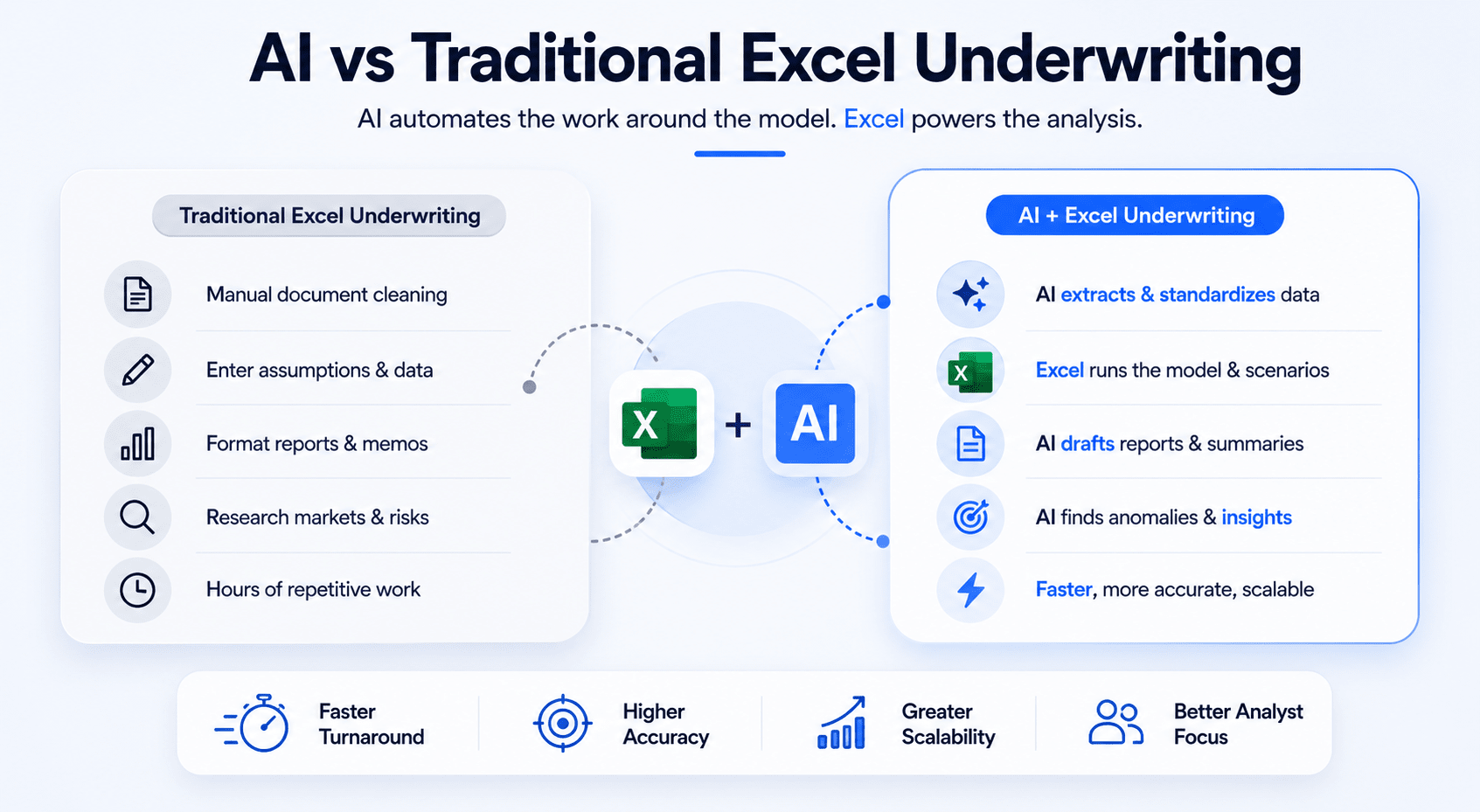
Traditional Excel underwriting still dominates commercial real estate. Most institutional workflows depend on spreadsheets for investment analysis, debt modeling, and reporting. However, AI is beginning to change how underwriting work gets completed operationally.
The difference is not necessarily the model itself. The difference is the speed surrounding the model.
Similarly, this comparison of AI vs traditional Excel models explains where automation improves underwriting speed and where Excel still remains essential for institutional CRE analysis.
Traditional workflows require analysts to manually:
-
Clean documents
-
Enter assumptions
-
Format reports
-
Research markets
-
Summarize risks
-
Build presentations
AI dramatically reduces this administrative workload.
Speed Comparison
Manual underwriting often takes several hours per deal.
AI-assisted workflows reduce time spent on:
-
Data extraction
-
Market summaries
-
Rent roll organization
-
Investment memo drafting
Many firms now screen more deals without increasing analyst headcount.
Accuracy Comparison
AI improves consistency when workflows remain structured.
For example:
-
Standardized expense categorization
-
Consistent report formatting
-
Automated anomaly detection
-
Repeatable market summaries
However, AI still requires human validation. Analysts remain responsible for final accuracy.
Scalability Comparison
Traditional underwriting scales slowly because it depends heavily on manual labor.
AI-assisted systems scale more efficiently because repetitive operational work becomes automated.
This allows firms to:
-
Evaluate more opportunities
-
Improve turnaround times
-
Reduce analyst fatigue
-
Increase reporting consistency
Staffing Impact
AI does not eliminate underwriting teams.
Instead, it shifts analyst responsibilities toward:
-
Strategic review
-
Risk analysis
-
Negotiation support
-
Investment decision-making
Junior analysts spend less time on repetitive formatting tasks and more time learning actual investment analysis.
Operational Cost Differences
Traditional underwriting workflows become expensive as deal volume increases. Firms often respond by hiring additional analysts, outsourcing support work, or extending review timelines. Those solutions increase operational costs without necessarily improving underwriting quality.
AI-assisted workflows reduce pressure on staffing expansion because analysts can process more opportunities within the same timeframe. The largest savings usually come from:
-
Faster deal screening
-
Reduced administrative work
-
Shorter reporting cycles
-
Lower repetitive labor costs
-
Improved workflow consistency
For example, an acquisitions team reviewing 40 deals monthly may spend hundreds of hours on manual formatting, data entry, and reporting. AI reduces much of that repetitive workload.
That does not mean firms should aggressively cut headcount. In most cases, the real advantage is leverage. Teams become capable of handling larger pipelines without operational bottlenecks.
Where Traditional Excel Still Wins
Despite rapid AI growth, Excel still performs better in several areas.
Excel remains stronger for:
-
Complex waterfall calculations
-
Institutional modeling standards
-
Custom debt structures
-
Highly nuanced sensitivities
-
Detailed formula auditing
-
Flexible scenario analysis
Most investment committees still prefer spreadsheet-driven analysis because Excel provides transparency and traceability.
Many institutional firms also have years of legacy underwriting templates. Replacing those systems entirely would create operational disruption.
For this reason, the future of CRE underwriting will likely remain hybrid:
-
Excel as the financial engine
-
AI as the workflow accelerator
Where AI Dramatically Outperforms
AI performs best in repetitive, document-heavy workflows.
This includes:
-
Lease abstraction
-
Market research summaries
-
Rent roll standardization
-
Financial categorization
-
Reporting drafts
-
Investment memo formatting
These tasks consume significant analyst time but follow predictable structures.
AI also improves speed during early-stage deal screening. Firms can evaluate more opportunities before committing full underwriting resources.
This creates a competitive advantage because:
-
Faster responses improve broker relationships
-
Teams identify stronger deals earlier
-
Analysts focus on higher-value decisions
-
Reporting quality becomes more consistent
The firms gaining the most from AI are not necessarily the largest firms. Often, lean teams benefit the most because automation creates operational scale without massive staffing growth.
Common Mistakes When Automating Underwriting
Many underwriting automation projects fail for predictable reasons. The technology itself is usually not the problem. Poor implementation decisions create most operational issues.
The biggest mistake is assuming AI alone fixes inefficient workflows. It does not. Automation improves existing systems. If the underlying process is disorganized, AI simply accelerates confusion.
Successful implementation requires operational discipline.
Blind Trust in AI Outputs
AI-generated outputs always require review.
Large language models can:
-
Misread lease terms
-
Misclassify expenses
-
Create inconsistent assumptions
-
Generate inaccurate summaries
Analysts should treat AI as an assistant, not a final decision-maker.
The best workflows use:
-
Validation checkpoints
-
Human review
-
Assumption testing
-
Formula verification
Trust increases only after workflows prove reliable over time.
Poor Excel Architecture
Many firms attempt automation using disorganized spreadsheets.
Common problems include:
-
Hardcoded formulas
-
Hidden assumptions
-
Broken links
-
Inconsistent tabs
-
Duplicate calculations
These issues reduce automation reliability significantly.
Before implementing AI, firms should standardize:
-
Input structures
-
Naming conventions
-
Formula logic
-
Reporting outputs
A clean underwriting model improves every downstream workflow.
No Quality Assurance Process
Automation without QA creates operational risk.
Strong QA systems include:
-
Deal review procedures
-
Assumption audits
-
Source verification
-
Sensitivity testing
-
Output comparisons
Many firms now create automated alerts for unusual underwriting assumptions.
Examples include:
-
Expense growth exceeding thresholds
-
Aggressive rent increases
-
Weak DSCR scenarios
-
Large tenant rollover exposure
These controls improve consistency and reduce errors.
Weak Prompting
Prompt quality directly impacts AI performance.
Weak prompts usually:
-
Lack context
-
Provide vague instructions
-
Request broad outputs
-
Ignore formatting requirements
Strong prompts define:
-
Analyst role
-
Required output structure
-
Specific underwriting objectives
-
Formatting expectations
-
Risk identification priorities
Prompt libraries help firms standardize underwriting workflows across teams.
Overpaying for Unnecessary Tools
Many CRE firms buy expensive software stacks before validating operational value.
A lean workflow often works best initially:
-
One AI platform
-
One automation tool
-
One Excel template
-
One reporting process
Complex systems increase:
-
Training requirements
-
Workflow friction
-
Operational confusion
-
Adoption resistance
The best automation systems are usually the simplest.
Future of AI Underwriting in Commercial Real Estate
AI underwriting is still early in its development cycle. Most firms are experimenting with operational workflows rather than fully transforming investment systems. However, several clear trends are already shaping the future.
The next phase will focus less on individual tools and more on connected operational ecosystems.
Instead of isolated AI tasks, firms will build integrated workflows that combine:
-
Data extraction
-
Market analysis
-
Financial modeling
-
Reporting
-
CRM systems
-
Portfolio management
This will create faster and more scalable underwriting operations.
AI Agents for Full Deal Packaging
AI agents are becoming more capable of handling multi-step workflows automatically.
Future underwriting systems may:
-
Read broker emails
-
Extract OM data
-
Clean rent rolls
-
Update Excel models
-
Generate IC memos
-
Organize lender packages
These systems will still require analyst oversight, but administrative workload will decline significantly.
Voice-Controlled Financial Modeling
Voice-driven workflows are improving quickly.
Analysts may eventually:
-
Update assumptions verbally
-
Run sensitivity scenarios through voice commands
-
Generate reports conversationally
-
Navigate models faster
This could improve efficiency during investment committee preparation and live deal review sessions.
Real-Time Market Intelligence
Today, many underwriting assumptions rely on static market reports. Future AI systems will integrate live market signals continuously.
This may include:
-
Rent movement tracking
-
Supply pipeline updates
-
Employment trends
-
Consumer spending shifts
-
Capital market changes
Real-time intelligence could improve underwriting responsiveness dramatically.
Automated Portfolio Monitoring
AI will increasingly extend beyond acquisitions underwriting into asset management operations.
Future systems may monitor:
-
Occupancy changes
-
Expense anomalies
-
Tenant risk
-
Lease rollover exposure
-
Debt maturity schedules
This creates continuous operational visibility across portfolios.
Predictive Deal Scoring
AI models are becoming stronger at identifying patterns across large datasets.
Future underwriting systems may score:
-
Risk probability
-
Market momentum
-
Refinance exposure
-
Tenant stability
-
Exit timing sensitivity
These tools will likely support decision-making rather than replace it entirely.
Institutional Adoption Trends
Large institutional firms are already investing heavily in underwriting automation.
Current trends include:
-
Internal AI teams
-
Proprietary underwriting workflows
-
AI-integrated reporting systems
-
Automated document review
-
Portfolio intelligence platforms
Smaller firms may actually move faster operationally because they face fewer legacy system constraints.
Should Your CRE Team Build an Automated Underwriting System?
For most commercial real estate firms, the answer is increasingly yes. The operational advantages are becoming difficult to ignore. Underwriting teams face growing pressure to move faster while maintaining analytical quality.
AI helps solve this challenge when implemented correctly.
The strongest results usually come from firms that:
-
Handle high deal volume
-
Operate lean teams
-
Depend heavily on spreadsheets
-
Spend excessive time on reporting
-
Manage repetitive workflows
These firms often achieve measurable productivity gains quickly.
Best Fit Firms
Several CRE business models benefit significantly from underwriting automation.
This includes:
-
Multifamily acquisitions teams
-
Brokerage firms
-
Developers
-
Debt originators
-
Asset management groups
-
Investment sales teams
Any organization reviewing large amounts of deal data can improve operational efficiency with AI-assisted workflows.
Teams That Benefit Most
Lean teams often see the fastest ROI because operational bottlenecks impact them more directly.
Examples include:
-
Two-to-five-person acquisitions groups
-
Regional investment firms
-
Growing brokerage teams
-
Owner-operators expanding pipelines
Automation allows these teams to compete more effectively without large staffing increases.
ROI Expectations
The return on investment usually appears in three areas:
-
Time savings
-
Increased deal capacity
-
Better reporting consistency
Firms may also improve:
-
Broker responsiveness
-
Analyst productivity
-
Internal collaboration
-
Investment committee preparation
The biggest advantage is often operational scalability rather than direct labor reduction.
Conclusion
Commercial real estate underwriting is changing rapidly. Firms no longer need to rely entirely on manual spreadsheet workflows to evaluate deals, organize financials, and create investment reports. AI is helping teams reduce repetitive work while improving operational speed and consistency.
An automated underwriting system using Excel + AI works best when firms combine structured workflows with strong human oversight. Excel remains the foundation for financial analysis, while AI handles document extraction, reporting support, market summaries, and repetitive operational tasks.
The firms gaining the biggest advantage are not necessarily using the most advanced tools. They are using practical systems consistently. They focus on implementation instead of experimentation.
CRE professionals who adopt AI thoughtfully will likely gain:
-
Faster underwriting cycles
-
Higher deal throughput
-
More scalable operations
-
Better reporting quality
-
Stronger competitive positioning
The most effective strategy is starting simple, validating workflows, and improving systems gradually over time.
Stop Building AI Workflows Through Trial and Error
Most CRE professionals waste months testing random AI tools that never improve real underwriting operations. Inside the AI for CRE Collective, members get proven underwriting workflows, prompt libraries, live demos, and practical systems already being used by brokers, investors, and acquisitions teams.
For weekly AI workflow breakdowns and implementation ideas, subscribe to the AI for CRE Newsletter.
Frequently Asked Questions About Automated Underwriting Systems Using Excel + AI
What is an automated underwriting system in commercial real estate?
An automated underwriting system in commercial real estate combines Excel-based financial modeling with AI-powered workflow automation. The goal is to reduce repetitive manual work while improving underwriting speed and consistency.
Traditional underwriting requires analysts to manually:
-
Clean rent rolls
-
Review T12 statements
-
Organize lease data
-
Build assumptions
-
Draft investment summaries
AI tools automate many of these operational tasks. For example, AI can extract data from PDFs, summarize market reports, categorize expenses, and generate investment memo drafts.
Excel still remains the financial modeling engine. AI supports the workflow surrounding the spreadsheet instead of replacing it completely. Most CRE firms use automation to improve productivity while keeping analysts responsible for final investment decisions and quality control.
How does AI improve commercial real estate underwriting?
AI improves commercial real estate underwriting by reducing the time spent on repetitive administrative work. Analysts often lose hours organizing documents, formatting reports, and manually entering data into spreadsheets. AI accelerates these workflows significantly.
Common underwriting improvements include:
-
Faster rent roll analysis
-
Automated lease abstraction
-
Quick T12 categorization
-
Market research summaries
-
Investment memo generation
-
Risk identification support
AI also improves consistency across underwriting workflows because outputs become more standardized. Teams can evaluate more opportunities without increasing analyst headcount.
However, AI works best when paired with strong review procedures. Human analysts still validate assumptions, review outputs, and make final investment decisions. The strongest underwriting systems combine automation efficiency with experienced CRE judgment.
Can small CRE firms use AI underwriting systems effectively?
Yes. Small and midsize CRE firms often benefit the most from underwriting automation because lean teams face greater operational pressure. AI allows smaller firms to process more deals without dramatically increasing staffing costs.
Many AI workflows now require:
-
Minimal technical knowledge
-
No coding experience
-
Low-cost software
-
Existing Excel models
A small acquisitions team can automate:
-
Rent roll cleaning
-
Financial summaries
-
IC memo drafting
-
Market research workflows
This creates operational leverage that was previously available mainly to large institutional firms.
Smaller firms also move faster operationally because they usually have fewer legacy systems and approval layers. Simple workflows using Excel, ChatGPT, and automation tools can create meaningful efficiency improvements within days.
What documents can AI analyze during underwriting?
AI can analyze many of the documents commonly used in CRE underwriting workflows. Modern large language models perform especially well with structured financial and operational data.
Common document types include:
-
Offering memorandums
-
Rent rolls
-
T12 operating statements
-
Lease agreements
-
Debt term sheets
-
Market reports
-
Property inspection reports
AI can extract:
-
Occupancy data
-
Lease expiration schedules
-
Expense categories
-
Tenant information
-
Financial trends
-
Risk indicators
The quality of results depends heavily on document quality and prompting structure. Analysts should still review outputs carefully because CRE documents often contain inconsistent formatting and missing information.
Which AI tool works best for CRE underwriting?
The best AI tool depends on the specific underwriting workflow being automated. No single platform handles every task perfectly.
Many CRE professionals currently use:
-
ChatGPT for summaries and analysis
-
Claude for long document review
-
Excel Copilot for spreadsheet tasks
-
Perplexity for market research
-
Zapier or Make for workflow automation
ChatGPT works well for:
-
Investment memo drafts
-
Financial summaries
-
Prompt workflows
Claude performs strongly with:
-
Lease abstraction
-
Large PDFs
-
Detailed report analysis
The best approach is usually to combine a few reliable tools rather than building overly complex software stacks. Firms should prioritize operational efficiency over hype-driven features.
Is AI underwriting accurate enough for real investment decisions?
AI can improve underwriting accuracy in some workflows, but it should never operate without human review. AI models may misread data, misunderstand lease structures, or create flawed assumptions if inputs are weak.
Accuracy improves when firms use:
-
Standardized templates
-
Strong prompts
-
Validation systems
-
Consistent review processes
AI performs especially well at:
-
Identifying anomalies
-
Organizing information
-
Standardizing outputs
-
Summarizing large datasets
However, experienced analysts still evaluate:
-
Market conditions
-
Sponsor quality
-
Strategic fit
-
Capital structure risks
The most reliable underwriting systems combine automation with disciplined human oversight.
How much time can AI save during underwriting?
Time savings vary by workflow, but many CRE firms reduce underwriting time dramatically after implementing AI-assisted processes.
Tasks commonly accelerated include:
-
Rent roll cleanup
-
Expense categorization
-
Market research
-
Investment memo formatting
-
Lease abstraction
-
Reporting workflows
Some acquisition teams reduce deal underwriting time from several hours to under one hour for initial screening workflows.
The largest gains usually come from:
-
Faster document review
-
Reduced repetitive formatting
-
Automated summaries
-
Standardized workflows
AI also allows firms to evaluate more opportunities without increasing analyst headcount. This operational scalability often creates the biggest long-term value.
Does AI replace commercial real estate analysts?
No. AI changes analyst responsibilities more than it replaces analysts entirely. Most underwriting work still requires human judgment, market understanding, and strategic thinking.
AI handles repetitive operational tasks such as:
-
Data extraction
-
Financial organization
-
Draft reporting
-
Basic analysis support
Analysts still focus on:
-
Investment decisions
-
Negotiation strategy
-
Market interpretation
-
Risk evaluation
-
Relationship management
In many firms, junior analysts spend less time formatting spreadsheets and more time learning investment fundamentals. This can actually improve analytical development because repetitive administrative work decreases.
AI increases productivity per analyst rather than eliminating the need for underwriting expertise.
What are the biggest risks of AI underwriting systems?
The biggest risks usually come from poor implementation rather than the technology itself. Firms that automate workflows without review procedures may create operational problems.
Common risks include:
-
Incorrect data extraction
-
Weak assumptions
-
Hallucinated outputs
-
Spreadsheet mapping errors
-
Overreliance on automation
-
Poor-quality source documents
Many problems occur when analysts trust AI-generated outputs without verification.
Strong risk management requires:
-
Human review checkpoints
-
Standardized workflows
-
Quality assurance systems
-
Formula validation
-
Source documentation
AI should support underwriting operations, not replace disciplined investment analysis.
How expensive is an AI underwriting workflow?
Basic underwriting automation can be relatively affordable compared to traditional enterprise CRE software systems. Many firms begin with inexpensive tools layered onto existing Excel models.
Common costs include:
-
AI subscriptions
-
Workflow automation tools
-
Cloud storage
-
Data providers
A lean workflow may involve:
-
ChatGPT subscription
-
Claude subscription
-
Zapier automation
-
Existing Excel models
More advanced systems may include:
-
API integrations
-
Proprietary dashboards
-
Enterprise automation platforms
Most firms should start small and validate operational value before investing heavily in custom infrastructure.
Can AI create investment committee memos automatically?
Yes. AI performs very well when generating first-draft investment committee memos. Many underwriting teams now use AI to speed up reporting workflows significantly.
AI-generated IC memos may include:
-
Executive summaries
-
Investment theses
-
Risk overviews
-
Market summaries
-
Financial highlights
-
Exit strategy discussions
However, analysts should still review and refine these reports carefully.
The best workflows use AI for:
-
Structure
-
Formatting
-
Initial drafting
-
Summary organization
Human reviewers then improve:
-
Nuance
-
Strategic positioning
-
Investment recommendations
-
Market interpretation
This hybrid workflow improves reporting speed while maintaining professional quality.
How do AI prompts improve underwriting workflows?
Prompt quality directly impacts underwriting output quality. Strong prompts help AI tools generate structured, investment-focused analysis instead of generic summaries.
Effective prompts usually define:
-
Analyst role
-
Output structure
-
Investment objectives
-
Formatting requirements
-
Risk priorities
For example, a strong rent roll analysis prompt may request:
-
Unit mix summaries
-
Lease rollover schedules
-
Occupancy analysis
-
Duplicate tenant detection
-
Underwriting risk flags
Prompt libraries also improve consistency across underwriting teams. Standardized prompts reduce workflow variability and improve reporting reliability.
Most firms underestimate how important prompt engineering becomes during operational implementation.
What property types benefit most from AI underwriting?
AI-assisted underwriting works best for property types with structured, repeatable operational data.
Strong use cases include:
-
Multifamily
-
Industrial
-
Retail portfolios
-
Self-storage
-
Student housing
These asset classes often involve:
-
Standardized rent rolls
-
Consistent lease structures
-
Repeatable expense categories
-
Predictable reporting formats
Office underwriting may require more manual review because lease structures can become highly customized and operationally complex.
Development projects also benefit from automation, especially during:
-
Budget organization
-
Scenario analysis
-
Reporting workflows
-
Market research
The more repetitive the operational workflow, the more valuable automation becomes.
What is the biggest mistake firms make with AI adoption?
The biggest mistake is focusing on tools instead of workflows. Many firms buy expensive AI software without fixing operational inefficiencies first.
Successful implementation requires:
-
Clean Excel models
-
Standardized processes
-
Clear review systems
-
Consistent prompts
-
Operational discipline
Other common mistakes include:
-
Overcomplicated automations
-
Weak quality control
-
Poor source data
-
Excessive tool stacking
The best underwriting systems are usually simple. Firms should automate one workflow at a time and improve gradually instead of attempting complete operational transformation immediately.
How long does it take to implement AI underwriting workflows?
Basic underwriting workflows can often be implemented within one day. More advanced operational systems may take several weeks depending on integration complexity.
Simple implementations usually involve:
-
Existing Excel templates
-
AI prompt libraries
-
Manual file uploads
-
Basic workflow automations
Firms often start with:
-
Rent roll analysis
-
T12 categorization
-
Investment memo generation
Over time, workflows expand into:
-
CRM integration
-
Automated reporting
-
Portfolio monitoring
-
Pipeline management
The most successful firms implement gradually. They validate operational improvements before scaling automation across larger underwriting systems.
What does the future of AI underwriting look like?
The future of AI underwriting will likely focus on connected operational ecosystems instead of standalone tools. CRE firms are moving toward integrated workflows combining financial modeling, reporting, document extraction, and market intelligence.
Future capabilities may include:
-
AI-driven deal packaging
-
Real-time market analysis
-
Predictive risk scoring
-
Automated portfolio monitoring
-
Voice-controlled financial modeling
However, Excel will likely remain central for many institutional workflows because it provides transparency and flexibility.
The biggest long-term change will probably be operational speed. Firms using AI effectively will evaluate opportunities faster, respond to brokers quicker, and scale underwriting operations more efficiently than competitors relying entirely on manual processes.
