
AI Broker Opinion of Value: Complete Guide for CRE Pros
Putting together a broker’s opinion of value used to take most of a day. This AI broker opinion of value guide shows how you can now build multiple BOVs from raw due diligence files to formatted PowerPoint decks in under 20 minutes. This is not theoretical. After testing this workflow on real deals, the results are consistent and practical.
Instead of manually reading documents, extracting numbers, building slides, and writing narratives, AI now handles the mechanical work. You focus on pricing strategy, comp selection, and market judgment.
This guide walks through the full process: what you need, how to set it up, what the output looks like, where it falls short, and how to make it repeatable. This AI broker opinion of value guide helps brokers streamline data extraction, automate slide creation, and produce consistent BOV outputs across multiple listings.
Why the Traditional BOV Process Is a Time Problem
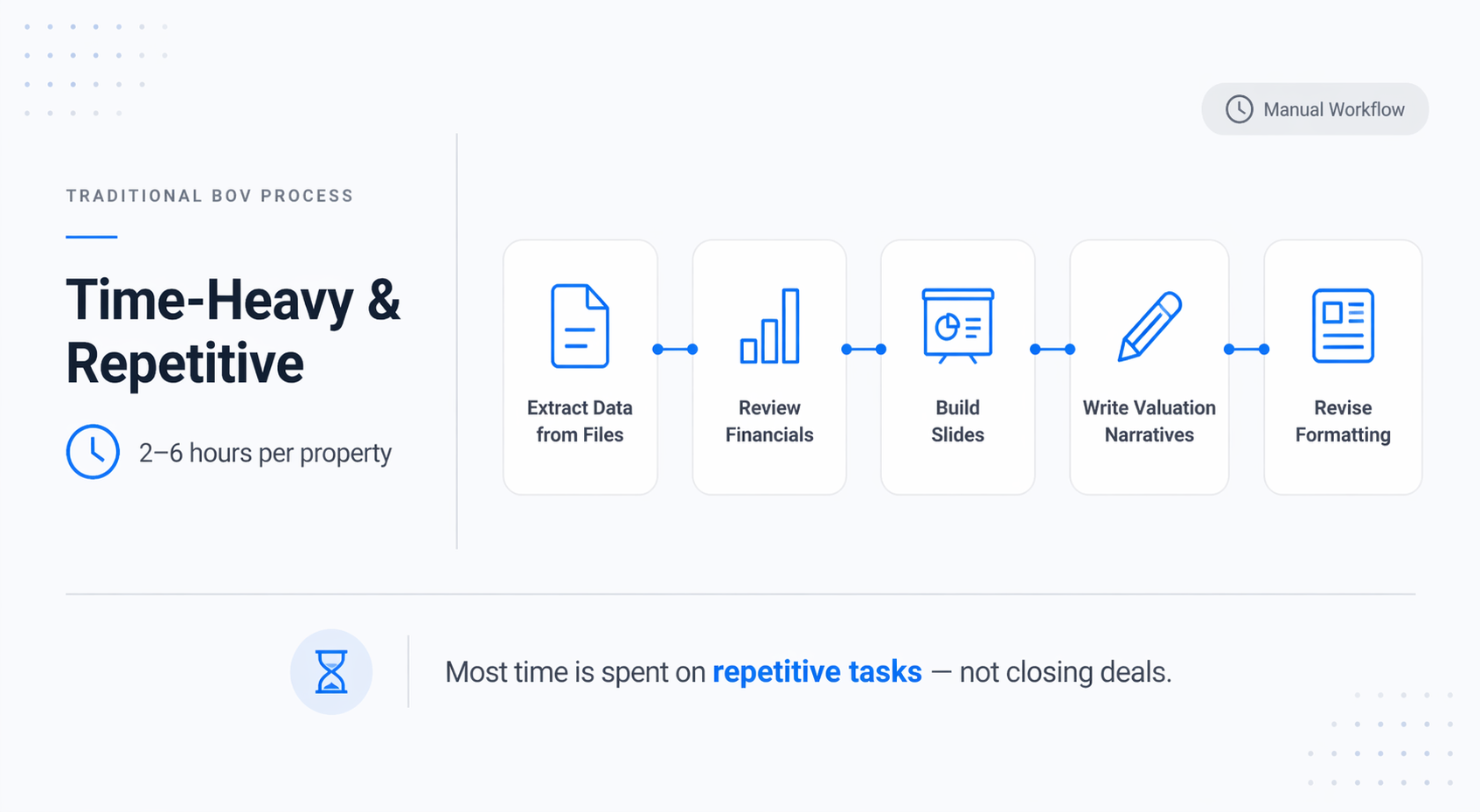
A well-built BOV takes 2–6 hours per property.
You’re:
-
Extracting data from multiple files
-
Reviewing financials
-
Building slides
-
Writing valuation narratives
-
Revising formatting
Multiply that across several listings, and most of your time goes into repetitive work instead of prospecting or closing deals. The issue is not skill; it’s the number of mechanical steps. This is exactly where AI performs best.
What AI Actually Changes About BOV Creation
Traditional workflow:
-
Gather documents
-
Read everything manually
-
Extract key numbers
-
Build slides
-
Write narratives
AI-assisted workflow:
-
Point Claude at your due diligence folder
-
Provide instructions
-
Let it extract, organize, and build
Within minutes, you get a BOV draft that is 70–80% complete.
You still control:
-
Market positioning
-
Cap rate assumptions
-
Final pricing strategy
AI handles the repetitive execution.
What You’ll Need Before You Start
To run this workflow, you need:
-
Claude Code (local file access required)
-
A due diligence folder per property
-
A defined slide structure (8–10 slides)
-
30 minutes for initial setup
The quality of your output depends heavily on the quality of your input.
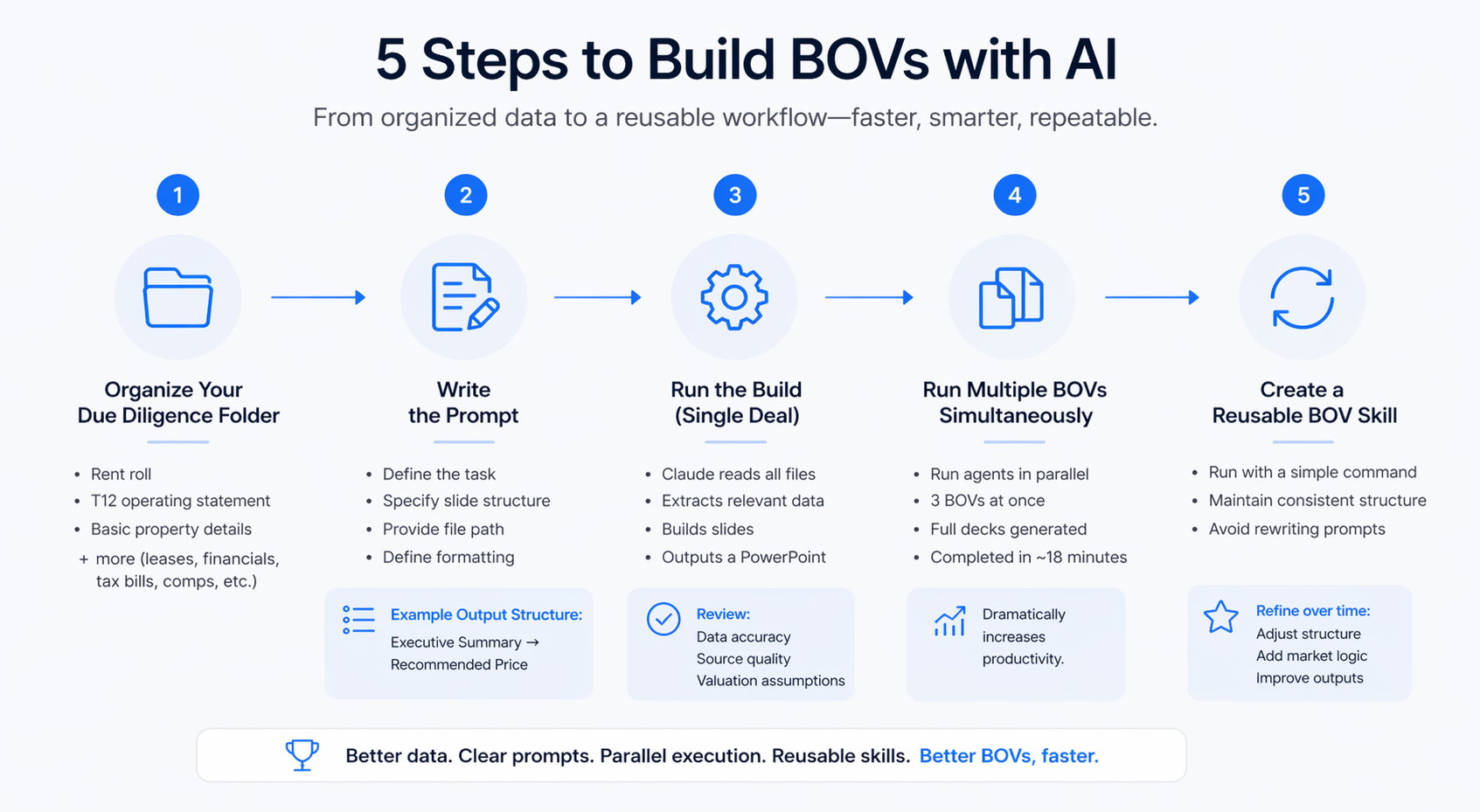
Step 1: Organizing Your Due Diligence Folder
Start with a clean, structured folder.
Minimum package:
-
Rent roll
-
T12 operating statement
-
Basic property details
Strong package:
-
Lease summaries or full leases
-
Multi-year financials
-
Tax bills
-
Inspection reports
-
Comparable sales data
The stronger your data, the better the output. This quick demo shows how rent rolls and financial data can be extracted and structured in seconds. Clean, structured data is what makes the entire AI BOV workflow reliable and accurate:
Step 2: Writing the Prompt
Your prompt controls the output.
Structure:
-
Define the task (build a BOV PowerPoint)
-
Specify slide structure
-
Provide file path
-
Define formatting requirements
Example output structure:
-
Executive Summary
-
Property Overview
-
Rent Roll Summary
-
Financial Summary
-
Valuation Analysis
-
Risks and Considerations
-
Recommended Price
-
Supporting Rationale
Clear instructions produce cleaner results.
Step 3: Running the Build (Single Deal)
Once executed:
-
Claude reads all files
-
Extracts relevant data
-
Builds slides
-
Outputs a PowerPoint file
Key things to review:
-
Data accuracy
-
Source document quality
-
Valuation assumptions
The valuation section requires your expertise. While AI handles the heavy lifting, underwriting and valuation still require human judgment. This walkthrough shows how brokers are combining AI with Excel to analyze deals faster and make better pricing decisions.
Step 4: Running Multiple BOVs Simultaneously
This is where the workflow becomes powerful. Instead of running deals sequentially, you can run multiple agents in parallel. Three BOVs can be completed in roughly the same time as one.
In testing:
-
Three properties
-
Full decks generated
-
Completed in ~18 minutes
This dramatically increases productivity. This AI broker opinion of value guide is especially useful when running multiple deals in parallel, helping brokers maintain consistency while scaling their valuation workflow.
Step 5: Creating a Reusable BOV Skill
For repeat use, build a reusable skill.
A skill allows you to:
-
Run the same workflow with a simple command
-
Maintain consistent structure
-
Avoid rewriting prompts
Over time, you can refine the skill:
-
Adjust slide structure
-
Add market-specific logic
-
Improve valuation outputs
This creates long-term efficiency. If you want to scale this across your entire pipeline, not just individual deals, here’s how to connect your CRM to AI and automate deal tracking across your workflow.
What You Get as Output
A complete BOV deck includes:
-
Executive summary with pricing
-
Property overview
-
Rent roll and financial analysis
-
Valuation methodology
-
Risk assessment
-
Final pricing recommendation
This serves as a strong first draft.
Where AI Performs Well
AI excels at:
-
Data extraction
-
Financial organization
-
Slide population
-
Workflow consistency
The biggest advantage is speed combined with structure.
Where AI Falls Short
Limitations still exist:
-
Design is basic
-
Market judgment is limited
-
Complex deals require oversight
You must review:
-
Cap rate assumptions
-
Pricing logic
-
Narrative tone
Time Comparison: AI vs Manual
| Task | Manual | AI |
|---|---|---|
| Data extraction | 45–90 min | 3–4 min |
| Slide creation | 30–60 min | Automated |
| Narrative writing | 30–45 min | Drafted |
| Review | 30–60 min | 15–20 min |
| Total (1 deal) | 2.5–4 hrs | ~20 min |
AI drastically reduces execution time.
Tips From Real Use
-
Use clear file names
-
Include multiple years of financials
-
Always review valuation assumptions
-
Build your skill before urgent use
-
Run deals in parallel
These small improvements compound over time.
How to Use This Today
Organize your files. Write a structured prompt. Run the workflow in Claude Code. Review outputs. Refine and present. This entire process takes under 20 minutes per deal.
Conclusion
This AI broker’s opinion of value guide shows how dramatically the workflow has improved. Instead of spending hours building BOVs manually, you can now generate structured, data-driven presentations in minutes.
AI does not replace brokers; it enhances productivity. The real advantage is scale. You can process more deals, faster, with consistent output quality.
Start Using This Workflow Today
If you’re still building BOVs manually, you’re operating at a disadvantage. Inside AI for CRE Collective, 600+ CRE professionals are already using workflows like this to increase output and efficiency. If you want access to prompts, demos, and real examples, subscribe to the newsletter and start applying these workflows immediately.
FAQs Regarding AI Broker Opinion of Value Guide
1. What is a broker’s opinion of value in commercial real estate?
A broker’s opinion of value is an estimate of a property’s market value prepared by a real estate broker based on financials, comps, and market conditions.
-
It includes rent roll analysis, income and expense review, and valuation assumptions
-
It is typically presented as a slide deck or report for sellers
-
It is used for pricing guidance before listing a property
Conclusion: A broker’s opinion of value helps property owners understand realistic pricing before going to market.
2. How does AI improve the broker’s opinion of the value process?
AI automates the most time-consuming parts of building a valuation report.
-
Extracts data from rent rolls, T12s, and supporting documents
-
Organizes financials into structured formats
-
Generates initial narratives and slide content
Conclusion: AI reduces manual work and allows brokers to focus on pricing strategy and market positioning.
3. How long does it take to create a broker opinion of value using AI?
AI significantly reduces the time required to build a valuation.
-
A single report can be generated in 6–8 minutes
-
Full workflow, including review, takes around 20 minutes
-
Traditional methods can take 2–6 hours
Conclusion: AI enables brokers to create more reports in less time without sacrificing structure.
4. What documents are required for accurate AI-generated valuations?
The quality of output depends heavily on the completeness of input data.
-
Rent roll with unit details and occupancy
-
Trailing 12-month operating statement
-
Lease summaries or full lease documents
-
Property details and inspection reports
Conclusion: More complete due diligence files lead to more accurate and useful outputs.
5. Can AI generate a complete valuation presentation ready for clients?
AI can generate a strong first draft, but final polishing is still needed.
-
Produces structured slides with financials and analysis
-
Generates valuation ranges and supporting rationale
-
Requires branding, narrative refinement, and final review
Conclusion: AI creates a solid draft, but brokers should refine it before presenting to clients.
6. How accurate are AI-generated valuation assumptions?
AI provides a baseline but lacks full market nuance.
-
Uses general market data and patterns
-
Estimates cap rates and pricing ranges
-
May not reflect hyper-local market conditions
Conclusion: AI outputs should always be reviewed and adjusted based on broker expertise.
7. Can AI handle multiple properties at the same time?
Yes, one of the biggest advantages is parallel processing.
-
Multiple BOVs can be generated simultaneously
-
Each property runs as a separate workflow
-
Total time remains close to a single run
Conclusion: AI allows brokers to scale their workload without increasing time spent.
8. What are the main limitations of AI in valuation workflows?
AI still has gaps in judgment and presentation quality.
-
Design output is basic and not fully branded
-
Market insight is limited compared to experienced brokers
-
Complex deal structures require manual adjustments
Conclusion: AI is best for speed and structure, not final decision-making.
9. Is AI suitable for all property types in valuation analysis?
AI can be adapted to different property types with proper inputs.
-
Works well for multifamily and standard commercial assets
-
Can be used for retail, office, and industrial use with the right documents
-
Requires more context for complex or mixed-use deals
Conclusion: AI works across property types but performs best with clear, structured data.
10. How should brokers integrate AI into their valuation workflow?
AI should be used as a first-pass automation layer.
-
Generate initial reports quickly
-
Review and refine outputs manually
-
Use results to support pricing discussions
Conclusion: AI enhances efficiency but should complement, not replace, broker expertise.
