
How to Use NotebookLM for Commercial Real Estate Workflows
Learning how to use NotebookLM for commercial real estate can help CRE professionals automate due diligence, market research, presentations, and financial analysis much faster. Instead of manually reviewing rent rolls, P&Ls, and property documents, NotebookLM can organize, summarize, and analyze CRE data within minutes.
In fact, if audio overviews are all you’re using, you’re leaving serious value on the table. Over the past few months, I’ve tested NotebookLM for commercial real estate workflows by uploading due diligence folders, rent rolls, P&L statements, property photos, and market research. As a result, the tool has improved rapidly.
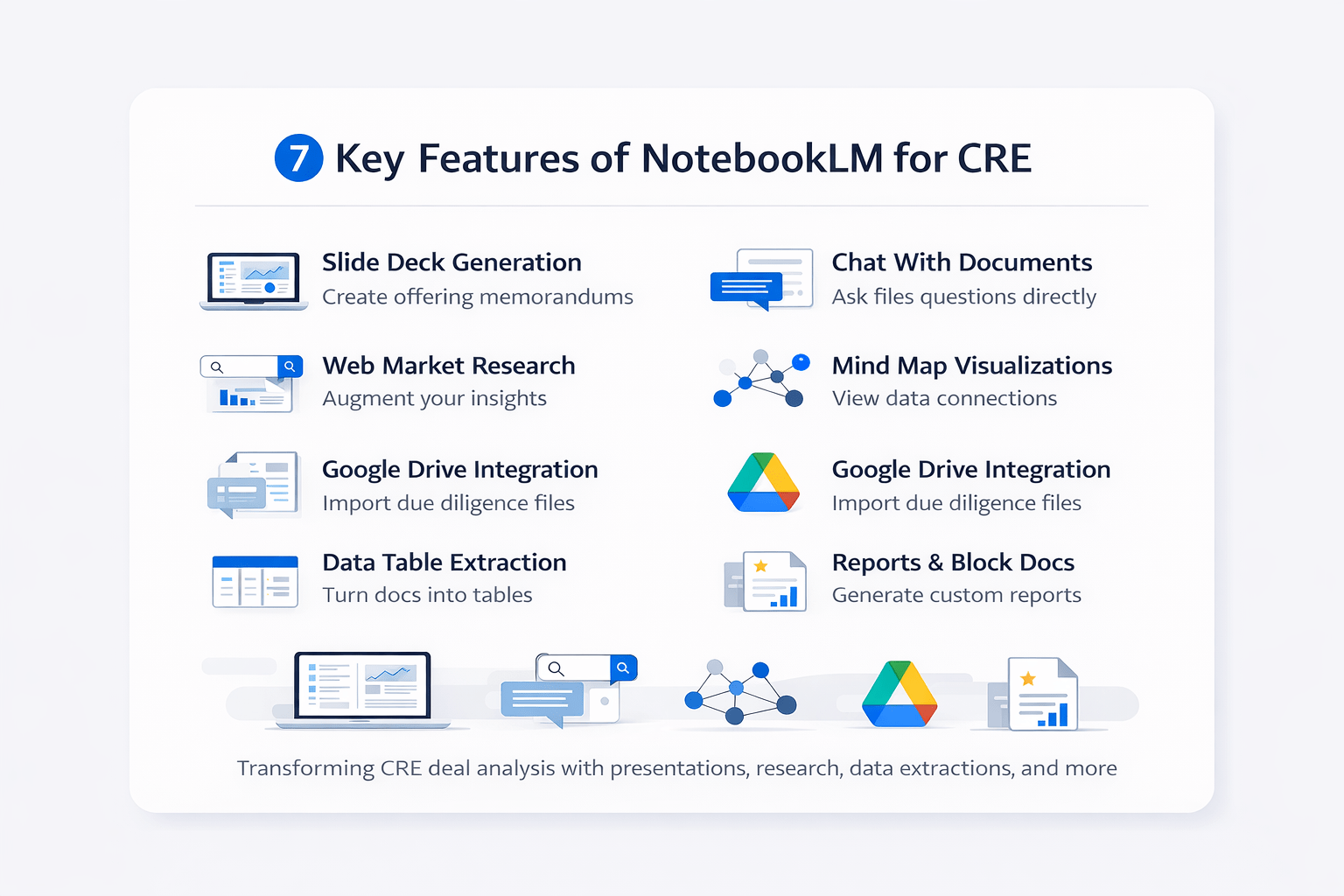
More importantly, the features that matter most for CRE professionals are not the ones getting the most attention. So, here are 7 NotebookLM features that actually move the needle for deal analysis, presentations, and research.
Most CRE professionals still spend hours manually reviewing due diligence folders, organizing market research, and building presentations from scratch. NotebookLM helps automate repetitive workflows and reduces manual analysis time significantly.
Step 1 — How to Use NotebookLM for CRE Presentations
First and foremost, this is the most impactful feature.
With NotebookLM for commercial real estate, you can upload your DD folder (P&Ls, rent rolls, photos, service contracts), and the platform generates a full presentation deck.
For example, I tested this on a 14-unit multifamily building in Venice, CA. After uploading all documents and requesting an offering memorandum, I received a professional slide deck that included:
-
Auto-generated charts
-
Market analysis
-
Financial breakdowns
Additionally, the visuals were highly detailed:
-
Pro forma graphs
-
Vacancy analysis charts
-
Rent roll breakdowns with loss-to-lease calculations
Format Options
You can choose between two formats:
-
Detailed deck
-
Presenter deck with talking points
In comparison, the presenter format consistently produced better results.
Step 2 — Use NotebookLM for CRE Market Research
In addition, NotebookLM includes a powerful research feature that many users overlook. Inside the platform, you can search the web and import sources directly. Consequently, those sources enhance your outputs.
For instance, I searched:
“Los Angeles multifamily market report February 2026.”
Then, after importing multiple reports, the generated deck included:
-
Submarket fundamentals
-
Market benchmarks
-
Median pricing insights
Research Modes
There are two modes available:
-
Fast research → Quick insights
-
Deep research → More comprehensive data
Therefore, both options help improve your final output depending on your needs.
How to Use NotebookLM for AI-Powered Research
NotebookLM works as an AI-powered research assistant that combines document analysis, AI-generated conversations, and source organization into one workflow. Instead of manually reviewing dozens of files, CRE professionals can upload documents and ask interactive questions directly inside the platform.
NotebookLM supports:
-
AI-powered research workflows,
-
document analysis,
-
source information tracking,
-
study guide creation,
-
financial report summaries,
-
content organization,
-
AI-generated research outputs.
Because NotebookLM integrates with Google Workspace, Google Docs, Google Drive, and Google Slides, it becomes much easier to centralize CRE research workflows and presentation creation.
Step 3 — Ask Questions About CRE Documents
Another major advantage of NotebookLM for commercial real estate is the ability to chat directly with your documents.
Instead of manually reviewing files, you can ask:
-
“What’s the vacancy rate?”
-
“Where is the loss-to-lease opportunity?”
As a result, the tool provides answers directly from your uploaded files.
Why This Matters
When working with large DD packages, this feature significantly reduces analysis time. In other words, it replaces hours of manual searching.
Step 4 — Visualize CRE Data With NotebookLM
Next, the mind map feature helps you understand complex data quickly. It automatically organizes your files into connected visual structures, such as:
-
Market data → Vacancy rates, supply pipeline
-
Financials → Rent levels, renovation costs
Best Use Case
This feature is especially useful when:
-
You have multiple documents uploaded
-
You need a quick overview before deep analysis
How NotebookLM Audio Overviews and Video Overviews Work
One of the most recognized NotebookLM features is Audio Overviews, which generate podcast-style discussions from uploaded source files. CRE professionals can use these audio discussions to review due diligence materials, market analyses, and investment summaries more efficiently.
NotebookLM also supports:
-
video overviews,
-
cinematic video overviews,
-
AI-generated conversations,
-
interactive mode workflows,
-
briefing docs,
-
study materials,
-
training manuals.
These features help transform static CRE documents into more interactive learning and research experiences.
Step 5 — Connect Google Drive to NotebookLM
Furthermore, NotebookLM integrates with Google Drive. Instead of uploading files manually, you can import:
-
Market reports
-
Deal memos
-
Internal research
Why It’s Valuable
As a result, this saves time and allows you to leverage your existing CRE database more efficiently.
Step 6 — Extract CRE Data Tables Automatically
Another key feature of NotebookLM for commercial real estate is data extraction. You can convert unstructured documents into structured tables.
Example Workflow
-
Upload an OM
-
Request rent roll extraction
-
Export to Google Sheets
Consequently, this process is much faster than manual data entry.
Important Note
Although it’s not perfect, it provides a strong first draft and reduces workload significantly.
Step 7 — Generate CRE Reports and Investment Memos
Finally, NotebookLM can generate multiple types of content beyond presentations.
For example, it can create:
-
Market reports
-
Investment memos
-
Property summaries
-
Blog-style content
Why This Matters
Because of this, you can reuse the same DD folder across multiple outputs. Therefore, it improves efficiency across your workflow.
Key Features of NotebookLM for Commercial Real Estate (Summary Table)
| Feature | Primary Use | CRE Benefit | Time Saved | Output Quality |
|---|---|---|---|---|
| Slide Deck Generation | Create presentations | Faster OM creation | High | High |
| Web Research Integration | Add market data | Better insights | Medium | High |
| Chat With Documents | Extract answers | Faster analysis | High | High |
| Mind Maps | Visualize data | Better understanding | Medium | Medium |
| Google Drive Integration | Import files | Workflow efficiency | Medium | Medium |
| Data Table Extraction | Structure data | Reduce manual work | High | Medium |
| Report Generation | Create documents | Multi-use outputs | High | High |
What NotebookLM Can’t Do (Yet)
However, there are still a few limitations to consider:
-
No Excel file support
Currently,.xlsxFiles are not supported.
Workaround: Export files as PDFs. -
Clunky editing workflow
You must regenerate slides instead of editing directly. -
No format labeling
Generated decks are not labeled by type afterward.
How to Start Using NotebookLM for Commercial Real Estate
If you’re evaluating NotebookLM for commercial real estate, the best approach is simple.
Step-by-Step
-
Upload a due diligence folder
-
Add market research sources
-
Generate a presentation or report
Then, review the output and refine as needed.
How NotebookLM Fits Into the Google AI Ecosystem
NotebookLM is part of Google’s broader artificial intelligence ecosystem and works alongside tools connected to Google Cloud, Google Search, Google Workspace, and Gemini models.
The platform currently supports:
-
Google Docs integration,
-
Google Slides workflows,
-
Google Drive imports,
-
multimodal support,
-
deep research workflows,
-
fast research summaries,
-
AI-powered search experiences.
Some advanced features may depend on Workspace plans, Google account access, or NotebookLM Plus availability. As Google continues expanding its AI tools, NotebookLM is becoming increasingly useful for CRE market research, document analysis, and workflow automation.
Final Thoughts
Overall, NotebookLM for commercial real estate is evolving quickly. While it’s not perfect, it already delivers significant value. More importantly, the ability to turn raw documents into presentations, reports, and insights is a major advantage.
As a result, CRE professionals who adopt these workflows early will gain a clear edge.
FAQs Regarding NotebookLM for Commercial Real Estate
What is NotebookLM for commercial real estate used for?
NotebookLM for commercial real estate is used to analyze property data and generate insights from deal documents.
-
It helps summarize due diligence files, such as rent rolls and P&Ls
-
It can generate presentations and reports from uploaded documents
-
It allows you to ask questions directly from your files
-
It supports adding external research to improve analysis
Overall, it acts as a centralized tool that simplifies CRE workflows and speeds up decision-making. Learn more: https://notebooklm.google/
Can NotebookLM create real estate presentations automatically?
Yes, NotebookLM can automatically generate real estate presentations using your uploaded files.
-
It converts due diligence folders into structured slide decks
-
It includes charts, financial summaries, and market insights
-
It offers both detailed and presenter-style formats
-
It reduces the need for manual PowerPoint creation
As a result, it saves significant time when preparing investment materials.
How accurate is NotebookLM for deal analysis?
NotebookLM is generally accurate when working with high-quality input data.
-
It pulls insights directly from your uploaded documents
-
It reduces manual errors during analysis
-
It still requires human review for final decisions
-
It performs better with multiple reliable sources
Therefore, it should be used as an assistant rather than a replacement for underwriting.
Can NotebookLM analyze rent rolls and financial data?
Yes, NotebookLM can extract and analyze rent rolls and financial data from documents.
-
It identifies tenant details, rent amounts, and lease terms
-
It organizes data into structured tables
-
It highlights opportunities such as loss-to-lease
-
It converts PDFs into usable formats
In short, it reduces manual work and speeds up financial analysis. You can export results here: https://www.google.com/sheets/about/
Does NotebookLM support Excel files for CRE workflows?
No, NotebookLM does not currently support Excel files directly.
-
You cannot upload .xlsx files
-
You need to convert Excel files into PDF format
-
You can also paste key data into documents
-
File support may improve in future updates
For now, preparing your data correctly ensures smoother usage.
How does NotebookLM help with market research in CRE?
NotebookLM improves market research by integrating external sources into your workflow.
-
You can import industry reports directly
-
It combines your data with third-party insights
-
It strengthens presentations with real benchmarks
-
It supports both quick and deep research modes
As a result, it helps create more data-driven deal narratives.
Is NotebookLM useful for commercial real estate beginners?
Yes, NotebookLM is useful for both beginners and experienced professionals.
-
It simplifies complex deal documents
-
It provides clear summaries and visual outputs
-
It reduces the learning curve for analysis
-
It allows beginners to focus on decision-making
Therefore, it works as both a learning tool and a productivity tool. Try it here: https://notebooklm.google/
What are the main limitations of NotebookLM for commercial real estate?
NotebookLM has a few limitations that users should understand.
-
It does not support Excel files directly
-
It requires full regeneration for slide edits
-
It lacks clear version labeling
-
It depends on the quality of the input data
However, despite these limitations, it still offers strong value for CRE workflows.
Want More CRE AI Workflows?
I share real-world workflows, prompts, and demos every week inside the AI for CRE Collective.
-
600+ CRE professionals testing tools
-
Weekly breakdowns
-
Real deal examples
In addition, 3,000+ CRE professionals subscribe to the newsletter every Thursday. If you want to stay ahead, this is where to start.
