
How to Use AI for CRE Analysis and Due Diligence
AI-powered CRE analysis workflows help acquisitions teams automate underwriting, due diligence, and deal screening much faster. Instead of reviewing property documents manually one by one, CRE professionals can use AI to generate checklists, financial analysis, red flag reports, and acquisition models in minutes.
Most acquisition teams still spend hours manually organizing due diligence documents, reviewing financials, and building underwriting reports. AI-powered CRE analysis workflows reduce repetitive manual work and improve deal screening speed significantly.
I test AI tools on commercial real estate workflows every week with 540+ members in the AI for CRE Collective, and the single biggest factor separating good AI output from bad? Whether you planned the task or just let AI run.
Table of Contents
ToggleHow AI Improves CRE Analysis Accuracy
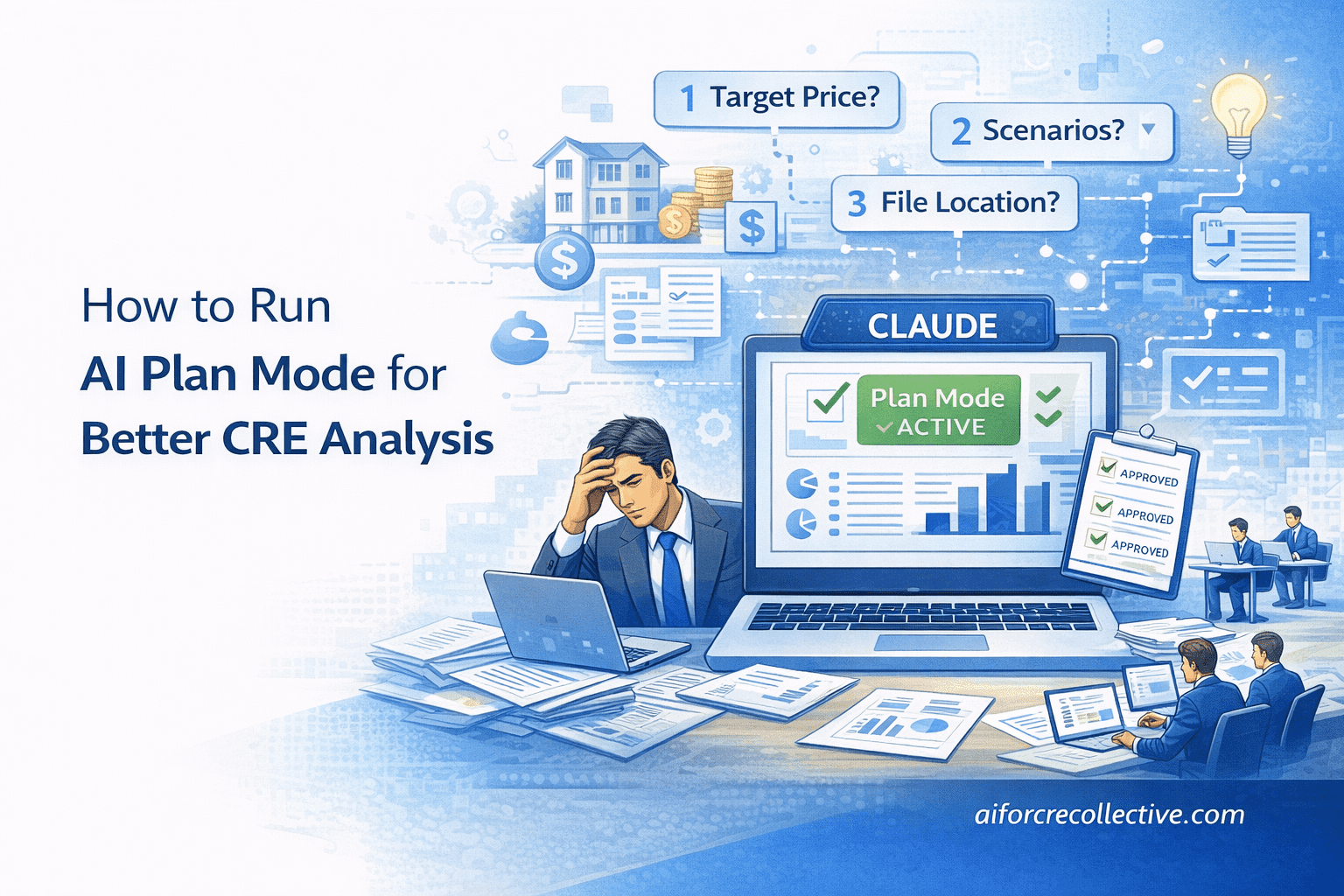
Plan mode is a setting in Claude Code that prevents the AI from executing tasks immediately. Instead, it forces the system to scan your data, ask you questions, and write out a full plan for your review before it touches anything.
Most people skip it because it feels slower. You paste your prompt, and you want results now. I get it. But here’s what happens when you skip: the AI assumes your purchase price. Assumes your return target, assumes which scenarios you care about, and assumes where to save the files.
And those assumptions cascade through every deliverable it produces.
Step-by-Step CRE Analysis Workflow Setup
I had a 14-unit multifamily deal in Venice, CA. $5.9M asking price. Full DD folder with rent rolls, P&L statements, ADU drawings, and other documents.
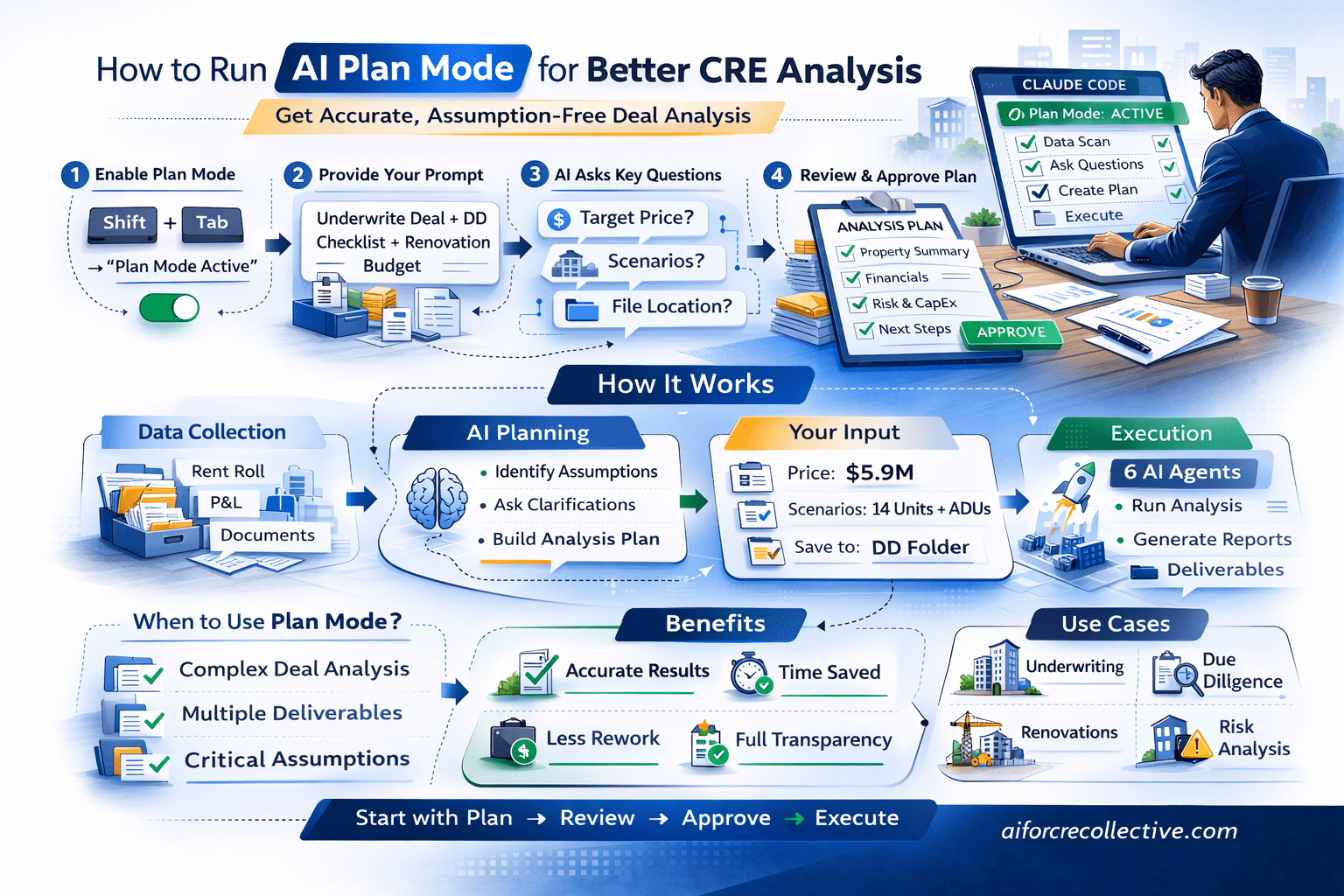
I opened the terminal, launched Claude Code, and hit shift+tab until I saw “plan mode” activated. That’s all it takes.
Then I pasted my prompt asking Claude to underwrite the deal, produce a DD checklist, red flag report, seller questions, and renovation budget.
Step 1 — Define CRE Analysis Assumptions
Before doing any work, Claude stopped and asked:
-
Do you have an existing contract price, or should I solve for the max purchase price to hit your return targets?
-
Should I model this as 14 units only at stabilized occupancy, 14 units plus 3 ADUs, or both?
-
Where do you want the output files saved?
These aren’t random questions. Each one represents an assumption that would’ve changed the entire output. If Claude had assumed I wanted only the 14-unit scenario, I would’ve missed the ADU analysis entirely. If it had guessed a different purchase price, every return metric would be wrong.
I answered: $5.9M price, both scenarios, save to the DD folder.
Step 2 — Generate an AI CRE Analysis Plan
Claude then produced a written plan covering:
• Property summary with all extracted deal details
• Document inventory: what’s present vs. missing
• Acquisition pro forma with my specific return assumptions
• DD checklist methodology and categories
• Red flag identification approach
• Seller follow-up question priority structure
• Renovation and CapEx budget methodology, including ADU construction
I reviewed the plan. Made no changes. Hit approve.
Then Claude executed everything. Six AI agents ran simultaneously, producing all deliverables in parallel. The results were dramatically more accurate than if I’d just let it go.
When to Use Plan Mode vs. Just Letting It Run
How Plan Mode in Claude for CRE Improves Underwriting Accuracy
Plan mode adds a few minutes to the front end. For simple, single-task requests like “extract the rent roll from this PDF,” you don’t need it. Just let Claude execute.
But for complex, multi-deliverable workflows? Always plan first. If your prompt asks for more than two things, or if the quality of the output depends on assumptions about your deal criteria, use plan mode.
The math is simple: spend 3–4 minutes planning upfront, or spend 30 minutes fixing outputs that were built on wrong assumptions.
How AI Automates CRE Analysis Workflows
AI-powered CRE analysis workflows help commercial real estate teams automate repetitive acquisition and due diligence tasks while improving underwriting efficiency.
Common CRE analysis tasks that AI can automate include:
-
Due diligence organization
-
Acquisition underwriting
-
Financial modeling
-
Red flag reporting
-
Seller follow-up tracking
-
CapEx analysis
-
Deal screening
-
Document inventory management
Instead of reviewing every file manually, CRE professionals can process multiple acquisition deliverables simultaneously using AI-driven workflows.
Why CRE Teams Are Using AI for CRE Analysis
CRE firms are increasingly adopting AI-powered CRE analysis workflows to improve underwriting speed, reduce analyst bottlenecks, and scale acquisition processes.
Benefits include:
-
Faster deal analysis
-
Reduced repetitive manual work
-
Improved due diligence organization
-
Better underwriting efficiency
-
Scalable acquisition workflows
-
Faster report generation
Instead of spending hours organizing acquisition files manually, analysts can generate CRE analysis outputs within minutes using AI workflows.
Plan Mode in Claude for CRE FAQs
What is AI-powered CRE analysis?
AI-powered CRE analysis is the use of artificial intelligence tools to automate commercial real estate underwriting, due diligence, and acquisition workflows. Instead of manually reviewing every property document, AI systems can analyze rent rolls, financial statements, checklists, and reports simultaneously.
AI-powered CRE analysis commonly helps with:
-
Acquisition underwriting
-
Due diligence review
-
Financial modeling
-
CapEx analysis
-
Red flag reporting
-
Document organization
This allows acquisitions teams to process deals faster while reducing repetitive manual work. Many CRE firms now use AI workflows to improve screening speed and operational efficiency during acquisitions and underwriting processes.
How does AI improve CRE analysis workflows?
AI improves CRE analysis workflows by automating repetitive acquisition and underwriting tasks that normally consume analyst time. Instead of reviewing files one by one, AI workflows process multiple deliverables simultaneously.
AI can help automate:
-
Due diligence organization
-
Financial analysis
-
Seller question tracking
-
Missing document identification
-
Risk reporting
-
Acquisition modeling
This improves operational speed and reduces bottlenecks during acquisitions. While analysts still validate assumptions and make investment decisions, AI workflows dramatically reduce the time spent organizing and reviewing large deal packages manually.
Can AI automate CRE due diligence?
Yes. AI can automate many parts of CRE due diligence by reviewing financial, legal, operational, and tenant-related documents simultaneously.
Common due diligence tasks AI can automate include:
-
Document inventory tracking
-
Missing file identification
-
Rent roll review
-
P&L analysis
-
Red flag reports
-
Seller follow-up questions
This allows acquisitions teams to generate structured due diligence outputs within minutes instead of hours. Human review is still necessary for final investment decisions, but AI significantly speeds up the first-pass analysis process.
What tasks can AI automate during CRE acquisitions?
AI can automate a wide range of repetitive CRE acquisition tasks that traditionally require significant analyst time.
Examples include:
-
Underwriting support
-
Financial modeling
-
Deal screening
-
Due diligence checklists
-
Acquisition summaries
-
CapEx estimation
-
Tenant analysis
-
Document organization
Instead of manually handling every acquisition workflow step, analysts can use AI to improve efficiency and process more opportunities faster. Many firms now use AI-powered CRE analysis systems to scale acquisition operations.
Can AI generate acquisition pro formas for CRE deals?
Yes. AI-powered CRE analysis workflows can generate acquisition pro formas using property financials, occupancy assumptions, CapEx scenarios, and investment criteria.
AI-generated pro formas may include:
-
NOI projections
-
Cash flow analysis
-
IRR calculations
-
Occupancy scenarios
-
Expense assumptions
-
Renovation budgets
These outputs provide a strong starting point for acquisitions teams. Analysts typically review and refine the final assumptions manually before making investment decisions.
How does AI reduce underwriting errors in CRE analysis?
AI reduces underwriting errors by organizing information systematically and asking clarifying questions before generating outputs. This helps avoid incorrect assumptions during acquisition analysis.
AI workflows can:
-
Identify missing documents
-
Highlight inconsistencies
-
Confirm modeling assumptions
-
Track deal variables
-
Organize financial data
This creates more structured and accurate underwriting workflows. Instead of relying entirely on manual review systems, acquisition teams can use AI to improve consistency and reduce operational mistakes.
What is the biggest advantage of AI-powered CRE analysis?
The biggest advantage is speed combined with workflow automation. AI-powered CRE analysis helps teams process acquisition data much faster while reducing repetitive manual work.
Benefits include:
-
Faster due diligence
-
Improved underwriting efficiency
-
Better document organization
-
Scalable acquisition workflows
-
Faster deal screening
This allows analysts and brokers to focus more on investment strategy and decision-making rather than administrative tasks. AI-powered workflows are especially valuable for firms reviewing multiple deals simultaneously.
Can AI analyze multifamily investment opportunities?
Yes. AI-powered CRE analysis works particularly well for multifamily acquisitions because the workflow can review multiple financial and operational documents quickly.
AI can analyze:
-
Rent rolls
-
T12 statements
-
Occupancy trends
-
CapEx history
-
Tenant balances
-
ADU scenarios
The system can also generate acquisition models and identify operational risks. Many multifamily acquisition teams use AI to improve underwriting speed and due diligence organization.
How do AI workflows improve deal screening?
AI workflows improve deal screening by processing acquisition information significantly faster than traditional manual systems.
AI helps:
-
Organize files automatically
-
Identify missing information
-
Generate risk reports
-
Build underwriting models
-
Compare acquisition scenarios
This allows acquisitions teams to review more opportunities without proportionally increasing analyst workload. Faster screening also helps firms respond to deals more quickly in competitive markets.
Can AI-powered CRE analysis replace acquisitions analysts?
No. AI-powered CRE analysis supports analysts by automating repetitive tasks, but it does not replace human judgment or investment decision-making.
AI workflows are best for:
-
Data organization
-
First-pass analysis
-
Workflow automation
-
Report generation
Analysts still handle:
-
Strategic decisions
-
Assumption validation
-
Negotiations
-
Market judgment
-
Final underwriting review
The goal of AI is operational efficiency, not full replacement of acquisitions professionals.
How fast can AI workflows process CRE documents?
AI-powered CRE analysis workflows can process large due diligence folders within minutes, depending on file quality and workflow setup.
Tasks completed may include:
-
File categorization
-
Financial review
-
Checklist creation
-
Red flag analysis
-
Underwriting support
Traditional workflows that require hours of analyst review can often be accelerated dramatically using AI-powered systems.
Can AI generate red flag reports during CRE analysis?
Yes. AI workflows can automatically identify and organize potential acquisition risks into structured red flag reports.
Common red flags include:
-
Missing documents
-
High vacancy levels
-
Delinquent tenant balances
-
Weak operating performance
-
Deferred maintenance issues
These reports help acquisitions teams prioritize review areas more efficiently and improve due diligence organization during acquisitions.
How does AI improve document organization in CRE?
AI-powered CRE analysis systems automatically organize and categorize acquisition files during due diligence review.
This may include:
-
Financial statements
-
Legal records
-
Tenant documents
-
Environmental reports
-
Title information
Improved document organization reduces administrative workload while helping analysts identify missing materials faster.
Can AI automate seller follow-up requests?
Yes. AI workflows can generate seller follow-up requests automatically based on missing or incomplete acquisition information.
This may include:
-
Financial documents
-
Lease records
-
Maintenance reports
-
Environmental studies
-
Operating statements
Automated seller requests improve communication efficiency and reduce repetitive administrative work during due diligence.
What file formats work best for AI-powered CRE analysis?
AI-powered CRE analysis generally works best with structured and text-based acquisition documents.
Recommended formats include:
-
PDFs
-
Excel spreadsheets
-
Word documents
-
CSV exports
-
Financial statements
Well-organized documents improve analysis accuracy and workflow efficiency. Poor scans or incomplete files may reduce output quality.
Try It Today
Open Claude Code. Hit shift+tab to activate plan mode. Paste your next complex CRE prompt. Let Claude ask you questions before it starts working.
I share workflows like this every week in the AI for CRE Collective—540+ CRE professionals testing and sharing what actually works. Join here.
For weekly breakdowns of AI tools and workflows for commercial real estate, subscribe to the newsletter. 3,000+ CRE professionals get it every Thursday.
