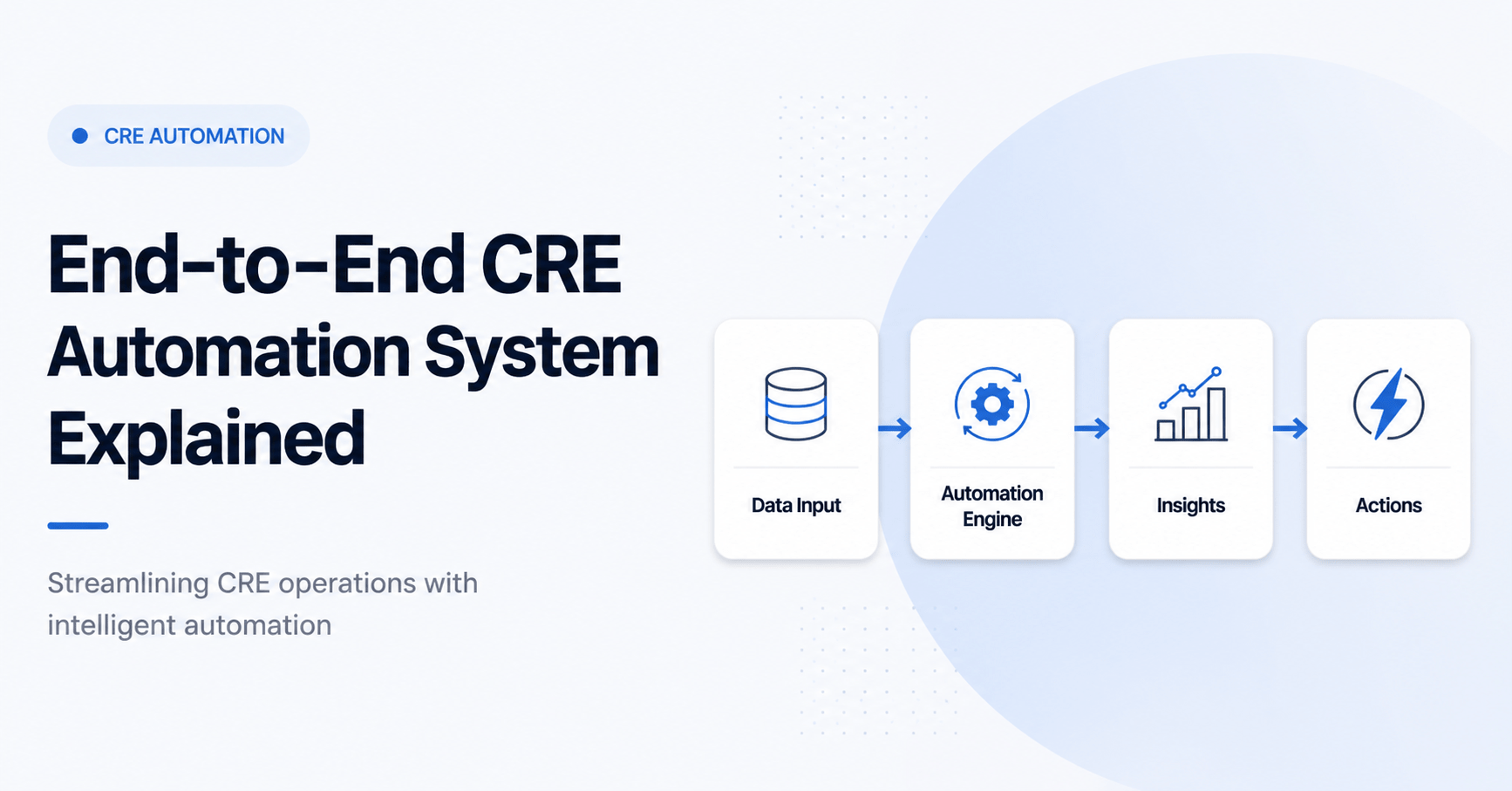
End-to-end CRE automation system explained
,Commercial real estate moves fast, but most workflows still move slowly. Brokers chase emails. Analysts rebuild models. Operators juggle spreadsheets and reports. The result is lost time, delayed decisions, and missed deals. This is exactly where an end-to-end CRE automation system explained approach becomes valuable.
An end-to-end system connects every step of your workflow. It starts with deal intake and ends with reporting. Instead of jumping between tools, everything works together. Data flows automatically. Tasks trigger without manual input. Insights are generated in minutes, not hours.
Many CRE professionals already use tools like ChatGPT or spreadsheets. But tools alone do not solve the problem. The real advantage comes from building a system. A system removes friction. It standardizes processes. It allows you to scale without adding more workload.
In this guide, you will learn how a complete automation system works. You will see how each part connects. More importantly, you will learn how to implement it in real life. No theory. No hype. Just practical workflows that improve productivity and deal flow.
What “End-to-End CRE Automation System” Actually Means
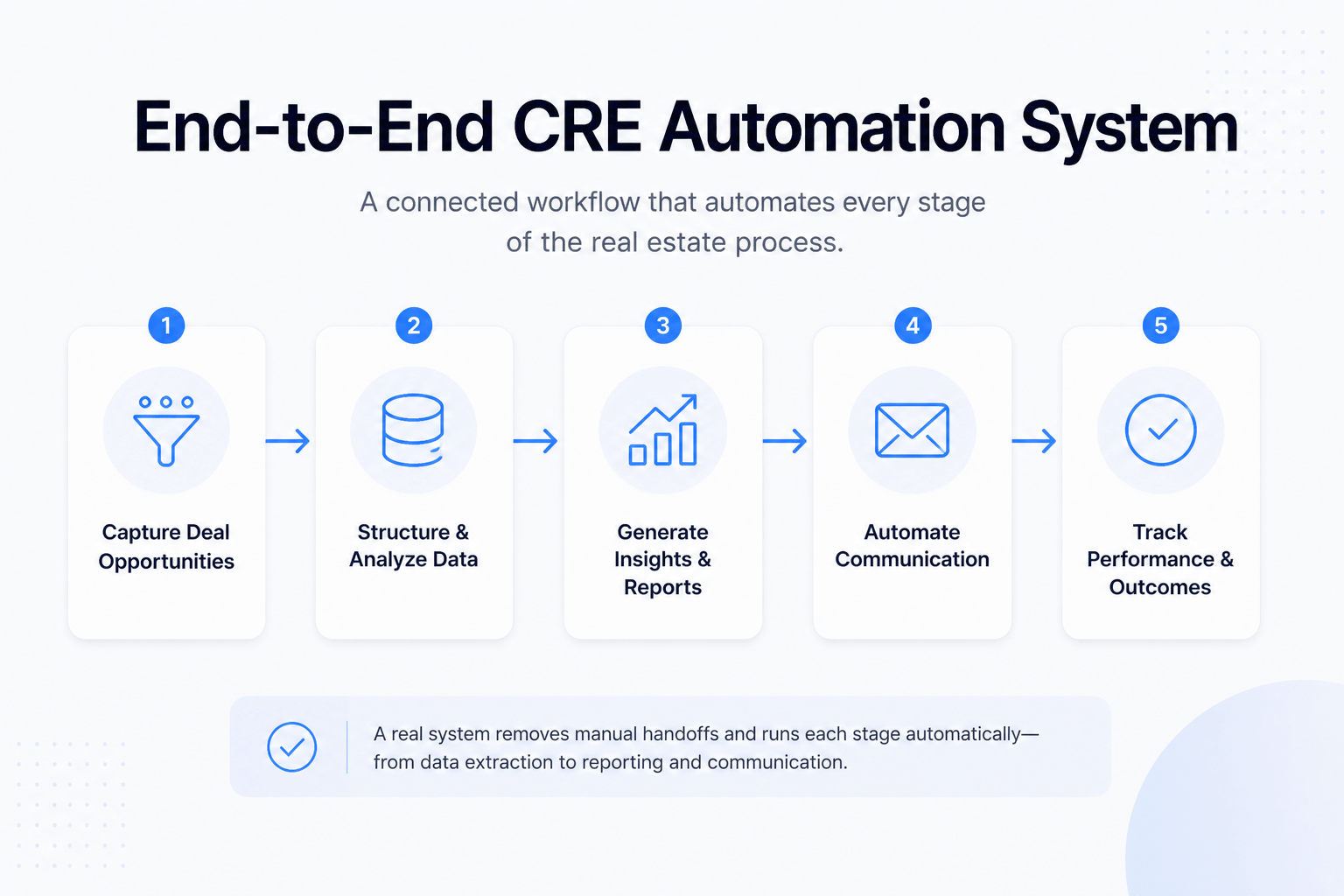
An end-to-end CRE automation system is a connected workflow. It links every stage of the real estate process into one system. Instead of isolated tools, everything works together through automation.
At its core, the system handles five key functions:
-
Capturing deal opportunities
-
Structuring and analyzing data
-
Generating insights and reports
-
Automating communication
-
Tracking performance and outcomes
Most CRE professionals already automate small tasks. For example, they may use templates for emails or Excel for underwriting. However, these are isolated improvements. They do not create a true system.
A real system removes manual handoffs. When a deal arrives, it moves through each stage automatically. Data is extracted. Financials are analyzed. Reports are generated. Emails are drafted all without repeated manual work.
The biggest difference is integration. Basic automation solves one problem. An end-to-end system solves the entire workflow.
Why most CRE automation setups fail
Many setups fail because they focus on tools instead of workflows. Professionals often stack tools without a clear structure. This leads to confusion, duplication, and poor results.
Common failure points include:
-
No clear workflow design
-
Poor data organization
-
Over-reliance on manual inputs
-
Lack of system integration
-
No testing or optimization
Another issue is overcomplication. Many try to build advanced systems too early. They add too many tools and workflows at once. This creates friction instead of efficiency.
A successful system is simple at first. It focuses on one workflow. Then it expands step by step.
Core Components of a CRE Automation System
Every effective automation system has a clear structure. Each component plays a specific role. When combined, they create a seamless workflow.
Lead Capture & Data Ingestion
This is where everything begins. Deals enter your system through multiple sources. These include broker emails, listing platforms, and internal referrals.
Instead of manually reviewing each opportunity, automation tools capture and organize the data. AI can scan emails, extract key details, and tag opportunities. This ensures nothing gets missed.
Typical workflow includes:
-
Email parsing tools scanning inbound deals
-
AI extracting property details and financials
-
Automatic tagging based on asset type or location
-
Storing data in a central database
This step removes the need to manually sort through inboxes. It creates a structured pipeline from the start.
Deal Analysis Automation
Once data is captured, the system moves to analysis. This is one of the most time-consuming tasks in CRE. Automation can significantly reduce this workload.
AI tools can process financial data quickly. They can calculate metrics such as:
-
Cap rate
-
Internal rate of return (IRR)
-
Cash-on-cash return
-
Risk indicators
Instead of building models from scratch, the system generates analysis instantly. This allows professionals to focus on decision-making, not data entry.
Communication Automation
Communication is constant in CRE. Brokers, investors, and partners expect quick responses. Automation helps maintain speed without sacrificing quality.
AI can draft emails based on deal data. It can also personalize responses. This ensures communication remains relevant and professional.
Examples include:
-
Broker follow-up emails
-
Investor updates
-
Meeting summaries
-
Deal status notifications
This reduces response time and improves consistency.
Workflow Orchestration Layer
This is the backbone of the system. It connects all tools and processes. Platforms like Zapier or Make automate the flow of data between systems.
For example:
-
Email received → triggers data extraction
-
Data stored → triggers analysis
-
Analysis completed → triggers report generation
-
Report created → triggers email draft
Without orchestration, tools remain disconnected. With it, everything works as one system.
Reporting & Dashboarding
The final component is visibility. Automation systems must provide clear insights. Dashboards track performance, deal flow, and key metrics.
Instead of building reports manually, the system updates them in real time. This allows faster decision-making.
Typical dashboards include:
-
Deal pipeline overview
-
Financial performance metrics
-
Activity tracking
-
Conversion rates
This creates a clear picture of business performance at all times.
Step-by-Step CRE Automation Workflow (Full System)
A complete system follows a structured process. Each step builds on the previous one. When connected, they create a seamless workflow.
Step 1: Capture Incoming Opportunities Automatically
Deals come from many sources. Without automation, it is easy to miss opportunities. The first step is to centralize all incoming data.
Set up systems that monitor:
-
Email inboxes
-
Listing platforms
-
CRM inputs
AI tools can scan these sources continuously. They extract key details and store them in a database. This ensures every opportunity enters the pipeline.
Step 2: Extract & Structure Property Data
Raw data is often unstructured. It may come in PDFs, emails, or spreadsheets. Automation tools convert this into usable formats.
Key actions include:
-
Extracting rent rolls and financials
-
Standardizing data fields
-
Organizing information into structured tables
This step is critical. Clean data leads to accurate analysis.
Step 3: Run Instant Deal Analysis
Once data is structured, the system performs analysis. This happens automatically. No manual modeling is required.
The system calculates key metrics. It also flags potential risks. This allows professionals to quickly evaluate deals.
Benefits include:
-
Faster decision-making
-
Consistent analysis
-
Reduced human error
Step 4: Generate Investment Summaries
After analysis, the system creates summaries. These are clear, concise, and ready to share.
AI generates:
-
Deal overviews
-
Key financial insights
-
Risk assessments
-
Investment highlights
This saves hours of manual writing.
Step 5: Automate Communication
Once the system generates insights, the next step is communication. This is where many CRE professionals lose time. Writing emails, updating investors, and following up with brokers can take hours each day.
Automation removes that burden. The system uses deal data to create context-aware messages. Instead of writing from scratch, you review and send.
For example, when a deal passes your criteria, the system can:
-
Draft a response to the broker requesting more details
-
Create an investor summary email with key metrics
-
Schedule follow-ups if no response is received
These messages are not generic. They use actual deal inputs. That makes them relevant and professional.
Another advantage is consistency. Every communication follows a standard format. This improves clarity and builds trust with partners.
Over time, this step alone can save several hours each week. It also ensures you never miss an important follow-up.
Step 6: Store & Sync Everything
A strong system needs a single source of truth. Without this, data becomes scattered. Teams lose track of deals. Decisions rely on outdated information.
This step ensures all data is stored and synced in one place. Usually, this is a database or CRM.
Key elements include:
-
Central deal database
-
Document storage (OMs, financials, notes)
-
Activity tracking (emails, updates, changes)
-
Integration with CRM tools
Every action in the system updates the database. When the analysis runs, the results are saved; when emails are sent, they are logged, and when new data arrives, it is added automatically.
This creates a complete history of each deal. Anyone on the team can access it at any time.
It also improves collaboration. Teams no longer rely on scattered files or personal inboxes. Everything is structured and accessible.
Step 7: Track Performance Automatically
The final step is tracking performance. Without visibility, automation loses its value. You need to understand what is working and what is not.
Automation systems generate real-time dashboards. These dashboards provide insights into your pipeline and operations.
Typical metrics include:
-
Number of deals analyzed
-
Conversion rates (deal to offer, offer to close)
-
Average deal evaluation time
-
Response time to brokers
-
Portfolio performance metrics
Instead of building reports manually, the system updates them continuously. This allows you to make faster, data-driven decisions.
It also highlights inefficiencies. If deals are getting stuck at a certain stage, you can identify and fix the issue quickly.
Before vs After CRE Automation (Productivity Comparison)
A clear way to understand the impact of automation is to compare workflows. Manual processes often involve repetition and delays. Automated systems reduce both.
Table: CRE Workflow Comparison (Manual vs Automated)
| Task | Manual Time | Automated Time | Impact |
|---|---|---|---|
| Deal analysis | 2–3 hours | 10–15 mins | Faster decisions |
| Email responses | 30 mins | Instant | Better responsiveness |
| Reporting | 4–6 hours | Automated | Real-time insights |
In a manual setup, each task requires attention. You open files, copy data, build models, and write emails. This limits how many deals you can handle.
With automation, tasks run in the background. You focus only on decisions. This increases capacity without increasing workload.
The biggest shift is speed. Faster analysis leads to faster action. In competitive markets, this can be the difference between winning and losing a deal.
Tools That Actually Work vs Hype
There are hundreds of AI tools available today. However, only a few are useful in real CRE workflows. The key is choosing tools that integrate well and solve specific problems.
Table: CRE Automation Tool Comparison
| Tool | Use Case | Key Features | Cost | Best For |
|---|---|---|---|---|
| ChatGPT | Analysis & writing | Prompt-based workflows | $$ | All CRE roles |
| Zapier | Automation | App integrations | $$ | No-code users |
| Make | Advanced workflows | Visual automation | $$ | Power users |
| Airtable | Database | Deal tracking | $$ | Operators |
| Notion AI | Docs & workflows | Knowledge base | $$ | Teams |
Each tool serves a different purpose. Together, they form a complete system.
-
ChatGPT helps with analysis, summaries, and communication
-
Zapier and Make connect workflows across platforms
-
Airtable acts as a structured database
-
Notion AI supports documentation and team collaboration
What actually works in practice
Tools that work well share common traits:
-
Easy integration with other platforms
-
Reliable automation triggers
-
Strong data handling capabilities
-
Flexible customization
What to avoid
Many tools look impressive but fail in real workflows. Common issues include:
-
Limited integrations
-
Poor data accuracy
-
Overly complex interfaces
-
Lack of scalability
It is better to use fewer tools that work well together. Simplicity leads to better results.
Real-World CRE Use Cases (How Professionals Use This)
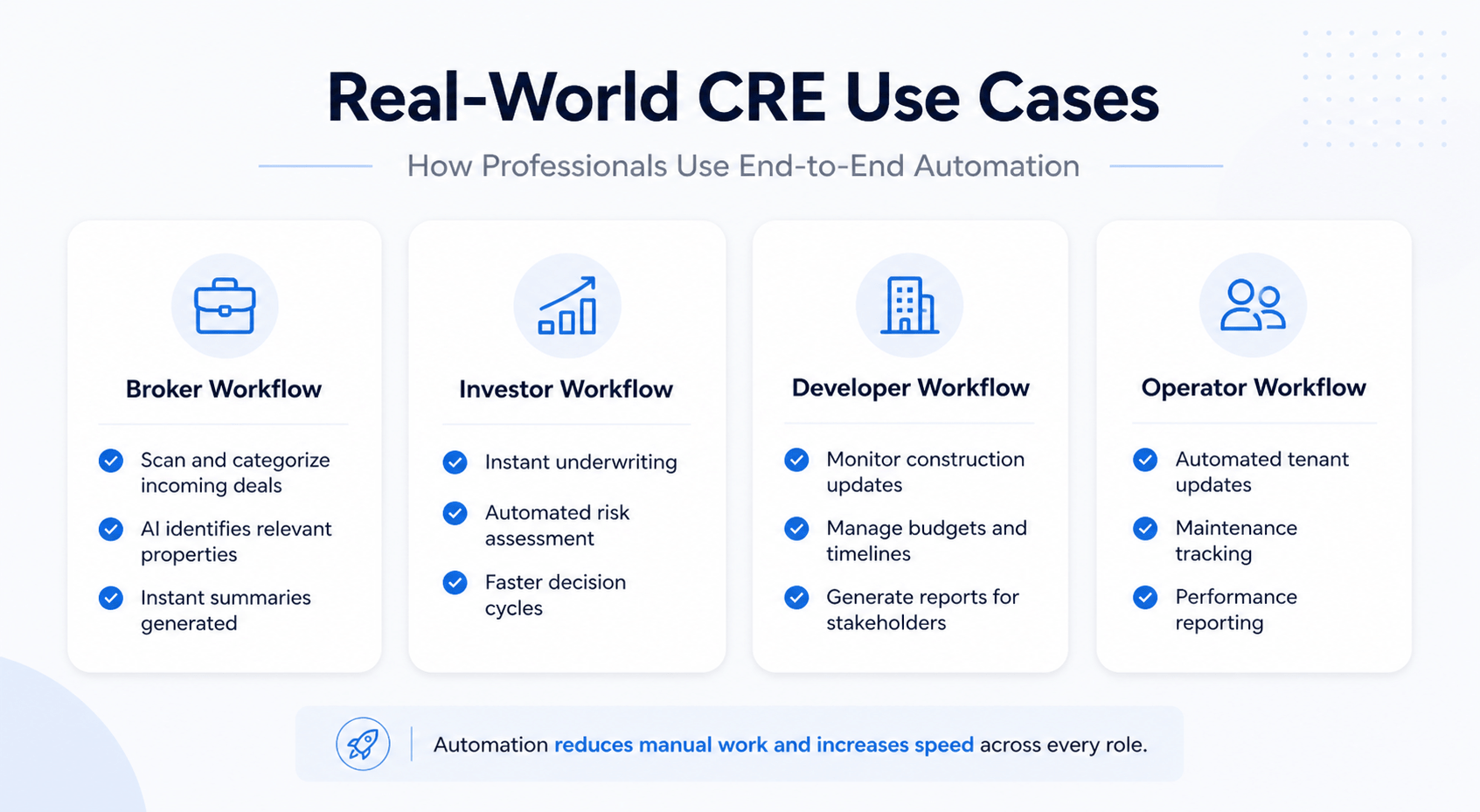
Automation systems are not theoretical. Many CRE professionals already use them in daily operations. The use cases vary by role, but the core idea remains the same: reduce manual work and increase speed.
Broker workflow
Brokers deal with high volumes of emails and listings. Automation helps filter opportunities quickly.
Typical setup:
-
Incoming deals are scanned and categorized
-
AI identifies relevant properties
-
Summaries are generated instantly
This allows brokers to focus on high-value opportunities.
Investor workflow
Investors need fast and accurate analysis. Automation enables quick screening of deals.
Key benefits include:
-
Instant underwriting
-
Automated risk assessment
-
Faster decision cycles
This improves deal flow and reduces missed opportunities.
Developer workflow
Developers manage complex projects. Automation helps track progress and data.
Examples include:
-
Monitoring construction updates
-
Managing budgets and timelines
-
Generating reports for stakeholders
This improves project visibility and control.
Operator workflow
Operators focus on property management and tenant relations. Automation supports communication and reporting.
Common use cases:
-
Automated tenant updates
-
Maintenance tracking
-
Performance reporting
This reduces administrative workload and improves service quality.
How to Implement This in 24 Hours (Action Plan)
Building a full system may seem complex. However, you can create a basic version in one day. The key is focusing on essential workflows first.
Phase 1: Setup (2–4 hours)
Start by selecting your core tools. Keep it simple.
-
Choose a database (Airtable or similar)
-
Select an automation platform (Zapier or Make)
-
Set up an AI tool for analysis
Create a basic structure for storing deals.
Phase 2: Build Core Workflow (6–8 hours)
Connect your tools into a working system.
Steps include:
-
Connect your email to the automation platform
-
Set triggers for incoming deals
-
Extract and store data in your database
-
Link AI tools for analysis
At this stage, the system should handle basic workflows automatically.
Phase 3: Add Intelligence (4–6 hours)
Enhance your system with AI capabilities.
-
Create prompts for deal analysis
-
Generate summaries automatically
-
Draft communication templates
This adds real value to your automation.
Phase 4: Test & Optimize (2–4 hours)
Test your system with real data. Look for errors and inefficiencies.
Focus on:
-
Accuracy of extracted data
-
Quality of AI outputs
-
Reliability of automation triggers
Make adjustments as needed. Over time, the system will improve.
Copy-Paste AI Prompts for CRE Automation
Prompts are the engine behind your system. A well-written prompt saves time and improves output quality. Weak prompts create noise and errors. The goal is to make prompts structured, specific, and repeatable.
Below are practical prompts used in real CRE workflows. These are not generic. Each one is designed to plug into your automation system.
Deal Analysis Prompt
Use this prompt after extracting property data. It evaluates the deal and highlights key insights.
-
Analyze the following commercial property data.
-
Calculate cap rate, IRR, and cash-on-cash return.
-
Identify risks based on vacancy, location, and financial stability.
-
Provide a short investment recommendation (buy, hold, reject).
-
Output in bullet points with clear financial metrics.
Rent Roll Extraction Prompt
This prompt converts messy rent rolls into structured data.
-
Extract all tenant data from the provided rent roll.
-
Identify lease terms, rent amounts, and expiration dates.
-
Standardize the output into a clean table format.
-
Flag missing or inconsistent data.
-
Keep output structured and easy to import into a database.
Investment Memo Prompt
Use this to generate investor-ready summaries.
-
Create a concise investment memo based on the provided data.
-
Include property overview, financial highlights, and risks.
-
Write in a professional tone suitable for investors.
-
Limit to 300–500 words.
-
Use bullet points for key insights.
Broker Email Reply Prompt
This helps automate communication with brokers.
-
Draft a professional reply to the broker.
-
Reference key details of the deal.
-
Ask for missing information if needed.
-
Keep the tone concise and respectful.
-
Avoid generic language.
Market Analysis Prompt
Use this for quick market insights.
-
Analyze the local market for the given property location.
-
Identify trends in rent, vacancy, and demand.
-
Highlight risks and opportunities.
-
Provide a short summary with actionable insights.
These prompts should be refined over time. The more specific your inputs, the better your outputs. Always test prompts with real data before scaling them across your system.
What Most CRE Professionals Get Wrong About AI
Many CRE professionals start using AI with high expectations. However, most do not see real results. The issue is not the technology. It is how it is used.
The biggest mistake is treating AI as a standalone tool. Tools can help, but they do not create efficiency on their own. Without a system, outputs remain inconsistent and disconnected.
Another common issue is poor workflow design. Professionals often jump straight into tools without mapping their processes. This leads to confusion and wasted time.
There is also a tendency to overcomplicate things. Many try to automate everything at once. This creates fragile systems that break easily.
Here are the most common misconceptions:
-
AI replaces human decision-making
-
More tools lead to better results
-
Automation works without clean data
-
Complex systems are more powerful
In reality, successful automation is simple and structured. It focuses on one workflow at a time. It builds gradually and improves through testing.
Common Mistakes When Building Automation Systems
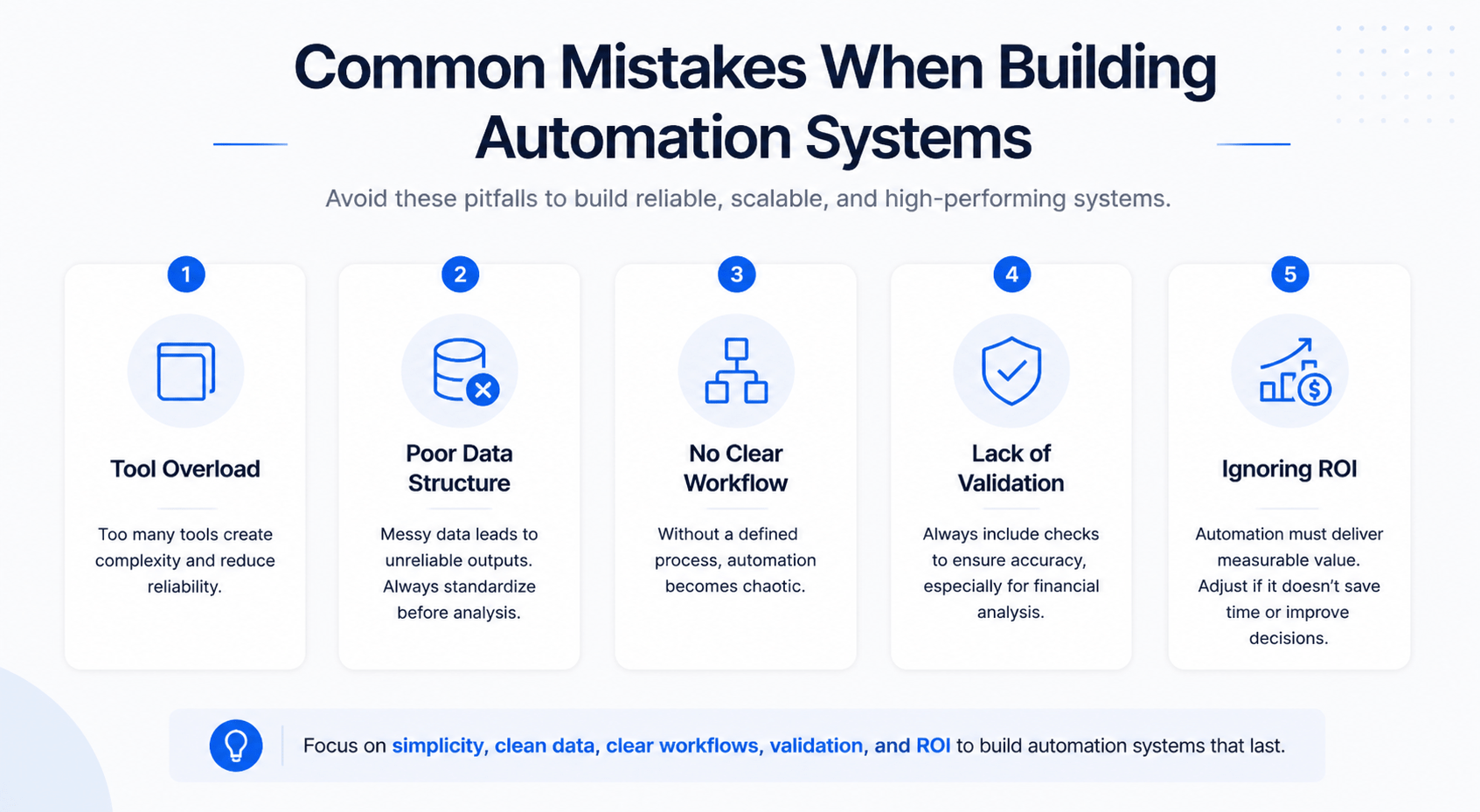
Even well-designed systems can fail if certain mistakes are ignored. Understanding these pitfalls can save time and effort.
Tool overload
Using too many tools creates unnecessary complexity. It increases maintenance and reduces reliability. Start with a small stack and expand only when needed.
Poor data structure
Automation depends on clean and organized data. If your inputs are messy, your outputs will be unreliable. Always standardize data before analysis.
No clear workflow
Without a defined process, automation becomes chaotic. Each step must have a clear purpose and connection.
Lack of validation
AI outputs are not always perfect. Systems must include checks to ensure accuracy. This is especially important for financial analysis.
Ignoring ROI
Automation should create measurable value. If a workflow does not save time or improve decisions, it needs to be adjusted.
Avoiding these mistakes improves system performance and long-term scalability.
Future of CRE Automation Systems
Automation in CRE is evolving quickly. What seems advanced today will soon become standard. Understanding future trends helps you stay ahead.
One major shift is the rise of AI agents. These systems can handle entire workflows independently. Instead of triggering individual tasks, they manage processes from start to finish.
Another trend is predictive analytics. Systems will not only analyze deals but also predict outcomes. This includes forecasting market trends and identifying high-potential investments.
We are also seeing the emergence of unified CRE platforms. These combine data, automation, and analytics into one system. This reduces the need for multiple tools.
Key trends to watch:
-
Autonomous underwriting systems
-
Real-time market intelligence
-
AI-driven portfolio optimization
-
Fully integrated CRE operating systems
The direction is clear. Automation will become more intelligent and more integrated. Early adopters will gain a significant advantage.
Conclusion
CRE is becoming more competitive. Speed and efficiency now play a major role in success. Manual workflows limit growth and reduce responsiveness.
An end-to-end CRE automation system explained approach shows how to solve this problem. It connects every part of the workflow. It reduces manual effort and improves decision-making.
The key takeaway is simple. Tools alone are not enough. A structured system creates real value. Start with one workflow. Build gradually. Focus on results.
If you want plug-and-play CRE automation workflows, join professionals already using them:
FAQs
What is a CRE automation system?
A CRE automation system is a connected set of tools and workflows. It automates tasks across the real estate process. This includes deal sourcing, analysis, communication, and reporting.
Instead of handling each task manually, the system manages them automatically. Data flows between tools. Actions are triggered without constant input.
Key features include:
-
Automated data extraction
-
AI-driven analysis
-
Workflow integration
-
Real-time reporting
The goal is to reduce manual work and improve efficiency. It also helps professionals handle more deals without increasing workload.
How does AI help in commercial real estate workflows?
AI improves speed, accuracy, and consistency. It processes large amounts of data quickly. This allows professionals to make faster decisions.
For example, AI can analyze financial data in seconds. It can also generate summaries and draft emails. This reduces the time spent on repetitive tasks.
Benefits include:
-
Faster deal analysis
-
Improved data accuracy
-
Automated communication
-
Better insights
AI does not replace human judgment. It supports it. Professionals still make final decisions, but with better information.
Do I need coding skills to build automation systems?
No, coding is not required for most systems. Many tools are designed for non-technical users. Platforms like Zapier and Make allow you to create workflows visually.
You can connect apps, set triggers, and automate tasks without writing code. AI tools also simplify complex processes.
However, understanding workflows is important. You need to know how your processes work before automating them.
Key skills include:
-
Logical thinking
-
Process mapping
-
Basic tool usage
With these skills, most CRE professionals can build effective systems.
What are the best tools for CRE automation?
The best tools depend on your workflow. However, some tools are widely used across CRE automation systems.
Common tools include:
-
ChatGPT for analysis and writing
-
Zapier for automation
-
Make for advanced workflows
-
Airtable for data management
-
Notion AI for documentation
Each tool serves a specific role. Together, they create a complete system.
It is important to choose tools that integrate well. Avoid tools that operate in isolation. Integration is key to building an effective system.
How much time can automation save in CRE workflows?
Automation can save a significant amount of time across daily tasks. The exact impact depends on your current workflow and deal volume. However, most CRE professionals see noticeable improvements within weeks.
For example, manual deal analysis can take two to three hours per property. With automation, this drops to minutes. Email drafting, reporting, and data entry have also become much faster.
Typical time savings include:
-
Deal analysis: reduced by 70–90%
-
Email communication: reduced by 60–80%
-
Reporting: reduced by 80–100%
These gains allow professionals to focus on higher-value work. Instead of repetitive tasks, they can spend more time on strategy and relationships.
Can automation replace analysts or brokers?
Automation does not replace professionals. It enhances their capabilities. Analysts and brokers still play a critical role in decision-making and relationship management.
AI handles repetitive and data-heavy tasks. This includes extracting information, running calculations, and drafting content. Humans then review and interpret the results.
The real benefit is increased capacity. One professional can handle more deals with the same effort. This leads to higher productivity without increasing headcount.
In practice:
-
Analysts focus on insights instead of data entry
-
Brokers spend more time closing deals
-
Teams operate more efficiently
Automation is a support system, not a replacement.
How accurate is AI in deal analysis?
AI can be highly accurate when used correctly. The quality of results depends on the quality of input data and prompts. Clean data leads to reliable outputs.
AI excels at calculations and pattern recognition. It can process financial data consistently and quickly. However, it may not always understand context perfectly.
To ensure accuracy:
-
Validate key outputs manually
-
Use structured data inputs
-
Refine prompts over time
-
Combine AI insights with human judgment
When used properly, AI improves both speed and consistency in deal analysis.
What’s the cost of building a system?
The cost of building a CRE automation system varies. It depends on the tools you choose and the complexity of your workflows. However, most systems can start at a relatively low cost.
Basic setup costs may include:
-
AI tools: $20–$50 per month
-
Automation platforms: $20–$100 per month
-
Database tools: $10–$50 per month
Total monthly cost often ranges from $50 to $200 for a basic system.
As your system grows, costs may increase. However, the return on investment is usually strong. Time savings and improved deal flow often outweigh the expenses.
How long does it take to implement?
A basic system can be built in one day. This includes setting up tools, connecting workflows, and testing automation. More advanced systems take longer.
Implementation timeline depends on:
-
Workflow complexity
-
Number of integrations
-
Level of customization
Typical timelines:
-
Basic system: 1 day
-
Intermediate system: 1–2 weeks
-
Advanced system: 1 month or more
The key is to start simple. Build a working system first. Then improve it over time.
Is automation secure for sensitive CRE data?
Security is an important consideration. Most modern tools follow strong security standards. However, proper setup is essential.
To protect data:
-
Use secure platforms with encryption
-
Limit access to sensitive information
-
Avoid sharing confidential data in unsecured systems
-
Regularly review permissions
It is also important to understand how each tool handles data. Choose platforms with clear security policies.
With the right setup, automation can be as secure as traditional workflows.
How do I start with no experience?
Starting without experience can feel overwhelming. The best approach is to focus on one simple workflow. Do not try to automate everything at once.
Begin with a basic process, such as deal intake or email automation. Learn how the tools work. Test your system with real data.
Steps to get started:
-
Identify a repetitive task
-
Choose simple tools
-
Build a basic workflow
-
Test and refine
As you gain confidence, you can expand your system. Over time, your workflows will become more advanced.
What workflows should I automate first?
The best workflows to automate are repetitive and time-consuming. These tasks provide the highest return on effort.
Common starting points include:
-
Deal intake and data extraction
-
Initial deal analysis
-
Email follow-ups
-
Report generation
These workflows are easy to automate and deliver immediate value. They also form the foundation for more advanced systems.
Can small firms benefit from CRE automation?
Yes, small firms can benefit significantly. In fact, automation often has a greater impact on smaller teams. It allows them to compete with larger firms.
With automation:
-
Small teams can handle more deals
-
Workflows become more efficient
-
Decision-making improves
This creates a competitive advantage. Instead of hiring more staff, firms can scale using technology.
What are the risks of automation?
Automation offers many benefits, but it also comes with risks. Understanding these risks helps you build a more reliable system.
Common risks include:
-
Incorrect data leading to wrong outputs
-
Over-reliance on automation
-
Poor system design
-
Lack of monitoring
To reduce risk:
-
Validate critical outputs
-
Maintain human oversight
-
Test workflows regularly
-
Keep systems simple
When managed properly, risks can be minimized.
How do I scale automation across a team?
Scaling automation requires structure and consistency. A system that works for one person must be adapted for team use.
Key steps include:
-
Standardizing workflows
-
Creating clear documentation
-
Training team members
-
Setting access controls
It is also important to maintain a central database. This ensures everyone works from the same data.
As the system grows, continue to refine it. Gather feedback from team members and improve workflows over time.