
How to Build an Offering Memorandum with Claude Design
Early-stage renderings have always been a strange expense in commercial real estate. You need them to tell the story, whether it’s a value-add pitch, a development concept, or a partnership deck. But before a deal is even under contract, spending thousands on visuals rarely makes sense. That’s exactly where AI property rendering workflows are changing how CRE professionals evaluate and present deals.
Instead of waiting days and paying $500 to $3,000 per rendering, you can now generate realistic renovation concepts, site plans, and even ADU layouts in minutes. The shift is not just about cost savings. It fundamentally changes how deals are evaluated, presented, and moved forward.
In competitive CRE markets, where speed and clarity often determine outcomes, that advantage is hard to ignore.
What Are AI Property Rendering Workflows?
AI renderings for CRE deals are concept-level visuals generated using artificial intelligence tools. They rely on prompts and real property images to produce realistic representations of what a property could become.
These outputs are not meant for construction or permitting. Instead, they sit at the earliest stage of the deal, where ideas need to be communicated quickly and clearly.
What They Enable
-
Turning existing property photos into renovated concepts
-
Generating mixed-use layouts from raw land images
-
Visualizing unit additions like ADUs
-
Creating early-stage floor plans
The core value is simple: you can show potential instead of describing it.
If you want to see how AI is already replacing early-stage feasibility work, this example breaks it down in a very practical way.
Why Traditional Renderings Slow Down CRE Deals
Before AI, visualization came with real friction.
-
High upfront cost before deal certainty
-
Slow turnaround from design firms
-
Limited ability to iterate quickly
-
Risk of over-investing too early
This forced many professionals to either delay visuals or skip them entirely.
As a result, early-stage discussions often relied on assumptions instead of clarity. That’s a problem because investors respond better to what they can see, not what they have to imagine.
How AI Property Rendering Workflows Change the Deal Workflow
AI introduces a new layer of speed and flexibility into the CRE process.
Instead of waiting until later stages, visuals now happen at the very beginning.
| Stage | Traditional Approach | AI-Driven Approach |
|---|---|---|
| Deal Review | Text + assumptions | Instant visuals |
| Investor Pitch | Limited imagery | Multiple scenarios |
| Revisions | Slow and costly | Real-time updates |
| Decision Speed | Delayed | Accelerated |
This shift allows professionals to move faster while improving communication at every step.
Use Case 1: Renovation Concepts for Value-Add Deals
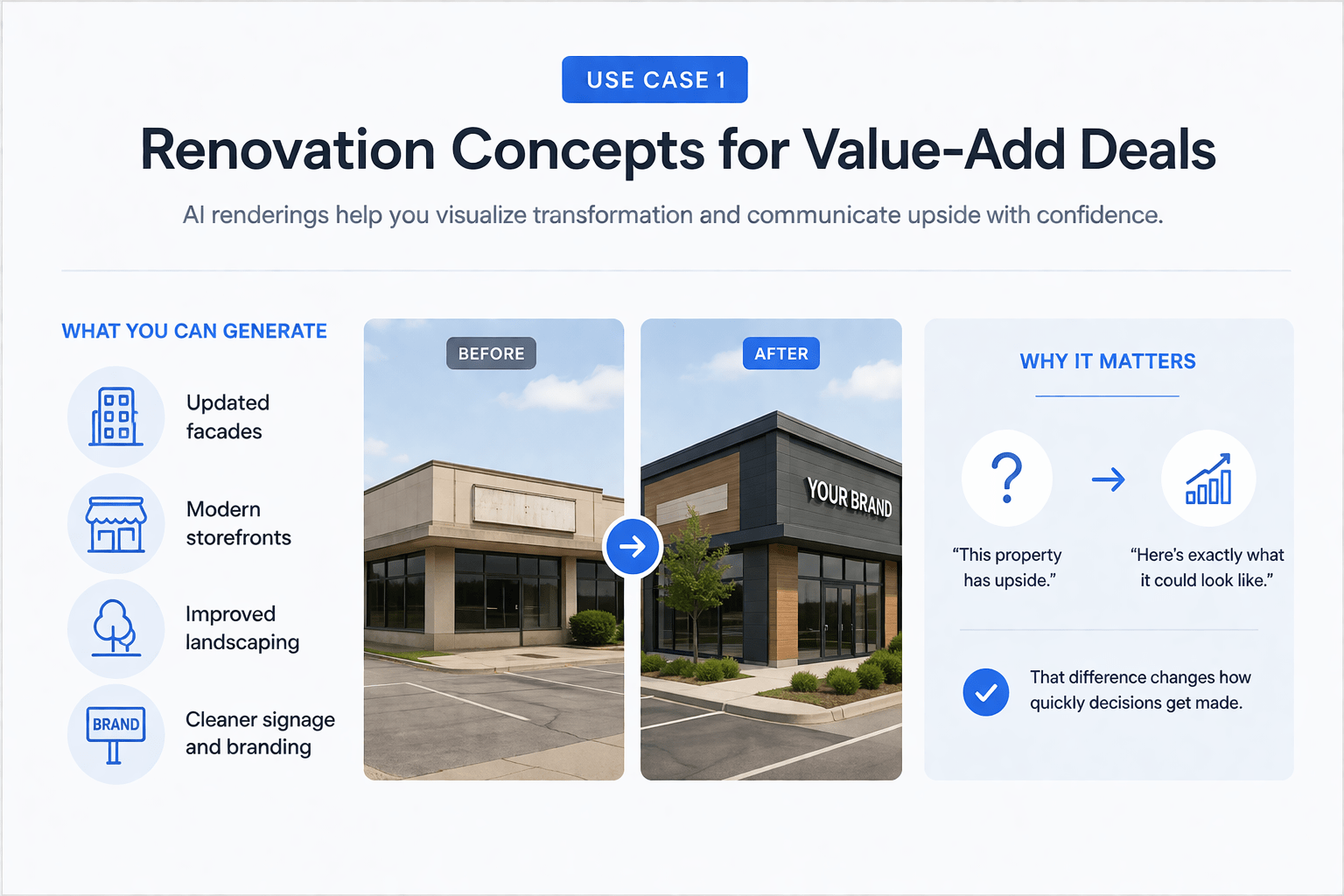
One of the most practical applications of AI renderings for CRE deals is visualizing renovation potential.
Instead of explaining what a property could look like, you can generate multiple post-renovation concepts within minutes. In addition, pairing these visuals with AI-generated investor decks makes it much easier to communicate the full upside of a deal to equity partners.
What You Can Generate
-
Updated facades
-
Modern storefronts
-
Improved landscaping
-
Cleaner signage and branding
These are not architectural drawings, but they are strong enough for investor conversations and internal planning.
Why It Matters
Value-add deals depend heavily on transformation. If investors cannot clearly see that transformation, they hesitate.
AI removes that friction.
You move from:
“This property has upside.”
To:
“Here’s exactly what it could look like.”
That difference changes how quickly decisions get made.
Use Case 2: Mixed-Use Site Plans
Mixed-use development is complex by nature. It combines residential, retail, and sometimes office components into a single layout.
AI simplifies the early-stage visualization of that complexity.
What AI Can Show
-
Apartments over retail layouts
-
Property boundaries and lot usage
-
Street integration and access points
-
Basic massing and density
Why This Is Valuable
At the early stage, stakeholders don’t need engineering precision. They need clarity.
AI-generated site plans provide just enough structure to answer critical questions:
-
How does the layout function?
-
What does the density look like?
-
How does the project fit the site?
That clarity speeds up feasibility discussions and investor alignment.
Use Case 3: ADU Conversions and Multifamily Optimization
ADUs (Accessory Dwelling Units) are one of the most underutilized value-add strategies in multifamily real estate.
The main reason? They are hard to visualize.
AI changes that instantly.
What You Can Visualize
-
Tuck-under parking conversions
-
Garage-to-unit transformations
-
Backyard ADU additions
-
Multiple unit configurations
Instead of relying on spreadsheets and descriptions, you show exactly how units can be added.
Real Impact
-
Stronger investor confidence
-
Faster approvals
-
Better understanding of spatial feasibility
When investors can see where units go, the opportunity becomes much easier to evaluate.
Cost and Speed Comparison
The difference between traditional and AI renderings is not subtle; it’s dramatic.
| Category | Traditional Renderings | AI Renderings |
|---|---|---|
| Cost per Concept | $500–$3,000 | Included in subscription |
| Turnaround Time | Days | Minutes |
| Revisions | Additional cost | Unlimited |
| Scalability | Limited | High |
The financial impact alone makes AI compelling. But the real advantage is speed. In CRE, speed is leverage.
When to Use AI Renderings for CRE Deals
AI renderings are most effective in specific scenarios.
Ideal Use Cases
-
LOI-stage presentations
-
Early investor discussions
-
Broker marketing for value-add listings
-
Internal deal analysis
When Not to Use Them
-
Permit submissions
-
Construction documents
-
Engineering validation
The key is understanding their role.
They are tools for exploration and communication, not execution.
AI vs Traditional Renderings: A Practical Perspective
This is not a replacement; it’s a shift in timing.
| Criteria | AI Renderings | Traditional Renderings |
|---|---|---|
| Speed | Extremely fast | Slow |
| Cost | Low | High |
| Precision | Moderate | High |
| Flexibility | Very high | Limited |
| Best Stage | Early-stage | Late-stage |
The most effective CRE professionals use both.
AI handles the early stage. Architects handle the final stage.
Advanced Strategy: Combining AI with Real Workflows
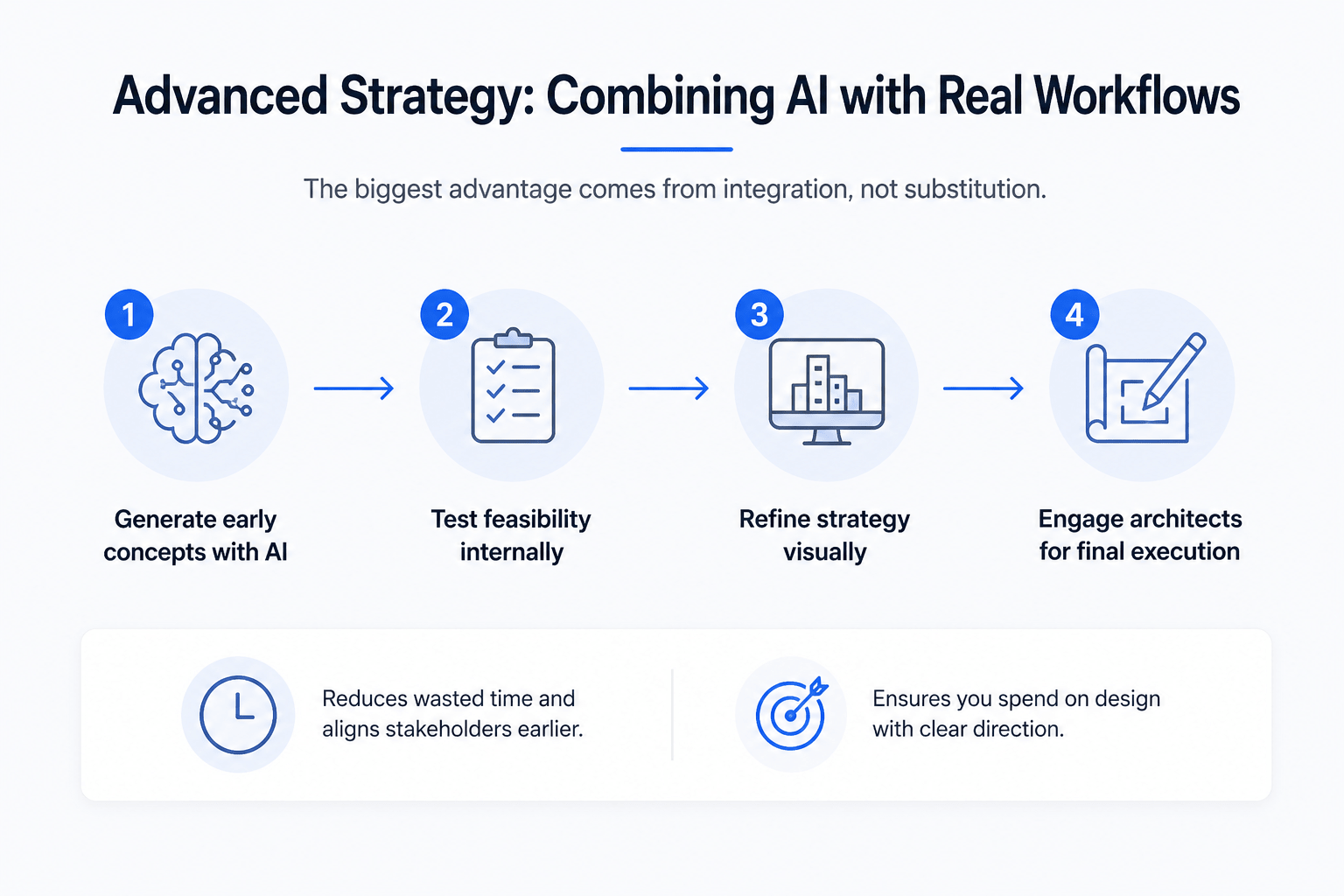
The biggest advantage comes from integration, not substitution.
Smart Workflow
-
Generate early concepts with AI
-
Test feasibility internally
-
Refine strategy visually
-
Engage architects for final execution
This approach reduces wasted time and aligns stakeholders earlier.
It also ensures that when you do spend money on design, you already know what direction you’re going.
Common Mistakes to Avoid
Treating AI as Final Output
These are concept visuals, not construction-ready documents.
Using Weak Prompts
Specific instructions produce better results.
Ignoring Local Constraints
Zoning and regulations still require professional review.
Over-Reliance on Visuals
Strong deals combine visuals with solid financial analysis.
Conclusion
AI renderings for CRE deals are transforming how early-stage real estate decisions are made.
They remove the cost barrier, eliminate delays, and make it easier to communicate potential. From renovation concepts to site plans and ADU strategies, these tools bring clarity to the most uncertain stage of a deal.
They don’t replace architects. They don’t replace technical design.
But they significantly improve how deals are evaluated, presented, and executed.
And in a market where speed and clarity win, that advantage matters.
Turn Concepts Into Competitive Advantage Faster
In today’s CRE market, the ability to communicate an opportunity quickly is a real edge. That’s exactly where AI renderings fit. Inside the AI for CRE Collective, you’ll find real workflows used by 600+ CRE professionals who are actively applying these tools to real deals, not just experimenting with them.
If you want to move faster, present deals more clearly, and make better decisions earlier, this is where it starts. Instead of figuring everything out yourself, you can follow proven systems already being used in the field. The next step is simple: subscribe to the newsletter and start applying these strategies immediately.
FAQs Regarding AI Property Rendering Workflows
1. What are AI property rendering workflows in commercial real estate?
AI property rendering workflows are structured processes that use artificial intelligence to generate visual concepts for real estate deals quickly.
-
Combine text prompts and property images
-
Generate renovation, site plan, and layout visuals
-
Enable rapid iteration without design software
Conclusion: They provide a faster, more scalable way to visualize property potential in early-stage CRE deals.
2. How do AI property rendering workflows improve deal evaluation?
They allow professionals to see potential outcomes before committing capital.
-
Visualize value-add opportunities instantly
-
Compare multiple design scenarios quickly
-
Reduce reliance on assumptions
Conclusion: By making deal potential visible, these workflows improve both speed and confidence in decision-making.
3. When should developers use AI property rendering workflows in a deal?
These workflows are most effective during the earliest stages of a deal lifecycle.
-
LOI and pre-acquisition analysis
-
Investor pitch preparation
-
Initial feasibility discussions
Conclusion: They are best used before major capital is deployed, when flexibility and speed matter most.
4. Can AI property rendering workflows replace architects or designers?
No, they are not a replacement for professional design services.
-
Lack of engineering precision
-
Do not account for zoning or compliance
-
Cannot produce permit-ready drawings
Conclusion: They complement architects by improving early-stage clarity, not replacing technical expertise.
5. What types of CRE projects benefit the most from AI property rendering workflows?
Projects with strong value-add or development potential benefit the most.
-
Retail renovation and repositioning deals
-
Mixed-use development concepts
-
Multifamily properties with ADU opportunities
Conclusion: Any deal that relies on future transformation gains significant value from visual workflows.
6. How do AI property rendering workflows reduce costs in CRE projects?
They eliminate the need for expensive early-stage renderings and reduce wasted design efforts.
-
No per-render costs like traditional firms
-
Unlimited iterations without additional fees
-
Lower upfront investment risk
Conclusion: These workflows help allocate capital more efficiently during the early phases of a deal.
7. What are the limitations of AI property rendering workflows?
Despite their advantages, they have clear constraints.
-
Not dimensionally or structurally precise
-
Do not consider local regulations
-
Output quality depends on prompt accuracy
Conclusion: They should always be paired with professional validation before execution.
8. How can CRE professionals integrate AI property rendering workflows effectively?
The most effective approach is to combine AI with traditional processes.
-
Use AI to generate early concepts
-
Align stakeholders with visual outputs
-
Transition to architects for final design
Conclusion: A hybrid workflow delivers the best balance of speed, clarity, and technical accuracy.
