Automating Follow-Ups and Client Communication with AI
In commercial real estate, timing matters. A delayed response can mean a lost lead, a missed meeting, or even a failed deal. Yet many brokers, investors, and operators still spend hours every week sending emails, following up with prospects, updating clients, and managing conversations across different platforms. This is where AI follow-up automation becomes useful.
Instead of manually tracking every conversation, AI can help organize contacts, draft responses, schedule follow-ups, and keep communication moving. The goal is not to replace relationships. The goal is to remove repetitive work so professionals can spend more time building those relationships.
Many CRE teams struggle with the same problem. They generate leads, attend meetings, and collect contacts, but follow-up activity becomes inconsistent. Some prospects receive multiple messages. Others receive none at all. Over time, opportunities slip through the cracks.
AI changes this process. Modern tools can monitor activity, create personalized messages, and trigger communication based on specific actions. A prospect who downloads a market report can receive a follow-up email automatically. A property owner who requests information can receive updates without anyone manually writing the message.
The result is a faster and more consistent communication system.
In this guide, you will learn how AI follow-up automation works, which tools are worth considering, how to build a practical workflow, and what mistakes to avoid when implementing automation in commercial real estate.
The adoption of AI continues to grow across sales, operations, and customer communication. The numbers below show why many CRE firms are exploring automation.
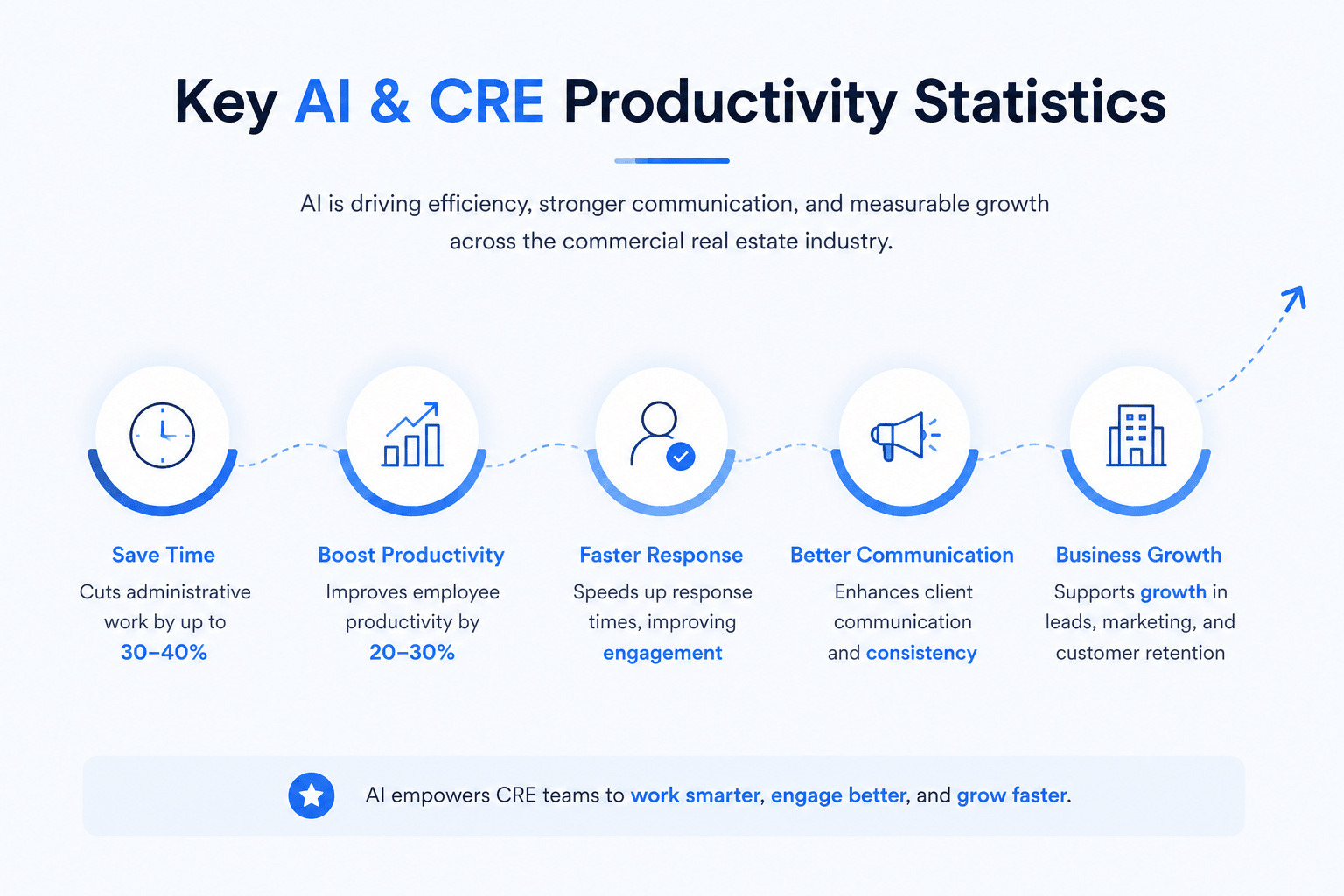
McKinsey estimates generative AI could add up to $4.4 trillion in annual productivity gains across industries.
Organizations using AI report measurable improvements in efficiency and employee productivity.
Faster lead response times consistently improve engagement and conversion opportunities.
AI adoption continues to grow in sales, marketing, and customer communication functions.
Commercial real estate firms increasingly use AI for prospecting, research, and workflow automation.
These trends point to one conclusion. Firms that improve communication speed and consistency often gain a competitive advantage.
A visual summary of how AI helps commercial real estate professionals save time, improve productivity, accelerate response times, strengthen client communication, and support business growth through automation.
Why Follow-Ups Matter More Than Most CRE Professionals Realize
Commercial real estate is a relationship-driven business. Deals often take months to close. Some opportunities remain active for years before a transaction occurs.
Because of this, follow-up is not just an administrative task. It is a revenue-generating activity.
A prospect may not be ready today. An investor may still be reviewing options. A property owner may wait months before making a decision. Consistent communication keeps those relationships active until the timing is right.
The Revenue Impact of Delayed Responses
Many professionals focus heavily on lead generation. However, lead management often receives less attention.
When follow-ups are delayed, several problems occur:
Leads lose interest
Competitors respond first
Meetings are forgotten
Opportunities become cold
Conversion rates decline
A prospect who receives a response within minutes often has a much better experience than one who waits several days.
This does not mean every message must be written immediately. It means a process should exist that keeps communication moving.
That is one reason AI follow-up automation has become popular among CRE teams.
Common Follow-Up Challenges in CRE
Commercial real estate professionals manage a large number of relationships.
These relationships may include:
Property owners
Investors
Tenants
Brokers
Developers
Lenders
Vendors
Each group requires different communication. As deal activity increases, common challenges begin to appear.
Manual Tracking
Many professionals still rely on spreadsheets, calendars, or memory. This works at a small scale. It becomes difficult as contact lists grow.
Inconsistent Messaging
Different team members often communicate in different ways. As a result, prospects receive mixed experiences.
Time Constraints
Follow-ups compete with prospecting, meetings, property tours, underwriting, and negotiations. Communication tasks are often pushed to the end of the day.
CRM Neglect
Many firms invest in CRM systems but fail to update them consistently. Incomplete data makes future communication much harder.
Where Most CRE Teams Lose Deals
Lost deals are not always caused by pricing, market conditions, or competition. In many cases, communication is the problem.
The most common breakdowns include:
⚡
Slow Response Times
Prospects lose interest when communication is delayed.
Lost Opportunities
📭
Missed Follow-Ups
Important conversations disappear from the pipeline.
Cold Leads
💬
Generic Messaging
Unpersonalized outreach reduces trust and engagement.
Fewer Meetings
📊
Poor CRM Updates
Missing information creates communication gaps.
Inconsistent Outreach
🔄
No Process
Without structure, opportunities fall through the cracks.
Pipeline Leakage
When these issues happen repeatedly, pipeline performance suffers. A structured communication system helps prevent these problems.
That system does not need to be complex. In many cases, a simple workflow combined with AI follow-up automation can create significant improvements.
The next step is understanding what AI communication automation actually looks like in practice and how CRE professionals are using it today.
What AI Follow-Up Automation Actually Means
Many people hear the word automation and assume AI will completely manage client communication on its own. That is not how successful CRE firms use it.
The best results come from combining AI with human oversight. AI handles repetitive tasks. People handle relationships, strategy, and negotiations.
In simple terms, AI follow-up automation uses artificial intelligence and workflow tools to send, organize, personalize, and track communications automatically.
Instead of manually writing every message, AI can help create drafts, schedule follow-ups, update CRM records, and trigger communications based on specific actions.
For example:
A prospect submits a contact form
AI drafts a personalized response
The CRM creates a follow-up task
A reminder sequence starts automatically
The broker receives an alert when engagement increases
The process happens in minutes instead of hours.
Core Components of an AI Communication System
Most CRE firms use four main components.
CRM Platform
The CRM stores contact information, communication history, and pipeline activity.
Examples include:
HubSpot
Salesforce
Pipedrive
Zoho CRM
The CRM acts as the central database.
AI Writing Assistant
AI writing tools help create emails, summaries, meeting notes, and follow-up messages.
Popular options include:
ChatGPT
Claude
Microsoft Copilot
Gemini
These tools save time while keeping communication personalized.
Automation Platform
Automation tools connect systems together.
For example:
New lead enters CRM
Automation triggers follow-up
AI drafts email
The email platform sends a message
Popular platforms include:
Zapier
Make
HubSpot Workflows
Salesforce Automation
Communication Channels
Messages can be delivered through:
Email
SMS
CRM notifications
LinkedIn outreach
Internal team alerts
The goal is simple. Every important contact receives timely communication.
Types of Communication AI Can Handle
Not every conversation needs human involvement from the beginning. Many routine interactions can be streamlined.
New Lead Responses
When someone requests information, AI can send an immediate acknowledgment and schedule the next step.
Meeting Follow-Ups
AI can summarize meeting notes and draft follow-up emails within minutes.
Property Inquiry Responses
Prospects often ask similar questions. AI can generate consistent responses while still allowing customization.
Investor Updates
Regular portfolio or market updates can be prepared faster using AI-assisted workflows.
Tenant Communication
Routine announcements, reminders, and updates can be partially automated.
What AI Should Not Automate
Some conversations require human judgment.
These include:
Negotiations
Lease disputes
Investment recommendations
Partnership discussions
Complex client concerns
High-value relationship management
AI should support these conversations, not replace them. The strongest CRE professionals use AI to save time, then invest that time in relationship building.
How AI-Powered Follow-Up Systems Work
A successful communication workflow follows a predictable process. Understanding this process helps firms avoid unnecessary complexity.
AI Follow-Up Engine
Lead Captured
AI Qualification
Email Generated
CRM Updated
Meeting Booked
Step 1: Capture Lead Information
Every workflow begins with data collection.
Lead sources may include:
Website forms
Property inquiries
LinkedIn outreach
Event registrations
Referral submissions
Newsletter signups
The information enters the CRM automatically.
Step 2: Organize Contacts
Not every contact belongs in the same category.
AI can help classify prospects based on:
Investor type
Asset preference
Geographic market
Deal size
Level of engagement
This improves personalization later.
Step 3: Generate Personalized Communication
Instead of using generic templates, AI can reference available information.
For example:
A broker specializing in multifamily assets should receive a different message than an industrial investor. This creates more relevant communication without increasing workload.
Step 4: Trigger Automated Follow-Ups
Automation rules determine what happens next.
Examples include:
Trigger Event
Automated Action
New lead submitted
Welcome email sent
Meeting completed
Follow-up drafted
Market report downloaded
Nurture sequence begins
No response after 7 days
Reminder email sent
Prospect opens the email multiple times
Broker notified
Table: Common AI Follow-Up Triggers and Actions
These workflows help maintain consistency across the pipeline. For example, our guide on AI lead nurturing workflows shows how HubSpot and AI can automatically nurture prospects, trigger personalized follow-ups, and keep leads engaged throughout the sales cycle.
Step 5: Monitor Engagement
AI can track behavior signals such as:
Email opens
Link clicks
Website visits
Form submissions
Meeting bookings
This data helps prioritize outreach.
A prospect showing strong activity may deserve immediate attention.
Step 6: Escalate High-Value Opportunities
Not every lead deserves the same level of effort.
AI helps identify:
Highly engaged investors
Active property owners
Qualified tenants
Repeat clients
These contacts can then be routed directly to team members.
Simple AI Communication Workflow Checklist
Before launching any automation, verify that you have:
CRM configured properly
Contact data organized
Message templates prepared
AI prompts tested
Follow-up sequences defined
Reporting dashboard active
Human review process established
A simple workflow usually performs better than a complicated one. Many firms fail because they attempt to automate everything at once. Start small. Then, it improves over time.
Best AI Tools for Automating Follow-Ups and Client Communication
The market is crowded with AI products. Some are useful. Others create more work than they save. The goal is not to find the newest tool. The goal is to find tools that improve communication and fit existing workflows.
Which Tool Should Most CRE Professionals Start With?
For small and mid-sized teams:
CRM platform
ChatGPT or Claude
Zapier automation
This combination is usually enough to create effective AI follow-up automation without high cost.
Tools That Actually Work vs Hype
New AI products launch every week. Many promise complete automation. Very few deliver it. CRE professionals should focus on outcomes, not marketing claims.
Tools That Usually Deliver Immediate Value
ChatGPT
Claude
HubSpot AI
Zapier
Microsoft Copilot
These tools solve real communication problems.
Tools That Often Require More Setup
Salesforce Einstein
Enterprise AI platforms
Custom AI systems
These solutions can work well, but usually need technical resources.
Tools That Are Often Overhyped
Common warning signs include:
Claims of fully autonomous deal-making
Guaranteed lead generation promises
Fully automated relationship management
No human review requirements
Real estate remains a relationship business.
Technology helps support relationships.
It does not replace them.
Recommended AI Stack for Small CRE Teams
HubSpot CRM
ChatGPT
Zapier
Outlook or Gmail
This setup can handle most communication needs without significant expense.
Recommended AI Stack for Larger CRE Firms
Salesforce
Einstein AI
ChatGPT Enterprise
Zapier or Make
Business intelligence dashboards
These firms typically require more advanced reporting and automation.
LIVE CRE AI SYSTEM
Stop Manually Managing Every Follow-Up
Access the same AI workflows, prompt libraries, CRM automations, and implementation guides used by commercial real estate professionals to save time and stay consistent.
Many CRE professionals assume automation takes weeks to implement. In reality, a simple system can be built in a single day. The goal is not perfection. The goal is to create a repeatable process that saves time and improves consistency.
If you are starting from scratch, focus on one communication workflow first. Once it works, expand to other areas.
Before building your own workflow, it helps to see what modern AI automation looks like in practice. This example shows how AI agents can handle repetitive broker tasks that typically consume hours each week.
Hour 1–2: Review Your Current Process
Before adding new tools, document your existing workflow.
Answer these questions:
Where do new leads come from?
How quickly do you respond?
How many follow-ups are sent?
Who handles communication?
What tasks are repeated every day?
Most teams discover several bottlenecks during this review.
Common issues include:
Slow response times
Missed follow-ups
Duplicate outreach
Inconsistent messaging
Poor CRM updates
Hour 3–4: Organize Your Contacts
A good workflow starts with clean data.
Create contact categories such as:
Investors
Property owners
Tenants
Brokers
Developers
Lenders
You can also segment by:
Property type
Market
Investment criteria
Stage in pipeline
Better segmentation leads to better communication.
Hour 5–8: Create Follow-Up Templates
Many CRE conversations follow predictable patterns.
Examples include:
Initial inquiry responses
Meeting follow-ups
Property updates
Investor updates
Re-engagement emails
Create templates for each scenario. AI can personalize them later.
Hour 9–12: Connect Your Systems
At this stage, connect:
CRM
Email platform
AI assistant
Automation platform
Typical setup:
Website Form → CRM → AI Draft → Email Sent → CRM Updated
This creates a simple communication pipeline. In addition, these automated CRE workflows demonstrate how Zapier and AI can connect multiple tools, trigger actions automatically, and reduce manual follow-up work.
Hour 13–18: Build AI Prompts
Prompts determine output quality. The better the prompt, the better the communication.
A strong prompt should include:
Audience type
Communication goal
Desired tone
Relevant context
Clear call to action
Hour 19–24: Test Everything
Before launching:
Submit test forms
Trigger workflows
Review AI outputs
Verify CRM updates
Check email formatting
Confirm notification delivery
Testing prevents future problems.
AI Follow-Up Workflow Checklist
Use this checklist before launching your system:
CRM configured correctly
Contact categories created
Templates approved
AI prompts tested
Automations connected
Notifications working
Reporting enabled
Team trained
A simple workflow can immediately improve communication consistency.
Copy-Paste AI Prompts for CRE Follow-Up Automation
One reason many professionals struggle with AI follow-up automation is poor prompts. AI performs best when instructions are clear and specific. The examples below can be customized for different situations.
New Lead Follow-Up Prompt
“Act as a commercial real estate broker. Write a professional follow-up email to a new prospect who requested information about a property. Keep the tone friendly and professional. Reference their inquiry, offer assistance, and suggest a short call. Limit the email to 150 words.”
Property Inquiry Response Prompt
“Act as a CRE leasing specialist. Draft a response to a prospect requesting information about available office space. Summarize key details, answer common questions, and invite further discussion. Keep the tone conversational.”
Investor Outreach Prompt
“Act as a commercial real estate investment advisor. Write a follow-up email to an investor interested in multifamily opportunities. Highlight relevant market activity and suggest a meeting. Keep the message concise.”
Meeting Follow-Up Prompt
“Create a professional follow-up email after a commercial real estate meeting. Summarize discussion points. List next steps. Include a clear call to action.”
Re-Engagement Prompt
“Write a follow-up email to a prospect who has not responded for 60 days. Be professional and helpful. Ask if priorities have changed and offer assistance. Avoid sounding aggressive.”
Deal Update Prompt
“Create a client update email regarding an active transaction. Summarize progress. Explain important developments. List action items. Keep the tone reassuring and professional.”
Broker Referral Prompt
“Draft a broker-to-broker follow-up message. Thank them for the previous collaboration. Ask about current opportunities. Keep the tone relationship-focused.”
Capital Raising Prompt
“Write an investor follow-up email regarding a capital raising opportunity. Provide a brief project update. Mention key milestones. Invite questions.”
Tenant Communication Prompt
“Draft a tenant update email. Explain the upcoming change clearly. Provide timelines. Answer likely concerns. Maintain a professional tone.”
Owner Prospecting Prompt
“Create a follow-up email for a property owner. Introduce brokerage services. Provide market insights. Offer a property consultation. Keep the email under 150 words.”
These prompts can serve as the foundation for most CRE communication workflows.
Real-World CRE Use Cases for AI Communication Automation
The value of AI follow-up automation becomes clearer when applied to real business situations. Different teams use automation differently.
AI
Automation Hub
🏢Brokerage
📈Investments
🏬Property Management
💰Capital Markets
🎯Prospecting
Broker Lead Nurturing
A broker receives leads from:
Website inquiries
Referrals
LinkedIn outreach
Industry events
Instead of manually tracking each lead, AI can:
Send immediate responses
Schedule reminders
Generate follow-up drafts
Track engagement activity
The broker focuses on meetings rather than administrative work.
Investor Relations
Investor communication requires consistency.
AI can help prepare:
Quarterly updates
Market summaries
Performance reports
Meeting recaps
This improves communication without increasing workload.
Property Management Communication
Property managers often send repetitive updates.
Examples include:
Maintenance notices
Lease reminders
Building announcements
Tenant updates
Automation reduces manual effort while improving response speed.
Capital Markets Outreach
Investment sales teams communicate with many buyers.
AI can assist with:
Buyer qualification
Initial outreach
Follow-up scheduling
Activity tracking
This keeps opportunities moving through the pipeline.
Consider a small brokerage team managing multiple asset classes.
Before automation:
Follow-ups were tracked manually
CRM updates were inconsistent
Response times varied significantly
Team members duplicated work
After implementing a simple workflow:
CRM captured inquiries automatically
AI drafted follow-up emails
Automated reminders were created
Engagement tracking improved visibility
Before and After Comparison
Activity
Manual Process
AI-Assisted Process
New lead response
Several hours
Minutes
Meeting follow-up
15–20 minutes
3–5 minutes
CRM updates
Manual entry
Automated
Reminder creation
Manual task
Automatic
Pipeline monitoring
Periodic review
Continuous tracking
Table: Communication Efficiency Before and After AI Adoption
Results Observed
Faster response times
Better communication consistency
Improved CRM accuracy
More time for client-facing activities
Greater visibility into active opportunities
The technology itself was not the biggest advantage. The biggest advantage was having a reliable process.
What Most CRE Professionals Get Wrong About AI
Many firms fail with automation because expectations are unrealistic. Understanding common mistakes can save time and money.
Expecting Full Automation
AI should support people. It should not replace relationship building. Clients still expect personal interaction.
Ignoring Data Quality
Poor CRM data produces poor results.
Before implementing automation:
Remove duplicates
Update records
Standardize fields
Verify contact information
Overusing Generic Templates
Clients recognize generic communication quickly. Personalization remains important. AI should make messages more relevant, not more robotic.
Focusing on Activity Instead of Outcomes
Sending more emails does not guarantee better results.
Track metrics that matter:
Response rates
Meeting bookings
Pipeline movement
Closed deals
Skipping Human Review
AI-generated communication should always be reviewed, especially for important clients and high-value opportunities. The most successful teams combine automation with human judgment.
Conclusion
Communication drives commercial real estate. The firms that respond quickly, stay organized, and maintain consistent follow-up often create more opportunities over time.
That is why AI follow-up automation has become an important tool for brokers, investors, operators, and property managers. The goal is not to replace human interaction. The goal is to remove repetitive work that slows teams down.
A simple workflow can help:
Respond faster
Improve consistency
Reduce administrative tasks
Maintain stronger relationships
Keep pipelines active
Start with one process. Test it. Improve it. Then expand gradually. The firms seeing the best results are not necessarily using the most advanced technology. They are using practical systems that fit their business and support better communication.
AI FOR CRE COLLECTIVE
Join CRE Professionals Building Real AI Workflows
See how brokers, investors, developers, analysts, and operators are using AI to automate communication, improve productivity, and move deals forward faster.
No. AI can automate repetitive communication tasks such as follow-ups, reminders, meeting summaries, and initial responses. However, important conversations involving negotiations, investment decisions, or complex client concerns should remain human-led. The best approach is combining automation with personal interaction. AI handles routine tasks while professionals focus on relationship building and strategic discussions.
What is the best AI tool for follow-up automation?
There is no single best tool for every CRE team. ChatGPT works well for writing communication. HubSpot is strong for CRM-based automation. Zapier helps connect systems. Salesforce Einstein is often used by larger organizations. The best solution depends on team size, budget, and existing software. Most small teams can start successfully with a CRM, ChatGPT, and Zapier.
How much time can AI save on follow-ups?
The amount varies by workflow. Many teams report significant reductions in time spent drafting emails, updating CRM records, creating reminders, and tracking communication. Tasks that previously required manual effort can often be completed automatically. The greatest savings usually come from reducing repetitive administrative work rather than eliminating client interaction.
Does AI improve lead response times?
Yes. Automated workflows can respond immediately when inquiries are received. Faster responses help maintain prospect interest and reduce delays. While AI may not close deals on its own, quicker communication often improves the overall client experience and increases opportunities for meaningful conversations.
Is AI follow-up automation expensive?
Not necessarily. Many effective systems can be built using affordable tools. Smaller firms often begin with existing CRM platforms, AI writing assistants, and basic automation software. Costs typically increase as workflows become more complex. Starting with a simple setup allows teams to test automation before making larger investments.
How do I start implementing AI today?
Start with one communication process. Choose an area that consumes time, such as lead follow-ups or meeting summaries. Organize your CRM, create message templates, build a few prompts, and test a simple workflow. Once the process works consistently, expand automation into other areas of the business.
How does AI personalize follow-up messages in commercial real estate?
AI personalizes follow-up messages by analyzing available client information, communication history, property interests, and engagement activity. Instead of sending the same email to every prospect, AI can tailor messages based on factors such as asset preferences, investment goals, location, or stage in the buying process.
For example, an investor interested in multifamily properties may receive different updates than a tenant searching for office space.
AI can personalize:
Property recommendations
Market updates
Follow-up timing
Meeting summaries
Call-to-action suggestions
The result is more relevant communication while reducing manual work for CRE professionals.
What are the biggest mistakes when using AI for client communication?
The biggest mistake is treating AI as a replacement for relationship building. Commercial real estate remains a people-focused business.
Other common mistakes include:
Sending generic AI-generated emails
Automating sensitive conversations
Using outdated CRM data
Failing to review AI outputs
Creating too many automation sequences
Ignoring performance metrics
The most successful firms use AI to support communication, not eliminate human interaction. Regular reviews and quality control help maintain professionalism and trust.
Can AI integrate with commercial real estate CRM systems?
Yes. Most modern AI tools can integrate with popular CRM platforms used by commercial real estate teams.
Common CRM integrations include:
HubSpot
Salesforce
Zoho CRM
Pipedrive
Microsoft Dynamics
These integrations allow AI to:
Draft follow-up emails
Update contact records
Create reminders
Trigger communication sequences
Track engagement activity
When combined with automation platforms such as Zapier or Make, AI can connect multiple systems and streamline communication workflows.
How can brokers use AI to nurture leads automatically?
Brokers can use AI to maintain regular communication with prospects throughout the sales cycle. Instead of manually tracking every contact, AI can automate many follow-up activities.
Examples include:
Sending welcome emails
Delivering property updates
Scheduling reminder sequences
Creating personalized follow-ups
Notifying brokers of engagement activity
AI helps ensure prospects remain engaged without requiring constant manual effort. Brokers can then focus on meetings, negotiations, and relationship development.
Is AI follow-up automation suitable for small CRE firms?
Yes. Small CRE firms often benefit the most because they usually have limited staff and resources.
AI can help small teams:
Respond faster
Manage larger contact databases
Improve CRM organization
Reduce administrative workload
Maintain consistent communication
Many small firms start with a CRM, ChatGPT, and an automation tool such as Zapier. This setup is often enough to automate common communication tasks without a large technology investment.
What is the future of AI communication in commercial real estate?
AI communication will likely become more proactive and predictive over the next few years.
Emerging developments include:
Voice AI assistants
Automated meeting summaries
Predictive lead scoring
Multi-channel communication workflows
Relationship intelligence platforms
Real-time communication recommendations
However, human relationships will remain central to commercial real estate. AI will continue handling repetitive tasks while professionals focus on negotiations, advisory services, and client relationships. Firms that balance automation with personal interaction are likely to see the strongest results over time.