
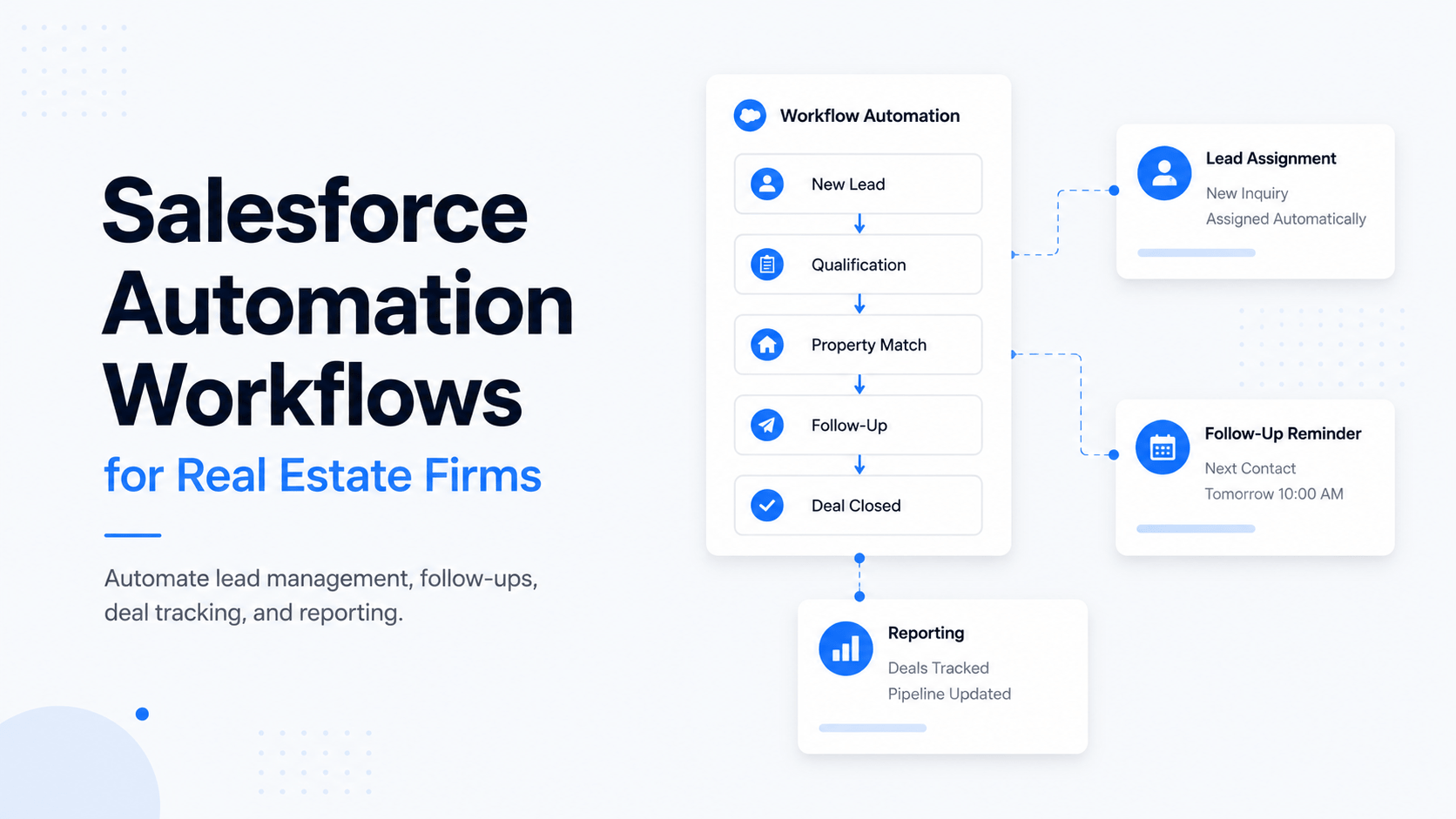
Salesforce Automation Workflows for Real Estate Firms
Salesforce automation workflows for real estate firms help teams reduce repetitive work, improve response times, and create a more organized operation. Whether you run a brokerage, investment firm, development company, or property management team, many daily tasks follow the same pattern. Leads need follow-ups. Deals need updates. Investors need reports. Team members need reminders.
The problem is that most of these activities are still handled manually.
Many real estate professionals spend hours each week updating CRM records, assigning tasks, tracking emails, and moving opportunities through the pipeline. These activities are necessary, but they do not directly generate revenue. Over time, manual processes create delays, inconsistencies, and missed opportunities.
This is where Salesforce automation becomes valuable.
Instead of relying on employees to remember every task, Salesforce can automate many routine processes. New leads can be assigned automatically. Follow-up emails can be triggered instantly. Deal stages can update based on activity. Reports can be delivered on schedule without manual effort.
For commercial real estate firms, automation is becoming a competitive advantage rather than a nice-to-have feature. As deal volume increases, firms need systems that can scale without adding unnecessary administrative work.
The goal is not to replace people. The goal is to remove repetitive tasks so brokers, analysts, asset managers, and operations teams can focus on higher-value work.
In this guide, you’ll learn what Salesforce automation workflows are, where they create the most impact, and how real estate firms can use them to improve productivity, consistency, and deal execution.
Table of Contents
ToggleKey AI & CRE Productivity Statistics
Technology adoption continues to reshape commercial real estate operations. Recent industry research shows why automation is becoming a priority for many firms.
McKinsey estimates generative AI could create between $110 billion and $180 billion in annual value across real estate-related activities.
PwC projects AI could contribute $15.7 trillion to the global economy by 2030.
Salesforce research shows sales professionals spend less than one-third of their time actively selling.
Deloitte reports that organizations adopting AI and automation often see measurable efficiency gains.
AI adoption among real estate professionals continues to increase as firms look for ways to improve productivity and reduce manual work.
These numbers point to a common challenge. Most professionals spend too much time on administration and not enough time on strategic work. Automation helps close that gap.
| Statistic | Industry Finding | Impact on Real Estate Firms |
|---|---|---|
| AI Value Creation | $110B–$180B annual potential | More efficient operations and decision-making |
| Global AI Growth | $15.7T projected economic impact | Increased investment in automation tools |
| Sales Productivity | Less than 30% of the time is spent selling | Opportunity to automate administrative tasks |
| AI Adoption | Growing across the real estate industry | Competitive advantage for early adopters |
| Operational Efficiency | Higher productivity reported by adopters | Faster workflows and reduced manual work |
Table: Industry Trends Driving Automation Adoption in Commercial Real Estate
What Are Salesforce Automation Workflows?
Salesforce Workflow Automation Explained
Salesforce workflow automation is a system that performs actions automatically when specific conditions are met.
Think of it as a digital process manager working behind the scenes.
For example, when a prospect submits a contact form, Salesforce can:
Create a new lead record
Assign the lead to the correct broker
Send a confirmation email
Create a follow-up task
Notify the sales team
Without automation, someone would need to complete each of these steps manually.
Salesforce workflows use predefined rules. When a trigger occurs, the system automatically performs the next action. This creates a consistent process and reduces the chance of human error.
How a Salesforce Automation Workflow Works
A single workflow can eliminate multiple manual tasks and improve response times.
How Automation Fits Real Estate Operations
Real estate businesses have many repetitive processes that are ideal for automation.
Lead Management
Every inquiry requires action. Automation can route leads, assign ownership, and track response times automatically.
Deal Management
As opportunities move through the pipeline, Salesforce can update records, assign tasks, and notify team members without manual input.
Investor Relations
Investment firms often send recurring project updates, fundraising communications, and performance reports. Many of these activities can be automated.
Property Operations
Lease expirations, maintenance requests, inspections, and tenant communications often follow predictable workflows that can be automated.
Executive Reporting
Instead of building reports manually every week, firms can generate dashboards and performance summaries automatically.
Workflow Automation vs AI Automation
Many professionals confuse workflow automation with AI automation, but they serve different purposes.
Workflow automation follows predefined rules.
For example:
“When a lead enters Salesforce, assign it to the broker covering that market.”
AI automation goes further by making recommendations or generating insights.
For example:
“Analyze historical deals and identify which leads are most likely to convert.”
Most firms should start with workflow automation first because it is easier to implement and delivers immediate operational improvements.
| Feature | Workflow Automation | AI Automation |
|---|---|---|
| Uses predefined rules | Yes | No |
| Learns from data | No | Yes |
| Easy to implement | High | Moderate |
| Best for repetitive tasks | Excellent | Good |
| Generates predictions | No | Yes |
| Creates content or summaries | No | Yes |
| Typical CRE Use Case | Lead routing and follow-ups | Lead scoring and market insights |
Table: Workflow Automation vs AI Automation in Salesforce
The most successful real estate firms use both approaches together. Workflow automation handles routine processes, while AI supports decision-making and analysis. When combined, they create a more efficient and scalable operation.
Why Real Estate Firms Need Salesforce Automation Workflows
Real estate is a relationship-driven business. Success depends on responding quickly, staying organized, and keeping deals moving forward. However, many firms still rely on manual processes to manage leads, update CRM records, track transactions, and communicate with clients.
As deal volume grows, those manual processes become harder to manage. Small inefficiencies start adding up. A missed follow-up can cost a new client. An outdated pipeline can lead to inaccurate forecasts. A delayed investor update can create unnecessary concerns.
This is why more firms are investing in Salesforce automation workflows for real estate firms. Automation helps teams create repeatable processes that improve consistency, reduce administrative work, and make operations more scalable.
The goal is not to replace people. The goal is to eliminate repetitive tasks so teams can spend more time building relationships, closing deals, and serving clients.
Automation is not just about saving a few minutes. Large real estate organizations are already using AI and automation to eliminate repetitive operational work. This example shows what that can look like in practice.
Common Manual Processes Slowing Teams Down
Most real estate firms deal with the same operational challenges.
A broker receives a new inquiry but forgets to update the CRM. An analyst finishes underwriting but does not notify the acquisitions team. An investor update gets delayed because data must be collected from multiple sources.
These situations happen every day.
Some of the most common manual processes include:
Assigning leads to brokers
Sending follow-up emails
Updating opportunity stages
Creating reminders for important milestones
Tracking due diligence tasks
Scheduling meetings
Preparing investor reports
Managing lease and contract deadlines
Each task may seem small on its own. Together, they can consume hours every week.
Operational Bottlenecks Automation Solves
Automation is most valuable when it removes bottlenecks that slow down business operations.
Slow Lead Response Times
Response speed often determines whether a prospect becomes a client.
Without automation, new inquiries may sit in a shared inbox until someone notices them. During that delay, the prospect may contact another firm.
Automated workflows can instantly:
Capture inquiries
Create lead records
Assign ownership
Notify the appropriate team member
Trigger follow-up actions
This creates a faster and more consistent experience.
Inconsistent Follow-Up
Many firms have talented brokers but inconsistent processes.
One broker may follow up immediately. Another may wait several days. Some leads receive multiple touchpoints while others receive none.
Automation standardizes follow-up activity and ensures every prospect enters a structured process.
Poor Visibility Into Active Deals
Managers need accurate information to make decisions.
When employees forget to update records, leadership loses visibility into:
Active opportunities
Deal stages
Team performance
Revenue forecasts
Automation helps maintain cleaner and more reliable CRM data.
Reporting Delays
Many firms still spend hours preparing weekly or monthly reports.
Data is pulled from spreadsheets, emails, and multiple software platforms before being combined into a report.
Automated dashboards provide real-time visibility without requiring constant manual updates.
The Cost of Not Automating
Many firms focus on the cost of software while overlooking the cost of inefficiency.
The bigger risk is often the money lost through missed opportunities and wasted time.
When processes remain manual, firms commonly experience:
Lost leads
Delayed responses
Incomplete CRM records
Duplicate work
Poor forecasting
Inconsistent client experiences
Reduced employee productivity
Over time, these issues can have a much larger financial impact than the cost of automation itself.
| Manual Process | Common Challenge | Automated Outcome |
|---|---|---|
| Lead Assignment | Slow response times | Immediate routing to the right broker |
| Follow-Up Emails | Missed opportunities | Consistent communication sequences |
| Pipeline Updates | Outdated CRM data | Real-time opportunity tracking |
| Investor Reporting | Time-consuming preparation | Scheduled updates and dashboards |
| Task Management | Forgotten responsibilities | Automatic reminders and assignments |
| Due Diligence Tracking | Process delays | Structured workflow management |
Table: How Salesforce Automation Reduces Common Operational Bottlenecks
Before vs After Productivity Comparison
The impact of automation becomes easier to understand when comparing daily operations.
| Before Automation | After Automation |
|---|---|
| Leads assigned manually | Leads assigned instantly |
| Follow-ups depend on memory | Follow-ups run automatically |
| CRM updates are often delayed | Records update in real time |
| Reports require manual preparation | Dashboards update automatically |
| Tasks managed through emails | Tasks assigned through workflows |
| Managers request status updates | Teams access live pipeline data |
Table: Before and After Salesforce Workflow Automation
The difference is not just about saving time. Automation creates a more predictable operation. Processes become easier to scale, managers gain better visibility, and teams spend less time on administrative work.
What Salesforce Automation Replaces
Most firms don't need more staff. They need fewer manual processes.
Manual Workflow
Automated Workflow
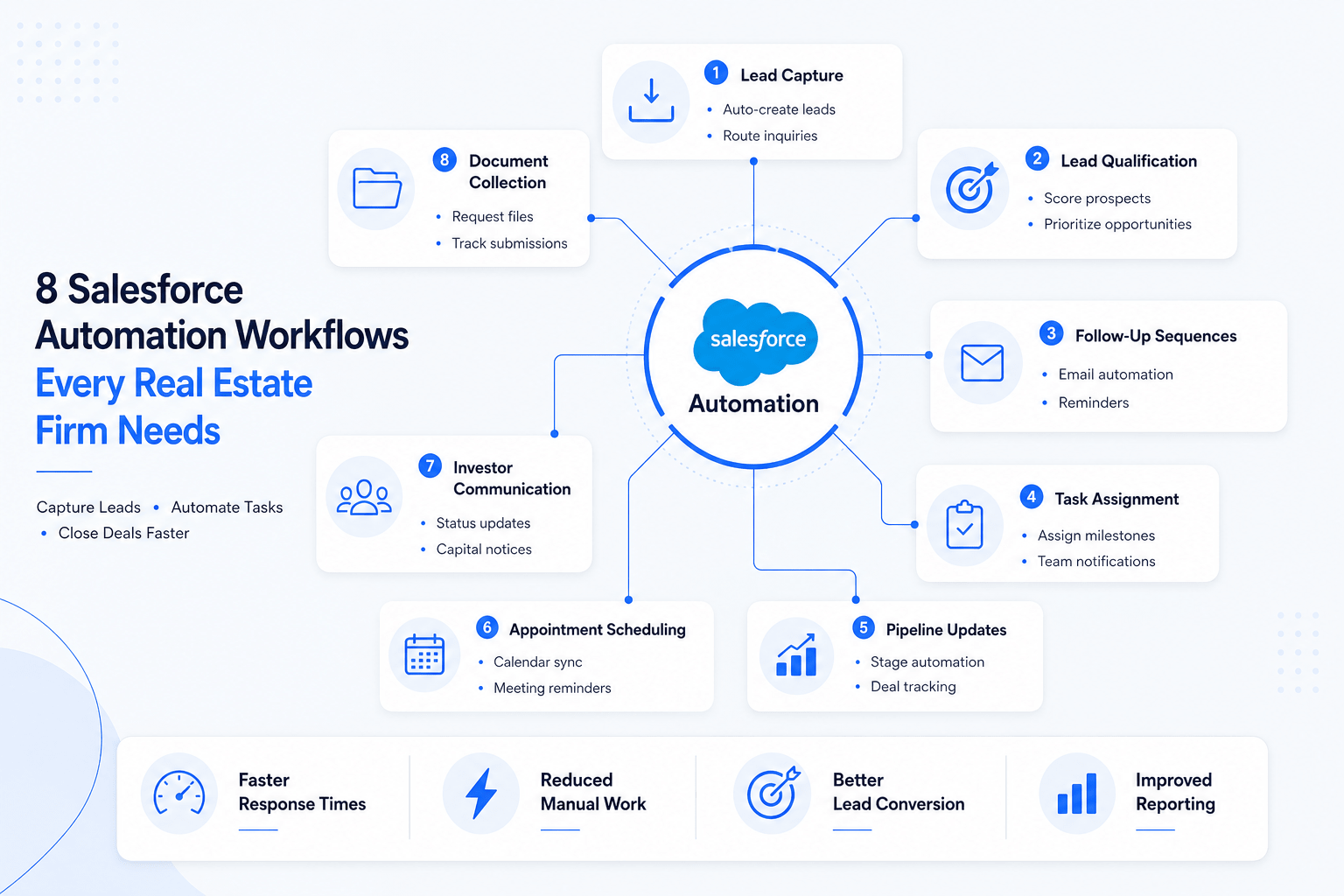
Core Salesforce Automation Workflows Every Real Estate Firm Should Build
Not every automation delivers the same value.
Some workflows produce immediate improvements and should be implemented first. These foundational automations help firms improve efficiency without making the system overly complicated.
Automated Lead Capture and Routing
Every lead should enter Salesforce automatically.
Whether inquiries come from a website, landing page, property listing, referral source, or marketing campaign, the process should be seamless.
An effective workflow can:
Create a lead record
Assign ownership
Notify the assigned broker
Trigger the first follow-up action
This reduces response times and prevents leads from being overlooked.
Automated Lead Qualification
Not every inquiry has the same value.
Lead qualification workflows help teams focus their efforts on the most promising opportunities.
Leads can be categorized based on:
Property type
Investment criteria
Market location
Company size
Budget range
Engagement history
This allows firms to prioritize high-value opportunities while still maintaining communication with lower-priority prospects.
Automated Follow-Up Sequences
Consistent follow-up is one of the simplest ways to improve conversion rates.
Salesforce workflows can automatically send:
Welcome emails
Property information
Meeting confirmations
Reminder emails
Re-engagement messages
Instead of relying on memory, firms create a repeatable communication process.
Automated Task Assignment
Commercial real estate transactions often involve multiple people.
As a deal progresses, new tasks need to be assigned to brokers, analysts, legal teams, marketing staff, or operations personnel.
Automation ensures tasks are assigned immediately when key milestones occur.
Examples include:
Property tours completed
Letters of intent submitted
Contracts executed
Due diligence initiated
Financing milestones reached
Automated Deal Pipeline Updates
A CRM is only valuable when the data remains accurate.
Automation can update opportunity stages when predefined actions occur.
For example:
Proposal sent
Meeting completed
Contract received
Due diligence started
Deal closed
This improves reporting accuracy and provides management with a more reliable view of the pipeline.
Automated Appointment Scheduling
Scheduling can create unnecessary administrative work.
Salesforce integrations can automate:
Meeting bookings
Calendar updates
Confirmation emails
Reminder notifications
Follow-up tasks
This reduces friction for both clients and team members.
Automated Investor Communication
Investment firms often spend significant time providing updates to investors and capital partners.
Automated workflows can support:
Project progress updates
Reporting schedules
Capital call reminders
Distribution notices
Portfolio summaries
Consistent communication improves transparency and saves valuable time.
Automated Reporting and Dashboards
Leadership teams need visibility into business performance.
Salesforce can automatically generate dashboards that track:
Lead volume
Conversion rates
Pipeline value
Broker activity
Marketing performance
Investor engagement
Instead of waiting for reports, managers can access live data whenever needed.
In addition, firms looking to improve reporting can explore how to build custom CRM dashboards that provide real-time visibility into leads, deals, and team performance.
Automated Document Collection
Many transactions require contracts, financial documents, due diligence materials, and compliance records.
Automated workflows can:
Request documents
Track submission status
Send reminders
Notify stakeholders when files are received
This reduces delays and helps keep transactions organized.
Essential Salesforce Automations to Prioritize First
If your firm is just getting started with automation, focus on these workflows before moving to more advanced use cases:
Lead capture automation
Lead routing automation
Lead qualification automation
Follow-up email automation
Task assignment automation
Pipeline management automation
Appointment scheduling automation
Investor communication automation
Reporting automation
Document collection automation
These workflows typically deliver the fastest return on investment while creating a strong foundation for future Salesforce initiatives.
See How Commercial Real Estate Firms Are Using Automation Today
Many real estate firms know they need automation, but they struggle to identify which workflows actually deliver results. The most successful teams start with practical, high-impact processes rather than trying to automate everything at once.
At AI for CRE Collective, members get access to real-world workflow examples, implementation guides, prompt libraries, tool recommendations, and automation systems built specifically for commercial real estate professionals. Instead of guessing what works, you can learn from proven processes already being used across brokerage, investment, development, and operations teams.
Stop Guessing Which Workflows Work
Join 700+ CRE professionals using real AI workflows, automation systems, prompt libraries, deal analysis frameworks, and implementation guides.
How Different Real Estate Firms Use Salesforce Automation Workflows
While the fundamentals of automation remain the same, the way Salesforce is used varies across different types of real estate businesses. A brokerage firm, investment company, and development group all have different priorities, but each can benefit from workflow automation.
The key is identifying repetitive processes that occur frequently and building workflows around them.
Brokerage Firms
Brokerage teams often manage large volumes of inquiries, meetings, property tours, and follow-up activities. As transaction volume increases, manual processes become difficult to maintain consistently.
Common Salesforce workflows for brokerage teams include:
Automatic lead assignment
Property inquiry follow-ups
Meeting and tour reminders
Opportunity stage updates
Broker task notifications
Client communication tracking
These workflows help ensure every prospect receives timely communication while giving managers better visibility into the sales pipeline.
Real Estate Investment Firms
Investment firms typically evaluate numerous opportunities before selecting a small number for acquisition. Managing this process manually can slow decision-making and create unnecessary administrative work.
Salesforce automation can help with:
Deal intake and opportunity creation
Underwriting task management
Due diligence tracking
Investment committee approvals
Investor communications
Acquisition pipeline reporting
Instead of relying on spreadsheets and email chains, firms can create a centralized process that improves efficiency and accountability.
Development Companies
Development projects often involve multiple stakeholders, long timelines, and hundreds of individual tasks.
Salesforce workflows can help developers manage:
Site acquisition milestones
Entitlement tracking
Consultant coordination
Construction progress updates
Capital partner reporting
Internal project communications
By automating notifications and task assignments, development teams can reduce delays and improve project visibility.
Property Operations Teams
Property management and operations teams handle many recurring processes that follow predictable patterns.
Common automation opportunities include:
Maintenance request tracking
Vendor coordination
Lease expiration reminders
Inspection scheduling
Tenant communications
Service request follow-ups
These workflows improve response times while reducing administrative overhead.
How to Implement Salesforce Automation Workflows in 24 Hours
Many real estate firms delay automation because they assume implementation will take weeks or months. While large CRM projects can become complex, many high-impact workflows can be planned and launched within a single day.
The key is starting with simple processes that deliver immediate value. For a broader look at how automation can connect multiple CRE processes together, see our AI workflow automation guide, which breaks down practical workflow examples used across commercial real estate teams.
24-Hour Automation Sprint
Audit
Map Workflow
Build
Test
Launch
Step 1: Identify Repetitive Tasks
Begin by looking for activities that happen repeatedly throughout the week.
Ask questions such as:
Which tasks consume the most time?
Which activities follow the same process every time?
Where do delays commonly occur?
Which tasks are frequently forgotten?
For most firms, the answers often include lead assignment, follow-up emails, task creation, and reporting.
Avoid trying to automate everything at once. Focus on a few high-impact processes first.
Step 2: Map the Current Process
Before building any workflow, document how the process currently works.
For example:
Lead submits inquiry.
Broker receives email.
Broker updates CRM.
Broker sends follow-up.
Manager reviews activity.
Once the process is visible, it becomes easier to identify opportunities for automation.
Many firms discover unnecessary steps during this exercise.
Step 3: Define Workflow Triggers
Every automation begins with a trigger.
Common Salesforce triggers include:
New lead created
Form submission received
Meeting completed
Opportunity stage changed
Document uploaded
Lease expiration approaching
When the trigger occurs, Salesforce performs the next action automatically.
Step 4: Build Simple Automations First
The most successful implementations start small.
Good first workflows include:
Lead routing
Follow-up emails
Task creation
Appointment reminders
Pipeline updates
These automations are relatively easy to configure and often generate immediate productivity improvements.
Step 5: Test Before Launching
Many automation problems occur because workflows are never tested properly.
Before launching:
Verify notifications are sent correctly.
Confirm tasks are assigned to the right people.
Check email sequences.
Review reporting accuracy.
Test multiple scenarios.
A few minutes of testing can prevent significant issues later.
Step 6: Measure Results
Automation should improve measurable outcomes.
Track metrics such as:
Lead response times
Follow-up completion rates
Pipeline accuracy
Task completion rates
Time spent on administrative work
These metrics help determine whether workflows are producing meaningful improvements.
| Implementation Stage | Primary Goal |
|---|---|
| Process Audit | Identify repetitive work |
| Workflow Mapping | Document current process |
| Trigger Selection | Define automation events |
| Workflow Creation | Build core automations |
| Testing | Verify accuracy |
| Performance Tracking | Measure results |
Table: Six-Step Salesforce Automation Implementation Framework
Start Small and Expand Gradually
One of the biggest mistakes firms make is trying to automate every process immediately.
Complex workflows often create confusion, reduce CRM adoption, and become difficult to maintain.
Instead, focus on one or two processes that create immediate value. Once those workflows are performing well, additional automations can be added over time.
Firms that take this approach typically see faster adoption, better data quality, and stronger long-term results.
Tools That Actually Work vs Hype
Not every Salesforce automation tool delivers the same value. Many real estate firms purchase software before understanding the problem they are trying to solve. The result is often a collection of expensive tools that add complexity instead of efficiency.
Before investing in additional software, focus on building strong workflows inside Salesforce. Once those processes are working, integrations can help expand functionality.
Salesforce Flow
Salesforce Flow is the primary automation tool built into Salesforce. It allows firms to automate tasks, notifications, approvals, record updates, and business processes without extensive coding.
For most real estate firms, Salesforce Flow should be the starting point because it is already part of the Salesforce ecosystem.
Best for:
Lead routing
Task assignment
Pipeline updates
Approval workflows
Notifications
Zapier
Zapier connects Salesforce with thousands of third-party applications.
Many CRE firms use Zapier to connect:
Website forms
Email marketing platforms
Calendar systems
Document management tools
Communication platforms
Zapier is often the easiest solution for connecting systems without custom development.
Make
Make offers similar to functionality to Zapier, but provide more advanced workflow customization.
It works well for firms managing complex multi-step automations involving several applications.
Best for:
Advanced workflow logic
Multi-system automations
Data synchronization
Custom integrations
DocuSign
Commercial real estate transactions involve a large number of documents and approvals.
Integrating DocuSign with Salesforce helps automate:
Signature requests
Contract approvals
Status updates
Document tracking
This reduces manual follow-up and improves transaction visibility.
Slack
Many firms struggle with internal communication during active transactions.
Salesforce and Slack integrations can automatically notify team members when:
New opportunities are created
Deal stages change
Documents are uploaded
Approvals are required
This helps teams stay informed without constantly checking the CRM.
| Tool | Best Use Case | Complexity | Recommended For |
|---|---|---|---|
| Salesforce Flow | Core workflow automation | Low | All real estate firms |
| Zapier | Connecting external apps | Low | Small and mid-sized teams |
| Make | Advanced automation workflows | Medium | Growing firms |
| DocuSign | Document approvals and signatures | Low | Transaction-heavy teams |
| Slack | Internal notifications and collaboration | Low | Teams with multiple stakeholders |
Table: Popular Salesforce Automation Tools for Real Estate Firms
Focus on Workflows Before Software
One of the biggest mistakes firms make is searching for new tools before improving their processes.
A poorly designed workflow remains inefficient even when powered by expensive software.
The firms that achieve the best results typically start by fixing their process, then use automation tools to support it. Technology should improve a workflow, not compensate for a broken one.
What Most Real Estate Firms Get Wrong About Salesforce Automation
Salesforce automation can improve productivity, but only when it is implemented correctly. Many firms invest in automation, expecting immediate results, only to discover that their workflows create new problems instead of solving existing ones.
In most cases, the issue is not the technology. The issue is the process behind it.
Automating a Broken Process
One of the most common mistakes is automating an inefficient workflow.
For example, if a lead management process already contains unnecessary steps, automation will simply make those unnecessary steps happen faster.
Before building any workflow, review the process carefully and remove activities that do not add value.
The best automations simplify operations rather than add complexity.
Building Too Much Too Soon
Many firms try to automate every process at once.
This approach often leads to:
Confusing workflows
User frustration
Poor CRM adoption
Difficult maintenance
Instead, start with a few high-impact automations such as lead routing, follow-up sequences, and task assignments. Once those workflows perform consistently, expand gradually.
Ignoring Data Quality
Automation depends on accurate data.
If CRM records are incomplete, outdated, or inconsistent, workflows will not perform as expected.
Common data issues include:
Duplicate contacts
Missing fields
Incorrect opportunity stages
Incomplete company information
Maintaining clean data is just as important as building the workflow itself.
Focusing on Activity Instead of Outcomes
Many firms measure how many automations they have built rather than the results those automations generate.
The goal is not to create more workflows.
The goal is to improve:
Lead response times
Conversion rates
Pipeline visibility
Team productivity
Client experience
Every workflow should support a measurable business objective.
Forgetting About User Adoption
Even the best automation strategy can fail if employees do not use the system consistently.
Team members should understand:
Why the workflow exists
How it helps them
What actions are still required from them
When employees see automation as a tool that saves time rather than creates extra work, adoption improves significantly.
The Most Successful Approach
The most successful real estate firms take a practical approach to automation.
They start with simple workflows, focus on clear business outcomes, maintain clean data, and continuously improve their processes over time.
Automation is not a one-time project. It is an ongoing effort to make operations more efficient and scalable.
The firms winning with Salesforce are not the ones with the most automation. They are the ones with the fewest manual processes.
Conclusion
Salesforce automation workflows help real estate firms reduce administrative work, improve consistency, and create more efficient operations. Whether you operate a brokerage, investment company, development firm, or property management business, automation can streamline many of the repetitive tasks that consume valuable time.
The most effective strategy is to start small. Focus on workflows that deliver immediate value, such as lead routing, follow-up automation, task assignments, and pipeline management. As those processes mature, additional automations can be introduced to support more advanced business functions.
The firms gaining the most value from Salesforce today are not necessarily the ones with the most technology. They are the ones with the best processes. When automation supports a well-designed workflow, teams spend less time on administration and more time building relationships, evaluating opportunities, and growing the business.
Learn From Real CRE Automation Workflows
Many commercial real estate firms know they need automation, but are unsure where to begin. Instead of experimenting through trial and error, learn from workflows already being used by brokers, investors, developers, and operators.
Join the AI for CRE Collective to access real-world automation examples, implementation guides, workflow libraries, and practical AI tools built specifically for commercial real estate professionals.
Frequently Asked Questions
How do Salesforce automation workflows improve lead response times in real estate?
Salesforce automation workflows improve lead response times by eliminating manual lead assignment and follow-up tasks. When a prospect submits an inquiry, Salesforce can automatically create a lead record, assign it to the appropriate broker, send a confirmation email, and create follow-up reminders. This reduces delays that often occur when inquiries sit in inboxes waiting for manual review.
For commercial real estate firms, faster response times can improve client experience and increase conversion rates. Automation ensures every lead enters a structured process immediately after submission.
Which Salesforce workflows should real estate firms automate first?
Most firms should start with workflows that have the greatest impact on daily operations.
These typically include:
Lead capture automation
Lead routing automation
Follow-up email automation
Task assignment automation
Pipeline stage automation
Reporting automation
Starting with these workflows allows firms to improve efficiency quickly without creating unnecessary complexity.
Can Salesforce automation help commercial real estate brokers close more deals?
Salesforce automation does not close deals automatically, but it helps brokers spend more time on activities that generate revenue.
Automation reduces time spent on administrative work such as updating records, assigning tasks, and managing reminders. This allows brokers to focus on prospecting, relationship building, property tours, and negotiations.
Many firms also use automation to ensure consistent follow-up, which can improve conversion rates throughout the sales cycle.
What is the difference between Salesforce workflow automation and AI automation?
Workflow automation follows predefined rules. It performs actions automatically when specific conditions are met.
For example:
Assign a lead to a broker
Send a follow-up email
Update an opportunity stage
AI automation goes beyond rules by analyzing data and generating recommendations. It can identify high-priority leads, summarize conversations, and assist with decision-making.
Most real estate firms begin with workflow automation before introducing AI-powered features.
How long does it take to implement Salesforce automation workflows?
Implementation time depends on workflow complexity.
Simple automations such as lead routing, email notifications, and task creation can often be configured within a few hours. More advanced workflows involving multiple departments, integrations, and approval processes may require several weeks.
Most firms achieve the best results by launching a few high-impact workflows first and expanding gradually over time.
Can Salesforce automate investor communications?
Yes. Many investment firms use Salesforce automation to manage recurring investor communications.
Common examples include:
Project updates
Capital call reminders
Distribution notices
Quarterly reports
Fundraising communications
Automation improves consistency while reducing the time required to manage investor relationships manually.
What are the biggest mistakes real estate firms make with Salesforce automation?
The most common mistakes include:
Automating inefficient processes
Creating overly complex workflows
Ignoring data quality issues
Failing to train users
Measuring activity instead of business outcomes
Successful firms focus on simple workflows, clean data, and measurable operational improvements.
Is Salesforce automation useful for small real estate firms?
Yes. Small firms often benefit significantly because they have fewer resources available for administrative work.
Even basic workflows can save hours each week by automating lead management, follow-ups, task assignments, and reporting. Starting with a few simple automations can improve efficiency without requiring a large technology budget.
Which Salesforce integrations are most useful for real estate firms?
The most widely used integrations typically include:
Zapier for application connections
DocuSign for document approvals
Slack for team communication
Outlook or Gmail for email management
Calendar tools for scheduling
The best integration depends on the firm’s existing technology stack and operational requirements.
How do you measure the success of Salesforce automation workflows?
The effectiveness of automation should be measured using business outcomes rather than the number of workflows created.
Key metrics include:
Lead response time
Follow-up completion rate
Opportunity conversion rate
Pipeline accuracy
Time saved on administrative work
User adoption rates
When these metrics improve, automation is contributing real value to the organization.
