
Claude for Microsoft Word: The Complete Guide for CRE Professionals (2026)
Microsoft Word is still the center of commercial real estate documentation. Deals move through LOIs, leases, PSAs, broker agreements, lender term sheets, and operating agreements every day. Most of that work still happens inside .docx files. That is why Claude’s integration into Microsoft Word matters so much. With Claude Microsoft Word Workflows, CRE professionals can review documents, summarize leases, generate redlines, create structured abstracts, and draft legal correspondence directly inside Word without switching tabs or copying text between platforms.
For acquisitions teams, brokers, asset managers, attorneys, and operators, this changes how document-heavy workflows get handled. Instead of spending hours on first-pass reviews and repetitive drafting, teams can automate major portions of the process while still keeping full control through track changes and comments.
In cities like Austin, Miami, Los Angeles, and New York, where CRE deal volume and legal complexity continue to rise, faster document review has become a real competitive advantage.
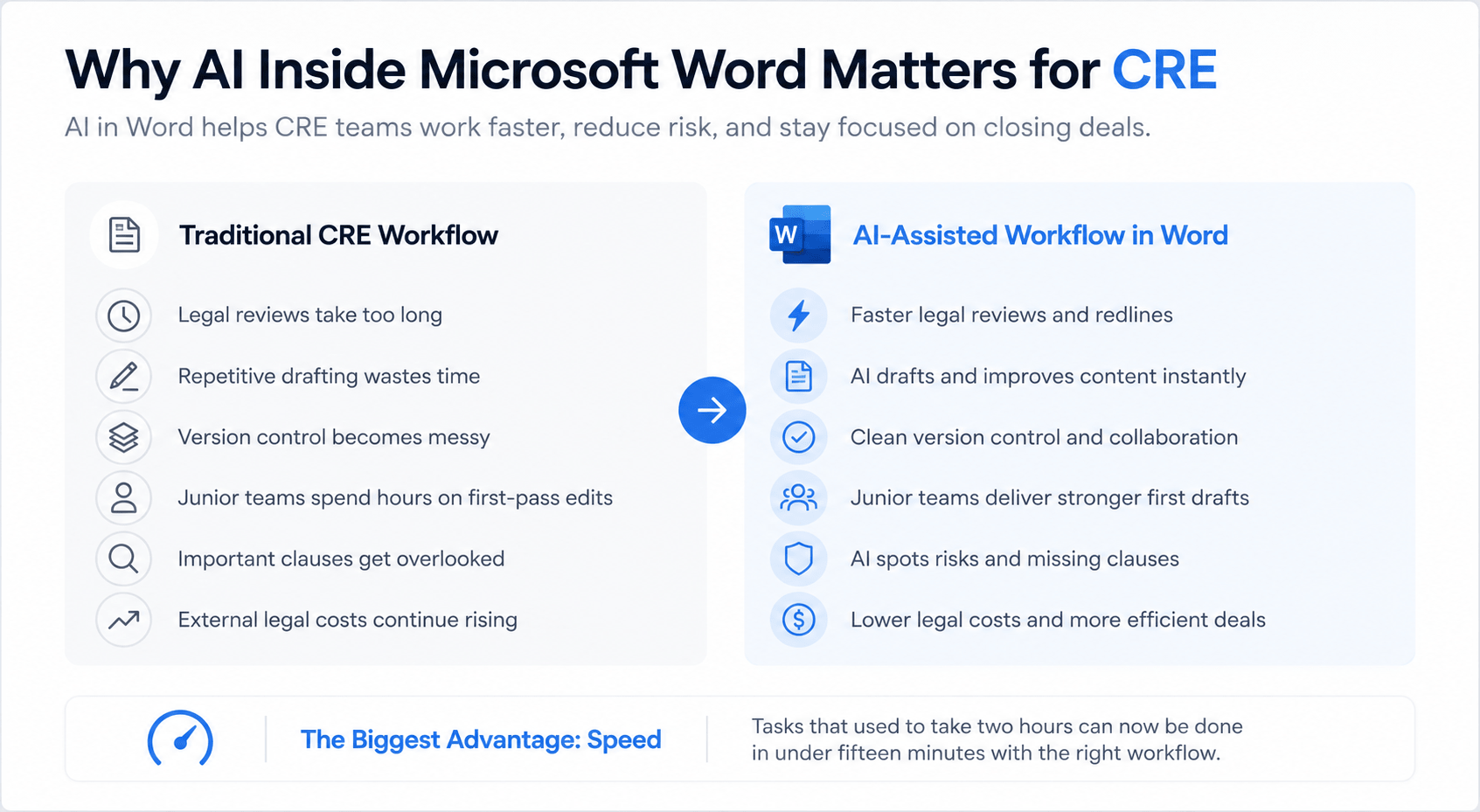
Why AI Inside Microsoft Word Matters for CRE
Commercial real estate is still heavily document-driven. Even with modern CRMs, underwriting systems, and deal management tools, most negotiations still happen through Word files and PDF markups.
That creates several operational problems:
-
Legal reviews take too long
-
Repetitive drafting wastes time
-
Version control becomes messy
-
Junior teams spend hours on first-pass edits
-
Important clauses get overlooked
-
External legal costs continue rising
AI inside Word directly addresses those pain points.
Instead of exporting files to another AI platform, CRE teams can now work inside the same environment they already use daily.
Traditional CRE Workflow vs AI-Assisted Workflow
The biggest advantage is speed.
A task that previously required two hours can often be completed in under fifteen minutes with the right workflow. A task that previously required two hours can often be completed in under fifteen minutes with the right workflow.
What Claude for Microsoft Word Actually Is
Claude for Microsoft Word is an official Microsoft Office add-in that embeds Anthropic’s Claude models directly into Word.
Once installed, Claude appears as a side panel inside documents.
Users can interact with the AI while editing files in real time.
Core Features Included
The platform supports several high-value capabilities for CRE teams.
Claude supports several high-value capabilities for CRE teams.
-
Track changes integration
-
Inline comments
-
Large context windows
-
Document summaries
-
Custom skills
-
Multi-model access
-
File context uploads
Unlike basic AI chat tools, Claude can directly interact with the live Word document.
That means:
-
Redlines appear instantly
-
Comments attach to clauses
-
Formatting stays intact
-
Review workflows remain familiar
-
Teams keep version history
This makes adoption easier for legal and real estate professionals who already rely on Word-based negotiation systems.
How to Install Claude in Microsoft Word
Installation is straightforward and usually takes less than a minute.
Step-by-Step Installation Process
Step 1: Open Microsoft Word
You can use either:
-
Word Desktop
-
Word for Mac
-
Word Online
Step 2: Open the Add-In Store
In Word Desktop:
-
Navigate to the Home tab
-
Click Add-ins
In Word Online:
-
Open the Insert tab
-
Click Add-ins
Step 3: Search for Claude
Search for “Claude” in the Microsoft Add-In Store.
Step 4: Install the Add-In
Click Add.
The integration installs automatically.
Step 5: Sign in to Your Anthropic Account
Use your Claude credentials.
Most CRE professionals will need at least the Pro plan for regular production work.
Step 6: Approve Permissions
Claude requires:
-
Read access
-
Edit permissions
-
Document interaction approval
After setup, Claude remains available in future Word sessions.
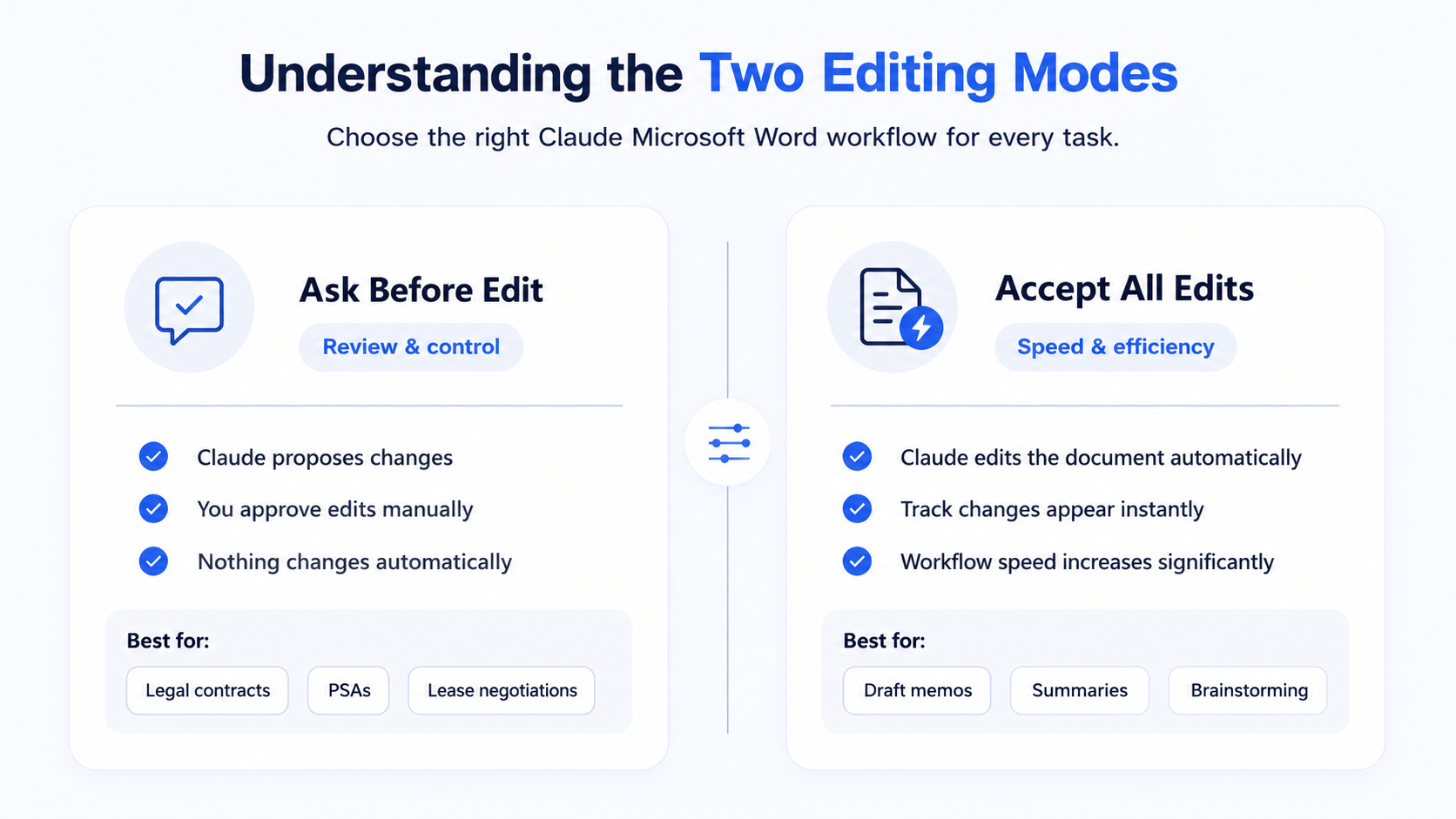
Understanding the Two Editing Modes
One of the most important parts of the Claude Microsoft Word Workflows is choosing the right editing mode. Claude currently operates in two primary modes.
Ask Before Edit Mode
In this mode:
-
Claude proposes changes first
-
Users approve edits manually
-
Nothing changes automatically
-
Review remains highly controlled
This is the preferred workflow for:
-
Legal contracts
-
PSAs
-
Lease negotiations
-
Partnership agreements
-
Lender documents
Accept All Edits Mode
In this mode:
-
Claude edits the document automatically
-
Track changes appear instantly
-
Workflow speed increases significantly
-
Manual approvals are minimized
This mode works best for:
-
Draft memos
-
Internal summaries
-
Brainstorming
-
Marketing content
-
Preliminary reviews
Recommended Workflow Strategy
For binding contracts and high-risk legal agreements, approval mode is the safest option because users can manually review every edit before changes appear in the document. For internal memos, marketing drafts, and preliminary summaries, automatic edits can dramatically improve workflow speed.
And for CRE legal work, most teams should begin with manual approval mode until they understand how Claude handles their preferred language and formatting style.
Best CRE Use Cases for Claude Inside Word
This is where the tool becomes genuinely valuable. Not every workflow benefits equally from AI. However, several CRE processes see immediate productivity gains.
LOI Redlining Workflows
LOI review is arguably the strongest use case.
Commercial real estate LOIs often follow familiar structures:
-
Earnest money
-
Due diligence timelines
-
Financing contingencies
-
Extension rights
-
Default remedies
-
Closing conditions
Claude can review these sections quickly and produce a structured first-pass markup.
What Claude Commonly Improves
| Clause Area | Typical AI Adjustment |
|---|
| Earnest Money | Tightens release schedule |
| Inspection Period | Shortens buyer flexibility |
| Financing Contingencies | Removes broad escape clauses |
| Extensions | Limits automatic rights |
| Remedies | Clarifies defaults |
| Closing Timeline | Adds enforcement language |
For seller-side negotiations, this creates major time savings. For buyers, Claude can expand protections and strengthen contingency structures.
Why This Matters
Attorneys often spend expensive billable hours making repetitive first-pass edits.
AI can reduce those hours significantly.
The attorney then focuses on:
-
Negotiation strategy
-
High-risk clauses
-
Custom deal terms
-
Jurisdictional concerns
That creates a more efficient legal process overall.
Lease Abstract Creation
Lease abstraction is another major opportunity. Large office, retail, and industrial leases can exceed 100 pages. Extracting terms manually is time-consuming and error-prone.
Claude can rapidly identify:
-
Base rent
-
Escalations
-
Recovery structures
-
Renewal options
-
Tenant rights
-
Security deposits
-
Guaranties
-
CAM structures
-
Exclusivity clauses
Example Lease Abstract Workflow
In a traditional workflow, analysts manually review leases, build spreadsheets, extract clauses, and organize business terms. Claude accelerates that process by generating structured summaries almost instantly.
This is especially valuable for:
-
Acquisitions teams
-
Asset managers
-
Leasing teams
-
Due diligence analysts
-
Property management firms
NDA and Confidentiality Agreement Reviews
NDAs follow relatively standardized patterns. That makes them highly suitable for AI-assisted review.
Claude can quickly identify:
-
Overly broad confidentiality definitions
-
Excessive term lengths
-
Geographic restrictions
-
Residual knowledge of language
-
One-sided obligations
-
Disclosure exceptions
Common NDA Risks AI Can Flag
-
Unreasonable survival periods
-
Broad non-compete language
-
Weak carve-outs
-
Undefined confidential information
-
Unlimited liability structures
Instead of reviewing every line manually, teams can focus on flagged sections. This dramatically speeds up transaction preparation.
Broker Engagement Letter Reviews
Broker agreements often contain hidden risks. Commission structures, exclusivity terms, and tail periods can create expensive obligations later.
Claude can identify:
-
Long tail provisions
-
Unclear commission triggers
-
Excessive exclusivity terms
-
Ambiguous expense reimbursements
-
Protection period risks
Areas Worth Reviewing Carefully
| Provision | Potential Risk |
| Tail Clauses | Future commissions owed |
| Exclusivity | Limited broker flexibility |
| Expense Reimbursement | Hidden marketing costs |
| Protection Lists | Long-term liability |
| Commission Timing | Early trigger events |
These issues are commonly overlooked during early negotiations.
PSA First-Pass Reviews
Purchase and Sale Agreements contain far more complexity than LOIs. Claude should not replace attorneys for final reviews.
However, it works extremely well for:
-
Initial cleanup
-
Issue spotting
-
Clause summarization
-
Identifying unusual provisions
-
Comparing revisions
Strong PSA Use Cases
-
Timeline analysis
-
Contingency review
-
Notice requirement summaries
-
Closing obligation extraction
-
Seller representation analysis
This allows attorneys to focus on the highest-value negotiation points rather than repetitive drafting.
CRE Correspondence and Letter Drafting
Commercial real estate generates constant written communication.
Claude can rapidly draft:
-
Default notices
-
Tenant notices
-
Broker follow-ups
-
Lease negotiation responses
-
Deal update memos
-
Investor summaries
-
Due diligence requests
Why This Improves Productivity
Most CRE professionals repeatedly rewrite similar communications. AI reduces repetitive drafting work while preserving consistency. Teams can also build reusable prompt templates for:
-
Acquisition updates
-
Leasing summaries
-
Lender responses
-
Legal notices
That standardizes communication quality across the organization.
The Best Claude Prompts for CRE Professionals
Prompt quality heavily affects results. Well-structured prompts create stronger legal and operational output.
Seller-Side LOI Prompt
Use this framework:
“You are my real estate attorney representing the seller of a commercial property. Review this LOI line by line and redline it in the seller’s favor. Tighten earnest money, shorten due diligence, remove financing contingencies, reduce extension rights, and strengthen seller remedies. Add comments explaining each strategic change.”
Buyer-Side LOI Prompt
This approach works well:
“You are my real estate attorney representing the buyer of a commercial property. Review this LOI and strengthen buyer protections, expand contingencies, soften closing requirements, and improve due diligence rights. Add comments explaining each edit.”
Lease Abstract Prompt
A strong abstraction prompt includes:
-
Tenant name
-
Rent structure
-
Escalations
-
Recovery methods
-
Guaranties
-
Options
-
Defaults
-
Assignment rights
The more structured the request, the better the resulting summary.
Real Example: Redlining a 15-Page LOI
A practical test highlights how efficient these workflows can become.
Initial Setup
Setup required:
-
Opening the document
-
Launching Claude
-
Selecting Opus mode
-
Enabling track changes
Total setup time: roughly 30 seconds.
What Claude Did Automatically
Claude:
-
Enabled track changes
-
Generated a redline summary
-
Identified negotiation priorities
-
Added clause-by-clause comments
-
Structured edits logically
-
Summarized key negotiation points
Clauses That Were Improved
Claude tightened several major negotiation areas during the review process.
-
Earnest money protections increased
-
Inspection periods became shorter
-
Financing contingencies were removed
-
Extension rights were limited
-
Seller remedies became stronger
-
Buyer carve-outs were reduced
Overall Results
The review was completed in under ten minutes. The markup quality resembled a mid-level associate attorney handling a standard first-pass review.
Was it perfect?
No.
But it significantly accelerated the legal workflow.
Limitations of Claude for Word
Despite its strengths, AI still has serious limitations. Understanding those limitations is critical.
Hallucination Risks
Legal wording matters. Small language changes can completely alter contractual meaning.
Examples include:
-
“May” vs “shall.”
-
“Including” vs “including without limitation.”
-
Timing definitions
-
Notice obligations
AI occasionally changes wording in ways that appear correct but create legal exposure. That is why human review remains essential.
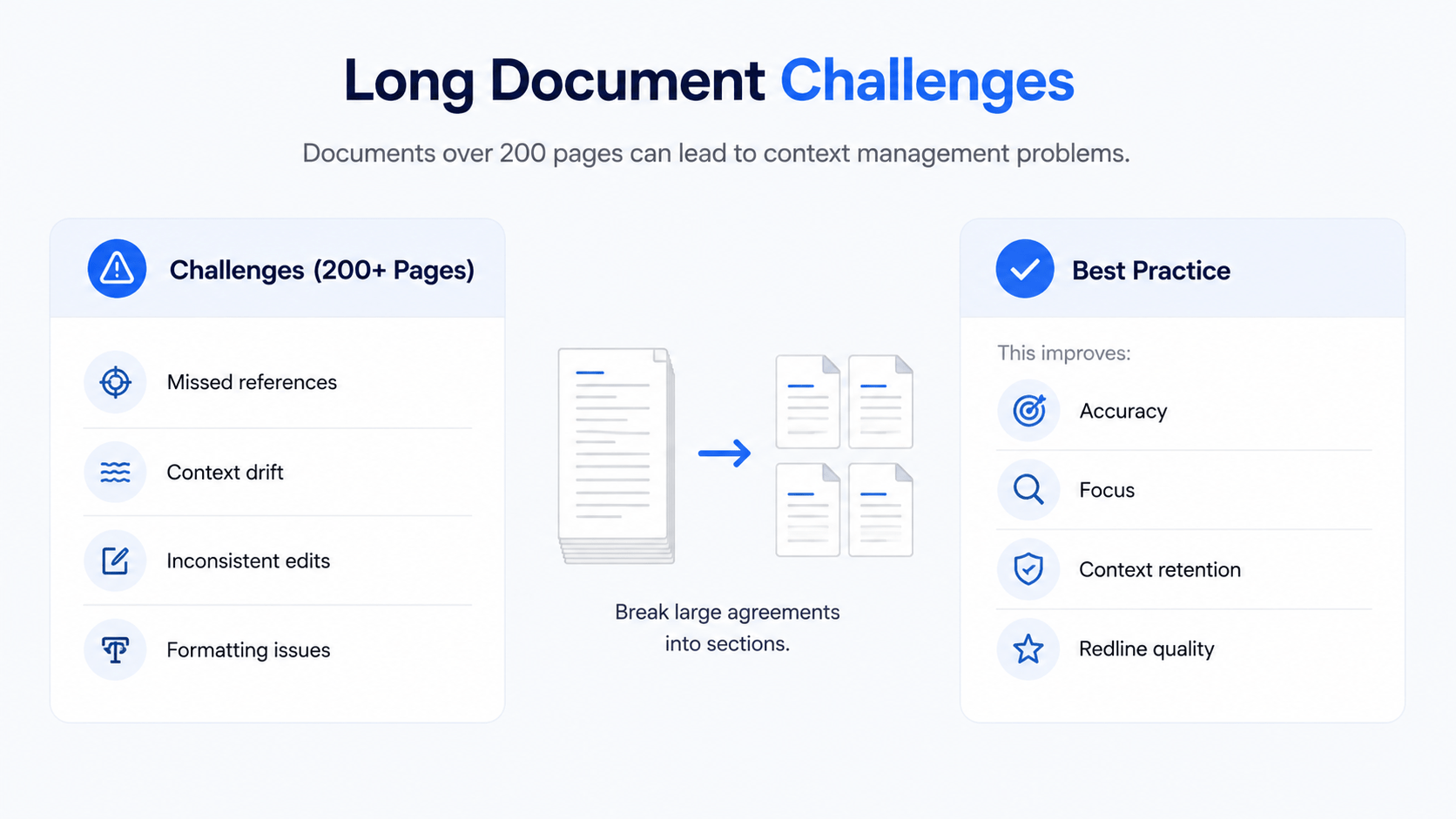
Long Document Challenges
Very large agreements can still create context management problems.
Documents exceeding 200 pages may cause:
-
Missed references
-
Context drift
-
Inconsistent edits
-
Formatting issues
Best Practice
Break extremely large agreements into sections.
This improves:
-
Accuracy
-
Focus
-
Context retention
-
Redline quality
Formatting and Redline Issues
Sometimes AI-generated markups become visually messy.
Examples include:
-
Overlapping redlines
-
Repeated comments
-
Formatting inconsistencies
-
Spacing problems
Fortunately, Word’s built-in formatting tools usually resolve these issues quickly.
Why AI Still Cannot Replace Attorneys
This point matters. AI is a productivity tool. It is not a replacement for legal counsel.
Experienced CRE attorneys still provide:
-
Negotiation strategy
-
Jurisdictional expertise
-
Risk assessment
-
Litigation awareness
-
Custom structuring advice
The best use case is collaboration between AI and professionals. AI handles repetitive groundwork. Attorneys focus on strategic judgment.
Claude Pricing and Plan Structure
Pricing varies depending on usage level.
Current Plan Overview
The free version works best for testing and light experimentation. Claude Pro is usually sufficient for individual CRE professionals handling regular document review.
Claude Max becomes more useful for acquisitions teams and organizations processing large volumes of contracts and legal documents every week. Enterprise plans support larger organizations that need stronger permissions, compliance controls, and centralized administration.
High-volume legal and acquisitions teams often benefit most from larger context limits and expanded usage capacity.
Best Practices for Claude Microsoft Word Workflows
The highest-performing teams follow consistent AI workflows. In addition, many CRE operators are now building repeatable AI workflow systems that standardize underwriting, lease analysis, and document review across their teams.
Start With Approval Mode
Always test new document types carefully.
Before enabling automatic edits:
-
Review Claude’s behavior
-
Understand formatting patterns
-
Confirm legal language quality
-
Build internal standards
This reduces operational risk.
Save Reusable Skills and Prompts
One of the biggest productivity advantages comes from reusable workflows.
Examples include:
-
Standard LOI reviews
-
Lease abstraction templates
-
NDA workflows
-
Broker agreement reviews
-
Deal summary generation
Over time, firms build internal AI libraries.
That compounds efficiency gains.
Use Context Connectors Strategically
Claude performs better when it understands:
-
Company standards
-
Existing templates
-
Internal clause preferences
-
Historical deal structures
Connecting internal resources improves consistency significantly.
Generate Summaries Before Editing
This is one of the smartest workflows.
Before asking Claude to redline:
-
Request a strategic summary
-
Review negotiation priorities
-
Identify directional issues
-
Confirm objectives
This prevents large-scale editing mistakes.
The Future of AI Inside CRE Software
The larger trend is clear. AI is moving directly into operational tools. This video expands on how Claude is moving beyond Word into underwriting and financial analysis workflows that CRE professionals use every day.
Instead of separate AI platforms, professionals will increasingly use AI inside:
-
Word
-
Excel
-
Outlook
-
CRM systems
-
Lease management platforms
-
Underwriting software
For teams exploring broader AI adoption, these Claude workflows for CRE teams show how AI is moving directly into underwriting, document review, and operational systems across commercial real estate.
Why This Changes CRE Operations
The firms that adopt AI-native workflows earlier will likely gain:
-
Faster execution
-
Lower administrative costs
-
Better responsiveness
-
More scalable operations
-
Improved internal efficiency
That competitive gap may widen quickly over the next few years.
Conclusion
Claude inside Microsoft Word represents one of the most practical AI applications currently available for commercial real estate professionals. The value is not theoretical. It directly improves workflows that consume massive amounts of time every week.
From LOI redlining to lease abstraction and broker agreement review, AI can now automate large portions of repetitive legal and operational work while preserving familiar Word-based workflows. The key is using the technology correctly. AI should accelerate professionals, not replace them.
Firms that combine strong legal oversight with efficient AI systems will likely gain significant operational advantages over the next several years.
Build Faster CRE Document Workflows
Commercial real estate professionals are already under pressure to move deals faster while controlling legal and operational costs. AI-driven document workflows are becoming one of the clearest ways to improve speed without sacrificing structure or visibility. Through the AI for CRE Collective, CRE operators can study real-world implementations, compare workflows, and learn how teams are reducing repetitive document work across acquisitions, leasing, and legal operations.
Can Claude review commercial real estate contracts accurately?
Yes, Claude for Microsoft Word can review many CRE contracts effectively, especially during first-pass analysis. It works well for documents like LOIs, leases, NDAs, broker agreements, and lender term sheets because these agreements often follow repeatable structures.
Claude can help by:
-
Identifying risky clauses
-
Summarizing key business terms
-
Highlighting missing protections
-
Generating redlines with comments
-
Speeding up repetitive review tasks
However, accuracy still depends on the document complexity and the quality of prompts being used. AI may occasionally misunderstand legal intent or wording nuances, especially in heavily negotiated agreements.
For that reason, most CRE professionals use Claude as a workflow accelerator rather than a replacement for legal counsel.
Conclusion: Claude improves document review speed significantly, but final legal oversight is still necessary for binding agreements.
Is Claude for Word useful for LOI redlining?
Yes, LOI redlining is one of the strongest use cases for Claude inside Microsoft Word. Commercial real estate letters of intent usually follow predictable structures, which makes them easier for AI to analyze and revise.
Claude can assist by:
-
Tightening inspection timelines
-
Adjusting earnest money language
-
Revising financing contingencies
-
Improving default remedies
-
Adding strategic negotiation comments
Many CRE teams now use AI-generated first-pass markups before sending documents to attorneys. This reduces repetitive drafting work and allows legal teams to focus on negotiation strategy instead of routine edits.
The workflow becomes even more effective when users save custom prompts for buyer-side and seller-side negotiations.
Conclusion: Claude performs extremely well for first-pass LOI reviews and can reduce review time dramatically.
How does Claude compare to ChatGPT for CRE document work?
Claude is often preferred for long-form CRE document workflows because of its strong context handling and document-focused editing capabilities inside Word. While both platforms support AI drafting and analysis, Claude’s integration with Microsoft Word makes legal review workflows more practical.
Claude offers advantages such as:
-
Native Word integration
-
Track changes support
-
Inline legal comments
-
Better long-document handling
-
Structured redlining workflows
ChatGPT may still perform well for brainstorming, quick drafting, or marketing content. However, many CRE professionals prefer Claude for contract-heavy operational tasks because the workflow stays inside the actual document environment.
The choice ultimately depends on how the team works and what type of documents they process most often.
Conclusion: Claude currently provides a more streamlined workflow for CRE document review directly inside Microsoft Word.
Can Claude create lease abstracts automatically?
Yes, Claude can generate lease abstracts automatically and much faster than traditional manual workflows. This is especially useful for acquisitions teams, asset managers, and due diligence analysts reviewing long leases.
Claude can extract information such as:
-
Base rent schedules
-
Escalation clauses
-
CAM recovery language
-
Renewal options
-
Tenant obligations
-
Security deposits
-
Assignment rights
-
Guaranties
Instead of manually reviewing dozens of pages, analysts can generate structured summaries in minutes and then verify the results for accuracy.
While AI speeds up the process significantly, users should still confirm important financial and legal clauses manually before relying on the final abstract.
Conclusion: Lease abstraction is one of the highest-value AI workflows currently available for commercial real estate teams.
Is Claude for Microsoft Word safe for confidential CRE documents?
Claude includes enterprise-grade privacy controls, but firms should still evaluate internal compliance requirements before uploading sensitive files. Anthropic states that Pro and Enterprise user data is not used for model training by default.
Security advantages include:
-
Controlled account permissions
-
Enterprise privacy settings
-
Limited training usage
-
Secure cloud infrastructure
-
Administrative controls for teams
Highly sensitive documents such as litigation materials, institutional acquisitions, or private equity transactions may still require additional review by internal legal or IT teams.
Many CRE firms are now developing internal AI policies that define what types of documents employees can process using AI tools.
Conclusion: Claude is generally safe for professional use, but firms should always align AI usage with internal compliance standards.
What types of CRE professionals benefit most from Claude?
Claude benefits commercial real estate professionals who regularly handle document-heavy workflows. Teams dealing with contracts, due diligence, negotiations, and repetitive drafting usually see the largest productivity gains.
The strongest use cases include:
-
Acquisitions teams
-
Asset managers
-
Leasing professionals
-
Real estate attorneys
-
Brokerage teams
-
Property management firms
-
Investment analysts
The platform is especially valuable for professionals reviewing multiple contracts every week because it reduces repetitive administrative work.
Smaller firms can also benefit because AI helps lean teams handle larger workloads without immediately expanding headcount.
Conclusion: The more document-intensive the role, the more value Claude typically provides to CRE professionals.
Can Claude help reduce legal costs in commercial real estate?
Yes, many CRE firms are using AI to reduce portions of their legal review expenses. Claude can automate first-pass reviews, summarize contracts, and identify common issues before attorneys become involved.
This helps reduce time spent on:
-
Routine redlining
-
Lease abstraction
-
NDA reviews
-
Clause summaries
-
Basic issue spotting
Instead of paying attorneys for repetitive document cleanup, firms can use legal counsel primarily for strategic review and negotiation guidance.
However, AI should never replace professional legal oversight on final agreements, especially for complex transactions or heavily negotiated deals.
The biggest savings often come from improved efficiency rather than eliminating attorneys entirely.
Conclusion: Claude can lower administrative legal workload and improve efficiency, but attorneys remain essential for final legal review.
Does Claude work well for long commercial leases?
Claude performs well with long commercial leases compared to many AI platforms because it supports large context windows. This allows the system to analyze extensive agreements while maintaining broader document awareness.
The platform can assist with:
-
Lease summaries
-
Clause extraction
-
Tenant obligation reviews
-
CAM analysis
-
Renewal option tracking
-
Assignment language review
However, extremely large agreements may still cause occasional context drift or formatting inconsistencies. Breaking documents into sections often improves output quality and accuracy.
Most CRE professionals still review critical clauses manually after AI processing to confirm legal precision and financial accuracy.
Conclusion: Claude handles long leases effectively, especially when workflows are structured carefully and reviewed by professionals.
Can Claude summarize lender term sheets?
Yes, Claude can summarize lender term sheets and identify major financing risks quickly. This helps acquisitions teams and borrowers review financing structures more efficiently before lender negotiations begin.
Claude can highlight:
-
Interest rate structures
-
Prepayment penalties
-
Recourse provisions
-
Covenant requirements
-
Extension conditions
-
Reserve obligations
-
Default triggers
AI summaries help teams focus on the most important financial and legal issues instead of manually reviewing every section line by line.
Still, borrowers should confirm all financing terms with attorneys and debt advisors because small wording differences can create major financial consequences.
Conclusion: Claude improves lender term sheet review speed and helps CRE teams identify important financing risks earlier.
