
How to Find Distressed Properties with AI
If you’re trying to find distressed properties with AI instead of manually browsing foreclosure registries and court record databases, you can reduce hours of research to minutes using an autonomous AI agent. I’ve tested this workflow on real markets with real results — 88 distressed apartment buildings found in Los Angeles in a single automated search. I run the AI for CRE Collective (540+ members testing AI tools on actual CRE workflows), and this is one of the most immediately useful setups I’ve come across.
In this guide, I’ll walk you through exactly how to set this up, the prompts that work, what the output actually looks like, and the mistakes to avoid so you don’t waste credits or get useless results.
Table of Contents
ToggleWhy Traditional Distressed Property Research Is Broken
Finding distressed properties has always been a grind. Here’s what the manual process typically looks like:
-
You open your city’s housing department foreclosure registry.
-
Browse through pages of records.
-
Cross-reference addresses against bankruptcy court filings.
-
Check REO listing sites.
-
Maybe call a few brokers.
-
Copy property data into a spreadsheet by hand.
If you’re thorough, this takes 2-4 hours. If you’re honest, you do it once a month at best. And by the time you find something, there’s a solid chance someone else already has. The real problem is consistency. Distressed opportunities appear and disappear quickly. Foreclosure notices get filed daily. Bankruptcy auctions get scheduled weekly. If you’re only checking monthly, you’re missing the majority of what comes to market. That’s where AI agents come in. They can run this research for you on a schedule — daily if you want — and compile results into a structured report any time.
What You’ll Need Before You Start
Before you set anything up, here’s what you need:
-
A Manus account — Manus is the AI agent I used for this workflow. It’s one of the best autonomous agents out there for web research. You’ll need credits (each run uses some)
-
A research prompt — I’ll give you the exact one I used, but you’ll want to customize it for your target market
-
A target geography — Be specific. “Los Angeles city” worked for me. “Southern California” would be too broad and produce messy results
-
Your distress categories are defined as foreclosures, bankruptcies, REOs, probate sales, tax liens, and code violations. Know what you’re looking for
-
About 5 minutes for setup — After that, it runs on autopilot
Optional but recommended: have Claude or ChatGPT help you write your prompt. I built mine in Claude first, then pasted it into Manus. AI writing prompts for other AI. Funny, but it works (shoutout to my guy Claude for prompt engineering).
Step 1: Choose Your AI Agent
I used Manus for this workflow because its research capabilities are genuinely impressive. It browses the web autonomously, navigates websites, extracts data, and compiles reports without you guiding it through each step. But this approach works with any autonomous AI agent that can browse the web. The key capabilities you need:
Key Capabilities
-
Web browsing — the agent needs to visit websites and extract data
-
Task planning — good agents create their own to-do lists and work through them
-
Data compilation — should output structured data, not just text summaries
-
Scheduled execution — must support recurring runs (daily, weekly)
Manus checks all four boxes. If you’re using a different agent, make sure it can do these things before you invest time building prompts.
What About Cost?
Each Manus run uses credits. The exact cost depends on how much browsing the agent does, which varies by the complexity of your search. My LA distressed property search used roughly one task’s worth of credits. If you’re running daily, factor that into your budget. For most people, the time savings is more than that.
Step 2: Build Your Distressed Property Prompt
This is the most important step. Your prompt determines the quality of everything that follows. Here’s the exact prompt I used:
“Research and compile a comprehensive list of apartment buildings in LA city that are currently available as distressed opportunities due to ownership changes, foreclosures, or corporate bankruptcies. Create a spreadsheet with property addresses, date registered, type of distress, key details, and the source.”
Why Each Part Matters
Geographic Specificity
“LA city” — not “LA area” or “Southern California.” The tighter your geography, the more focused your results.
Distress Categories
“Ownership changes, foreclosures, or corporate bankruptcies” — I named specific distress types so Manus knew exactly what to search for.
Other distress categories worth adding:
-
Tax lien sales
-
Code violation accumulation
-
Receivership filings
-
Estate/probate sales
-
Loan maturity defaults
Output Format
“Create a spreadsheet with property addresses, date registered, type of distress, key details, and the source.” — Tell the AI exactly what columns you want.
Improved Prompt Example
“Research and compile a list of apartment buildings (5+ units) in Los Angeles city currently available as distressed opportunities. Include foreclosures with notices filed, bankruptcy court liquidations, bank-owned REO listings, probate sales, and properties with significant code violations. Create a spreadsheet with: property address, unit count (if available), date of filing/listing, type of distress, key details, and source URL. Only include properties not found in previous runs. Prioritize properties with actionable next steps (active listings, upcoming auction dates, contact information for sellers/trustees).”
Step 3: Set Up the Scheduled Task
This is the easy part. In Manus:
-
Go to Settings → Scheduled Tasks → New Schedule
-
Name your task (I used “Distressed Property Finder”)
-
Paste your prompt
-
Connect integrations (I connected Gmail for email results)
-
Set the cadence: daily, weekly, or monthly
-
Pick a run time
-
Save
Daily vs. Weekly Cadence
I run daily because foreclosure notices get filed constantly. Weekly might work in slower markets. Monthly is too infrequent.
Step 4: Run It and Review the Output
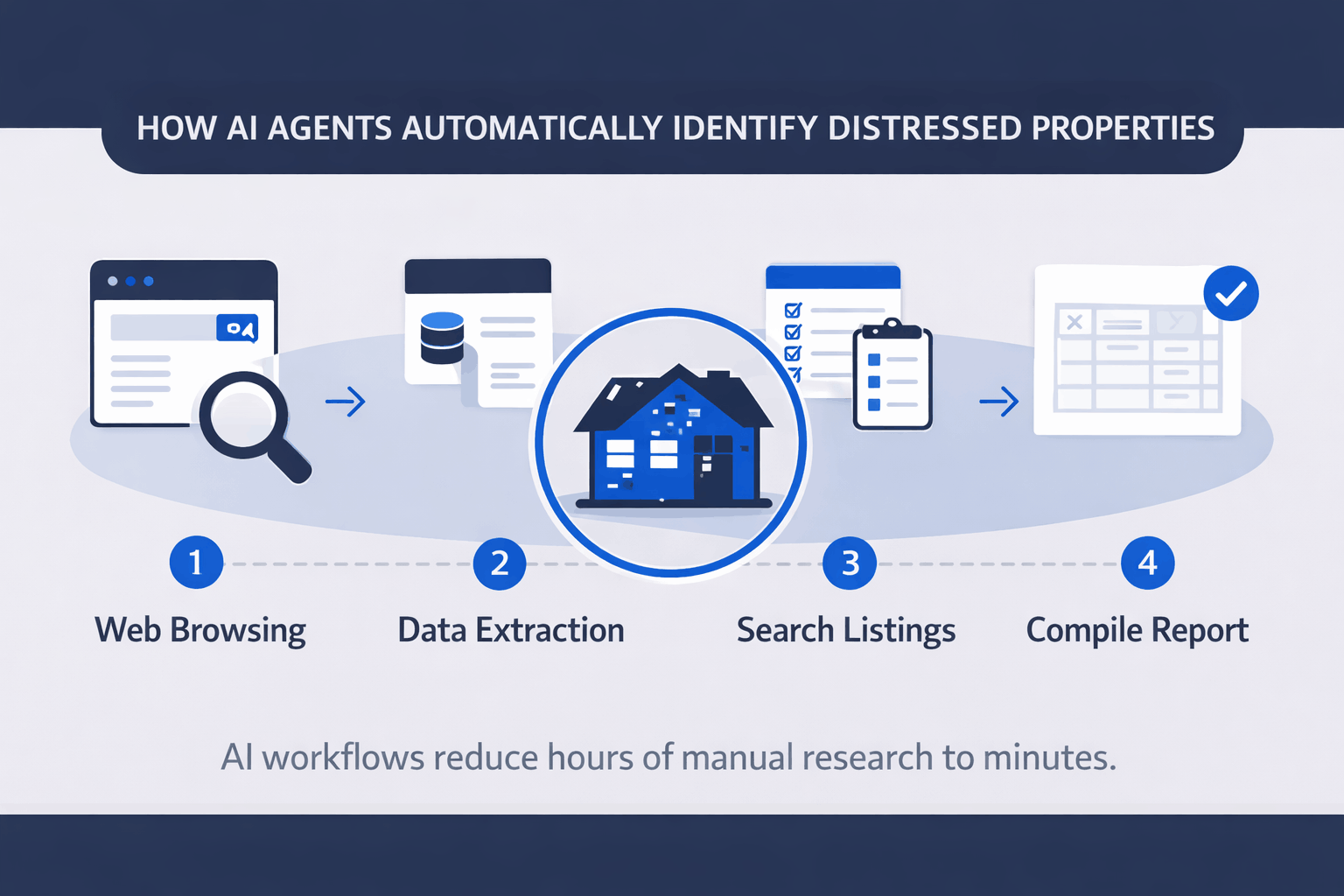
When Manus runs, it goes through a multi-step process:
-
Search current foreclosure properties and REO listings
-
Research bankruptcy filings and court records
-
Identify distressed property sales and off-market opportunities
-
Access public records
-
Compile and organize findings
-
Deliver the final research report
About 8 minutes later, the run was complete.
My First Run Results: 88 Properties
-
84 properties in the LAHD foreclosure registry with notices filed
-
2 properties in bankruptcy court liquidation
-
1 bank-owned REO for sale
-
1 probate distress sale
The output came in two formats: Markdown Research Report and Structured Spreadsheet.
Step 5: Iterate Your Prompt for Better Results
Improvements to consider:
-
Add de-duplication: “Only surface new properties not included in prior reports.”
-
Request source URLs
-
Add unit count filters
-
Request auction dates and contact info
-
Specify freshness: only include recent filings
What the Full Output Looks Like
-
Markdown Research Report — narrative overview by location, council districts, lenders, immediate opportunities, data sources
-
Structured Spreadsheet — property addresses, registration dates, distress types, key details, sources
Distressed Property Data Sources AI Agents Use
| Data Source | What AI Looks For | Why It Matters |
|---|---|---|
| Foreclosure Registries | Notice of default, auction filings | Identifies properties entering foreclosure before auctions occur |
| Bankruptcy Court Records | Liquidation filings, distressed ownership | Finds owners forced to sell assets quickly |
| REO Listings | Bank-owned property sales | Banks often sell these properties below market value |
| Probate Sales | Estate property transfers | Estates sometimes sell quickly to settle an inheritance |
| Tax Lien Records | Delinquent property taxes | Indicates financial distress that may lead to a sale |
| Code Violation Databases | Repeated building violations | Signals poorly managed or distressed assets |
What It Does Well vs. Where It Falls Short
Strengths
-
Speed and consistency — 88 properties in 8 minutes daily
-
Breadth of search — multiple public sources
-
Structured output — ready for use
-
Prioritization — identifies immediate opportunities
Limitations
-
Public data only
-
Data freshness varies
-
No verification of accuracy
-
Credit cost for daily runs
Time Comparison: AI vs. Manual Research
| Task | AI Agent | Manual |
|---|---|---|
| Setup | 5 minutes | N/A |
| Daily search execution | 8 minutes | 2–4 hours |
| Data organization | Included | 30–60 minutes |
| Weekly time investment | 0 | 10–20 hours |
| Monthly total | ~0 active time | 40–80 hours |
Tips from Running This Daily
-
Start with one city and one asset type
-
Run your first search manually
-
Keep a running list of properties already investigated
-
Connect your email integration
-
Pair with follow-up workflows for owners, values, and contacts.
Use Cases by Role
-
Brokers: Be first to know about new foreclosure or bankruptcy auctions
-
Acquisitions analysts: Create daily deal pipelines for your firm
-
Investors: Monitor multiple markets with scheduled tasks
-
Property managers: Track neighboring ownership changes and distress signals
FAQs regarding How to Find Distressed Properties with AI
1. What is a distressed property in CRE?
Distressed properties are real estate assets facing financial or legal challenges.
-
Foreclosures or bank-owned (REO) listings.
-
Bankruptcy-related sales.
-
Probate or estate sales with urgency.
-
Tax lien or code violation sales.
These properties often sell below market value, offering potential investment opportunities. Learn more about distressed property types here.
2. How can AI help find distressed properties?
AI can automate data gathering and analysis for CRE investments.
-
Search multiple public databases simultaneously.
-
Compile structured reports for actionable insights.
-
Identify high-priority investment opportunities.
AI drastically reduces manual research time, allowing faster decision-making.
3. Which AI agents are suitable for distressed property research?
Autonomous web-browsing agents work best.
-
Manus: For structured data extraction and scheduled tasks.
-
Claude or ChatGPT: Useful for prompt generation and workflow planning.
-
Any agent must support web browsing, task planning, data compilation, and scheduled execution. Explore AI agents here.
4. How accurate is AI in identifying distressed properties?
AI accuracy depends on data sources.
-
Foreclosure registries and court records are reliable.
-
Always verify property status and key dates manually.
-
Data freshness may vary depending on register updates. Learn verification techniques here.
5. What types of distressed properties should I target?
Choosing the right type maximizes ROI.
-
Apartment buildings (5+ units recommended).
-
Bank-owned REOs and bankruptcy auctions.
-
Probate or estate sales with active listings.
-
Properties with code violations or tax liens. Focus on asset types aligned with your investment strategy here.
6. How do I build a proper AI prompt for distressed property research?
A clear prompt ensures actionable output.
-
Specify geography: e.g., “Los Angeles city,” not “Southern California.”
-
Define property types and distress categories.
-
Mention output format: spreadsheet columns and address, unit count, and filing date.
-
Include prioritization rules for actionable leads. Prompting guidance is available here.
7. What is Plan Mode in AI tools like Claude Code?
Plan Mode prevents immediate execution to reduce errors.
-
AI asks clarifying questions before starting tasks.
-
Ensures correct assumptions for purchase price, scenarios, and output formats.
-
Recommended for multi-step workflows or complex deals.
8. How often should AI research distressed properties?
Frequency affects deal coverage and opportunity capture.
-
Daily runs catch new foreclosure notices and auctions.
-
Weekly runs may suffice in slower markets.
-
Monthly is too infrequent for fast-moving deals.
9. Can AI find off-market distressed properties?
AI is limited to publicly available data.
-
Can search court filings, foreclosure registries, and public REO listings.
-
Cannot access MLS or private broker-only deals.
-
For hidden deals, human networking is still required.
10. How does AI compare to manual distressed property research?
AI saves hours and improves consistency.
-
Manual: 2–4 hours per search, limited frequency.
-
AI: 8 minutes per daily automated search, consistent updates.
-
Structured spreadsheet output reduces data entry errors.
11. How do I set up a scheduled AI task for property research?
Automation ensures timely data delivery.
-
Name the task (e.g., “Distressed Property Finder”).
-
Paste the prompt and connect integrations (email, spreadsheet).
-
Set frequency and run time (daily recommended).
-
Enable notifications for completed runs. Full guide available here.
12. What output formats should AI provide?
Structured, actionable output is key.
-
Spreadsheets (Excel/CSV) for filtering, sorting, and team sharing.
-
Markdown or Word reports for narrative summaries.
-
Include source URLs for verification and follow-up. Learn formatting tips here.
13. How can I prevent duplicate property results?
De-duplication ensures fresh leads every run.
-
Add instructions: “Only surface new properties not in prior reports.”
-
Keep a running record of already reviewed properties.
-
Cross-check addresses for alternate formats. Check duplicate handling here.
14. Can AI analyze multiple CRE deals simultaneously?
Yes, parallel execution speeds up the workflow.
-
Multiple AI agents can run different tasks at once.
-
Each terminal can process a separate deal in parallel.
-
Greatly reduces analyst bottlenecks and accelerates deal screening. Learn more about parallel AI execution here.
15. How do I prioritize distressed properties identified by AI?
Prioritization saves time and improves ROI.
-
Flag properties with actionable next steps (auctions, active listings).
-
Consider location, unit count, and property type.
-
Filter by high-priority distress categories first. Explore prioritization methods here.
16. Can AI help with the financial analysis of distressed properties?
Yes, AI can extract and organize key financial data.
-
Build pro forma scenarios for purchase and renovation.
-
Pull historical capital expenses from P&L statements.
-
Identify IRR or ROI gaps for different acquisition scenarios.
17. How do I verify the data AI provides?
Verification ensures reliable investment decisions.
-
Cross-check property addresses and ownership.
-
Confirm foreclosure and auction dates independently.
-
Validate distress type against official registries.
18. Can AI track changes in property status over time?
Yes, scheduled runs monitor market activity.
-
Daily updates capture new filings and sales.
-
Compare reports to identify new opportunities or trends.
-
Supports investment planning and deal pipeline management.
19. Is AI cost-effective for CRE professionals?
AI offers high ROI when used correctly.
-
Saves 40+ hours per month compared to manual research.
-
Costs include AI agent credits per run.
-
Value depends on deal volume and speed advantage. Explore cost analysis here.
20. Can AI handle different property types beyond apartments?
Yes, workflow is flexible across asset classes.
-
Office, retail, industrial, and land properties can be analyzed.
-
Adjust prompts for property-specific distress indicators.
-
Structured reports remain consistent for easy comparison. Full guide for property types here
Start Using This Today
I’ve shared the full demo video, exact prompt, and sample output at the AI for CRE Collective. 540+ CRE professionals are testing workflows like this every week and sharing what actually works. Join the Collective for full access, or subscribe to the newsletter for weekly AI playbooks and CRE automation workflows.
