
How to Use Notebook LM to Train CRE Teams
Notebook LM CRE Training can solve one of the biggest onboarding challenges in commercial real estate today. If you’ve hired a new junior agent, analyst, or associate in the past year, you already know the training problem. You’re expected to build study materials, organize documents, create assessments, and deliver structured onboarding while still managing deals and pipeline.
Most firms hand new hires a folder of PDFs or rely on informal ride-alongs and hope for the best. I run the AI for CRE Collective (540+ members testing AI tools on real workflows), and I’ve tested a workflow that solves this in a single sitting.
Using NotebookLM and Claude, I built a complete multifamily brokerage training curriculum in about 15 minutes, including 69 flashcards, a scored quiz, custom reports, audio walkthroughs, and a full training guide. This guide walks you through the exact setup, prompts used, and what you can expect from the output.
Table of Contents
ToggleWhy CRE Training Is Stuck in 2010
Training in commercial real estate has barely changed in a decade.This is exactly where Notebook LM CRE Training helps firms create structured onboarding without manual curriculum building. Most firms rely on some combination of these approaches:
The PDF Dump
Hand the new hire a folder with 15-20 documents. Market reports, sample OMs, underwriting templates, and company SOPs. Say “read through these when you get a chance.” Check in two weeks later and discover they skimmed the first three.
The Ride-Along Method
Shadow a senior broker for a few weeks. Pick up what you can through observation. Hope the senior broker is a good teacher (they often aren’t — they’re good at deals, not necessarily at explaining them).
The Sink-or-Swim Approach
Throw the new person into the work and see if they figure it out. The fastest way to lose good talent.
The core problem is always the same: building structured training materials takes time that producing professionals don’t have. Every hour spent building a study guide is an hour not spent prospecting or closing deals. That trade-off is real. But it’s also one of the reasons that turnover is so high for junior CRE positions. People leave when they feel unsupported during the learning curve (shoutout to every junior agent who’s been there — I see you).
AI doesn’t eliminate the need for mentorship. But it can build 80% of the training materials in minutes, freeing up your time for the 20% that actually requires a human: judgment, relationship building, and real-time feedback.
What You’ll Need Before You Start
Before you sit down to build your curriculum:
-
Claude account (free or paid) — you’ll use Claude to curate sources and write prompts for NotebookLM
-
NotebookLM account (free, Google product) — this is where your training materials get generated
-
Your training topic is defined — be specific. “Multifamily brokerage” is better than “commercial real estate.” “Industrial lease negotiation” is better than “leasing.”
-
10-15 minutes — the actual setup time after you know what you’re building
-
Optional: a list of your favorite articles, guides, or resources on your topic — if you already have bookmarked sources, you can skip the Claude curation step and paste them directly
Step 1: Curate Your Training Sources with Claude
This is the step most people would skip, and it’s the one that makes the biggest difference.
Open Claude and type something like:
“I’m training a new junior agent broker on my team and I want to use NotebookLM. Can you gather sources on multifamily brokerage and investing for me? I need URLs for articles, guides, and frameworks covering underwriting, deal sourcing, market analysis, financing, and key terminology.”
Claude returned 60 source URLs, organized by category: underwriting fundamentals, deal sourcing and prospecting, financing and loan types, key metrics and calculations, market trends, due diligence processes.
Doing this manually — opening Google, searching, reading, evaluating, bookmarking — takes at least 2-3 hours for the same coverage.
Why Claude Is Better at This Than Searching Yourself
-
Curates sources by relevance to your specific training goal
-
Pulls articles about property tax analysis, NOI calculations, cap rate methodology, deal sourcing strategies, and broker relationship building
-
Avoids generic search results full of irrelevant blog posts or advertisements
Pro Tip: Be Specific About Categories You Want
-
Underwriting multifamily properties
-
Deal sourcing and prospecting methods
-
Financing and loan structures
-
Market analysis techniques
-
Key financial metrics and formulas
-
Due diligence processes
-
Client relationship management
Step 2: Load Sources into NotebookLM
Open NotebookLM and create a new notebook. Go to the sources panel and add links. NotebookLM lets you add multiple URLs at once.
What Counts as a Good Source?
-
Detailed enough to generate specific questions (2,000+ word guides are ideal)
-
Authoritative — industry publications, experienced practitioners, educational institutions
-
Relevant to your specific niche — avoid generic or unrelated content
-
Not behind paywalls — NotebookLM can’t access gated content
You can also upload PDFs or Google Docs for broader coverage. This step strengthens your Notebook LM CRE Training output by ensuring all learning materials are source-backed and role-specific.
Step 3: Generate Flashcards and Quizzes
Flashcards
-
NotebookLM analyzes all sources and generates question-answer cards
-
Example: “According to Ike Hoffman, what is arguably the most critical expense line item when underwriting multifamily?” Answer: property taxes, specifically future millage rate exposure
-
Customize the number of cards, difficulty level, and topic focus
Quiz
-
Generates multiple-choice questions with scoring and hints
-
Example: “When analyzing a multifamily property tax bill, how should an analyst treat a special assessment for a public project like sewer improvements?”
Step 4: Use the Reports Feature (NotebookLM’s Newest Update)
Standard Report Options
NotebookLM always offers these standard formats:
Notebook LM CRE Training uses these reports to convert curated CRE knowledge into structured onboarding documents.
-
Briefing doc
-
Study guide
-
Blog post
AI-Suggested Reports (Based on Your Sources)
Based on your sources, NotebookLM suggested four custom reports:
-
Investment Memorandum — A full confidential memo synthesized from your sources
-
Market Analysis — Strategic guide covering deal sourcing, inbound/outbound strategies, and valuation
-
Introductory Guide — Beginner-friendly walkthrough for on-market deals, broker interactions, and management strategies
-
Concept Explainer — “Demystifying Multifamily Real Estate Finance: A Beginner’s Guide,” covering gross potential rent, NOI, and property taxes
Step 5: Build a Notebook LM CRE Training Guide
-
Use NotebookLM’s custom report builder
-
Claude can generate a concise prompt for a comprehensive guide
-
Example output: “The Junior Broker’s Guide to Multifamily Real Estate”, including:
-
Core Fundamentals
-
Deal Sourcing and Prospecting Strategies
-
A Sample Weekly Schedule
-
Seven-Step Underwriting Framework
-
Step 6: Generate Audio and Video Overviews
-
Audio overview — podcast-style walkthrough for learning during commutes or workouts
-
Video overview — visual format for learners who prefer visual content
-
Multiple formats cover different learning styles
The Complete Output: What Your New Hire Gets
With Notebook LM CRE Training, each new hire receives structured onboarding resources within minutes instead of weeks.
-
69 flashcards covering underwriting, deal sourcing, and market analysis
-
10-question quiz with hints and scoring
-
4 AI-suggested reports (investment memo, market analysis, introductory guide, concept explainer)
-
1 custom training guide (comprehensive curriculum with schedule and underwriting framework)
-
Audio overview
-
Video overview
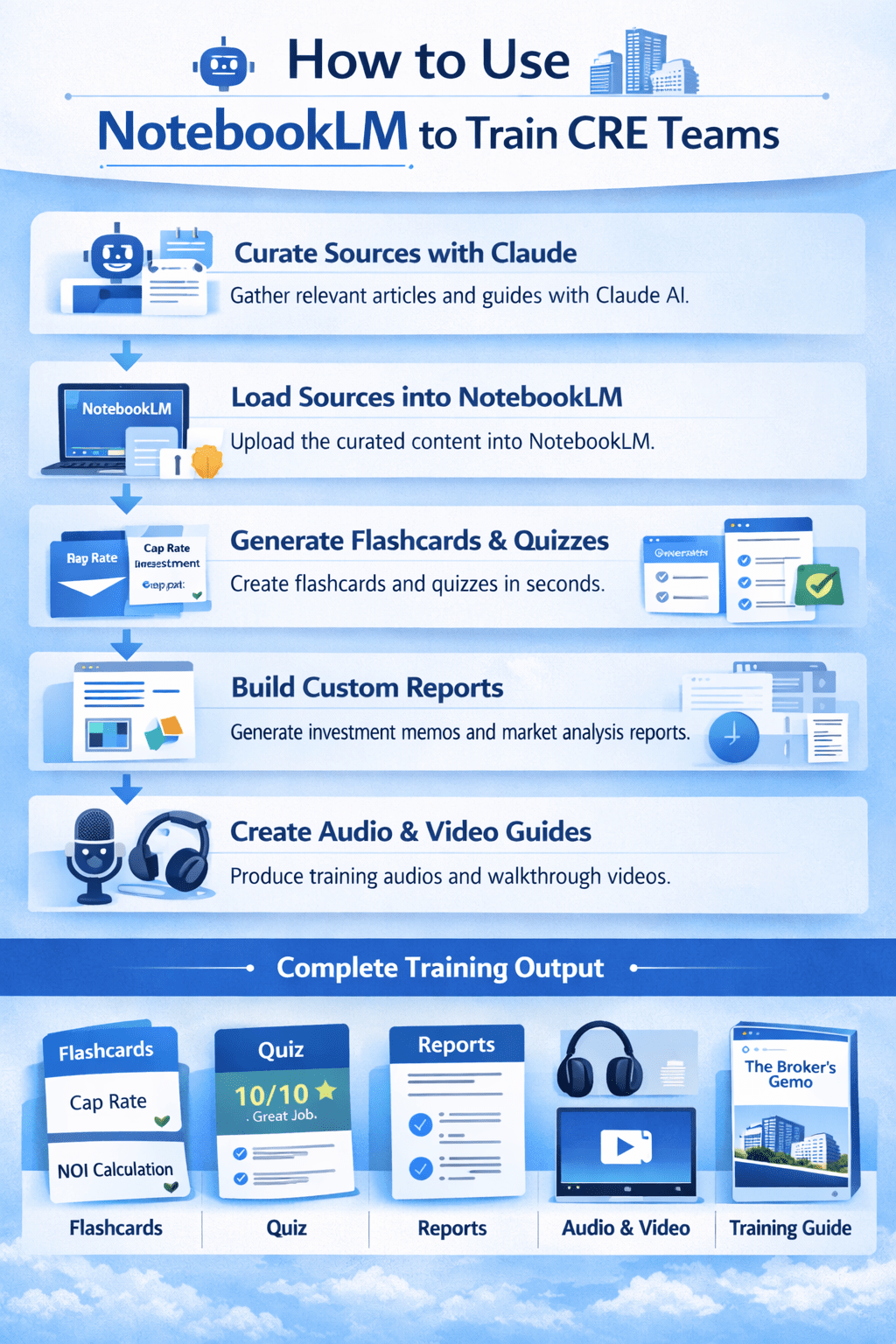
NotebookLM converts curated CRE training sources into flashcards, quizzes, reports, and onboarding guides to streamline team training and improve learning outcomes.
What It Does Well vs. Where It Falls Short
Strengths
-
Speed — entire workflow in ~15 minutes
-
Source fidelity — materials generated from your curated sources
-
Multiple learning formats
-
Reports suggestions — saves cognitive load
Limitations
-
Source quality determines output
-
No experiential knowledge
-
Some sources may not load
-
Quiz difficulty customization is limited
Time Comparison: AI vs. Manual Curriculum Building
| Component | AI Workflow | Manual Creation |
|---|---|---|
| Source curation | 30 sec (Claude) | 2-3 hrs (Google) |
| Loading sources | 2 min | N/A |
| Flashcard creation | 1 min | 4-6 hrs |
| Quiz creation | 1 min | 2-3 hrs |
| Report generation | 2-3 min (four reports) | 8-16 hrs per report |
| Custom training guide | 2 min | 1-2 weeks |
| Audio/video | 5-10 min | Not feasible |
Notebook LM CRE Training Tips for CRE Teams
-
Start with Claude for source curation
-
Load 15-25 sources for best results
-
Generate flashcards on appropriate difficulty
-
Use the custom report builder for firm-specific training
-
Let Claude write a custom report prompt
Use Cases by Role and Firm Type
-
Brokerages hiring junior agents: Full first-90-days curriculum
-
Investment firms onboarding analysts: Underwriting training materials
-
Property management companies training new managers: Lease admin, tenant relations
-
Development firms educating interns: Entitlements and construction finance can be processed, but can be summarized if transcribed. Text-based inputs remain the most reliable. Learn about supported sources here.
FAQs regarding Using NotebookLM for CRE Training
For weekly breakdowns of AI tools and workflows for commercial real estate, subscribe to the newsletter. 3,000+ CRE professionals get it every Thursday.