
How to Update a CRE Offering Memorandum with AI
This AI offering memorandum workflow changes how CRE teams update listings. Claude went online on its own, pulled current rent comps and comparable sales, rebuilt the pro forma, and ran ADU financial calculations without being specifically prompted. This is the AI offering memorandum workflow that actually saves time. Not because the output was perfect. But because it compresses the most time-consuming part of OM prep into background processing, you can run it while working on other things. Here’s exactly how I did it, what Claude handled automatically, and what still needs manual attention.
Table of Contents
ToggleWhy the AI Offering Memorandum Workflow Saves So Much Time
Every new listing kicks off the same cycle. Grab the old template. Swap out property photos. Update the address and deal basics. Rebuild the rent roll analysis with the new unit mix. Find current market rent for the submarket, actual research time, not just copy-paste. Hence, for comparable sales. Update the pro forma with new acquisition assumptions. Then fix the inevitable formatting that breaks when you swap in new text. For a thorough 22-slide OM, you’re looking at a full day of work for someone on your team. More if the submarket requires real research or if the deal has complex economics.
AI changes this equation, but not in the way most people expect. It’s not a one-click OM generator. It handles the time-consuming middle section — research, data population, financial calculations — while leaving final review and cleanup in your hands.
What You’ll Need
• Claude account with access to Claude PowerPoint (the add-in for Microsoft PowerPoint)
• Claude Opus 4.6 selected as your model (most capable — select this when you open the plugin)
• An existing OM template you’re happy with — design quality in determines design quality out
• New property documents: OM or deal summary, rent roll, any photos you have
• 30-45 minutes of active time (the rest runs in the background)
One thing worth knowing: Claude PowerPoint is brand new as of early 2026. It’ll get better. What I’m describing here is the current capability.
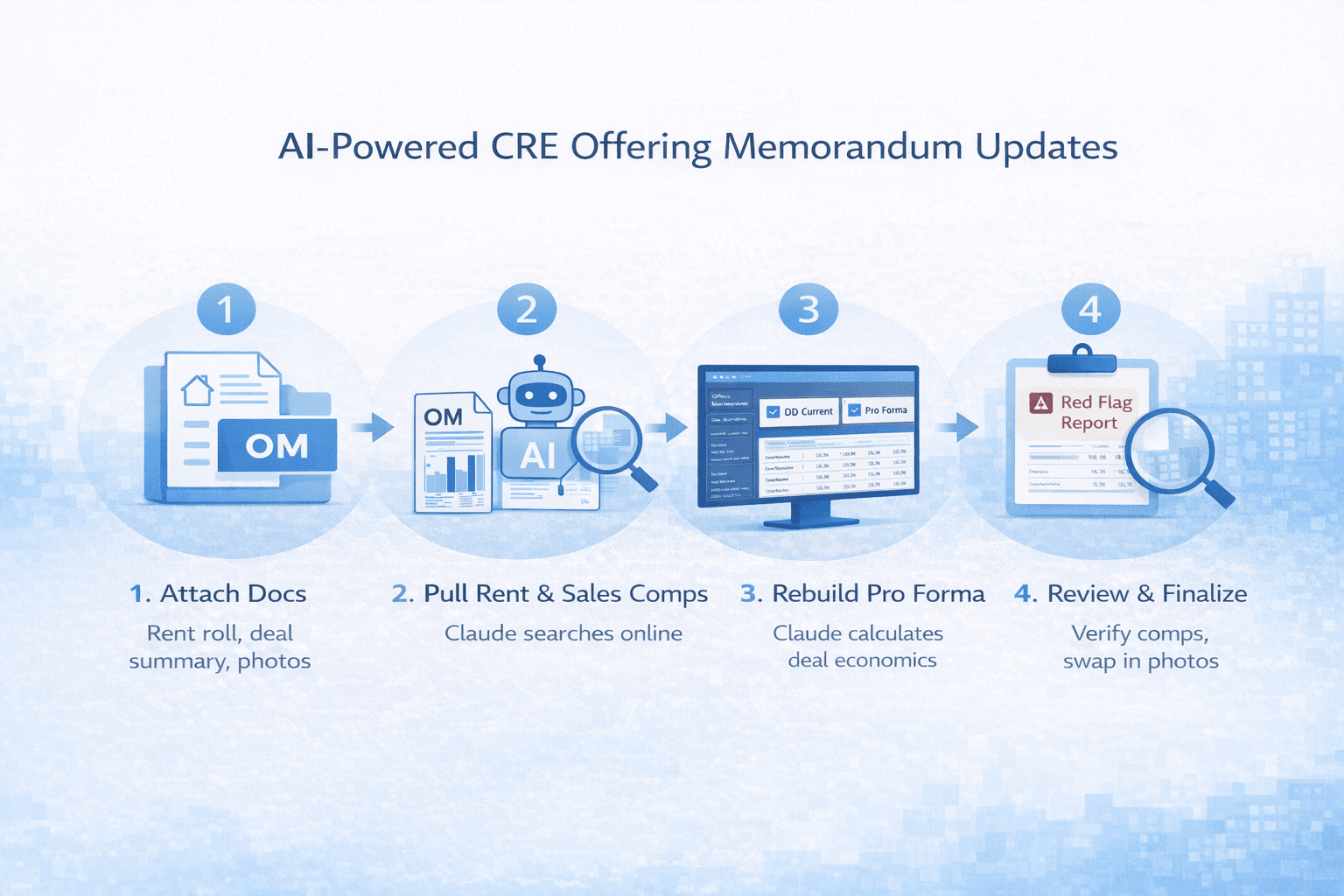
Step 1: Attach Your Files and Set Up the Session
Open PowerPoint, find the Claude add-in panel, and select Opus 4.6.
Attach your existing OM template directly in the chat. Then attach the new property documents, OM, deal summary, rent roll, and photos if you have them. Before typing anything, toggle “ask before edits” mode on. This requires Claude to ask for your approval before making changes to slides. You don’t want it running through your template, making decisions you didn’t authorize.
Here’s the prompt I used:
“See attached offering memorandum template. I have a new property we’re listing. Study my template and update it based on the new asset. The format, colors, branding, and logo should all remain the same. Ask questions if anything is unclear.”The “ask questions” instruction matters. AI that skips questions makes assumptions. With a 22-slide template, bad assumptions compound quickly.
Step 2: Let Claude study the template
Claude reads every slide before changing anything. It’s looking at column structure on the rent roll table, header formatting, where content blocks sit on each slide, and how the investment highlights are laid out. This takes a few minutes. Let it finish. The more it understands the template’s structure, the more accurately it repopulates. In my test, it identified the specific column layout of the rent roll table before touching it, which meant the repopulated version matched the original format rather than creating a new one.
Step 3: Watch It Work Slide by Slide
Once Claude understands the template, it starts updating. Here’s what it did in my test across all 22 slides:
Executive summary and investment highlights
Updated automatically with new property details. All 6 investment highlight cards refreshed with deal-specific information.
Pro forma
Rebuilt with new deal economics. Claude used the financial data from the attached property documents and filled in the pro forma structure from the template.
Rent comp slide
This is where it surprised me. Claude went online on its own and searched Google for current market rents in Westlake and MacArthur Park in Los Angeles, pulling 2025 data. I didn’t prompt it to do this. It recognized the slide needed current market data and went looking.
Comparable sales
Same autonomous behavior. It searched “Westlake Los Angeles multifamily apartment sales 2024 2025 price per unit” on its own, found results, and updated the comp slide.
ADU financial impact
Calculated construction cost, additional annual income, and additional value created for 8 ADUs independently. It showed the investment, the income, and the value, all calculated from the deal specifics. The autonomous web searches are the most practically useful feature. Market research that would take 30-60 minutes manually happened in the background.That’s the practical advantage of using an AI offering memorandum workflow in real CRE environments.
Step 4: Handle What Still Needs Manual Attention
Claude handles content. You still own the cleanup. Here’s what always needs manual review:
• Photos: Claude can’t insert actual property photos from your attachments in a usable way yet. Placeholder formatting stays in place. Swap in real photos after Claude finishes.
• Comp verification: Claude pulls real data from Google, but you’re responsible for accuracy. Check every rent comp and comparable sale before the OM goes to a client or investor.
• Formatting issues: Text occasionally overflows boxes, especially in data-heavy sections like the rent roll. Quick fixes, but worth checking every slide.
• External links: Any hyperlinks in the template need manual verification. Claude doesn’t update them.
• Context limits: For longer decks with lots of data (22+ slides), Claude can hit its context limit before finishing. If it does, start a fresh chat, re-attach the template, and tell it which slide you left off on. This happened near the end of my test.
What the Final Output Looks Like
After Claude’s work plus 20-30 minutes of cleanup:
All 22 slides updated with new property information. Market rent data from a real web search in the target submarket. Comparable multifamily sales from 2024-2025. Updated pro forma with new deal economics. ADU financial impact fully calculated. Template design, branding, and color scheme were preserved exactly. It’s a solid first draft. Not a print-ready OM. But something that would take at least a full day to produce manually.This is what a mature AI offering memorandum workflow looks like in practice for CRE teams.
Creating OM Decks from Scratch: A Different Story
Quick note, since it’s the natural next question: I also tested Claude’s PowerPoint on building an investor deck from scratch, starting from just an OM and underwriting model, no existing template. The content analysis and questions were impressive (it re-underwrote parts of the deal, recalculated the purchase price to hit target returns). The slide design did not include elementary layouts, text overlaps, or misaligned elements. For creating decks from nothing, tools like Manus and Gamma produce significantly better design output right now. Claude, PowerPoint for template updates. Those tools for creation from scratch.
Time Comparison
Manual OM repopulation for a new listing: 6-8 hours for a thorough job, including market research
Claude-assisted workflow:
30-45 minutes of active time, rest runs in the background. What that time difference means in practice: you can run this workflow while handling other things. I had a second project running simultaneously in a separate session while Workflow 2 was completed.
Claude vs Manual OM Update Workflow
| Task | Manual Process | AI-Assisted Workflow |
|---|---|---|
| Update Executive Summary | Rewrite and reformat manually | Auto-updated from new deal data |
| Rent Comp Research | 30–60 minutes Google research | AI searches and summarizes comps |
| Comparable Sales | Manual data gathering | AI pulls recent sales automatically |
| Pro Forma Rebuild | Rebuild in Excel slide by slide | AI recalculates inside template |
| ADU Financial Impact | Manual modeling | AI calculates income & value |
| Slide Formatting | Frequent layout fixes | Template preserved, minor cleanup |
| Total Time | 6–8+ hours | 30–45 minutes active time |
Comparison of manual OM repopulation versus AI-assisted workflow across research, modeling, and formatting tasks.
FAQs regarding AI-Powered Offering Memorandum Automation with Claude
How can AI help automate a commercial real estate offering memorandum (OM)?
AI can handle the research and data-heavy parts of OM creation.
-
Analyze your existing OM template structure slide by slide
-
Extract data from rent rolls, deal summaries, and underwriting models
-
Pull current market rent comps from online sources
-
Search recent comparable sales automatically
-
Rebuild pro formas and calculate ADU financial impact
Tools like Claude are designed for structured reasoning and document analysis workflows (https://www.anthropic.com/claude).
In short, AI reduces manual research and data entry while you stay in control of final edits.
What is Claude PowerPoint, and how does it work?
Claude PowerPoint is an add-in that connects Claude directly to Microsoft PowerPoint.
-
Runs inside your PowerPoint environment
-
Reads and understands existing slide templates
-
Updates content while preserving formatting and branding
-
Can perform autonomous web research when needed
-
Works best with Claude Opus-level models
You can explore Claude’s capabilities here:
https://www.anthropic.com/claude
It behaves more like a research assistant inside your deck than a basic slide generator.
Can Claude automatically pull rent comps and sales comps?
Yes, Claude can autonomously search for relevant market data.
-
Identifies when a slide requires current rent data
-
Searches for submarket-specific rent comps
-
Looks up recent multifamily sales by price per unit
-
Inserts findings into your comp slides
-
Formats data based on your template structure
Web-enabled AI systems are built to retrieve and summarize structured data (https://en.wikipedia.org/wiki/Web_scraping).
However, you must verify every comp before sending the OM to investors.
Does AI preserve my existing OM design and branding?
Yes, if you use a structured template workflow.
-
Maintains your logo and color scheme
-
Keeps existing slide layouts intact
-
Reuses the rent roll table formatting
-
Updates content without redesigning slides
-
Respects the header and highlight card structure
AI works best when given a strong template foundation (https://www.microsoft.com/en-us/microsoft-365/powerpoint).
Better design leads to better output.
What still requires manual review after AI updates an OM?
AI handles content, but humans handle accountability.
-
Swap in final property photos
-
Verify rent comps and sales data
-
Fix text overflow or formatting breaks
-
Double-check hyperlinks
-
Review pro forma assumptions
Responsible AI use always includes human validation (https://cloud.google.com/ai).
Think of AI as the first draft, not the final sign-off.
How much time does AI save in OM repopulation?
AI dramatically reduces active working time.
-
Manual repopulation: 6–8 hours
-
AI-assisted workflow: 30–45 minutes active
-
Market research runs in the background
-
Financial modeling updates automatically
-
Multiple tasks can run simultaneously
Parallel processing is a core advantage of modern computing systems (https://en.wikipedia.org/wiki/Parallel_computing).
The biggest gain isn’t perfection — it’s time compression.
Can Claude create an OM from scratch?
It can, but results differ from template-based workflows.
-
Strong at analyzing deal documents
-
Can re-underwrite assumptions
-
Generates structured slide content
-
Design quality may include layout issues
-
Works better when updating an existing template
AI presentation tools vary in design strength (https://www.gartner.com/en/information-technology).
For template updates, Claude performs well. For design from zero, specialized tools may outperform it.
What are the biggest risks when using AI for OM creation?
The main risks involve assumptions and data accuracy.
-
Incorrect interpretation of deal inputs
-
Pulling outdated or mismatched comps
-
Context limits on long decks
-
Overwriting slides without approval
-
Formatting inconsistencies in dense tables
AI systems operate based on probabilistic reasoning (https://mitsloan.mit.edu/ideas-made-to-matter).
Use “ask before edits,” force clarification questions, and verify outputs before client delivery.
Tips from Testing This
-
Use “ask before edits” mode. You want to approve changes before they happen. Don’t skip this.
-
Tell it to ask questions first. This one instruction prevents most of the bad assumptions.
-
Better template = better output. Claude preserves your design language. If the starting template is rough, the repopulation will reflect that.
-
Verify every comp it pulls. The data is real, but you own the accuracy. Check rent comps and sales comps before client delivery.
-
Have a plan for the context limit. On long decks, you’ll likely hit it. Keep a note of which slide you’re on so you can pick up in a fresh chat.
I’ve shared the full demo video and the complete AI offering memorandum workflow inside the AI for CRE Collective. 600+ CRE professionals are testing workflows like this on real deals every week. Join us if you want to see it in action.
If you’re not ready to join the Collective, subscribe to the newsletter. I break down real AI workflows for offering memorandums, underwriting, due diligence, and acquisition automation every week with exact prompts and practical steps you can implement immediately.
Join 3,000+ CRE professionals getting step-by-step AI playbooks delivered straight to their inbox.