
How to Build AI Underwriting Skills in Manus
If you’ve ever used AI underwriting for CRE to evaluate a deal, you’ve probably seen the problem. The output looks different every time, with tabs, formatting, and assumptions changing across Excel models. You can’t compare deals side by side when every Excel file is a one-off.
I run the AI for CRE Collective (540+ members testing AI tools on real deals), and the number one complaint I hear about AI underwriting is consistency. The outputs aren’t standardized. So I built a custom underwriting skill inside Manus that uses my exact Excel model. Every deal gets the same template, same tabs, same formulas — with deal-specific numbers plugged in.
Here’s the full walkthrough.
Table of Contents
ToggleWhy Generic AI Underwriting Falls Short
This lack of standardization is one of the biggest challenges with AI underwriting for CRE workflows today. Ask Manus (or any AI) to “underwrite this deal,” and you’ll get an Excel file. It’ll have some financial assumptions. And it’ll look completely different from the last one it produced. Run it 10 times, and you’ll get 10 different structures. Some have sensitivity tables and calculate IRR. Others skip it. You can’t hand these to an LP or plug them into your existing workflow. The fix is skills — explicit instructions that tell the AI exactly how to structure the output every time.
What You Need Before You Start
How AI Underwriting for CRE Improves Deal Standardization
Before building the skill, you need:
-
Your underwriting model in Excel.
The one you actually use. Not a template you found online. Your actual model with tabs, formulas, and sensitivity tables. -
A Manus account.
The skills and the agents feature both need to be active. -
About 20–30 minutes.
The upfront investment pays off on every deal after this.
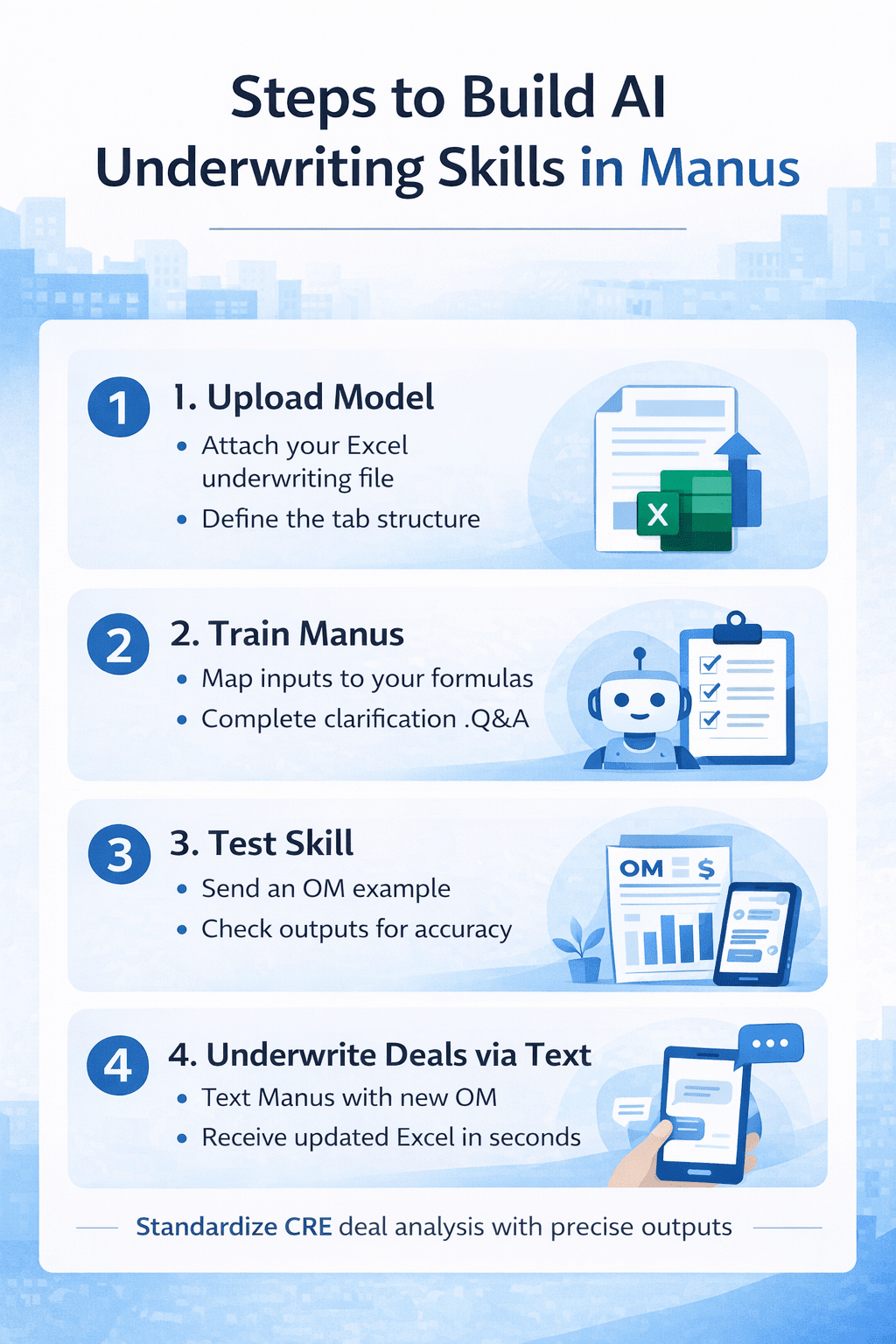
Step 1: Upload Your Excel Model
Go to Manus settings and find the skills section. Hit “Build with Manus” and tell it what you want:
“Help me create a skill. Anytime I ask you to underwrite a deal. to underwrite it using my exact model attached here. It should use this exact template with updated numbers from each deal. I will usually send you an OM and ask you to underwrite. You will go ahead and underwrite the deal and return this exact model with the updated numbers for that specific deal.”Then upload your Excel file.
I added one more line that made a difference:
“Please ask me questions if you aren’t clear.”That last part is important. It forces Manus to clarify before it makes assumptions.
Step 2: Answer Manus’s Clarification Questions
Manus will go into your Excel model and ask specific questions. When I did this, it asked:
- Should sensitivity tables be recalculated, or should the deal’s inputs be hard-coded values? (Recalculate them.)
- Should it implement an actual solver to find the purchase price? (Yes.)
- Should it auto-generate analyst notes based on what it extracts from the OM? Yes.
- Should it always support up to 6 unit types? Yes, for now.
- Should it always use the formula-based approach for renovation premiums? Yes.
Answer these carefully. This is where the skill becomes yours, not generic. The more specific your answer is, the better output you get.
Step 3: Let Manus Build the Skill
Manus will initialize the skill and build all the resources. It maps every tab in your Excel file, creates reference documents for the model specs, and writes the full skill instructions. This took about 10–15 minutes in my test.
You’ll see it working through subtasks — mapping the template, cleaning up example files, copying the model, and creating extraction docs. When it’s done, the skill shows up in your skills library. Mine is called “Multifamily Underwriter.”
Step 4: Test It With a Real OM
Here’s where it gets good. I attached an OM for a property at 163 8th Place, texted Manus from Telegram, and said:
“Please underwrite this deal using our new multifamily underwriter skill.”Manus extracted the deal data from the OM, researched market comps, validated assumptions, and built the full pro forma using my exact template. The result: 5.4% IRR at the asking price. Recommendation: pass. The returns were below typical institutional targets for a value-add deal. And the model looked exactly like mine. Same tabs. structure and sensitivity tables. With the deal’s actual numbers populated throughout.
What Worked Well
The standardization is the real win. Every deal that goes through this skill comes back in the same format. You can compare them, stack them, hand them to your team or investors, and they know exactly where to look.
The agent also self-corrected when it hit a snag. At one point, it couldn’t find the skill files. Without me saying anything, the agent went back, located the files, and sent them to the subtask. Then it finished the underwriting.
AI Underwriting vs Manual CRE Deal Analysis
| Process Stage | Manual CRE Underwriting Workflow | AI Underwriting Skills in Manus |
|---|---|---|
| OM Data Extraction | Manual data entry from PDF | Automated OM data extraction |
| Excel Model Setup | New file for every deal | Standardized Excel template |
| Assumptions Entry | Manually input each time | Auto-filled from OM |
| Sensitivity Tables | Rebuilt for each deal | Automatically recalculated |
| IRR & Return Metrics | Analyst-dependent | Model-driven outputs |
| Deal Comparison | Difficult across files | Easy side-by-side analysis |
| Formatting Consistency | Varies by analyst | Same tabs and structure |
| Time Per Deal | 1–2 hours | 20–30 minutes |
| Lender/LP Review | Needs formatting edits | Ready-to-share output |
| Workflow Scalability | Limited by manpower | Scales across deals |
Comparison between manual CRE underwriting workflows and AI underwriting skills in Manus for standardized deal analysis.
Where It Falls Short (For Now)
The underwriting isn’t to be 100% accurate out of the box. You still need to verify assumptions, check rent comps, and validate the numbers. This is a first draft, not a final product. And building the skill takes real time upfront. But that’s the whole point — invest 30 minutes now, save hours on every deal after.
FAQs regarding AI Underwriting for CRE in Manus
Why does AI underwriting for CRE produce different Excel outputs each time?
AI underwriting for CRE often gives inconsistent Excel models because it lacks a standard structure.
-
Generic AI tools build a new format for every deal
-
Tabs, assumptions, and formulas may change
-
Sensitivity tables may appear or disappear
-
IRR and DSCR models are not always included
This makes deal comparison across multiple CRE investments difficult.
Learn more about AI in financial modeling: https://www.mckinsey.com/capabilities/quantumblack/our-insights
How can Manus standardize AI underwriting for CRE workflows?
Manus can standardize AI underwriting for CRE using custom skills.
-
Upload your Excel underwriting model
-
Train Manus to follow your structure
-
Map deal inputs to your formulas
-
Use the same tabs for every deal
This ensures all CRE deals return in the same Excel format.
Explore underwriting automation basics: https://www.investopedia.com/terms/u/underwriting.asp
What is a custom underwriting skill in Manus?
A custom underwriting skill is an AI SOP for CRE deal analysis.
-
It uses your actual Excel model
-
Keeps the same sensitivity tables
-
Applies your IRR and return formulas
-
Updates numbers for each OM
This helps automate CRE underwriting without changing templates.
Can AI underwriting for CRE read offering memorandums automatically?
Yes. AI underwriting for CRE can extract deal data from OMs.
-
Reads the rent roll and expenses
-
Pulls unit mix and income
-
Maps assumptions to your model
-
Updates financial projections
This reduces manual data entry for CRE analysts.
How does AI underwriting for CRE improve deal comparison?
Standardized AI underwriting for CRE improves deal comparison.
-
Uses one Excel template
-
Keeps the same assumptions
-
Aligns IRR and cap rate inputs
-
Maintains formula consistency
This allows side-by-side CRE deal evaluation.
Do CRE professionals still need to verify AI underwriting outputs?
Yes. AI underwriting for CRE creates a first draft only.
-
Rent comps may need validation
-
Expense ratios require checks
-
Market assumptions may vary
-
Renovation costs may differ
Manual review ensures underwriting accuracy.
Review financial due diligence: https://www.pwc.com/gx/en/services/deals.html
How long does it take to set up AI underwriting for CRE in Manus?
Setting up AI underwriting for CRE in Manus takes about 20–30 minutes.
-
Upload your Excel model
-
Answer skill questions
-
Map underwriting tabs
-
Test with a real OM
This upfront setup saves hours on each deal later.
Explore workflow automation: https://zapier.com/blog/workflow-automation/
Can AI underwriting for CRE support multiple unit types?
Yes. Manus can support multiple unit types in CRE deals.
-
Handles studio to multi-bed units
-
Applies rent assumptions
-
Updates renovation premiums
-
Adjusts revenue projections
This supports multifamily underwriting workflows.
The Bigger Picture
Skills are basically SOPs for AI. However, your analyst would screen a deal, map it out step by step. Give those instructions to the AI. It builds the skill. Then you trigger it by text from your phone. I’ve been doing this with Claude for months. Manus adding the same concept, plus the Telegram agent layer, is a huge step forward.
If you want to see the full demo video and the actual underwriting output, I shared everything within the AI for CRE Collective. We’ve got 540+ CRE professionals testing workflows like this every week. For weekly CRE AI breakdowns and tool updates, you can also join our newsletter, followed by 3,000+ industry professionals.