Many CRE brokers don’t have an AI CRE broker website. Previously, you had to hire a designer; it took weeks of coordination, and you were spending that time not prospecting. Your online presence ends up being a LinkedIn profile and maybe a page on your firm’s corporate site that hasn’t been updated since 2022. AI changed the math. You could build a 7-page brokerage website in 20 minutes with AI. No coding. designer, and back-and-forth revisions over email. Just a detailed prompt and a vibe coding platform that writes thousands of lines of code automatically.
I run the AI for CRE Collective (575+ members testing AI on real CRE workflows), and this is an immediately actionable guide. Every broker can do this. This guide walks through the exact process, the mistakes to avoid, and what a realistic output looks like. We’re going to focus on Lovable for this guide, but it can easily be done with Claude, Manus, Replit, Google, Codex (OpenAI), and many other platforms.
Why Most CRE Brokers Still Don’t Have a Professional Website
I’ve asked several brokers why they don’t have a website. The answers are always the same:
“I don’t have time to coordinate with a designer.”
“I don’t know what I’d even put on it.”
“It feels like a big project, and I’d rather be prospecting.”
“I tried once,e and it took months and cost a fortune.”
All fair points. But here’s the cost of not having one: every time a prospect Googles your name, they find your LinkedIn profile and maybe a Loopnet listing with your photo. Meanwhile,e your competitors have professional sites showcasing their track record, team, active listings, and market expertise.
A professional website especially one built quickly using AI gives you credibility on autopilot. It works for you 24/7 when you’re on calls, in meetings, or sleeping. Prospects who find you online can see your deals, your team, your market knowledge, and contact you directly. Without one, you’re relying entirely on personal outreach and referrals.
The traditional solution – hiring a designer – is expensive and slow. $1K+ for a decent site…$5K+ for a good one. Weeks of coordination. Multiple rounds of revisions. That’s why most solo brokers and small teams skip it entirely (and I honestly can’t blame them for the old model).
The AI solution takes 20 minutes and costs a fraction. And the output, while not agency perfect, is more than good enough to establish a professional online presence.
What You’ll Need to Build an AI CRE Broker Website
Before you sit down to build:
Claude account (free or paid): You’ll use Claude to help with research and write the website prompt
Lovable account: the vibe coding platform that builds the actual site. Free tier available, paid plans for more features
Your brokerage’s public information: deals, team members, market focus, services, and any media/podcast appearances. If you’re active online, Claude will find most of this for you
20-30 minutes: 5 minutes for research and prompt, 8 minutes for the build, 10-15 minutes for iteration
Your logo and team headshots (for after the first draft): Lovable will use placeholder images initially. You’ll swap in real ones during cleanup
Optional but helpful: examples of brokerage websites you like. Show Claude a competitor’s site and say, “I want something in this style.” That context improves the prompt dramatically.
Step 1: Research with Claude
Open Claude and ask it to research you. Here’s the exact approach I would use:
“Please research [Your Name], [Your City] [specialization] broker. Find as much information as possible about team members, deal history, market focus, any media appearances, partnerships, and brokerage details. Give me a comprehensive brain dump.”
For my demo, I used @TAYVAY_ and The Group CRE as the example. They’re active on the internet with podcasts, social media, and deal announcements, so Claude found a ton of material.
Claude came back with team member names and roles, deal history and transaction volume, market specialization details, podcast information (No Vacancy), key partnerships, and company positioning.
This step matters because it makes your website specific, with real content rather than generic placeholder text. The difference between a website that says “We are a leading brokerage firm” and one that says “Since 2015, we’ve closed $X in multifamily transactions across LA’s Westside” is the difference between forgettable and credible.
What If You’re Not Active Online?
If Claude doesn’t find much about you publicly, that’s fine. Just provide the information yourself. Tell Claude:
“Here’s information about my brokerage. I want you to organize this for a website prompt: [paste your bio, deal list, team info, services, market focus].”
Claude will structure it the same way whether it researches you or you hand it the information directly.
Step 2: Write the Website Prompt with Claude
This is the most important step in the entire process. Your prompt determines 80% of the website quality.
Take the research from Step 1 and tell Claude:
“Using all of this information, create a detailed prompt for a website builder (Lovable). I want a modern, premium, multi-page website. Include the following pages: homepage, about us, services, listings, resources, results, and contact. For each page, specify the sections, content, and functionality. Include brand identity notes and design aesthetic.”
What Claude Should Include in the Prompt
Claude will organize the prompt page by page. Here’s what each page section should cover:
Homepage: Hero section with a clear value proposition, animated stat counters (deals closed, volume, years in business), services overview, featured testimonials, newsletter signup, recent market insights, and a clear CTA.
About Us: Company story and origin, key milestones and timeline, full team section with bios for each member, company values or differentiators, and partner/affiliation logos.
Services: Each service offering with descriptions, what makes your approach different, property valuation CTA, and market specialization callouts.
Listings: Current active listings with photos and details, off-market property section with registration form, recently closed transactions, and search/filter functionality.
Resources: Podcast integration (if applicable), market update blog or newsletter archive, downloadable market reports and PDFs, and educational content.
Results: Numbers (deals closed, transaction volume, average days on market), client testimonials with names and deal context, featured success stories, and track record visualization.
Contact: Contact form with email routing, team member direct contact info, calendar booking integration placeholder, Google Maps embed for office location, and social media links.
The Prompt Will Be Long… That’s Okay
My prompt for the Taylor Avakian demo was massive. Pages of specific content, design notes, and functionality requirements. That’s exactly what you want.
Vibe coding platforms respond directly to the details in your prompt. A 200-word prompt gives you a generic template. A 2,000-word prompt gives you a website that actually looks like your business.
Don’t be intimidated by the length. Claude writes it for you. You review and adjust.
Step 3: Build the Website with Lovable
Copy Claude’s entire prompt. Open Lovable. Paste it in. Hit send.
Lovable will:
Read and analyze the prompt
Plan the website architecture
Start writing code (HTML, CSS, JavaScript, React… you won’t need to know any of it)
Build each page with the content and functionality you specified
Deliver a preview of the completed site
My build took about 8 minutes for the first draft. Lovable noted the features it was building: seven pages with unique content, sticky navigation, automated stat counters, newsletter signups, responsive design, and smooth animations.
While it builds, you can watch the progress. It’s genuinely fascinating to see thousands of lines of code being written in real time. I clicked into the code files during my demo, page after page of code. I don’t know what a single line means. The website works anyway.
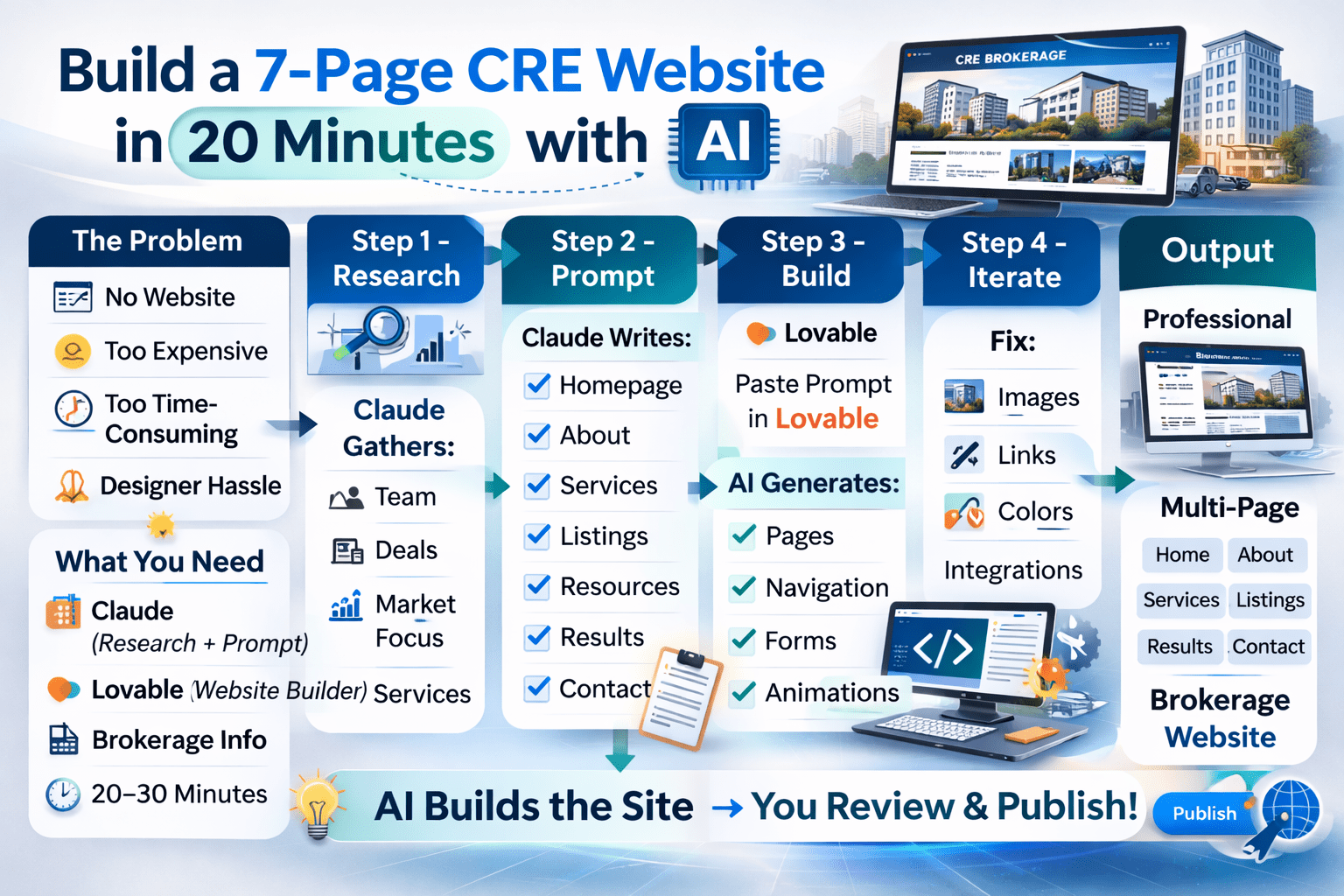
A simple four-step AI workflow for creating a professional multi-page CRE brokerage website in minutes without coding or design experience.
Step 4: Review the First Draft
Your first draft will be impressive and imperfect. Here’s what to expect:
What Usually Works on the First Try
Page structure and navigation: all seven pages built with working internal links
Content placement: sections organized logically based on your prompt
Responsive design: works on desktop, tablet, and mobile
Animations and interactions: smooth scrolling, hover effects, animated counters
Form structures: contact forms, newsletter signups, property inquiry forms
What Usually Needs Fixing
Images: Lovable uses AI-generated placeholder images or stock photos. You’ll need to upload your actual team headshots, property photos, and logo.
External links: LinkedIn profiles, social media URLs, and external website links often need manual correction. The AI sometimes guesses wrong.
Button routing: Some CTAs and buttons won’t point to the right destination. Fix the manual.
Color and contrast: Occasionally text is hard to read against the background color. Easy to adjust in the next iteration.
Integrations: Calendar booking, CRM connections, and email routing are placeholders. You’ll connect actual services later.
Copy refinement: Some auto-generated text will be generic or slightly off. Quick text edits fix this.
My Taylor Avakian demo had all of these issues. The site looked great from a design and structure standpoint, but links needed fixing, images needed replacing, and a couple of color choices made the text hard to read. Standard first-draft stuff. None of it was hard to fix.
Step 5: Iterate with Chat Mode
This step separates good results from great results. And it’s where most people make their biggest mistake.
The Chat Mode Strategy
Lovable has a chat button that lets you communicate with the AI without it making changes. USE THIS. Don’t start requesting edits directly. Plan first.
My approach:
Type: “Good first draft. like the website to be more modern and [your aesthetic preference]. What do you recommend?”
Lovable responds with a phased improvement plan – Phase 1 (biggest visual impact), Phase 2 (detail refinements), etc.
Tell it to proceed with Phase 1 only
Review the changes
If satisfied, move to Phase 2. If not, adjust direction
This phased approach prevents scope creep, which destroys vibe coding projects.
The “Ask It to Ask You Questions” Technique
Before any major iteration, tell Lovable: “Before you make changes, ask me questions about anything you’re unclear on.”
When AI makes assumptions, they’re often wrong. The AI might assume you want a dark theme when there is light, and might add a property calculator when you just wanted a simple contact form.
Five minutes of Q&A upfront saves hours of fixing bad assumptions later. This technique works with every AI tool, but it’s especially critical for website builders, where wrong assumptions can cascade through every page.
Step 6: Fix Links, Images, and Integrations
After iteration, you have a visually polished website that needs “last-mile” fixes:
Images: Upload your actual logo, team headshots, and property photos. Replace every placeholder image. This is the single biggest improvement you can make.
Links: Click through every button and link. Fix any that don’t route correctly. External links (LinkedIn, Instagram, Loopnet) need the actual URLs.
Integrations: Connect your calendar tool (Calendly, Cal.com) to the booking section. Set up your email routing for contact forms. Connect newsletter signup to your email platform (Mailchimp, Substack).
Domain: Lovable lets you publish to a Lovable subdomain immediately. For a custom domain (yourname.com), you’ll need to configure DNS settings. Lovable provides instructions.
This cleanup takes 30-60 minutes, depending on how many pages and integrations you have. After that, hit publish.
What the Full Output Looks Like (Page by Page)
Here’s what my 7-page demo website included after the first draft + one round of iteration:
Homepage: Animated hero section, stat counters for deals closed and transaction volume, services overview cards, featured client testimonials, podcast mention with link, newsletter signup form, and recent market analysis callout. Working navigation to all other pages.
About: Company origin story, timeline of key milestones, full leadership team section with individual bios, partner and affiliation logos, and company values section.
Services: Detailed cards for each service offering, “request a free valuation” CTA, and market specialization highlights.
Listings: Active property cards with details and photos, property search with filters, off-market section with registration form, recently closed transactions, and “request more info” buttons.
Resources: Podcast section with episode references, weekly market update area, blog posts, downloadable PDF market reports, and educational contents
Results: Numbers section (deals, volume, years), detailed client testimonials, featured success stories with deal specifics, and track record visualization.
Contact: Contact form with email integration, team member direct contact cards, calendar booking placeholder, social media links, and Google Maps area for office location.
All pages: sticky navigation, responsive mobile design, smooth scroll animations, consistent brand styling, and footer with full contact info and social links.
AI CRE Broker Website Build Timeline
Phase
Task
AI Tool Used
Outcome
Research
Gather brokerage info and positioning
Claude
Structured content for AI CRE broker website
Prompt Writing
Create detailed site architecture prompt
Claude
Website sections and functionality defined
Build
Generate full website code
Lovable
Multi-page AI CRE broker website draft
Review
Check design, layout, and content
Lovable Preview
Functional AI CRE broker website structure
Iteration
Improve UI and content
Lovable Chat
Polished AI CRE broker website
Launch
Replace placeholders & connect domain
Manual Setup
Live AI CRE broker website
AI CRE Broker Website FAQs
How long does it take to build an AI CRE broker website?
A complete AI CRE broker website can be built in about 20 minutes using tools like Claude and Lovable, allowing brokers to launch a professional online presence without coding or hiring a designer.
Do I need coding skills to create an AI CRE broker website?
No. An AI CRE broker website can be generated using detailed prompts without writing code, as AI platforms handle the design, layout, and development automatically.
What tools are required to build an AI CRE broker website?
Most brokers use Claude for research and prompt creation and Lovable to generate the final AI CRE broker website based on that structured input.
Can solo brokers create an AI CRE broker website?
Yes. Solo brokers can create an AI CRE broker website using their deal history, services, and market focus to generate a fully functional site without agency involvement.
Is an AI CRE broker website good enough for client acquisition?
A professionally structured AI CRE broker website can showcase listings, team information, and market expertise, helping brokers build credibility with prospects searching online.
Can I update my AI CRE broker website after launch?
Yes. Once published, your AI CRE broker website can be iterated using the same AI platform to improve design, update listings, or add new content.
Explore More AI Workflows for CRE Brokers
I share the full demo, prompt, and implementation steps inside the AI for CRE Collective every week. 575+ CRE professionals are testing AI workflows like this across brokerage, acquisitions, and marketing.
For weekly breakdowns of AI tools and workflows for commercial real estate, subscribe to the newsletter. 3,000+ CRE professionals get it every Thursday.