
Claude Cloud Routines for Commercial Real Estate: The Complete Guide
Commercial real estate workflows are filled with repetitive, time-consuming tasks that rarely generate direct revenue. From daily email triage to pipeline tracking and market research, brokers often spend hours every week doing work that could be automated. This is exactly where the Claude cloud routines CRE guide becomes a game-changer. Instead of relying on manual processes or junior analysts, you can now build automated workflows that run in the background without your involvement.
Whether you’re managing deals, tracking comps, or preparing investor updates, cloud-based automation is fundamentally changing how CRE professionals operate. The shift isn’t incremental; it’s operational.
What Are Claude Cloud Routines in CRE?
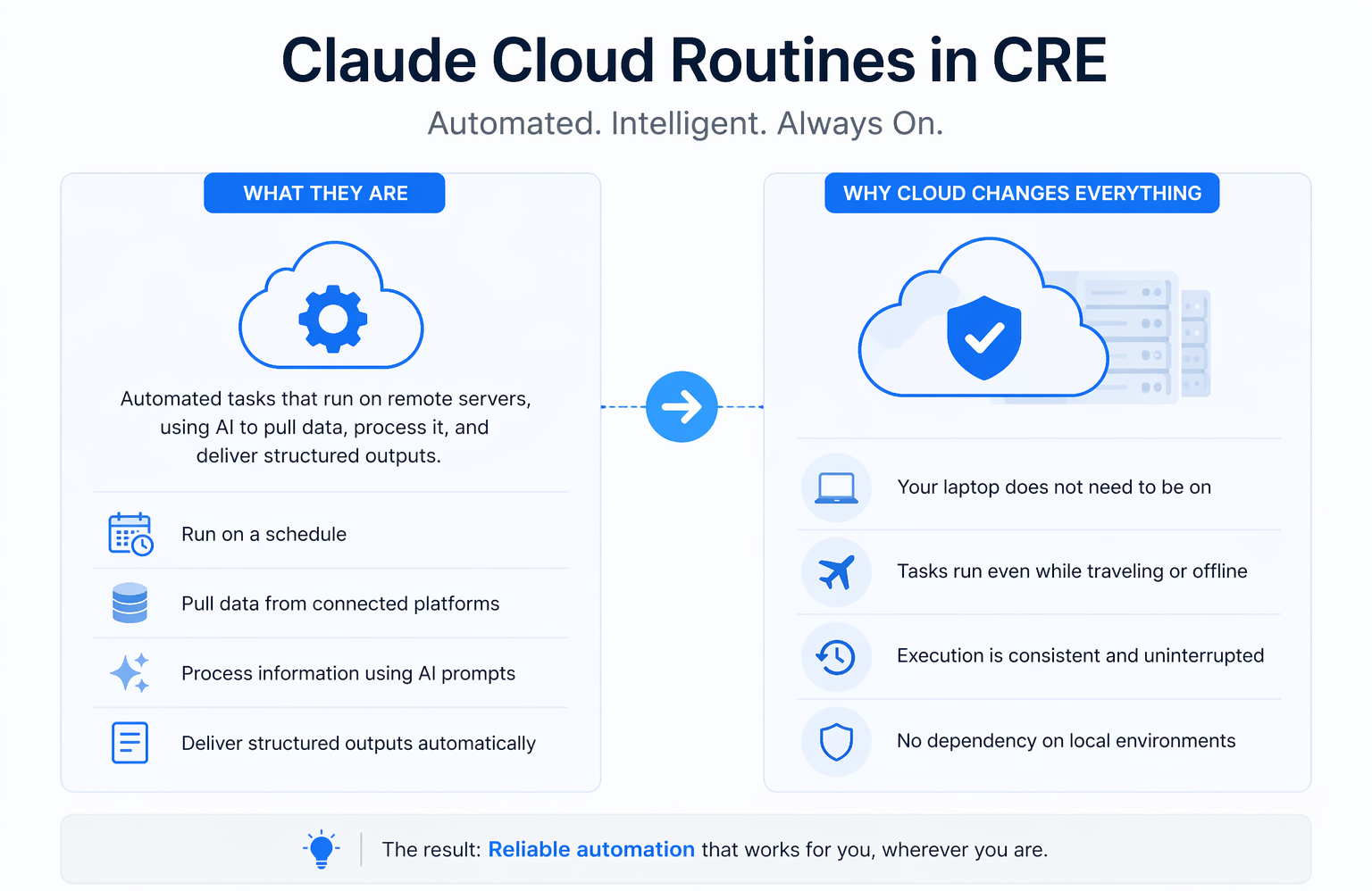
Claude Cloud Routines are automated tasks that run on remote servers instead of your local machine.
Unlike traditional automation tools, these routines:
-
Execute on a schedule (daily, weekly, event-based)
-
Pull data from connected platforms
-
Process information using AI prompts
-
Deliver structured outputs automatically
The critical advantage is that they operate independently of your device.
Why “Cloud” Changes Everything
-
Your laptop does not need to be on
-
Tasks run even while traveling or offline
-
Execution is consistent and uninterrupted
-
No dependency on local environments
As highlighted in the guide, this eliminates the biggest limitation of earlier automation systems, dependency on your machine being active.
Why the Claude Cloud Routines CRE Guide Matters
Most CRE professionals underestimate how much time they lose to operational tasks.
Common Time Drains in CRE
-
Morning email reviews
-
Calendar coordination
-
Deal intake screening
-
Weekly reporting
-
Lender follow-ups
-
Market research tracking
These tasks are necessary but not high-leverage.
Time Impact Breakdown
| Task Type | Weekly Time (Manual) | With Cloud Routines |
|---|---|---|
| Email triage | 2–3 hours | Automated |
| Deal screening | 1–2 hours | Automated |
| Reporting | 2 hours | Automated |
| Research tracking | 1–2 hours | Automated |
| Total | 6–10 hours | Near zero |
This is exactly the workload that cloud routines replace.
Cloud Routines vs Traditional Automation
Understanding this distinction is critical before implementation.
Core Differences
| Feature | Local Automation | Cloud Routines |
|---|---|---|
| Execution | Requires an active device | Runs remotely |
| Reliability | Breaks if the system sleeps | Always runs |
| Scalability | Limited | High |
| Maintenance | Manual oversight | Minimal |
| Flexibility | Moderate | High |
Local automation works, but it’s fragile. Cloud routines are persistent.
Step-by-Step: Claude Cloud Routines CRE Guide
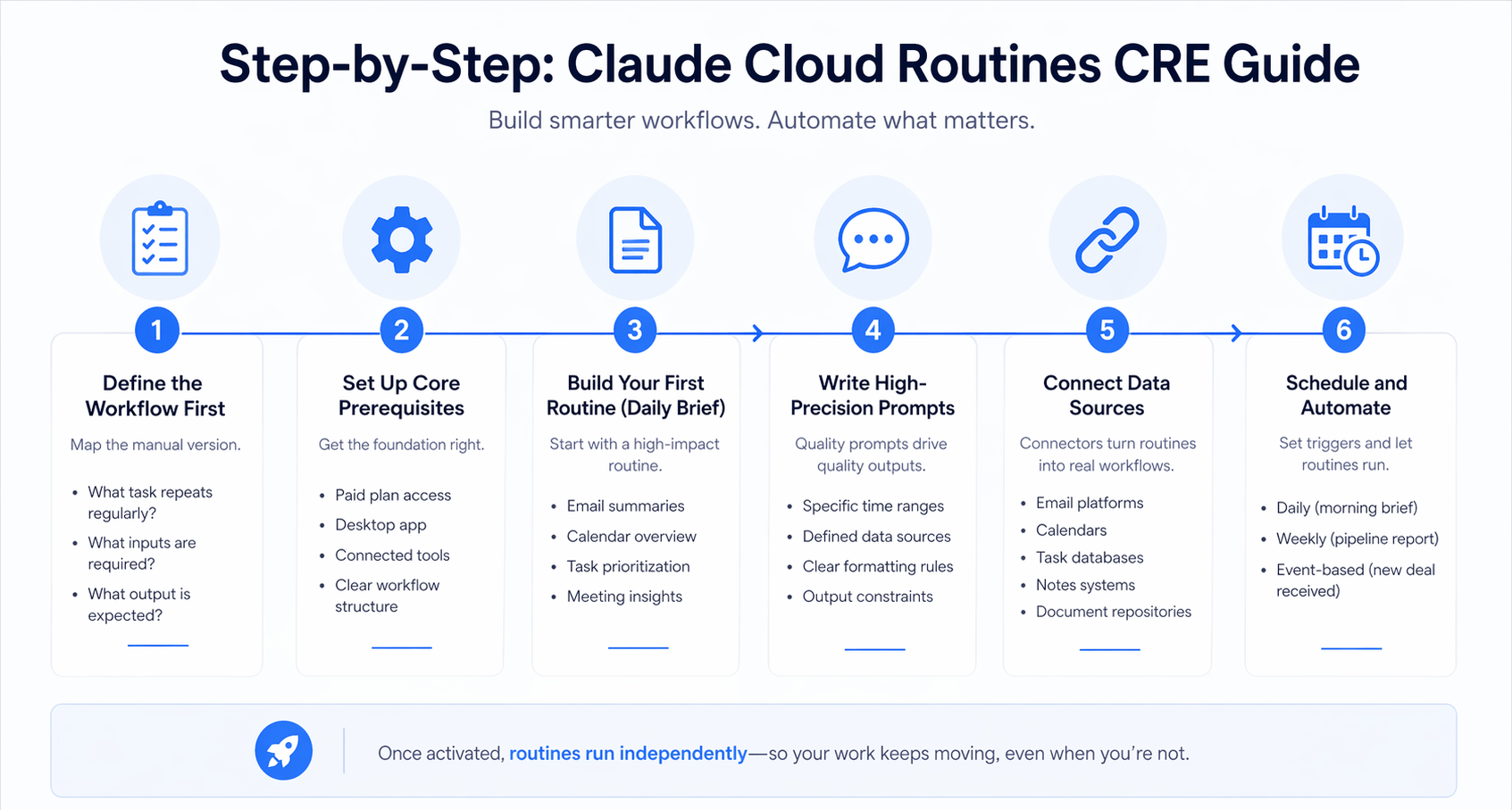
Step 1: Define the Workflow First
Before building anything, map the manual version.
Ask:
-
What task repeats regularly?
-
What inputs are required?
-
What output is expected?
If a junior analyst can follow it, it can be automated.
Step 2: Set Up Core Prerequisites
You need:
-
Paid plan access
-
Desktop app
-
Connected tools (email, calendar, task manager)
-
Clear workflow structure
Without this foundation, routines fail.
Step 3: Build Your First Routine (Daily Brief)
The daily brief is the best entry point.
It typically includes:
-
Email summaries
-
Calendar overview
-
Task prioritization
-
Meeting insights
Example Workflow Logic
-
Pull the last 24 hours of email
-
Extract calendar events
-
Identify urgent tasks
-
Summarize key actions
This mirrors exactly how a human assistant would operate.
Step 4: Write High-Precision Prompts
Prompt quality determines output quality.
Strong Prompt Characteristics
-
Specific time ranges
-
Defined data sources
-
Clear formatting rules
-
Output constraints
As the guide emphasizes, vague prompts lead to unreliable results, while structured prompts produce consistent outputs.
Step 5: Connect Data Sources (Connectors)
Connectors turn routines into real workflows.
Most Important Connectors
-
Email platforms
-
Calendars
-
Task databases
-
Notes systems
-
Document repositories
Without connectors, routines are just scheduled text generation.
Step 6: Schedule and Automate
Set triggers such as:
-
Daily (morning brief)
-
Weekly (pipeline report)
-
Event-based (new deal received)
Once activated, routines run indefinitely.
High-ROI Use Cases for CRE Professionals
The power of the Claude cloud routines CRE guide becomes clear in real applications.
Top Use Cases
-
Daily deal briefings
-
Automated deal screening
-
Pipeline summaries
-
Investor reporting drafts
-
Market tracking alerts
Example Use Case Breakdown
| Routine | Frequency | Output |
|---|---|---|
| Daily brief | Daily | Email summary |
| Deal intake | Ongoing | Go/no-go analysis |
| Pipeline digest | Weekly | Status report |
| LP updates | Quarterly | Draft reports |
Each routine replaces a recurring manual process.
The GitHub Workaround for Local Data
One limitation of cloud systems is access to local files.
Solution: Sync to Repository
-
Upload local files to a private repository
-
Connect the repository to your workflow
-
Reference files in prompts
This allows cloud routines to access structured data remotely.
Writing Prompts That Actually Work
Most failures in AI workflows come down to poor prompts.
Key Principles
-
Be specific about data sources
-
Define filters clearly
-
Set output formats precisely
-
Limit ambiguity
Example Improvement
Instead of: “Summarize my emails.”
Use: “Summarize emails from the last 24 hours, excluding promotions, and identify the top 5 requiring response.”
This level of specificity drives accuracy.
Common Issues and How to Fix Them
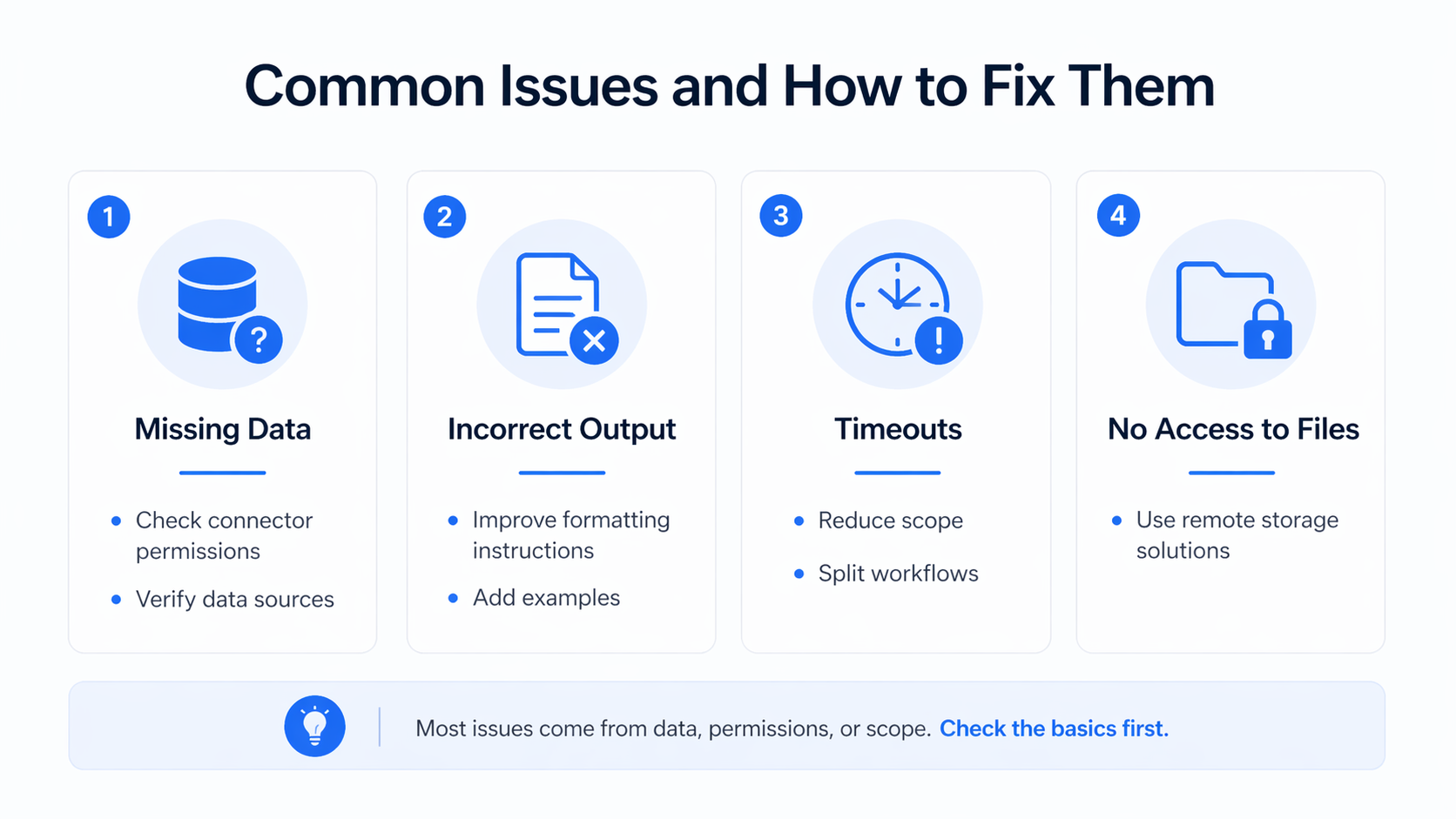
1. Missing Data
-
Check connector permissions
-
Verify data sources
2. Incorrect Output
-
Improve formatting instructions
-
Add examples
3. Timeouts
-
Reduce scope
-
Split workflows
4. No Access to Files
-
Use remote storage solutions
Claude vs Other CRE AI Tools
The CRE tech stack is evolving quickly.
Comparison Overview
| Tool | Strength | Limitation |
|---|---|---|
| Claude Cloud Routines | Automation | No deep browser tasks |
| Manus | Multi-step execution | More complex |
| Traditional AI tools | Content generation | No automation |
Cloud routines dominate in recurring workflows.
Advanced Strategy: Build a Full CRE Automation Stack
To maximize impact:
-
Use cloud routines for recurring tasks
-
Use AI tools for document generation
-
Use templates for consistency
-
Continuously refine prompts
This creates a fully automated CRE workflow system.
Conclusion
The Claude cloud routines CRE guide represents a fundamental shift in how commercial real estate professionals operate. Tasks that once required hours of manual effort can now run automatically in the background consistently and reliably.
This isn’t about replacing expertise. It’s about removing friction. The brokers and investors who adopt these systems early will gain a massive advantage in efficiency, speed, and scalability. And in CRE, that advantage compounds quickly.
Automate Your CRE Workflow Like Top Operators
If you want to stay competitive in today’s CRE market, automation isn’t optional anymore; it’s foundational. Inside AI for CRE Collective, you’ll find 600+ CRE professionals actively implementing workflows like the ones in this Claude cloud routines CRE guide. These aren’t theories; they’re real systems being used to save hours every week and close more deals.
Instead of figuring everything out alone, you can learn proven routines, prompts, and automation strategies that actually work in the field. If you’re serious about scaling your productivity and staying ahead, now is the time to subscribe to the newsletter and start building your automation stack.
FAQs Regarding Claude Cloud Routines CRE Guide
What is the Claude cloud routines CRE guide?
The Claude cloud routines CRE guide is a structured system for automating repetitive commercial real estate tasks using AI-powered scheduled workflows.
-
It uses cloud-based execution instead of local automation
-
It connects tools like email, calendar, and task managers
-
It runs workflows automatically based on triggers
-
It replaces repetitive analyst-level work
Conclusion: It’s a practical framework that turns manual CRE operations into automated, always-running systems.
How do Claude Cloud Routines work in commercial real estate?
Claude Cloud Routines operate by combining prompts, connectors, and scheduled triggers.
-
You define a workflow using a detailed prompt
-
You connect data sources like Gmail or Notion
-
You set a trigger (time-based or event-based)
-
The system executes tasks automatically in the cloud
Conclusion: They function like a virtual analyst that runs tasks independently without requiring manual input.
What are the biggest benefits of using Claude Cloud Routines in CRE?
The main benefits revolve around efficiency and scalability.
-
Saves 5–10 hours per week on repetitive tasks
-
Reduces dependency on manual processes
-
Improves consistency across workflows
-
Allows brokers to focus on high-value activities
Conclusion: The biggest advantage is reclaiming time while maintaining operational consistency.
What types of tasks can be automated using Claude Cloud Routines?
A wide range of CRE workflows can be automated.
-
Daily email and calendar summaries
-
Deal intake and screening
-
Pipeline and reporting updates
-
Market research tracking
-
Investor communication drafts
Conclusion: Any repeatable, data-driven CRE task is a strong candidate for automation.
Do Claude Cloud Routines require technical knowledge to set up?
No, but structured thinking is required.
-
No coding is necessary for basic workflows
-
You must clearly define the task logic
-
Prompt writing is the most important skill
-
Iteration improves results over time
Conclusion: While technical skills help, clarity in workflow design matters more than coding ability.
How accurate are Claude Cloud Routines outputs?
Accuracy depends on input quality and prompt precision.
-
Clean data sources improve reliability
-
Detailed prompts reduce errors
-
Outputs should still be reviewed
-
Iteration increases consistency
Conclusion: High accuracy is achievable, but validation is still necessary for critical tasks.
What is the difference between cloud routines and local automation?
The key difference is where and how tasks run.
-
Cloud routines run on remote servers
-
Local automation depends on your device being active
-
Cloud workflows are more reliable and scalable
-
Local workflows are more limited and fragile
Conclusion: Cloud routines are more dependable and better suited for business-critical operations.
Can Claude Cloud Routines replace a real estate analyst?
They can replace a portion of analyst tasks, but not the role entirely.
-
They handle repetitive and structured work
-
They cannot provide strategic judgment
-
They lack deep market intuition
-
They still require human oversight
Conclusion: They act as a productivity multiplier, not a full replacement for human expertise.
What are the most common mistakes when using Claude Cloud Routines?
Mistakes usually come from poor setup rather than the tool itself.
-
Writing vague or incomplete prompts
-
Not connecting the correct data sources
-
Skipping workflow planning
-
Expecting perfect results without iteration
Conclusion: Most issues can be solved by improving prompt clarity and workflow structure.
How can I optimize my Claude cloud routines CRE workflow over time?
Optimization comes from continuous refinement.
-
Improve prompts after each run
-
Standardize workflows and templates
-
Expand automation gradually
-
Monitor outputs and fix inconsistencies
Conclusion: The best workflows evolve over time through iteration, making them more efficient and reliable.
