
How to Plan a Unit Renovation with AI: The Complete Guide for CRE Professionals
Every apartment owner has faced this situation. This AI apartment renovation planning guide is designed to help landlords and CRE professionals quickly plan renovations, estimate costs, and make faster unit turn decisions using AI. A tenant moves out, and the unit needs work. The kitchen is outdated, the bathroom needs upgrades, paint is peeling, and you need to figure out the scope, cost, timeline, and expected outcome.
This process typically involves walking the unit with a contractor, waiting for bids, revising the scope, and hoping everything aligns with your rent targets. This AI apartment renovation planning guide shows a faster approach.
I tested this workflow on a 2-bed, 1-bath, 750-square-foot unit in Los Angeles. By uploading photos into Manus, I generated four complete deliverables in a single session: a detailed scope of work, renovation renderings, a line-item construction cost estimate in Excel, and a construction schedule with a Gantt chart.
The entire process took about 30 minutes across two renovation scenarios. This guide walks through the exact process, what to prepare, how to structure prompts, what outputs look like, where AI performs well, and where you still need real-world validation. If you want a deeper breakdown of automating deal workflows, check out our guide on automated deal underwriting with AI.
Why Traditional Renovation Planning Takes So Long
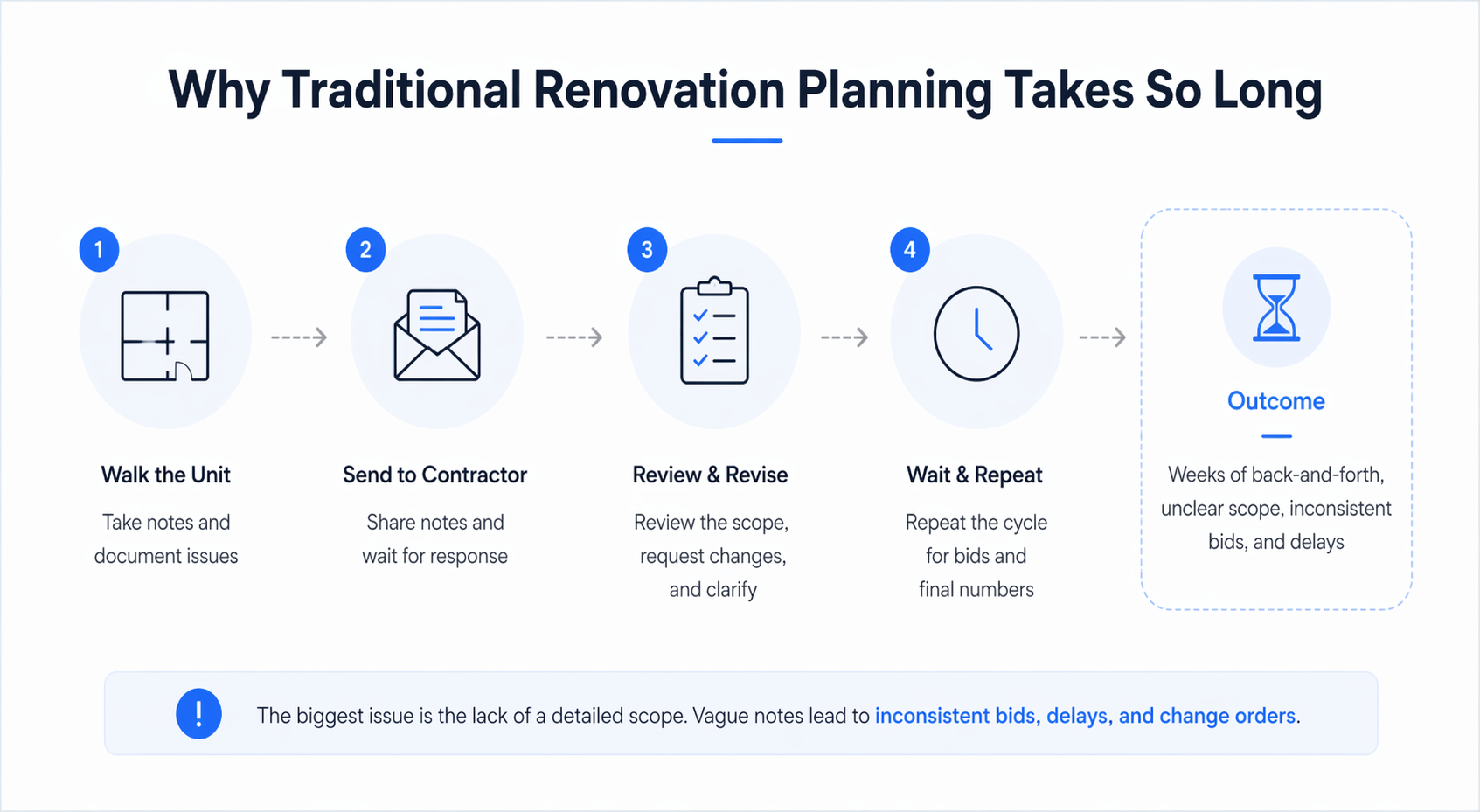
The traditional process is slow because it relies on multiple handoffs. You walk the unit, take notes, send them to a contractor, wait for them to inspect, wait for bids, review, revise the scope, and repeat. Even for a basic refresh, this takes one to two weeks.
For a full renovation, it can take three to four weeks just to finalize numbers. The biggest issue is the lack of a detailed scope.
Most operators write vague notes like:
-
Redo kitchen
-
Update bathroom
-
Paint throughout
That is not a usable scope. Contractors interpret it differently, which leads to inconsistent bids, delays, and change orders. A proper, detailed scope takes hours to create, and most people skip it. This is exactly where AI changes the workflow.
What You’ll Need Before You Start
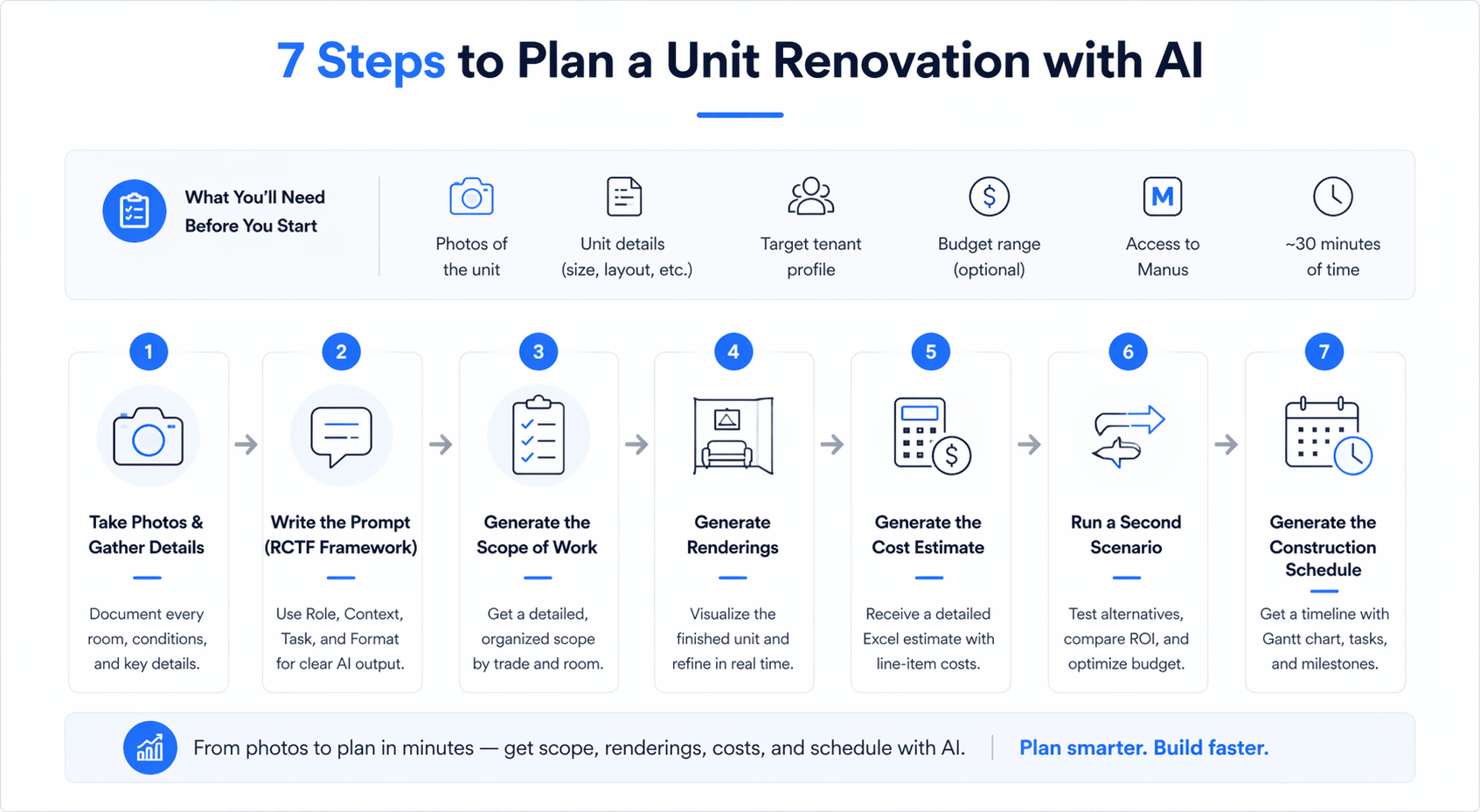
Before using AI for renovation planning, gather the following:
-
Photos of the unit (all rooms and angles)
-
Unit details (size, layout, location, condition)
-
Target tenant profile (mid-market, luxury, student, etc.)
-
Budget range (optional but helpful)
-
Access to Manus
-
Around 30 minutes of time
The quality of your inputs directly impacts the output.
Step 1: Take Photos and Gather Details
Walk the unit and document everything.
Capture:
-
Every room from multiple angles
-
Close-ups of damage or wear
-
Appliances, fixtures, flooring, and finishes
Also note that anything in photos won’t show:
-
HVAC condition
-
Plumbing concerns
-
Electrical issues
Even small details matter because they influence scope recommendations.
Step 2: Write the Prompt Using the RCTF Framework
This is the most important step.
Use the RCTF structure:
Role
Define the AI as an experienced construction estimator and designer familiar with your market.
Context
Provide specifics about the unit, location, and condition.
Task
Request exact deliverables:
-
Scope of work
-
Renderings
-
Cost estimate
-
Schedule
Format
Specify how outputs should be structured (Excel, organized scope, realistic renderings). Being specific here dramatically improves output quality.
Step 3: Generate the Scope of Work
The AI analyzes your photos and builds a structured scope.
Scopes are organized by:
-
Trade (plumbing, electrical, HVAC)
-
Room (kitchen, bathroom, bedrooms)
-
Task-level detail
Instead of vague instructions, you get precise line items like:
-
Replace plumbing fixtures
-
Install new cabinetry and hardware
-
Upgrade electrical outlets and lighting
This level of detail allows contractors to provide consistent bids. However, initial scopes may be aggressive, so you still need to apply judgment. If you want to see how this actually works in practice, watch this quick walkthrough:
Step 4: Generate Renovation Renderings
AI generates visual renderings of the finished unit.
These typically include:
-
Kitchen upgrades
-
Bathroom improvements
-
Living space enhancements
You can edit specific elements in real time, such as:
-
Changing vanity styles
-
Adjusting finishes
-
Modifying materials
This makes it easy to align with partners or investors before spending money.
Step 5: Generate the Construction Cost Estimate
The AI produces a detailed Excel estimate with:
-
Line-item costs
-
Trade breakdowns
-
Quantities and pricing
In the test scenario:
-
Full renovation: ~$82,000
-
Includes demolition, plumbing, electrical, HVAC, and kitchen rebuild
This gives you a clear understanding of cost distribution.
Step 6: Run a Second Scenario at a Lower Budget
This is where the workflow becomes powerful. Instead of accepting one estimate, you can test alternatives.
Example:
-
Full gut renovation vs. cosmetic refresh
Second scenario results:
-
Cost: ~$15,250
-
Focus: surface-level upgrades
-
No permits required
This allows you to compare ROI and choose the most efficient strategy.
Step 7: Generate the Construction Schedule
The AI can also generate a project timeline.
Includes:
-
Gantt chart
-
Task sequencing
-
Trade assignments
-
Milestones
The example schedule showed ~5 weeks for a cosmetic rehab. This provides a strong starting framework for contractor discussions.
What You End Up With
From a single session, you get:
-
Two scopes of work
-
Two sets of renderings
-
Two cost estimates
-
One construction schedule
All exportable and ready to share.
Where AI Gets It Right
AI performs well in:
-
Detailed scope creation
-
Scenario comparison
-
Visual renderings
-
Structured cost estimates
The biggest advantage is speed combined with structured output.
Where AI Falls Short
There are still limitations:
-
Material specs may be too high-end
-
Cost estimates need local validation
-
Schedules can be conservative
-
Hidden issues are not detected
AI works best as a starting point, not a final decision.
Time Comparison: AI vs Traditional Planning
| Task | AI Approach | Traditional Approach |
|---|---|---|
| Scope of work | 10–15 minutes | 2–4 hours |
| Renderings | Instant | 1–2 weeks |
| Cost estimate | 5–10 minutes | 1–2 weeks |
| Schedule | 5 minutes | 30–60 minutes |
| Total | ~30 minutes | 2–4 weeks |
AI dramatically improves speed and efficiency.
Tips From Testing This Across Multiple Units
-
Always define your target tenant
-
Run at least two scenarios
-
Use a budget cap for optimization
-
Edit renderings incrementally
-
Share estimates with contractors early
These small adjustments improve outcomes significantly.
How to Use This on Your Next Unit Turn
Take photos of the unit. Write a structured prompt. Upload everything into Manus. Generate scope, renderings, cost estimate, and schedule. Run multiple scenarios. Use the output to guide contractor conversations.
This entire process takes about 30 minutes, less time than scheduling a contractor walkthrough.
Conclusion
This AI apartment renovation planning guide shows how dramatically the process has changed. Instead of relying entirely on slow, manual workflows, you can now generate structured renovation plans, cost estimates, and timelines in a fraction of the time.
AI does not replace contractors or real-world expertise, but it gives you a faster, clearer starting point for better decisions. The real advantage is speed, clarity, and the ability to evaluate multiple renovation strategies before committing capital.
Start Using This on Your Next Unit Turn
If you’re still relying on manual planning for every unit turn, you’re losing time and efficiency.
Inside AI for CRE Collective, 600+ CRE professionals are already using workflows like this to move faster and make better decisions. If you want access to prompts, demos, and real-world use cases, subscribe to the newsletter and start applying these strategies immediately.
FAQs Regarding AI Apartment Renovation Planning Guide
1. What is AI apartment renovation planning, and how does it work?
AI apartment renovation planning uses tools like Manus or Claude to analyze unit photos and generate renovation scopes, cost estimates, renderings, and timelines automatically.
-
AI reviews images and identifies the current unit condition
-
It creates structured scopes of work by trade and room
-
It generates cost estimates and construction schedules
Conclusion: It replaces manual planning steps with a fast, data-driven workflow.
2. How accurate are AI-generated renovation cost estimates?
AI cost estimates are directionally accurate but not final, bid-level precise.
-
They reflect typical material and labor costs based on location
-
They provide line-item breakdowns useful for budgeting
-
They may not capture contractor-specific pricing or hidden issues
Conclusion: Use AI estimates for planning and comparison, but validate with contractors before execution.
3. Can AI replace contractors in renovation planning?
No, AI cannot replace contractors, but it enhances early-stage planning.
-
AI generates scopes and estimates quickly
-
Contractors validate feasibility and execution details
-
On-site inspections still identify hidden issues
Conclusion: AI supports decision-making, while contractors handle real-world execution.
4. What are the biggest benefits of using AI for apartment renovations?
AI significantly improves speed, consistency, and decision-making.
-
Reduces planning time from weeks to minutes
-
Enables multiple renovation scenarios instantly
-
Produces structured outputs ready for contractors
Conclusion: The biggest advantage is faster, more informed decision-making.
5. What inputs are required for accurate AI renovation outputs?
The quality of results depends heavily on input detail.
-
High-quality photos of all rooms and conditions
-
Unit details like size, layout, and location
-
Target tenant profile and budget constraints
Conclusion: Better inputs lead to more realistic and usable outputs.
6. How does AI help compare renovation scenarios?
AI allows side-by-side comparison of different renovation strategies.
-
Generates multiple scopes at different budget levels
-
Shows cost differences and upgrade trade-offs
-
Helps evaluate ROI for each option
Conclusion: Scenario comparison is one of the most valuable features of AI planning.
7. What are the limitations of AI in renovation planning?
AI still has several practical limitations.
-
May suggest higher-end materials than needed
-
Cannot detect hidden structural or system issues
-
Timeline estimates may be overly conservative
Conclusion: AI is a strong starting point but requires human validation.
8. How long does AI renovation planning take compared to traditional methods?
AI dramatically reduces planning time.
-
The full workflow can be completed in ~30 minutes
-
Traditional planning can take 2–4 weeks
-
Multiple scenarios can be generated instantly
Conclusion: AI enables faster decision cycles and higher deal velocity.
9. Can AI renovation planning be used for commercial properties?
Yes, the same workflow applies beyond apartments.
-
Can be adapted for office tenant improvements
-
Useful for retail and industrial renovations
-
Requires adjusting the prompt context for the property type
Conclusion: AI works across property types with proper prompt customization.
10. How should landlords and investors use AI in renovation workflows?
AI should be used as the first step in planning.
-
Generate initial scopes and budgets quickly
-
Use outputs to guide contractor discussions
-
Validate final plans with professionals
Conclusion: AI improves efficiency and clarity but should complement, not replace, expert input.
