

How to Set Up Automated Deal Underwriting with AI
I set up an AI agent that handles AI underwriting commercial real estate directly from my inbox before I wake up. Every weekday at 9 am, it scans for new broker packages, pulls the numbers, runs a full underwriting model, and writes the results into Notion.
The first deal processed was listed at $3.9M. Claude came back with $3.625M for a 15% levered IRR. By the time I opened my laptop, there was a completed analysis waiting for me.
I run the AI for CRE Collective (600+ members testing AI tools on real CRE workflows), and this is one of the most requested workflows I’ve ever shared. So, here’s exactly how to set it up.
Why Manual Deal Screening Is Killing Your Pipeline
If you’re an acquisitions analyst or broker, you know the workflow. Packages land in your inbox at all hours. However, some sit for days before you review them. By the time you run the numbers, the deal is either dead or someone else is already in LOI.
The average broker package takes 1–2 hours to manually underwrite. Therefore, if you’re receiving 5–10 packages per week, that equals a full day or more spent on initial screening.
In contrast, AI underwriting commercial real estate workflows can complete the first-pass analysis in about 3 minutes.
What You Need Before You Start for AI Underwriting Commercial Real Estate
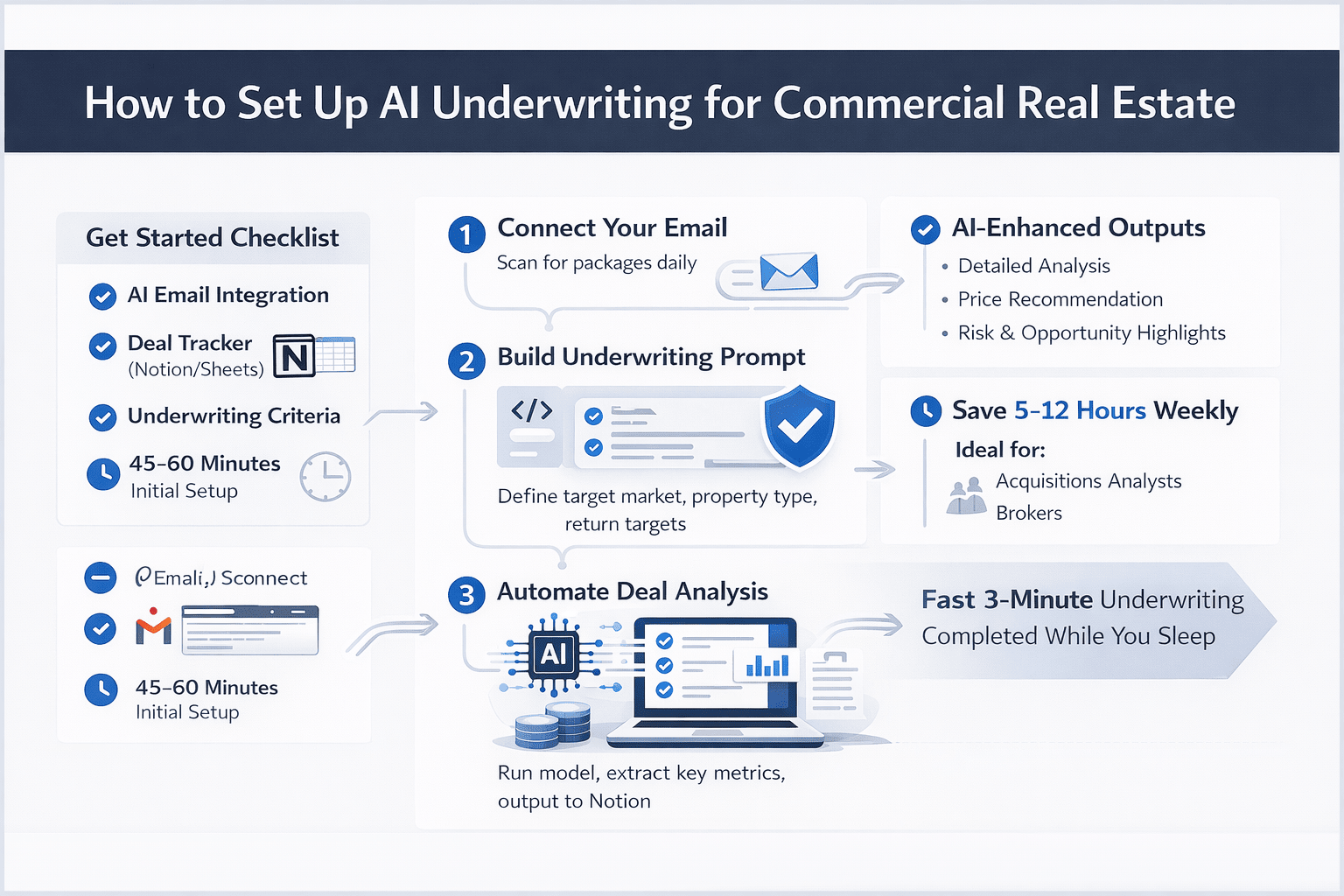
Here’s your setup checklist:
-
An AI platform with email access (Claude Cowork with Gmail connected)
-
A deal tracker in Notion, Google Sheets, or your preferred tool
-
Your underwriting assumptions documented (cap rate ranges, target IRR, expense ratios)
-
About 45–60 minutes for initial setup
The assumptions matter most. In other words, the AI is only as good as the criteria you provide.
I spent about 15 minutes creating a context file that included:
-
Target markets
-
Preferred property types
-
Minimum deal size
-
Return thresholds
Step 1: Connect Your Email
Claude Cowork uses connectors to integrate with your tools. The Gmail connector gives it access to your inbox.
Set this up through the connectors panel. Then, authorize access and define the filters.
For example, I configured it to:
-
Monitor emails with attachments
-
Filter broker domains
As a result, the setup takes about 5 minutes.
Step 2: Build Your AI Underwriting Prompt
This step determines output quality.
Your prompt should clearly define:
-
What to identify (OMs, broker packages, flyers)
-
How to extract key metrics (price, rents, occupancy, expenses)
-
Your underwriting assumptions (IRR, hold period, exit cap)
-
Output format (structured for your database)
I used ChatGPT to write the prompt. Interestingly, it performs well for structuring detailed instructions.
The final prompt was about 400 words. As a result, it produced consistent and flexible outputs.
Step 3: Create the Scheduled Task
In Claude Cowork, scheduled tasks automate the entire workflow.
I set mine to run at 9 am every weekday.
Task Sequence:
-
Scan Gmail for unread messages (last 24 hours)
-
Identify deal-related emails
-
Extract property and financial data
-
Run the underwriting model
-
Generate a summary and offer a price
-
Write results into Notion
The first run analyzed a 10-acre parcel in Southwest Bakersfield with a $2M asking price in about 3 minutes.
Step 4: Review and Refine AI Outputs
The AI output is a first pass, not a final decision.
I review each analysis and check:
-
Did it extract the correct numbers?
-
Are the assumptions appropriate for the market?
-
Does the pricing align with comparable deals?
For example, on a $3.9M deal:
-
AI suggested: $3.625M
-
Final adjusted: $3.58M
Therefore, the AI handled about 90% of the work.
After the first week, accuracy improved significantly. By the second week, review time dropped to 5–10 minutes per deal.
What the AI Underwriting Output Looks Like
Each analysis includes:
-
Property overview (location, size, type, year built)
-
Financial summary (NOI, price per unit or per SF)
-
Return metrics (cash-on-cash, IRR, equity multiple)
-
Sensitivity scenarios (best case, base case, downside)
-
Recommended offer price
-
Key risks or red flags
In addition, everything is formatted cleanly and written directly into your deal tracker. No manual copying is required.
Limitations of AI Underwriting Commercial Real Estate
There are still some limitations to consider:
-
Complex capital structures require manual modeling
-
Unusual property types may produce generic assumptions
-
Poor document quality can affect data extraction
-
Market-specific nuances still require local expertise
Therefore, human review remains essential for final decisions.
Time Comparison: Manual vs AI Underwriting
| Step | Manual | AI-Assisted |
|---|---|---|
| Email scanning | 15–30 min | Automatic |
| Data extraction | 20–30 min | 1–2 min |
| Model building | 30–60 min | 2–3 min |
| Sensitivity analysis | 15–20 min | Included |
| Writing summary | 15–20 min | Automatic |
| Total | 1.5–2.5 hours | 5–10 min review |
As a result, at 5 deals per week, this workflow can save 7–12 hours.
How to Start AI Underwriting Commercial Real Estate
If you want to test this workflow, start simple.
-
Focus on one property type
-
Clearly define your assumptions
-
Run the system once per day
-
Review the first 5–10 outputs carefully
Then, refine your prompt.
By the second week, you’ll have a system that screens deals faster than a typical analyst.
FAQs Regarding AI Underwriting Commercial Real Estate
What is AI underwriting in commercial real estate?
AI underwriting commercial real estate uses automation to analyze deals, extract data, and generate investment insights quickly.
-
It scans deal packages and extracts financial data
-
It runs underwriting models based on preset assumptions
-
It calculates returns such as IRR and cash-on-cash
-
It generates summaries and recommended pricing
In short, it replaces manual first-pass analysis and speeds up deal evaluation significantly. Learn more: https://www.mckinsey.com/capabilities/mckinsey-digital/our-insights
How does AI underwriting commercial real estate work?
AI underwriting commercial real estate works by connecting your data sources and automating analysis workflows.
-
It connects to email or document sources
-
It identifies relevant deal files automatically
-
It extracts key metrics from documents
-
It applies underwriting assumptions
-
It outputs structured analysis into your system
As a result, it creates a repeatable workflow that runs without manual input. Explore automation tools: https://zapier.com/
What tools are used for AI underwriting commercial real estate?
Several tools can be used together to build an AI underwriting system.
-
Claude for analysis and reasoning
-
ChatGPT for prompt creation and workflow setup
-
Notion or Google Sheets for deal tracking
-
Email integrations like Gmail for automation
Therefore, the best setup usually combines multiple tools instead of relying on one platform. Tool overview: https://www.anthropic.com/
Is AI underwriting accurate for commercial real estate deals?
AI underwriting is accurate when it is based on high-quality data and clear assumptions.
-
It reduces manual errors in calculations
-
It pulls directly from real deal documents
-
It improves consistency across analyses
-
It still requires human review for final decisions
In summary, it is reliable for screening but should not replace final underwriting judgment.
Can AI underwriting replace acquisitions analysts?
AI underwriting does not fully replace analysts but significantly enhances their productivity.
-
It automates repetitive tasks like data extraction
-
It reduces the time spent on initial screening
-
It allows analysts to focus on decision-making
-
It improves deal response speed
Therefore, it acts as a force multiplier rather than a replacement.
What are the limitations of AI underwriting commercial real estate?
AI underwriting has limitations that users should understand before relying on it fully.
-
It struggles with complex capital structures
-
It may misread poorly formatted documents
-
It lacks deep local market knowledge
-
It depends heavily on input data quality
However, when used correctly, it still provides major efficiency gains. Research insights: https://www.bcg.com/publications
How much time can AI underwriting save?
AI underwriting can save a significant amount of time compared to manual workflows.
-
Manual underwriting takes 1–2 hours per deal
-
AI can complete initial analysis in minutes
-
Weekly savings can reach 7–12 hours
-
It scales easily across multiple deals
As a result, it dramatically improves pipeline efficiency. Productivity research: https://hbr.org/
How do you get started with AI underwriting commercial real estate?
Getting started requires a simple and structured approach.
-
Define your underwriting assumptions clearly
-
Choose tools for automation and analysis
-
Connect your email or data sources
-
Start with one property type
-
Review and refine outputs regularly
In conclusion, starting small and iterating quickly leads to the best results. Learn workflow basics: https://zapier.com/blog/
Final Thoughts
Overall, AI underwriting commercial real estate is no longer experimental. It is already saving hours of work every week.
More importantly, it allows you to focus on decision-making instead of manual analysis.
Want More CRE AI Workflows?
I share full prompts, demos, and real workflows inside the AI for CRE Collective.
-
600+ CRE professionals
-
Weekly breakdowns
-
Real deal examples
If you want access to templates and recordings, this is where to start.
