
How to Create AI-Generated CRE Investor Decks: Complete Guide (2026)
AI CRE investor decks are quickly becoming a practical tool for commercial real estate teams that want to create investor presentations faster. I run the AI for CRE Collective (600+ members testing AI tools on real CRE workflows), and I’ve spent the past several weeks testing every major AI tool specifically on investor deck creation. In this guide, I’ll walk you through the exact workflows, honest results, and the specific techniques that make the difference between a useful output and a frustrating one.
This covers two separate use cases: creating investor decks from scratch and updating existing templates. They’re fundamentally different tasks, and the tools that win at one don’t necessarily win at the other. Understanding how AI CRE investor decks work helps CRE teams decide which workflow to use for each deal.
Table of Contents
ToggleWhy Investor Deck Creation Still Takes So Long
Every CRE professional who’s put together an investor deck or offering memorandum knows the cycle. You grab the old template and start swapping out information. The address, the photos, the basic deal summary. Then you hit the market section, and the real work starts: finding current rent comps for the submarket, pulling recent comparable sales, and updating the pro forma with new acquisition assumptions.
The research alone can eat an afternoon. This is exactly the type of work AI CRE investor decks aim to streamline. Pulling comps from CoStar or LoopNet, cross-referencing against public data, and verifying what you’ve found. For a thorough 22-slide OM targeting sophisticated investors, you’re looking at 6-8 hours of work. Often more. The problem gets compounded when you’re working multiple listings simultaneously. Each new property restarts the cycle. And most of that time isn’t judgment, it’s repetitive data gathering and population that someone on your team grinds through. AI changes the equation on the repetitive parts. This is where AI CRE investor decks begin delivering measurable efficiency for CRE teams. The judgment, relationships, and deal expertise stay with you. The data gathering, financial calculations, and slide-by-slide content population are where AI is already useful in 2026.
The AI Tools Worth Testing in 2026
Three tools are getting real use in CRE for investor decks and OM creation:
Claude PowerPoint — An AI add-in for Microsoft PowerPoint released in early 2026. Powered by Claude Opus 4.6 (or Sonnet 4.6). It can browse the internet autonomously, ingest Excel files alongside PDFs, and work directly inside your existing slide files. Best suited for template updates and financial analysis tasks.
Manus — An autonomous AI agent with strong visual and design capabilities. Creates decks from scratch with genuine design quality. Handles images, multi-step research, and complex visual formatting better than alternatives. The tool to use when you’re building from nothing.
Gamma — A purpose-built AI presentation platform. Strong design defaults, simple workflow. Gets to a polished first draft faster than more complex tools. Good for creating from scratch when you don’t need deep financial analysis integrated.
I’ve tested all three. None wins everything. The tool you use should match the specific task you’re trying to accomplish. Each of these platforms approaches AI CRE investor decks differently depending on whether the workflow starts from scratch or updates an existing template.
AI Tools for Creating CRE Investor Decks
| AI Tool | Best Use Case | Key Strengths | Limitations | Best For CRE Professionals Who… |
|---|---|---|---|---|
| Claude PowerPoint | Updating existing investor deck templates | Reads PDFs and Excel files, re-underwrites deals, autonomous market research, works inside PowerPoint | Weak visual design when creating decks from scratch | Already have a strong OM template and want AI to repopulate it quickly |
| Manus | Creating investor decks from scratch | Excellent visual design, strong formatting, handles complex layouts and images | Limited deep financial modeling compared to Claude | Want professional-looking investor decks without designing slides manually |
| Gamma | Fast AI-generated presentations | Clean design defaults, fastest first draft creation, simple workflow | Less control over detailed financial analysis | Need a polished investor deck quickly with minimal setup |
| Traditional PowerPoint Workflow | Manual deck creation | Full control over design and content | Very time consuming (4–8 hours), repetitive research and formatting | Prefer manual control or work in highly customized institutional templates |
Comparison of AI tools used to create CRE investor decks, including Claude PowerPoint, Manus, and Gamma.
What You’ll Need Before You Start
For creating from scratch:
• Claude PowerPoint access (or Manus/Gamma account)
• Claude Opus 4.6 selected if using Claude PowerPoint (most capable model)
• The offering memorandum in PDF format
• Your underwriting model (Claude PowerPoint ingests Excel files directly)
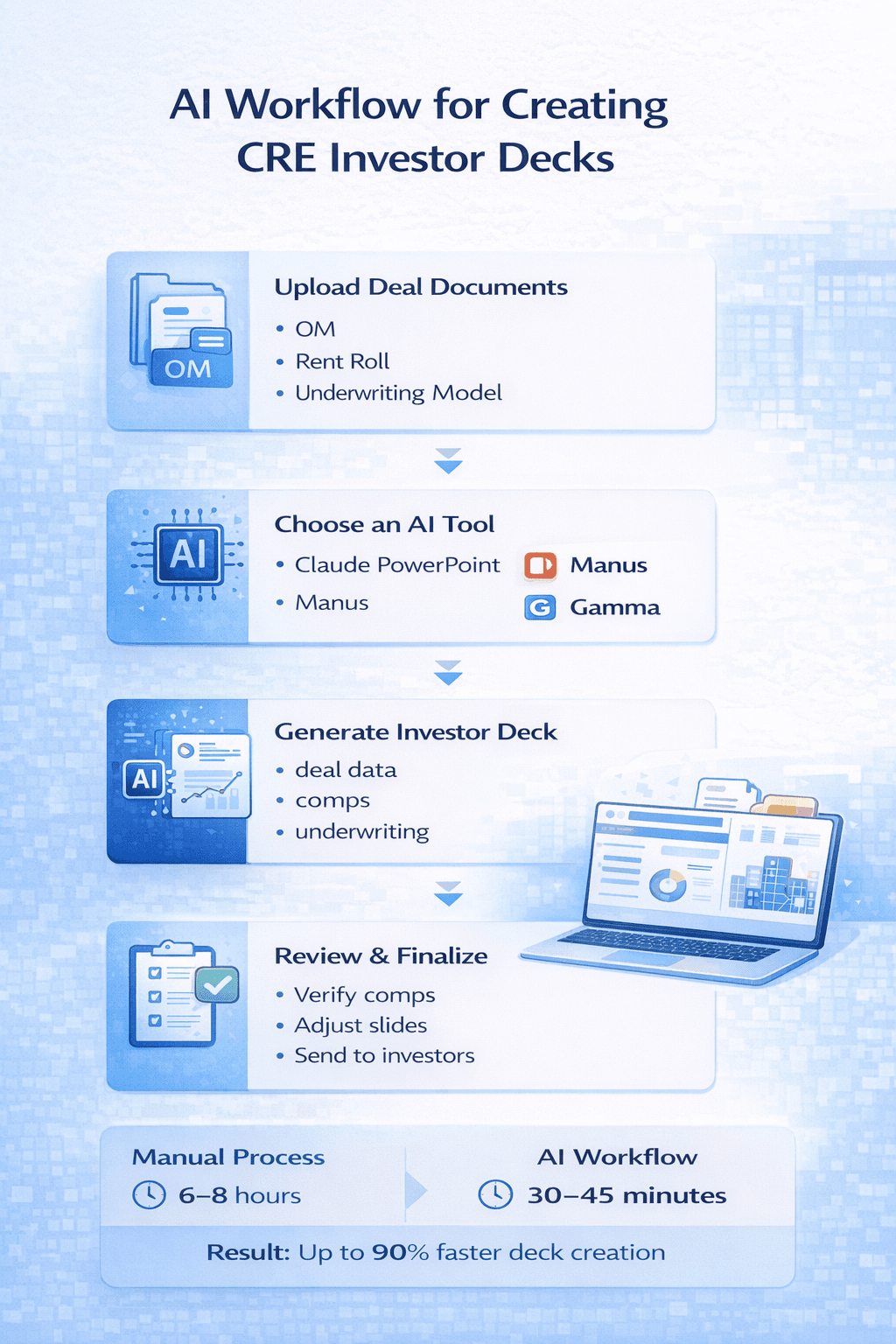
• 30-45 minutes of active time, more running in the background
For updating an existing template:
• Your existing OM template (the design quality of your starting template determines output quality)
• New property documents: OM or deal summary, rent roll, photos
• Claude PowerPoint for this specific use case
• “Ask before edits” toggle turned ON (you want to approve changes before they happen)
For either workflow:
• A clear brief: company name, equity structure, fee structure, return targets, value-add angle
• Patience for the first run, expect iteration
The brief matters more than most people expect when building AI CRE investor decks. AI that doesn’t know your equity structure, preferred return, or target IRR will make assumptions. Those assumptions show up in the deck. More on this in the workflow sections.
Workflow 1: Creating a CRE Investor Deck from Scratch
I tested this with a real deal: an offering memorandum plus an underwriting model. The goal was a 10-slide investor presentation built as one of the AI CRE investor decks for potential equity investors.
Step 1: Upload Your Files and Ask It to Ask You Questions
Attach your OM and underwriting model directly to the Claude PowerPoint chat. Then, before asking it to build anything, tell it to map out the slide outline and ask you questions before proceeding.
Here’s the exact framing I used:
“See attached offering memorandum and underwriting model for a property we’re considering acquiring. Help me create a simple investor deck to show potential investors. First, let’s map out the slide outline. Then let’s build. Please ask me any questions for clarity before proceeding.”
That last sentence is critical. AI that skips to building will guess at every ambiguous detail. In an investor deck, ambiguous details become incorrect information.
What Claude Asked (6 Questions)
After reading both files, Claude came back with:
-
What name to use on the cover slide for your group
-
Whether you’re raising the full equity amount or contributing some as sponsor equity
-
Fee structure — preferred return, profit split
-
Value-add angle — purely a lease-up/stabilization play, or are you adding a renovation budget?
-
Return assumptions — present the current numbers or recalculate using different assumptions?
-
Any additional slides beyond the standard structure?
I answered: “Westmont Partners” for the group name. Sponsor putting in 10% of the required equity. 8% preferred return, 80/20 profit split above the pref. Added $10k per unit renovation budget. Recalculate the purchase price to hit 15% levered IRR. No additional slides needed.
Step 2: Let It Build and Re-Underwrite
This is where Claude does something genuinely useful: it re-underwrites. Based on my answers, it recalculated deal economics with the renovation budget added, then found the acquisition price that achieves 15% levered IRR with the updated assumptions. It built the deck using those revised numbers, not the numbers in the original underwriting model.
If you’re creating investor materials, this is valuable. You’re showing investors the deal that pencils at your target return, not whatever the seller’s asking price produces. The build itself took several minutes. Claude works slide by slide, asking for approval before each change if you have “ask before edits” enabled.
Step 3: The Honest Design Reality
Here’s where I have to be direct: the slide design was elementary. The content analysis and financial recalculation were solid. The visual output, text overlapping, misaligned elements, and layouts that looked unpolished would not hold up in front of an institutional investor or investment committee. I ran multiple rounds trying to get Claude to fix the cosmetic issues. It made partial progress on some slides but never fully resolved the formatting problems.
For creating investor decks from scratch where design quality matters, Manus and Gamma produce significantly better visual output right now. Claude PowerPoint’s “from scratch” design capability needs work. This is likely to improve, as Claude and Figma recently announced a partnership, and design is clearly where the current gap is.
Workflow 2: Updating an Existing OM Template for a New Property
This is where Claude PowerPoint earns its place in your workflow. I had an existing 22-slide OM template built in Manus professional design, strong layout, the kind of template you’d actually send to investors. New property came in. The question: can Claude repopulate the entire thing for a new asset?
Step 1: Set Up the Session
Attach your existing template to the Claude PowerPoint chat. Then attach all new property documents: OM or deal summary, rent roll, and any photos you have. Turn on “ask before edits” mode. This is non-negotiable for this workflow — you want Claude to request approval before making changes to slides you’ve invested in.
Here’s the prompt I used:
“See attached offering memorandum template. Here’s information on a new property we’re listing. Study my template and update it based on the new asset. Format, colors, branding, and logo all remain exactly the same. Ask questions if anything is unclear.”
Step 2: Let Claude Study Before It Touches Anything
Claude reads every slide systematically before making a single change. It’s analyzing column structure on the rent roll table, understanding how the investment highlights are formatted, noting where the logo sits, and mapping the pro forma layout.In my test, it identified the specific column headers on the rent roll slide before updating it, which meant the repopulated table matched the original format rather than creating a new one.
This reading phase takes a few minutes. Don’t interrupt it. The accuracy of what it produces depends on how well it understands what you started with.
Step 3: Watch It Update Slide by Slide
Once it understands the template, Claude moves through each slide:
Executive summary and investment highlights: Updated all 6 investment highlight cards with the new property’s specific details. Replaced the old property’s financial summary with the new deal’s economics.
Pro forma: Rebuilt the financial projections using data from the attached property documents. Used the template’s existing structure and formatting.
Rent comp slide: Here’s what surprised me. Claude went online on its own — without being prompted — and searched Google for current market rents in Westlake and MacArthur Park in Los Angeles. It found 2025 market data and populated the rent comp slide with real numbers. I didn’t ask it to do this. It recognized the slide needed current market data and went looking.
Comparable sales: Same autonomous behavior. It searched for recent multifamily sales in the area, found transaction data from 2024-2025, and updated the comparable sales slide.
ADU financial impact: The property had an ADU opportunity. Claude calculated the construction cost for 8 ADUs, the additional annual rental income those units would generate, and the additional value created. All independently, based on the deal specifics in the attached documents. This is the core value proposition of this workflow: 30-45 minutes of Claude working in the background replaces 6-8 hours of someone on your team doing the same research and data population manually. In practice, this is where AI CRE investor decks deliver the most value for CRE teams.
Step 4: Managing Context Limits
For long decks (22+ slides with substantial data), Claude will likely hit its context window limit before finishing. This happened in my test near the last few slides. When it does: start a fresh Claude PowerPoint chat, re-attach the template in its current state, and tell Claude which slide you left off on. It picks up from there without issue. This isn’t a major problem, but it’s worth planning for. On a 22-slide deck, budget for one context restart.
How Claude Autonomously Researches Market Data
The autonomous web research deserves its own section because it’s the most practically useful capability in this workflow. When Claude encounters a slide that needs current market data, rent comps, comparable sales, and market vacancy rates, it recognizes the gap and searches for real data on its own. In my test, I watched it type search queries in real time:
“Westlake MacArthur Park Los Angeles average rent 2025.”
Westlake Los Angeles multifamily apartment sales 2024 2025 price per unit. “It found results, extracted the relevant data, and applied it to the appropriate slides, all without being prompted. For CRE professionals, this compresses 45-60 minutes of market research into something that happens while the overall update runs in the background. You still need to verify what it finds. But getting an accurate first cut automatically is a meaningful time savings.
Important: Always verify rent comps and sales comps before the OM goes to any client, investor, or counterparty. Claude is pulling from the public internet. The data is real, but you’re responsible for accuracy. Treat the AI-pulled comps as a starting point, not a finished product.
The Complete Output: What You Actually Get
After Claude’s work on Workflow 2, plus 20-30 minutes of manual cleanup, here’s what a typical output looks like:
• All 22 slides updated with new property information, deal economics, and market data.
• Pro forma with new acquisition assumptions, return projections, and deal economics.
• Rent comp analysis populated with market data from Claude’s web search, actual submarket rents, unit mix comparisons, and position against the market.
• Comparable sales from 2024-2025 in the area, pulled autonomously.
• Investment highlights fully refreshed with deal-specific callouts.
• ADU analysis (if applicable) with construction economics and value-add impact calculated.
• Template design preserved colors, fonts, logo placement, sand ection structure all exactly as they were.
What still needs manual attention: property photos (Claude can’t insert actual photos yet), external hyperlinks, minor formatting cleanup on data-heavy slides, and verification of all market data. It’s a thorough first draft. On a complex deal with real submarket research, it would take a full day manually. With this workflow, you’re spending 30-45 minutes of active time on a session that mostly runs in the background.
What AI Does Well vs. Where It Falls Short
Strengths
Template repopulation: Claude PowerPoint’s strongest use case. Systematic, thorough, and surprisingly good at preserving design integrity.
Financial re-underwriting: The ability to recalculate deal economics based on new assumptions, finding the price that hits a target IRR, adjusting for a renovation budget, is genuinely useful for investor materials.
Autonomous market research: Searching for rent comps and comparable sales without being prompted saves meaningful research time.
Background processing: You can run multiple deck projects simultaneously. While one runs, you start another. This changes the capacity math for busy investment sales professionals.
Limitations
Design from scratch: Creating AI CRE investor decks with strong visual output from nothing is not Claude PowerPoint’s strength right now. Use Manus or Gamma for this.
Photo handling: Claude can’t insert actual property photos from attachments in a usable way yet. Photos are always a manual step.
Complex context windows: Very long decks hit limits. Plan for a context restart on 20+ slide projects.
Verification requirement: AI-pulled market data needs human review before any external use. This isn’t a limitation to eliminate, it’s a step to budget for.
Time Comparison: AI vs. Manual
OM template update (22 slides)
Manual Time: 6-8 hours
AI-Assisted Active Time: 30-45 min
Total AI Time (incl. background): 60-90 min
Market rent research
Manual Time: 45-60 min
AI-Assisted Active Time: 0 (autonomous)
Total AI Time: Included above
Comparable sales research
Manual Time: 30-45 min
AI-Assisted Active Time: 0 (autonomous)
Total AI Time: Included above
Investor deck from scratch
Manual Time: 4-6 hours
AI-Assisted Active Time: 1-2 hours
Total AI Time: 3-4 hours
The “active time” distinction matters. With AI doing the work in the background, you can run multiple projects simultaneously. That’s where the real leverage is, not just that one deck takes less time, but that you can have four decks running while you handle other work.
Tips from Testing This on Real Deals
-
Always use “ask before edits” mode. Let Claude show you what it’s planning to change before it changes it. On a template you’ve invested in, blind edits are risky.
-
Ask it to ask you questions before building anything. This single instruction prevents most bad assumptions. For Workflow 1, those 6 questions completely changed what got built.
-
Match the tool to the task. Creating from scratch: Manus or Gamma. Updating an existing template: Claude PowerPoint. Using the wrong tool for the wrong job costs time.
-
Verify every web search result before client delivery. Claude pulls real data from real searches, but you’re responsible for accuracy. Treat AI-pulled comps as a starting point.
-
Plan for context limits on long decks. Budget for one restart if you’re working on 20+ slides. It’s not a major issue, just keep track of which slide you’re on.
-
Your starting template determines output quality. The better your existing OM template, the better the repopulation. If you don’t have a strong template, building one first (in Manus or Gamma) is worth the upfront investment.
FAQs regarding AI CRE investor deck creation
What is an AI-powered CRE investor deck?
An AI-powered CRE investor deck is a presentation created or updated using artificial intelligence to automate research, financial modeling, and slide population.
-
AI ingests offering memorandums, rent rolls, and underwriting models.
-
It generates slides such as investment highlights, pro formas, and market comps.
-
Human review is still required before investor delivery.
Learn more about AI in commercial real estate here: https://www.mckinsey.com/industries/real-estate/our-insights
In short, AI accelerates deck creation without replacing deal expertise.
How does AI reduce time spent on investor decks?
AI reduces time by handling repetitive research and formatting tasks automatically.
-
Pulls rent comps and comparable sales in the background.
-
Recalculates pro formas based on target returns.
-
Updates multiple slides without manual rework.
A breakdown of AI productivity gains is available here: https://hbr.org/2023/04/how-ai-is-changing-work
Overall, AI shifts time from execution to higher-level decision-making.
Can AI create a CRE investor deck from scratch?
Yes, AI can generate investor decks from scratch, but output quality depends on the tool used.
-
Some tools prioritize financial accuracy.
-
Others focus on layout and visual design.
-
Most decks still need manual polish.
This overview explains AI-generated presentations: https://www.forbes.com/sites/forbestechcouncil/2024/01/15.
Is AI better for updating existing OM templates?
AI performs best when updating existing offering memorandum templates.
-
Branding, layout, and formatting are preserved.
-
New property data is repopulated systematically.
-
Market research is refreshed automatically.
See how AI supports document automation here: https://www.ibm.com/topics/intelligent-document-processing
This is currently the highest-ROI AI use case.
What data do I need before using AI for decks?
AI outputs improve significantly with clean, structured inputs.
-
Offering memorandum or deal summary.
-
Rent roll and underwriting model.
-
Clear assumptions on equity and returns.
Best practices for data preparation are explained here: https://www.tableau.com/learn/articles/data-preparation
Better inputs lead to more accurate outputs.
Can AI re-underwrite deals for target IRRs?
AI tools can re-underwrite deals based on specific return targets.
-
Adjusts purchase price assumptions.
-
Incorporates renovation and value-add budgets.
-
Updates IRR and equity multiple projections. AI use in finance is explained here: https://www.coursera.org/articles/ai-in-finance.
Does AI pull real rent comps and sales data?
Yes, AI can autonomously search the public internet for market data.
-
Finds recent rent comps by submarket.
-
Pulls comparable sales from recent years.
-
Populates slides with sourced estimates.
An overview of AI-powered market research is here: https://www.gartner.com/en/articles/what-is-ai-market-research.
AI-generated research is directionally accurate but not definitive.
-
Data comes from public sources.
-
Results vary by geography and data freshness.
-
Human validation is required.
Best practices for validating AI outputs are discussed here: https://www.nature.com/articles/d41586-023-03971-5.
Can AI handle complex CRE financial models?
AI can manage moderately complex underwriting scenarios.
-
Multi-year pro formas and exit assumptions.
-
Renovation and value-add modeling.
-
Debt and equity structures at a high level.
AI limitations in finance are outlined here: https://www.investopedia.com/ai-in-finance-7378599
What parts of investor decks still require manual work?
-
Property photos and image placement.
-
Final formatting and alignment.
-
Verification of all market data.
A realistic view of AI limitations is discussed here: https://www.weforum.org/stories/2024/01/ai-limitations. AI accelerates work but does not eliminate review.
Can AI maintain branding and design consistency?
Yes, especially when working from an existing template.
-
Colors, fonts, and logos remain unchanged.
-
Slide structure is preserved.
-
Content is updated within fixed layouts. Template quality directly impacts output quality.
Is AI safe to use for investor-facing materials?
AI is safe when used with proper oversight.
-
Avoid sharing sensitive data with unsecured tools.
-
Review outputs carefully before distribution.
-
Follow internal compliance policies.
AI governance guidance is available here: https://www.oecd.org/ai/principles. Responsibility always stays with the sponsor.
How long does an AI-assisted OM update take?
AI-assisted workflows dramatically reduce active time.
-
30–45 minutes of active review.
-
60–90 minutes total, including background processing.
-
Significant time savings over manual workflows.
Productivity research on AI is covered here: https://www.nber.org/papers/w31161. The biggest gain comes from parallel processing.
Can AI handle multiple deals at once?
AI enables teams to run multiple deck updates simultaneously.
-
One deck is processed while another is started.
-
Research runs in the background.
-
Team capacity effectively increases.
Efficiency benefits are explained here: https://www.asana.com/resources/ai-productivity. This changes how CRE teams scale.
Does AI replace analysts or associates?
AI augments analysts rather than replacing them.
-
Reduces repetitive tasks.
-
Free time for analysis and judgment.
-
Improves consistency across materials.
Workforce impact research is here: https://www.brookings.edu/articles/ai-and-the-future-of-work. Roles evolve instead of disappearing.
What skills do CRE professionals need to use AI effectively?
AI rewards clarity more than technical skill.
-
Ability to write precise prompts.
-
Strong understanding of deal mechanics.
-
Willingness to review and iterate.
Prompting fundamentals are explained here: https://www.promptingguide.ai. Domain expertise remains essential.
Are AI-generated decks acceptable for institutional investors?
They are acceptable when properly reviewed and polished.
-
Financial logic must be sound.
-
Visual quality must meet expectations.
-
Data accuracy must be confirmed.
Investor communication standards are discussed here: https://www.cfainstitute.org/en/ethics. AI assists preparation, not credibility.
How do context limits affect long decks?
Large decks may exceed AI context limits.
-
Work pauses before completion.
-
Sessions can be restarted mid-deck.
-
Planning avoids workflow disruption.
Technical limits of large models are explained here: https://ai.googleblog.com/2023/05/long-context.html.This is manageable with process discipline.
Should AI-generated comps be disclosed to investors?
Disclosure depends on firm policy and regulations.
-
AI is typically a research assistant, not a cited source.
-
Final numbers are owned by the sponsor.
-
Transparency builds trust.
Ethics in AI disclosure are discussed here: https://www.pwc.com/ai-ethics. Accuracy matters more than tooling.
Is AI investor deck creation worth adopting now?
Yes, adoption already delivers measurable leverage.
-
Saves hours per deal.
-
Improves consistency across materials.
-
Scales output without additional hires.
AI adoption trends are outlined here: https://www.statista.com/topics/846/artificial-intelligence-ai
Early adoption builds long-term advantage.
How should beginners start using AI for CRE decks?
Beginners should start with low-risk workflows.
-
Update an existing OM template first.
-
Verify every output carefully.
-
Expand usage as confidence grows.
A practical AI adoption guide is here: https://www.bain.com/insights/ai-adoption-playbook
I’ve shared the full demo video, the exact prompts I used for both workflows, and the step-by-step breakdown inside the AI for CRE Collective. 600+ CRE professionals testing AI workflows on real deals every week.
If you want to see this process in action and every new workflow I test as these tools keep improving, join the community. If you prefer a weekly digest format, subscribe to the newsletter. Nearly 3,000 CRE professionals get it every Thursday. The tools will get better, and AI CRE investor decks will likely become a standard workflow for CRE investment teams. The Figma partnership, the improved models, the faster processing, we’re looking at the earliest version of what AI investor deck creation is going to become. The time to build the habit is now.
