

AI Due Diligence for CRE: Complete Guide
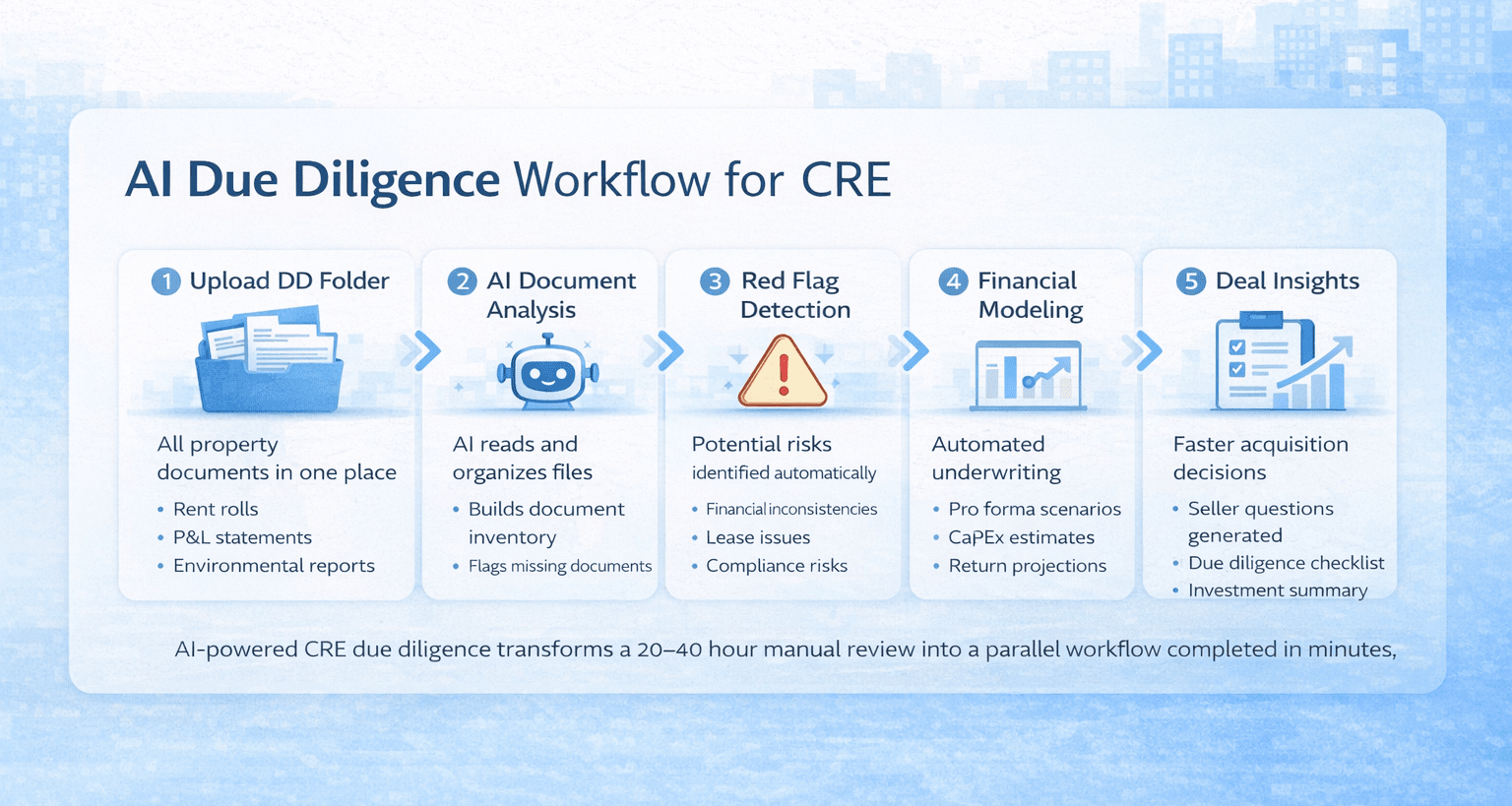
Commercial real estate due diligence usually takes weeks, but Claude Code CRE due diligence workflows can reduce that process to minutes. Instead of manually opening PDFs, cross-referencing rent rolls with P&L statements, building checklists in Excel, flagging missing documents, drafting seller questions, estimating renovation costs, and running pro forma scenarios, AI agents can now perform many of these tasks simultaneously.
I tested a different approach. I fed an entire DD folder into Claude Code (Anthropic’s terminal-based AI tool), wrote one prompt, and six AI agents produced a document inventory, red flag report, seller questions, DD checklist, CapEx budget, and acquisition simultaneously. The deal was a 14-unit multifamily in Venice, CA, at $5.9M. I run the AI for CRE Collective (540+ members testing AI on real CRE workflows), and this was the most ambitious single-prompt workflow I’ve run to date. This guide walks through every step of that process, what worked, what I’d do differently, and how to replicate it on your own deals.
Table of Contents
ToggleWhy Traditional DD Takes So Long
The typical DD process for a multifamily acquisition looks something like this: you receive a DD package from the seller or broker. You open the folder. There are 15-40 documents in various formats. Some are PDFs, some are scanned images, some are spreadsheets.First, you figure out what you have. Then you figure out what’s missing. You build a checklist. You start reviewing each document individually. Financial documents get their own analysis. Legal documents get flagged for attorney review. Environmental reports get checked for red flags.Along the way, you’re building seller questions. Every time something doesn’t add up, or a document is missing, you write it down. You organize those questions by priority. You estimate renovation and CapEx costs based on property condition and planned improvements.
And then you underwrite the deal. Input assumptions and build scenarios. Check returns against your targets.Each of these tasks requires focus and attention. You can only do one at a time. A thorough DD review on a single deal takes an experienced analyst 20-40 hours, depending on the complexity and the quality of the DD package.The bottleneck isn’t intelligence. It’s bandwidth.
Claude Code vs Traditional CRE Due Diligence Workflow
| Due Diligence Task | Traditional Workflow | Claude Code Workflow |
|---|---|---|
| Document Organization | Analyst manually opens and sorts 15–40 files | AI scans the entire DD folder and builds a document inventory automatically |
| Missing Document Tracking | Excel checklist created manually | AI flags missing or incomplete documents instantly |
| Financial Review | Analyst compares rent rolls and P&L statements manually | AI extracts financial data and cross-checks documents automatically |
| Seller Questions | Questions written during document review | AI generates prioritized seller follow-up questions |
| Red Flag Identification | Analyst flags issues during review | AI produces a structured red flag report with priority levels |
| CapEx & Renovation Estimates | Manual estimates using contractor assumptions | AI builds a CapEx budget using property data and improvement plans |
| Pro Forma Modeling | Financial model built manually in Excel | AI generates multi-scenario acquisition pro forma models |
| Total Time Required | 20–40 hours for a typical deal | About 15–20 minutes for a first-pass DD analysis |
Using Claude Code shifts CRE due diligence from a slow, sequential process to a fast parallel workflow where multiple AI agents complete analysis at the same time.
What You Need Before Starting
Before you sit down to run this workflow:
-
Claude Code is installed on your computer. This runs in the terminal (the command line interface on your Mac or PC). If you’ve never used the terminal before, the Claude masterclass in the AI for CRE Collective covers setup from scratch.
-
A DD folder on your desktop or an accessible location. All the due diligence documents for the deal. Rent rolls, P&L statements, property condition reports, ADU plans, and environmental reports. Whatever you have. Claude will read all of them.
-
Your acquisition criteria. Purchase price or target purchase price. Return targets (IRR, cash-on-cash). Hold period assumptions. Any hard filters you apply to deals.
-
15-20 minutes. About 5 minutes for setup and planning, 10-15 minutes for execution.
-
Claude’s latest model (Opus 4.6 or newer). The results are significantly better on newer models. If you’re running an older version, update before running complex workflows like this.
You don’t need coding experience. You don’t need a CS degree. I’ve been in real estate my whole life, and I learned this through practice (like going to the gym, reps make you stronger).
Step 1: Organize Your DD Folder
Put all your due diligence documents in one folder. Keep it clean. Name the folder something descriptive, like “123 Main St DD” or the property name.Claude Code will scan every file in the folder. It can read PDFs, Excel files, Word documents, and image-based documents. The more organized your folder is, the better Claude’s document inventory will be. But it still works with messy folders. It’ll just take slightly longer to parse everything.For the Venice deal, I had rent rolls, a trailing 12-month P&L, ADU option drawings with specifications, and several other property documents. Everything went into one folder on my desktop.
Quick Tip on File Naming
If your files have descriptive names like “Rent_Roll_2024.pdf” and “T12_PL_Statement.xlsx,” Claude will categorize them faster and more accurately than if they’re named “Document1.pdf” and “scan_003.pdf.” Not required. Just helpful.
Step 2: Activate Plan Mode in Claude Code
Open your terminal. Type “Claude” and hit enter. Claude Code launches.Now the critical step: hit shift+tab until you see plan mode activated. This changes Claude from “just execute whatever I tell you” mode to “analyze, ask questions, plan, get approval, then execute” mode.
Why does this matter
Because the alternative is Claude making assumptions about your deal. If you don’t tell Claude the purchase price, he’ll guess. You don’t specify which scenarios to model; it’ll pick one. And if you don’t clarify your return targets, it’ll use some default.Plan mode adds 3-5 minutes to the process. It eliminates hours of fixing outputs built on wrong assumptions.I’ve tested both approaches across dozens of workflows. Plan mode has better results every time for complex, multi-deliverable tasks. For simple single-task requests (extract a rent roll, summarize this document), you can skip it. For full DD analysis? Always plan.
Step 3: Write the Master Prompt
Here’s the structure I used. You’ll customize the specifics for your deal:
The prompt tells Claude:
“I have a due diligence folder at [location on your computer]. Please do the following in order:
-
Ingest and organize all files. Create a document inventory showing what’s present and what’s missing.
-
Underwrite the deal using these assumptions: [purchase price, hold period, return targets, rent growth, expense growth, cap rate assumptions].
-
Prepare a comprehensive DD checklist categorized by type.
-
Prepare a red flag report identifying anything concerning in the documents.
-
Prepare seller follow-up questions prioritized by urgency.
-
Build a renovation and CapEx budget, including construction estimates for any planned improvements.”
That’s one prompt. One message. Claude handles the rest.
The key is being specific about your assumptions. Don’t say “underwrite the deal.” Say “underwrite the deal at $5.9M purchase price, 5-year hold, model both 14-unit as-is and 14-unit plus 3 ADU scenarios, target 16% levered IRR and 5% average cash-on-cash.” The more specific your assumptions, the more useful the output.
What I’d Add Next Time
Tell Claude what file formats you want upfront. I didn’t, and it defaulted to markdown files (which look ugly). Include this line in your prompt:
“Produce all reports as Word documents and all spreadsheets as Excel files with proper formatting.”
Saves you a conversion step later.
Step 4: Answer Claude’s Questions
After you paste the prompt with plan mode active, Claude will come back with questions. On the Venice deal, it asked three:
-
“Do you have an existing price or contract price for this deal? If not, I’ll solve for the max purchase price that hits your return targets.” I answered $5.9M.
-
“Should I model this as 14 units only at stabilized occupancy, 14 units plus 3 ADUs, or both scenarios?” I said both.
-
“Where do you want the output files saved?” I told it to save everything in the DD folder.
Your questions will vary based on your prompt and the documents Claude finds. If it asks about something you don’t know, say so. “I don’t have that number. Use market assumptions for Venice, CA multifamily.” Claude will work with what it has.
Step 5: Review and Approve the Plan
Claude writes out a detailed plan. On my deal, the plan covered:
-
Property summary with extracted deal details
-
Documents available vs. documents needed
-
Acquisition pro forma structure with both scenarios
-
Baseline assumptions it would use
-
DD checklist methodology (categories, tracking approach)
-
Red flag identification criteria
-
Seller question priority framework
-
Renovation and CapEx budget methodology
Read the plan. If something looks off, tell Claude to adjust. “Change the hold period to 7 years” or “add a third scenario with only 2 ADUs.” Once you’re satisfied, hit approve.
This is the last human checkpoint before Claude starts producing deliverables. Take 2-3 minutes to review it carefully.
Step 6: Let the Agents Execute
After approval, Claude launches multiple agents in parallel. On my deal, it ran six agents simultaneously:
-
Four agents writing Word documents (document inventory, red flag report, seller questions, DD checklist)
-
Two agents building Excel spreadsheets (pro forma and CapEx/renovation budget)
You’ll see agents launch in your terminal. Files start appearing in your output folder. You don’t need to do anything during this phase. You could open another terminal and start a second deal while the first one processes (that’s where the productivity really stacks up).
The execution phase on my deal took about 5-8 minutes for all six deliverables. Your timing will vary based on the number of documents and the complexity of the analysis.
FAQs regarding Claude Code Due Diligence
What is Claude Code, and how does it work for CRE due diligence?
Claude Code is a terminal-based AI tool that automates complex CRE workflows.
-
It can ingest entire DD folders and extract data.
-
Supports multiple file types: PDFs, Excel, Word, and images.
-
Allows multi-agent parallel processing for simultaneous deliverables.
-
Plan Mode ensures assumptions are clarified before execution.
Using Claude Code speeds up due diligence from weeks to minutes. Learn more about Claude Code.
Do I need coding experience to use Claude Code?
No coding is required to run Claude Code for CRE workflows.
-
You interact with the terminal using plain English prompts.
-
Plan Mode guides the AI to ask clarifying questions.
-
You can execute multi-step workflows without scripts or API knowledge.
Even beginners can run a full multifamily DD workflow after following a tutorial. Check the Masterclass for setup guidance.
How does Claude Code automate CRE due diligence?
Claude Code accelerates due diligence by handling repetitive and analytical tasks.
-
Builds document inventory and flags missing files.
-
Prepares DD checklists categorized by type.
-
Generates red flag reports and seller follow-up questions.
-
Produces CapEx budgets and pro forma scenarios in parallel.
This approach reduces manual effort by 80-90% compared to traditional DD.
What is Plan Mode in Claude Code, and why is it important?
Plan Mode ensures that the AI clarifies assumptions before executing tasks.
-
Asks questions about purchase price, scenarios, and return targets.
-
Prevents errors caused by default assumptions.
-
Ensures outputs match your exact criteria.
Plan Mode is critical for complex multi-deliverable CRE workflows. Read more about it here.
What types of files can Claude Code read?
Claude Code supports most CRE document types for DD.
-
PDFs, including scanned documents.
-
Excel files for financials and rent rolls.
-
Word documents for contracts or summaries.
-
Images, which can be OCR-processed into text.
Organizing files with descriptive names improves accuracy and speed. Learn file tips here.
How long does it take to complete a full CRE due diligence workflow?
Claude Code completes full workflows much faster than manual analysis.
-
Document inventory: ~2 minutes
-
DD checklist: ~3 minutes
-
Red flag report: ~2 minutes
-
Seller questions: ~2 minutes
-
CapEx and pro forma: ~5 minutes
-
Total: ~15-20 minutes for a 14-unit deal
Compared to 8–16 hours manually, this saves significant time. Learn timing details here.
What deliverables does Claude Code produce for CRE deals?
Claude Code outputs six main deliverables for each workflow.
-
Document inventory with missing and partial files flagged.
-
DD checklist across categories like financial, legal, and environmental.
-
Red flag report with priority levels (high, medium, low).
-
Seller follow-up questions, prioritized by urgency.
-
CapEx budget including ADU estimates.
-
Acquisition pro forma with multiple scenarios.
These deliverables are ready for review and investor presentation. See examples here.
How accurate are Claude Code’s financial outputs?
Financial outputs are accurate for preliminary analysis.
-
Pro forma models multiple scenarios (e.g., 14 units vs 14+3 ADUs).
-
CapEx budgets include hard and soft costs, contingency, and permits.
-
Red flag reports identify discrepancies in P&L and rent rolls.
Final verification by a human is recommended for investment decisions. More accuracy tips here.
Can Claude Code handle complex multifamily deals?
Yes, but complexity may require additional context.
-
Works best with standard multifamily structures.
-
Complex partnerships, unusual financing, or regulatory issues may need iterations.
-
Plan Mode helps guide the AI for nuanced deal structures.
It’s ideal for fast first-pass due diligence before deeper human analysis. More guidance here.
Can Claude Code be used for other CRE asset classes?
Yes, Claude Code works across various commercial real estate sectors.
-
Office, retail, industrial, self-storage, and mixed-use assets.
-
Adjust DD checklist categories and underwriting assumptions per asset.
-
The core process of ingestion, flagging, and analysis remains consistent.
This flexibility makes Claude Code suitable for all CRE professionals. Learn more here.
How does Claude Code improve deal analysis speed?
Claude Code runs multiple AI agents simultaneously for parallel execution.
-
Six agents can handle document inventory, checklists, red flags, seller questions, CapEx, and pro forma.
-
Tasks that take hours manually are done in minutes.
-
Parallel processing ensures no sequential bottlenecks.
This dramatically increases productivity for acquisition teams. See workflow examples here.
How does Claude Code generate red flag reports?
Red flag reports identify potential risks in DD documents automatically.
-
Flags missing or incomplete financial statements.
-
Highlights lease discrepancies, vacancies, and regulatory issues.
-
Categorizes issues by priority (high, medium, low).
These reports save analysts time in identifying critical issues. Learn more here.
How do I prepare a DD folder for Claude Code?
Organizing your DD folder is key to accurate analysis.
-
Place all relevant documents in one main folder.
-
Name files descriptively: “Rent_Roll_2024.pdf,” “T12_PL.xlsx.”
-
Include all property, legal, financial, and environmental reports.
A well-prepared folder ensures faster and more accurate AI outputs. Tips here.
Can Claude Code generate pro forma scenarios?
Yes, it builds acquisition pro formas automatically.
-
Handles multiple scenarios, e.g., as-is vs. renovation with ADUs.
-
Includes rent growth, expense growth, cap rate assumptions, and IRR calculations.
-
Pulls data from rent rolls and P&L statements.
Pro formas provide a preliminary financial outlook for deals. Learn more here.
How do seller follow-up questions work in Claude Code?
Claude Code creates prioritized, actionable questions for sellers.
-
Organizes questions into tiers (urgent, pre-closing, informational).
-
Focuses on missing documents, lease clarifications, and property conditions.
-
Reduces manual effort in drafting detailed inquiries.
These questions streamline communication with sellers. See examples here.
How does Claude Code handle CapEx and renovation budgets?
CapEx budgets include detailed historical and projected expenses.
-
Historical expenses pulled from trailing 12-month P&L.
-
ADU or renovation estimates included with unit sizes and per-square-foot costs.
-
Soft costs like permits, engineering, and contingency are automatically calculated.
Budgets provide a comprehensive view of renovation costs. Learn setup tips here.
How do I validate Claude Code outputs?
Human validation ensures outputs are investment-ready.
-
Verify pro forma numbers against source documents.
-
Check red flag reports for completeness.
-
Spot-check DD checklist and CapEx calculations.
Validation reduces the risk of errors while saving time overall. More details here.
Is Claude Code subscription-based?
Yes, Claude Code requires access to Claude Pro or API usage.
-
Claude Pro subscription: $20/month.
-
API credits vary based on document volume and workflow complexity.
-
Access includes full terminal-based AI capabilities.
Subscriptions make repeated workflows cost-effective. More info here.
Can Claude Code run multiple deals at once?
Yes, you can process multiple deals simultaneously.
-
Open multiple terminal windows.
-
Each instance runs its own set of agents in parallel.
-
Works efficiently for CRE teams handling several acquisitions.
This feature maximizes productivity across portfolios. See tips here.
What are the limitations of Claude Code?
While powerful, Claude Code has some limitations.
-
Outputs still need human verification.
-
Complex deal structures may require iterations.
-
Default file formats may need manual adjustment (Word/Excel recommended).
Understanding limits ensures better results and reliable analysis. Learn limitations here.
How do I start using Claude Code for CRE due diligence today?
Getting started is straightforward.
-
Install Claude Code on your terminal (Mac or PC).
-
Organize your DD folder and prepare assumptions.
-
Activate Plan Mode and enter a single multi-deliverable prompt.
-
Review outputs and validate key numbers.
Take Action Today
