
Claude + NotebookLM: The AI Stack CRE Professionals Should Be Using
The Claude NotebookLM CRE workflow is changing how commercial real estate teams use AI tools for research, due diligence, and investor onboarding. Most CRE professionals use AI tools one at a time — ask ChatGPT a question, get an answer, and move on. But the real productivity gains come when you stack tools together. The Claude NotebookLM CRE workflow combines Claude for research and source curation with NotebookLM for transforming documents into reports, training materials, and investment insights.
I’ve been testing a two-tool combination that’s become one of my go-to workflows: Claude for thinking and curating, NotebookLM for transforming and generating. Here’s how it works and why CRE professionals should pay attention.
Why the Claude NotebookLM CRE Workflow Works Better Than One Tool
Every AI tool has strengths and blind spots. Claude is excellent at research, prompt writing, and generating structured content. But Claude can’t create flashcards, build quizzes, or generate audio walkthroughs from source materials.
NotebookLM is brilliant at transforming source documents into multiple learning formats. But it needs good sources to work with. And it can’t browse the internet to find those sources for you.
Put them together, and the gaps disappear.
Claude NotebookLM CRE Workflow for Source Curation
Here’s the exact process I tested.
Step 1: Ask Claude to Curate Sources
I told Claude I was training a new junior multifamily broker and needed sources for NotebookLM. It returned 60 URLs organized into the following categories: underwriting fundamentals, deal sourcing, financing, market analysis, and key metrics.
Claude was the research assistant. It found, vetted, and organized sources in seconds. Doing this manually means hours of searching, reading, and bookmarking.
Step 2: Feed Sources to NotebookLM
I pasted 22 URLs into NotebookLM. It ingested the content and was ready to generate materials immediately.
Step 3: Let NotebookLM Do Its Thing
From those sources, NotebookLM generated 69 flashcards, a 10-question quiz, audio and video overviews, and four AI-suggested reports (investment memo, market analysis, introductory guide, and concept explainer).
Step 4: Use Claude Again for Custom Prompts
Here’s where the stack really works. I went back to Claude, showed it NotebookLM’s custom report builder, and asked it to write a prompt for a comprehensive training guide. Claude wrote the prompt, I pasted it into NotebookLM, and got a full junior broker training curriculum.
Claude wrote the instructions. NotebookLM executed them. Each tool does exactly what it’s best at.
In practice, the Claude NotebookLM CRE workflow helps CRE professionals turn scattered deal documents into structured insights for faster commercial real estate investment analysis.
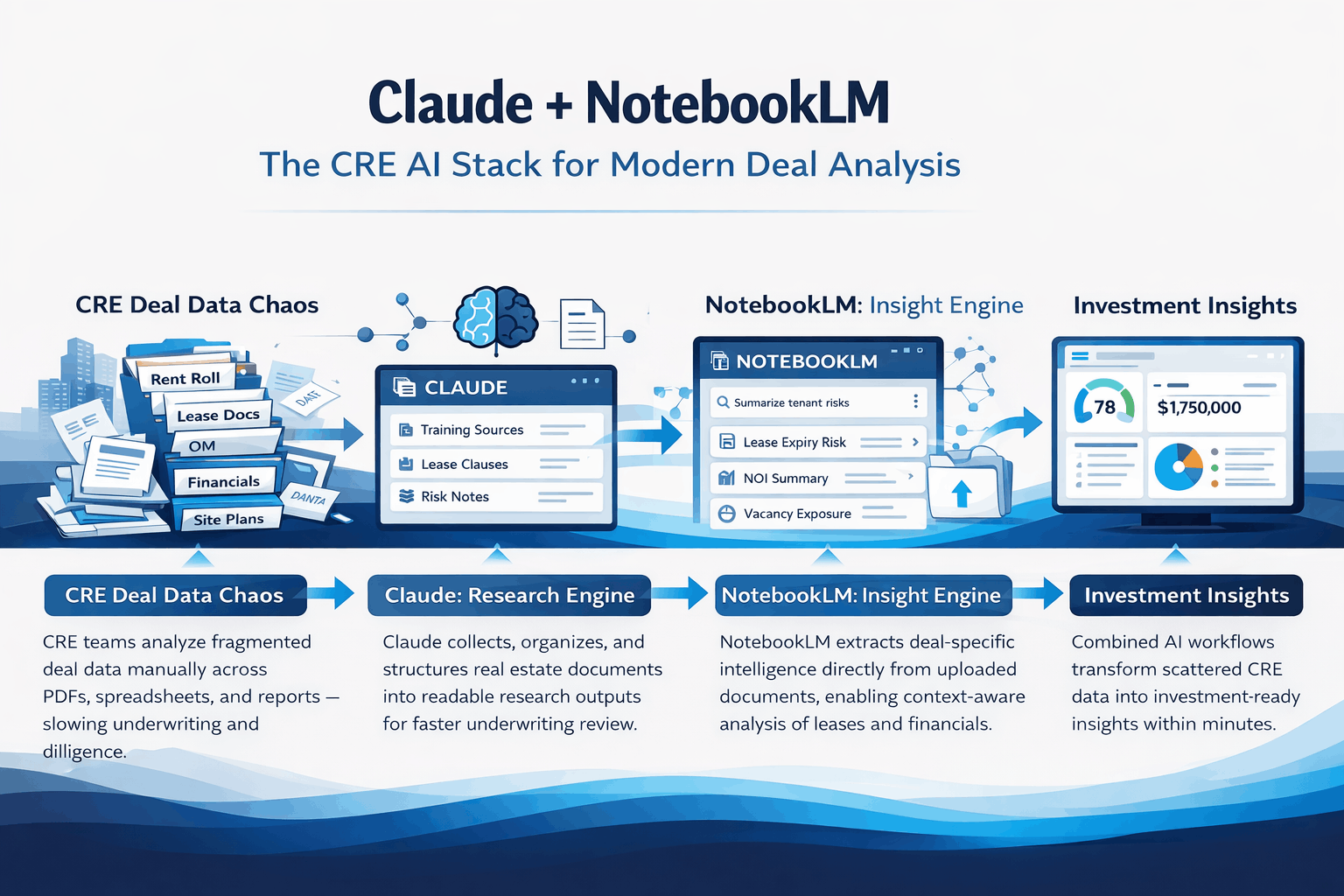
Where the Claude NotebookLM CRE Workflow Improves Deal Analysis
This same Claude + NotebookLM combination works across multiple CRE workflows.
For client presentation prep, Claude curates relevant market data sources, and NotebookLM turns them into briefing documents and talking point reports.
When handling due diligence study guides, you can upload inspection reports and environmental documents, then generate quiz materials to help your team fully understand the findings.
In market research compilation, Claude gathers 30–40 sources on a specific submarket, and NotebookLM synthesizes them into a single, structured market analysis report.
For investor onboarding, curate fund documents and prior communications, then create an introductory guide and FAQ tailored for new LPs.The pattern remains consistent: Claude curates, NotebookLM transforms.
Claude NotebookLM CRE FAQs
1. What is the Claude NotebookLM CRE workflow in commercial real estate?
Claude NotebookLM CRE is an AI workflow that combines Claude’s research capabilities with NotebookLM’s content generation tools for CRE deal analysis and training.
2. How does Claude NotebookLM CRE help CRE professionals?
It helps CRE professionals organize research sources and generate investment reports, training materials, and due diligence summaries faster.
3. Can Claude NotebookLM CRE be used for multifamily deal analysis?
Yes, the workflow can be used to review documents and generate market analysis for multifamily acquisitions.
4. Does Claude NotebookLM CRE support team onboarding?
Yes, NotebookLM can turn curated deal documents into flashcards, quizzes, and onboarding guides for CRE teams.
5. Can Claude NotebookLM CRE improve due diligence workflows?
It improves due diligence by organizing source documents and generating structured reports from inspection or financial files.
6. Is Claude NotebookLM CRE useful for investor onboarding?
Yes, it can create introductory guides and FAQs based on investor documents and communications.
7. How fast can Claude NotebookLM CRE generate training materials?
Training materials such as reports and quizzes can be generated within minutes once the sources are uploaded.
8. What is the main benefit of Claude NotebookLM CRE?
The main benefit is combining AI research and content generation into a single workflow for CRE deal analysis.
How the Claude NotebookLM CRE Workflow Improves CRE Training and Due Diligence
How Claude NotebookLM CRE Improves Deal Analysis
The AI tools that’ll produce the best results aren’t the ones that try to do everything. They’re the ones that do one thing extremely well and play nice with others.
Claude excels at reasoning, research, and writing. NotebookLM excels at turning source material into multiple output formats. Neither one replaces the other. Together they’re genuinely powerful.
I test AI tool combinations like this every week inside the AI for CRE Collective. 540+ CRE professionals sharing what actually works. [Subscribe to the newsletter for weekly workflow breakdowns.
For weekly breakdowns of AI tools and workflows for commercial real estate, subscribe to the newsletter. 3,000+ CRE professionals get it every Thursday.
